

Windows 11 users are once again debating memory use after a TechRadar writer spent a week running a GitHub RAM optimizer and reported drops of up to 6GB, just as Microsoft is reportedly preparing a broader Windows “K2” effort to reduce bloat, AI overhead, and gaming-performance gaps. The interesting part is not that a script can make Task Manager look better. The interesting part is that people increasingly feel compelled to run one. That is a trust problem, not merely a memory-management problem.
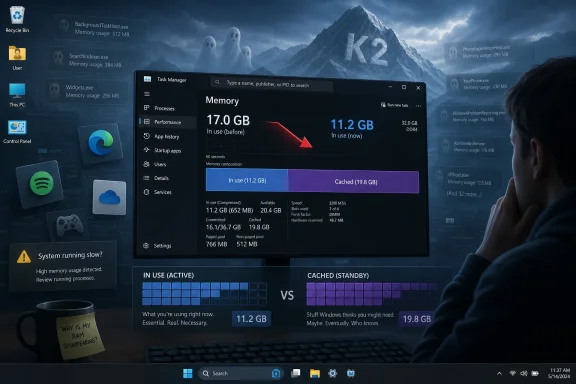
The appeal of a RAM optimizer is obvious: press a button, watch memory usage fall, feel as though the machine has been rescued from Windows’ appetite. In TechRadar’s example, a script from GitHub reportedly killed unnecessary background processes, trimmed working sets, and ran repeatedly in the background to claw back memory. The author saw RAM usage fall from around 17GB to 11GB in some browser-heavy scenarios, and by 1GB to 2GB while idle.
That is the sort of result that spreads quickly because it is visible. Task Manager gives users a number, the number goes down, and the software feels vindicated. But Windows memory accounting has always been more subtle than that, and the modern desktop has made it harder for users to separate useful caching from waste, legitimate background services from bloat, and browser preloading from genuine leakage.
The uncomfortable truth is that a RAM optimizer can make Windows look leaner without necessarily making Windows better. Trimming a process working set can force pages out of active memory, only for the same application to fault them back in later. Emptying caches can produce a short-term drop in visible usage while throwing away data the system kept around precisely because it expected to reuse it.
That does not mean the user’s frustration is wrong. It means the metric is slippery. If people are reaching for third-party scripts because a fresh-ish Windows 11 session with a browser, Spotify, launchers, update agents, cloud sync, overlays, widgets, security services, and AI-adjacent helpers feels obese, then Microsoft has already lost the explanatory battle.
That design philosophy made sense when the alternative was a cold, disk-bound PC that spent half its life waiting for programs to load. Modern Windows is aggressive about caching because modern users expect the machine to feel instant. The problem is that the distinction between “used,” “committed,” “cached,” “available,” and “actually unavailable” is opaque even to technically literate people.
Task Manager tries to simplify the story, but simplification cuts both ways. A user with 16GB of RAM who sees 9GB consumed at idle does not experience a lecture on standby pages as reassurance. They experience it as evidence that the operating system and its ecosystem have expanded to fill the room.
That perception is sharpened by hardware reality. For desktop builders, RAM has historically been one of the easier upgrades. For laptop and handheld users, it is often soldered, fixed, and expensive to escape. A 16GB Windows handheld is not equivalent to a 16GB ATX tower with two empty DIMM slots, and Microsoft’s “available when needed” logic feels much thinner when the user is fighting for every gigabyte before launching a game.
Microsoft Edge and Google Chrome are especially awkward characters in this story because they are both essential and extravagant. They isolate tabs and extensions for stability and security, preload pages, run background tasks, sync state across devices, and increasingly act as containers for web apps that once would have been native programs. That architecture is defensible, but it is not cheap.
Spotify, Teams, Discord, Steam, Epic Games Launcher, Adobe Creative Cloud, OneDrive, widgets, phone-linking services, and update helpers all contribute to the same ambient tax. None of them, in isolation, has to be scandalous. Together, they create a baseline experience in which a supposedly idle PC is not idle at all.
This is where Windows 11 absorbs blame even when third parties deserve some of it. The operating system owns the startup experience, the notification model, the default app nudges, the background permissions, the shell integrations, and the overall sense of what is allowed to squat in memory. If Microsoft ships a platform where every vendor learns that persistent background presence is the path to engagement, Windows cannot later pretend it is merely a neutral bystander.
A weather panel is not just a weather panel; it is a feed. A search box is not just local search; it is a web surface. A browser is not just a browser; it is an account layer, shopping assistant, PDF reader, sidebar host, and AI front end. A cloud-sync client is not just optional storage; it becomes the presumed default place where Windows wants your known folders to live.
That shift matters because users do not merely object to megabytes. They object to loss of agency. Windows 11 often feels like it has a commercial agenda running alongside the user’s agenda, and memory use becomes the measurable stand-in for a broader complaint: the machine is doing too many things the owner did not clearly ask it to do.
AI has intensified that suspicion. Microsoft has spent the last few years pushing Copilot branding, AI features in inbox apps, and cloud-connected assistance across Windows and Microsoft 365. Some of these features are useful. But when an OS already carries a reputation for nagging, telemetry, account pressure, and advertising-adjacent surfaces, every new AI hook looks less like innovation and more like another resident process waiting to happen.
That advice is mostly correct. It is also emotionally unsatisfying. A RAM optimizer gives users something Windows increasingly withholds: a visible lever.
The danger is that the lever can be crude. A script that loops every 10 seconds and trims memory may create churn. It may mask the real offender. It may break background expectations, disrupt app responsiveness, or teach users to treat all memory residency as waste. In enterprise environments, random GitHub scripts that terminate processes or alter performance behavior are a governance and security nightmare.
But the popularity of these tools should embarrass Microsoft anyway. When sophisticated users would rather trust an enthusiast script than the operating system’s own judgment, the platform has a credibility gap. The correct answer cannot simply be “users do not understand memory.” The more useful answer is that Windows no longer gives users enough understandable control over its own appetite.
If accurate, that framing is more important than any one feature. Microsoft does not need one more settings page that promises “performance mode” while leaving the underlying incentives untouched. It needs a cultural reset in which Windows teams are rewarded for subtraction, restraint, predictable behavior, and low overhead.
The SteamOS comparison is especially revealing. For decades, Windows did not need to be the elegant gaming OS; it merely needed to be the compatible one. Game developers targeted it, anti-cheat vendors supported it, GPU makers optimized for it, and users tolerated the rest because the library was there. Valve has spent years attacking that assumption from the other side, not by making Linux universal, but by making it good enough in a growing number of cases.
On handheld gaming PCs, the difference becomes visceral. A living-room or travel device exposes Windows’ weaknesses more brutally than a desktop does. Sleep and resume matter. Controller-first navigation matters. Background overhead matters. Update timing matters. Battery life matters. A gaming handheld does not forgive the desktop OS habits that a plugged-in tower can hide.
Still, users do not judge operating systems by architectural excuses. They judge them by the experience on the hardware in front of them. If SteamOS or SteamOS-like Linux distributions can make the same handheld feel faster, cleaner, quieter, or more console-like, Windows loses the argument even when it wins the compatibility spreadsheet.
Microsoft appears to understand this. The reported K2 emphasis on matching SteamOS gaming performance on the same hardware is not just a technical target. It is a reputational target. It says Windows can no longer assume that gamers will accept overhead as the cost of doing business.
The hard part is that SteamOS’ advantage is not merely memory usage or frame rates. It is focus. SteamOS on a handheld is designed around launching games, suspending games, updating cleanly, and staying out of the way. Windows 11 is designed around being everything to everyone, while also serving Microsoft’s strategic priorities in cloud, AI, identity, search, ads, security, and subscriptions.
That is the tension K2 must resolve. Performance cannot be a layer of polish applied after every product group has added its hook. It has to be a veto.
Yet the underlying complaint is familiar. Enterprise Windows estates suffer when the OS becomes noisier, when update behavior erodes confidence, when inbox apps multiply, when user-profile services misbehave, and when the shell gets heavier without delivering proportional value. The cost is not just RAM; it is helpdesk volume, image maintenance, user training, and the constant work of suppressing experiences that were enabled by default.
Windows 11 also arrived with stricter hardware requirements and a security story built around TPMs, virtualization-based security, and modern silicon. Those choices can be defensible in a threat landscape filled with credential theft, kernel attacks, and ransomware. But security features also carry overhead, and Microsoft has to be honest that the secure-by-default PC may feel heavier than the permissive PC users remember.
The enterprise opportunity for K2 is therefore not to give admins a magic “debloat” switch. It is to make the default business build less needy. Fewer consumer surfaces. Clearer background-task accounting. More predictable update restarts. Better shell performance under real-world profile and policy loads. Less friction when organizations choose local workflows, third-party browsers, or non-Microsoft cloud stacks.
In that sense, K2 will be judged not by whether Microsoft can produce a great benchmark slide, but by whether admins spend less time undoing Microsoft’s defaults.
Software vendors have spent much of the last decade assuming hardware abundance. Electron won because developer convenience and cross-platform consistency often beat native efficiency. Browsers became app runtimes because distribution through the web is irresistible. Operating systems layered on services because engagement metrics reward persistent presence. AI now threatens to extend that pattern with background indexing, local models, semantic search, recall-style histories, and assistant hooks.
There is nothing inherently wrong with using memory to deliver capability. The question is whether the user receives value proportional to the cost. A photo editor consuming RAM while exporting an image is doing work. A game reserving memory for assets is doing work. A browser with dozens of tabs is arguably doing work. A half-dozen background surfaces waking themselves to promote, sync, prefetch, suggest, scan, index, or upsell are harder to defend.
Microsoft’s challenge is that Windows sits beneath all of this and increasingly participates in it. The company cannot credibly scold app developers for waste while shipping an OS that users associate with widgets, web search, account nags, Copilot prompts, OneDrive pressure, Edge persistence, and inconsistent settings migrations. Discipline has to begin at home.
Most people do not. Even many power users live in Task Manager, and Task Manager’s simplified memory view does not always answer the question users are really asking: “What can I safely stop, what is helping me, and what is hurting me?”
Microsoft could do more here without dumbing the system down. Windows should distinguish more clearly between reclaimable cache, active application memory, background platform services, startup-resident third-party agents, and Microsoft-added experiences. It should explain memory pressure in plain language. It should identify apps whose background behavior is disproportionate to recent use. It should make startup impact less of a vague rating and more of an accountable resource history.
This matters because distrust thrives in ambiguity. If users cannot tell whether Windows is intelligently caching or lazily hoarding, they will assume the latter. If they cannot tell whether Edge is resident for a useful reason or because Microsoft wants it there, they will assume the latter. If AI features appear without transparent local cost, they will assume the worst.
A credible K2-era Windows would not merely use less memory. It would make memory use legible.
The danger for K2 is debloat theater: removing a few visible annoyances while preserving the incentives that created them. Killing one preinstalled app means little if the shell keeps growing new promotional surfaces. Reducing AI in one corner means little if Copilot hooks reappear through Edge, Office, search, and notifications. Improving game benchmarks means less if handheld users still fight sleep behavior, update timing, and controller-hostile dialogs.
There is also a naming problem, though not in the literal codename. “K2” sounds like a mountain, and the metaphor is apt: impressive, dangerous, and easy to underestimate from base camp. Microsoft’s climb is not a single summit. It is a long slog through teams, defaults, telemetry goals, partner relationships, and revenue incentives.
The company has to decide whether Windows is primarily a product users control or a distribution channel Microsoft continuously optimizes. It can be both to some degree, but Windows 11 has too often made the second role visible enough to damage the first. A performance initiative that does not confront that conflict will produce marginal gains and familiar disappointment.
But the current backlash is not just retro grumbling. Users are asking for an operating system that respects context. A gaming handheld should not behave like a corporate laptop. A domain-joined workstation should not feel like a consumer ad surface. A local-account desktop should not be treated as an onboarding failure. A user who disables a cloud or AI feature should not have to keep proving the decision.
This is where Microsoft could learn from both Apple and Valve without copying either. Apple wins loyalty by controlling the whole stack and making many background decisions invisible. Valve wins goodwill by narrowing the job and obsessing over the gaming path. Microsoft cannot become either company, but it can adopt the principle that defaults should feel intentional rather than opportunistic.
A cleaner Windows does not have to be tiny. It has to be coherent. It can cache aggressively, secure aggressively, and support decades of software while still being more transparent about what runs, why it runs, and how to stop it.
A user who watches 6GB disappear from reported usage after running a script does not come away thinking, “Ah, working-set trimming produced a transient accounting change.” They come away thinking, “Windows was wasting my RAM.” Microsoft can argue with the interpretation, but it cannot ignore the emotional result.
The K2 effort, if the reporting proves accurate, is Microsoft’s chance to answer that sentiment with engineering rather than messaging. That means less background noise, fewer unwanted resident experiences, faster shell components, better gaming behavior, more reliable updates, and a clearer distinction between user value and Microsoft value.
Near-term, Windows enthusiasts should be cautious about miracle tools. If a PC is struggling, the better first moves are to audit startup apps, uninstall unused vendor utilities, reduce browser extensions, check for leaks, update drivers, measure with Sysinternals tools, and understand whether the issue is active pressure or reclaimable cache. But that sensible advice should not become a shield for Microsoft. Users should not need a graduate seminar in memory management to feel that their operating system is on their side.
Source: TechRadar https://www.techradar.com/computing...microsoft-turn-things-around-with-project-k2/
 The RAM Optimizer Is a Symptom, Not a Cure
The appeal of a RAM optimizer is obvious: press a button, watch memory usage fall, feel as though the machine has been rescued from Windows’ appetite. In TechRadar’s example, a script from GitHub reportedly killed unnecessary background processes, trimmed working sets, and ran repeatedly in the background to claw back memory. The author saw RAM usage fall from around 17GB to 11GB in some browser-heavy scenarios, and by 1GB to 2GB while idle.That is the sort of result that spreads quickly because it is visible. Task Manager gives users a number, the number goes down, and the software feels vindicated. But Windows memory accounting has always been more subtle than that, and the modern desktop has made it harder for users to separate useful caching from waste, legitimate background services from bloat, and browser preloading from genuine leakage.
The uncomfortable truth is that a RAM optimizer can make Windows look leaner without necessarily making Windows better. Trimming a process working set can force pages out of active memory, only for the same application to fault them back in later. Emptying caches can produce a short-term drop in visible usage while throwing away data the system kept around precisely because it expected to reuse it.
That does not mean the user’s frustration is wrong. It means the metric is slippery. If people are reaching for third-party scripts because a fresh-ish Windows 11 session with a browser, Spotify, launchers, update agents, cloud sync, overlays, widgets, security services, and AI-adjacent helpers feels obese, then Microsoft has already lost the explanatory battle.
Windows Learned to Use Spare RAM, Then Forgot to Explain It
For years, Microsoft has defended high memory usage with a technically sound argument: unused RAM is wasted RAM. Windows uses memory for file cache, standby lists, prefetching, memory compression, and resident working sets because keeping data close to the CPU is faster than dragging it back from disk. On a healthy system, much of that memory can be reclaimed under pressure.That design philosophy made sense when the alternative was a cold, disk-bound PC that spent half its life waiting for programs to load. Modern Windows is aggressive about caching because modern users expect the machine to feel instant. The problem is that the distinction between “used,” “committed,” “cached,” “available,” and “actually unavailable” is opaque even to technically literate people.
Task Manager tries to simplify the story, but simplification cuts both ways. A user with 16GB of RAM who sees 9GB consumed at idle does not experience a lecture on standby pages as reassurance. They experience it as evidence that the operating system and its ecosystem have expanded to fill the room.
That perception is sharpened by hardware reality. For desktop builders, RAM has historically been one of the easier upgrades. For laptop and handheld users, it is often soldered, fixed, and expensive to escape. A 16GB Windows handheld is not equivalent to a 16GB ATX tower with two empty DIMM slots, and Microsoft’s “available when needed” logic feels much thinner when the user is fighting for every gigabyte before launching a game.
The Browser Became the Second Operating System
The TechRadar test blamed Windows 11 and non-Microsoft applications together, which is the only honest framing. Windows is the platform, but the modern PC workload is increasingly a federation of mini-platforms. Chromium-based browsers, Electron applications, game launchers, sync clients, RGB utilities, anti-cheat services, VPNs, password managers, and communication tools all want a permanent seat at the table.Microsoft Edge and Google Chrome are especially awkward characters in this story because they are both essential and extravagant. They isolate tabs and extensions for stability and security, preload pages, run background tasks, sync state across devices, and increasingly act as containers for web apps that once would have been native programs. That architecture is defensible, but it is not cheap.
Spotify, Teams, Discord, Steam, Epic Games Launcher, Adobe Creative Cloud, OneDrive, widgets, phone-linking services, and update helpers all contribute to the same ambient tax. None of them, in isolation, has to be scandalous. Together, they create a baseline experience in which a supposedly idle PC is not idle at all.
This is where Windows 11 absorbs blame even when third parties deserve some of it. The operating system owns the startup experience, the notification model, the default app nudges, the background permissions, the shell integrations, and the overall sense of what is allowed to squat in memory. If Microsoft ships a platform where every vendor learns that persistent background presence is the path to engagement, Windows cannot later pretend it is merely a neutral bystander.
Bloat Is No Longer Just Candy Crush
The old Windows bloat debate was almost quaint. Users complained about preinstalled games, trialware, OEM utilities, and Start menu suggestions. Much of it was visible, removable, and frankly tacky. The modern version is harder to fight because bloat has been rebranded as integration.A weather panel is not just a weather panel; it is a feed. A search box is not just local search; it is a web surface. A browser is not just a browser; it is an account layer, shopping assistant, PDF reader, sidebar host, and AI front end. A cloud-sync client is not just optional storage; it becomes the presumed default place where Windows wants your known folders to live.
That shift matters because users do not merely object to megabytes. They object to loss of agency. Windows 11 often feels like it has a commercial agenda running alongside the user’s agenda, and memory use becomes the measurable stand-in for a broader complaint: the machine is doing too many things the owner did not clearly ask it to do.
AI has intensified that suspicion. Microsoft has spent the last few years pushing Copilot branding, AI features in inbox apps, and cloud-connected assistance across Windows and Microsoft 365. Some of these features are useful. But when an OS already carries a reputation for nagging, telemetry, account pressure, and advertising-adjacent surfaces, every new AI hook looks less like innovation and more like another resident process waiting to happen.
RAM Optimizers Win Because They Offer Agency
The classic advice from Windows veterans is simple: do not use RAM cleaners. Let the operating system manage memory. If you have a leak, find the leaking application. If you have pressure, close programs, reduce startup items, add RAM, or investigate with proper tools such as Resource Monitor, Performance Monitor, RAMMap, VMMap, or Windows Performance Analyzer.That advice is mostly correct. It is also emotionally unsatisfying. A RAM optimizer gives users something Windows increasingly withholds: a visible lever.
The danger is that the lever can be crude. A script that loops every 10 seconds and trims memory may create churn. It may mask the real offender. It may break background expectations, disrupt app responsiveness, or teach users to treat all memory residency as waste. In enterprise environments, random GitHub scripts that terminate processes or alter performance behavior are a governance and security nightmare.
But the popularity of these tools should embarrass Microsoft anyway. When sophisticated users would rather trust an enthusiast script than the operating system’s own judgment, the platform has a credibility gap. The correct answer cannot simply be “users do not understand memory.” The more useful answer is that Windows no longer gives users enough understandable control over its own appetite.
Project K2 Sounds Like an Admission Wrapped in a Codename
That is why the reported Windows “K2” initiative has landed with unusual force. According to recent reporting, Microsoft is working on a broad internal quality push focused on performance, craft, and reliability, with particular attention to bloat, AI excess, intrusive updates, and gaming performance. It is reportedly not a single Windows release so much as a discipline Microsoft wants to apply across the platform.If accurate, that framing is more important than any one feature. Microsoft does not need one more settings page that promises “performance mode” while leaving the underlying incentives untouched. It needs a cultural reset in which Windows teams are rewarded for subtraction, restraint, predictable behavior, and low overhead.
The SteamOS comparison is especially revealing. For decades, Windows did not need to be the elegant gaming OS; it merely needed to be the compatible one. Game developers targeted it, anti-cheat vendors supported it, GPU makers optimized for it, and users tolerated the rest because the library was there. Valve has spent years attacking that assumption from the other side, not by making Linux universal, but by making it good enough in a growing number of cases.
On handheld gaming PCs, the difference becomes visceral. A living-room or travel device exposes Windows’ weaknesses more brutally than a desktop does. Sleep and resume matter. Controller-first navigation matters. Background overhead matters. Update timing matters. Battery life matters. A gaming handheld does not forgive the desktop OS habits that a plugged-in tower can hide.
SteamOS Is a Benchmark Because It Has Fewer Excuses
SteamOS does not have to support every legacy enterprise workflow, every obscure peripheral control panel, every line-of-business application, or every management stack built since the Clinton administration. Windows does. That is Microsoft’s burden and its moat.Still, users do not judge operating systems by architectural excuses. They judge them by the experience on the hardware in front of them. If SteamOS or SteamOS-like Linux distributions can make the same handheld feel faster, cleaner, quieter, or more console-like, Windows loses the argument even when it wins the compatibility spreadsheet.
Microsoft appears to understand this. The reported K2 emphasis on matching SteamOS gaming performance on the same hardware is not just a technical target. It is a reputational target. It says Windows can no longer assume that gamers will accept overhead as the cost of doing business.
The hard part is that SteamOS’ advantage is not merely memory usage or frame rates. It is focus. SteamOS on a handheld is designed around launching games, suspending games, updating cleanly, and staying out of the way. Windows 11 is designed around being everything to everyone, while also serving Microsoft’s strategic priorities in cloud, AI, identity, search, ads, security, and subscriptions.
That is the tension K2 must resolve. Performance cannot be a layer of polish applied after every product group has added its hook. It has to be a veto.
The Enterprise Lesson Is Different but Just as Sharp
For sysadmins, the consumer RAM-optimizer story may sound like amateur hour. No serious IT department wants unmanaged memory cleaners running across a fleet. The enterprise answer is measurement, baselines, endpoint management, controlled startup policy, browser governance, app rationalization, and hardware standards.Yet the underlying complaint is familiar. Enterprise Windows estates suffer when the OS becomes noisier, when update behavior erodes confidence, when inbox apps multiply, when user-profile services misbehave, and when the shell gets heavier without delivering proportional value. The cost is not just RAM; it is helpdesk volume, image maintenance, user training, and the constant work of suppressing experiences that were enabled by default.
Windows 11 also arrived with stricter hardware requirements and a security story built around TPMs, virtualization-based security, and modern silicon. Those choices can be defensible in a threat landscape filled with credential theft, kernel attacks, and ransomware. But security features also carry overhead, and Microsoft has to be honest that the secure-by-default PC may feel heavier than the permissive PC users remember.
The enterprise opportunity for K2 is therefore not to give admins a magic “debloat” switch. It is to make the default business build less needy. Fewer consumer surfaces. Clearer background-task accounting. More predictable update restarts. Better shell performance under real-world profile and policy loads. Less friction when organizations choose local workflows, third-party browsers, or non-Microsoft cloud stacks.
In that sense, K2 will be judged not by whether Microsoft can produce a great benchmark slide, but by whether admins spend less time undoing Microsoft’s defaults.
The Real Memory Crisis Is Product Discipline
The TechRadar piece mentions an “ongoing memory crisis,” and the phrase captures both market anxiety and platform anxiety. RAM pricing and availability can move with supply cycles, AI data-center demand, and manufacturing decisions, but the user-facing effect is simple: the easy answer of “just buy more RAM” feels less easy. When memory is expensive, soldered, or already maxed out, software discipline matters again.Software vendors have spent much of the last decade assuming hardware abundance. Electron won because developer convenience and cross-platform consistency often beat native efficiency. Browsers became app runtimes because distribution through the web is irresistible. Operating systems layered on services because engagement metrics reward persistent presence. AI now threatens to extend that pattern with background indexing, local models, semantic search, recall-style histories, and assistant hooks.
There is nothing inherently wrong with using memory to deliver capability. The question is whether the user receives value proportional to the cost. A photo editor consuming RAM while exporting an image is doing work. A game reserving memory for assets is doing work. A browser with dozens of tabs is arguably doing work. A half-dozen background surfaces waking themselves to promote, sync, prefetch, suggest, scan, index, or upsell are harder to defend.
Microsoft’s challenge is that Windows sits beneath all of this and increasingly participates in it. The company cannot credibly scold app developers for waste while shipping an OS that users associate with widgets, web search, account nags, Copilot prompts, OneDrive pressure, Edge persistence, and inconsistent settings migrations. Discipline has to begin at home.
Task Manager Needs to Tell a Better Story
One practical failure in all of this is observability. Windows has excellent diagnostic tooling, but much of it is built for experts. RAMMap can show how physical memory is assigned. VMMap can break down a process. Windows Performance Analyzer can reveal resident sets and memory pressure. Event logs, counters, traces, and resource views can tell the truth if the user knows where to look.Most people do not. Even many power users live in Task Manager, and Task Manager’s simplified memory view does not always answer the question users are really asking: “What can I safely stop, what is helping me, and what is hurting me?”
Microsoft could do more here without dumbing the system down. Windows should distinguish more clearly between reclaimable cache, active application memory, background platform services, startup-resident third-party agents, and Microsoft-added experiences. It should explain memory pressure in plain language. It should identify apps whose background behavior is disproportionate to recent use. It should make startup impact less of a vague rating and more of an accountable resource history.
This matters because distrust thrives in ambiguity. If users cannot tell whether Windows is intelligently caching or lazily hoarding, they will assume the latter. If they cannot tell whether Edge is resident for a useful reason or because Microsoft wants it there, they will assume the latter. If AI features appear without transparent local cost, they will assume the worst.
A credible K2-era Windows would not merely use less memory. It would make memory use legible.
The Risk of Debloat Theater
Microsoft has been here before. Windows has had performance pushes, quality pushes, gamer-focused promises, and “back to basics” rhetoric across multiple eras. Sometimes the company delivers real engineering gains. Sometimes it ships a settings toggle and a blog post while the larger product machine continues unchanged.The danger for K2 is debloat theater: removing a few visible annoyances while preserving the incentives that created them. Killing one preinstalled app means little if the shell keeps growing new promotional surfaces. Reducing AI in one corner means little if Copilot hooks reappear through Edge, Office, search, and notifications. Improving game benchmarks means less if handheld users still fight sleep behavior, update timing, and controller-hostile dialogs.
There is also a naming problem, though not in the literal codename. “K2” sounds like a mountain, and the metaphor is apt: impressive, dangerous, and easy to underestimate from base camp. Microsoft’s climb is not a single summit. It is a long slog through teams, defaults, telemetry goals, partner relationships, and revenue incentives.
The company has to decide whether Windows is primarily a product users control or a distribution channel Microsoft continuously optimizes. It can be both to some degree, but Windows 11 has too often made the second role visible enough to damage the first. A performance initiative that does not confront that conflict will produce marginal gains and familiar disappointment.
The Cleaner Windows Users Are Asking For Is Not a Minimalist Fantasy
It is tempting to dismiss complaints about Windows bloat as nostalgia for an impossible past. That is too easy. Windows has always been messy. The Start menu was never a monastery. Legacy support has always carried weight. OEM images have been cursed for decades. Enthusiasts have been threatening to switch to Linux since before many current Windows 11 users were born.But the current backlash is not just retro grumbling. Users are asking for an operating system that respects context. A gaming handheld should not behave like a corporate laptop. A domain-joined workstation should not feel like a consumer ad surface. A local-account desktop should not be treated as an onboarding failure. A user who disables a cloud or AI feature should not have to keep proving the decision.
This is where Microsoft could learn from both Apple and Valve without copying either. Apple wins loyalty by controlling the whole stack and making many background decisions invisible. Valve wins goodwill by narrowing the job and obsessing over the gaming path. Microsoft cannot become either company, but it can adopt the principle that defaults should feel intentional rather than opportunistic.
A cleaner Windows does not have to be tiny. It has to be coherent. It can cache aggressively, secure aggressively, and support decades of software while still being more transparent about what runs, why it runs, and how to stop it.
The Week of RAM Cleaning Points to the Bigger Test
The most useful lesson from the TechRadar experiment is not that everyone should run a GitHub RAM optimizer. Most users should not, and IT departments certainly should not deploy one casually. The lesson is that a visible memory drop has become a form of protest.A user who watches 6GB disappear from reported usage after running a script does not come away thinking, “Ah, working-set trimming produced a transient accounting change.” They come away thinking, “Windows was wasting my RAM.” Microsoft can argue with the interpretation, but it cannot ignore the emotional result.
The K2 effort, if the reporting proves accurate, is Microsoft’s chance to answer that sentiment with engineering rather than messaging. That means less background noise, fewer unwanted resident experiences, faster shell components, better gaming behavior, more reliable updates, and a clearer distinction between user value and Microsoft value.
Near-term, Windows enthusiasts should be cautious about miracle tools. If a PC is struggling, the better first moves are to audit startup apps, uninstall unused vendor utilities, reduce browser extensions, check for leaks, update drivers, measure with Sysinternals tools, and understand whether the issue is active pressure or reclaimable cache. But that sensible advice should not become a shield for Microsoft. Users should not need a graduate seminar in memory management to feel that their operating system is on their side.
The Numbers Microsoft Now Has to Beat
The RAM-optimizer story gives Microsoft a brutally simple scoreboard: users believe Windows 11 is heavier than it needs to be, and third-party tools can produce visible relief even when the underlying mechanics are debatable. K2 will be judged against that lived experience, not against internal charts.- Windows 11 needs to reduce background overhead in ways users can feel without requiring them to disable half the operating system after setup.
- Microsoft needs to treat SteamOS as a usability benchmark for gaming handhelds, not merely a frame-rate rival in selected tests.
- AI features must earn their residency instead of arriving as another layer of always-on platform ambition.
- Task Manager and Settings should make memory pressure, startup cost, and background activity understandable enough that users do not reach first for scripts.
- Enterprise customers need cleaner defaults and stronger policy control, not more consumer experiences to suppress.
- RAM optimizers should become unnecessary because Windows itself becomes more disciplined, more transparent, and less presumptuous.
Source: TechRadar https://www.techradar.com/computing...microsoft-turn-things-around-with-project-k2/