

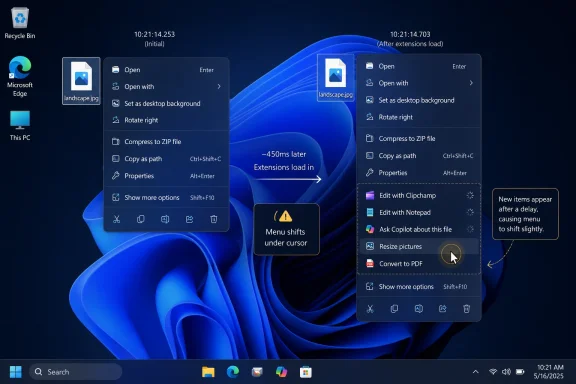
Microsoft has acknowledged that Windows 11’s modern right-click menu can load slowly because late-arriving context-menu extensions, including entries from apps such as Clipchamp, Notepad, and Copilot, can appear after the menu opens and shift items under the pointer. That admission matters because the context menu is not some ornamental corner of the shell; it is one of the places where Windows users most directly feel whether the operating system is helping or getting in the way. Windows 11 promised a cleaner, calmer desktop, but the right-click menu became a small daily referendum on whether “modern” had started to mean “less predictable.” Microsoft’s latest work on a smaller, configurable menu is therefore less about a menu and more about whether Windows can relearn the discipline of being boring in the best possible way.
Windows 11 did not invent the messy context menu. By the end of the Windows 10 era, right-clicking a file on a well-used PC could produce a vertical junk drawer of archive tools, cloud sync verbs, GPU control panels, editor shortcuts, security scanners, sharing targets, and assorted vendor experiments. The old menu was fast enough, but it was not exactly elegant.
Microsoft’s Windows 11 answer was to modernize the surface. The most common commands moved into a cleaner top row, application extensions were grouped more deliberately, and the old sprawling menu was pushed behind “Show more options.” The theory was sound: make the default path readable, keep legacy compatibility available, and encourage developers to use the newer extension model.
The problem is that users do not grade UI architecture diagrams. They grade muscle memory. If the new menu opens, then grows, then reflows, then causes the command under the cursor to change, it has already failed the one test a context menu must pass.
That is why the latest reporting lands harder than a typical shell tweak. Microsoft is not merely polishing a visual affordance. It is trying to fix a trust problem created when Windows makes a basic action feel probabilistic.
That kind of delay is worse than a visibly slow operation. A progress spinner tells the user to wait. A frozen window tells the user something is broken. A late-loading menu item tells the user nothing at all, then punishes them for acting like the interface is ready.
This is where Windows 11’s design ideal collided with the reality of the Windows ecosystem. The operating system has to support a huge range of applications, extension models, file types, and hardware profiles. A right-click on a JPEG is not just a right-click on a JPEG; it can be an invitation for Photos, Paint, Clipchamp, OneDrive, compression utilities, security tools, cloud providers, and now AI-related handlers to state their case.
Microsoft’s grouping of app extensions was intended to impose order on that chaos. But order imposed late is still late. If the shell draws first and negotiates with extensions afterward, the user experiences that negotiation as jitter.
The old menu was not beloved because it was beautiful. It was beloved because it was predictable. For many users, especially administrators and developers, predictability beats elegance every time.
The “Show more options” compromise always had an awkward premise. Microsoft effectively said: here is the clean new menu for normal use, and here is the older one for everything else. But “everything else” is not a niche category on Windows. It is where years of professional workflows, shell extensions, file utilities, and enterprise habits live.
If the modern menu had been dramatically faster and more stable, users might have tolerated the split. Instead, some users got the worst of both worlds: a new menu that was cleaner but not always faster, and an old menu that was still necessary but now farther away.
A locked-down platform can make the right-click menu clean by allowing almost nobody to participate. Windows cannot do that without breaking the implicit contract that made it valuable in the first place. Developers expect to integrate with File Explorer. Users expect installed tools to appear where file work happens. Businesses expect line-of-business software, endpoint agents, sync clients, and document systems to hook into the shell.
The technical distinction matters. Modern Windows 11 context menu extensions are supposed to use newer interfaces and packaging approaches, while older shell extensions remain available through the legacy menu. That is a reasonable migration path on paper. In practice, the user does not care which interface an extension implements; the user cares whether the command appears where expected and whether Explorer remains responsive.
The right-click menu therefore sits at the intersection of three competing demands. Microsoft wants a simplified default experience. Developers want visibility for their commands. Users want speed, stability, and control. The current pain comes from Microsoft trying to satisfy all three without giving the user enough authority over the final result.
But nesting is not a free win. Every submenu is a bet that the reduced clutter is worth the extra targeting cost. If Microsoft hides rarely used commands, users benefit. If it hides frequently used commands, the new design becomes another “Show more options” controversy in miniature.
The name itself, reportedly a placeholder, hints at the problem. “Manage file” is accurate in the generic Microsoft way, but a context menu is not a management console. Users are not trying to manage an abstract object; they are trying to copy, open, rename, compress, edit, share, inspect, or delete this particular file right now.
Still, the move is directionally right. The top-level context menu should be a shortlist, not a census. The question is whether Microsoft can make the shortlist fast and customizable enough that users do not feel robbed.
Context menus are personal infrastructure. A photographer, a software developer, a lawyer, a student, and a help-desk technician do not need the same default right-click surface. The entire point of a general-purpose operating system is that it should adapt to the work, not force the work through a single sanitized path.
For years, users who wanted control over the context menu often had to rely on shell-tweaking utilities, registry edits, or uninstalling the offending application. That is a bad security story and a bad product story. If an operating system exposes a place where applications can compete for attention, it should also expose a first-party way for users to referee that competition.
Configurability would also change the politics of bundled Microsoft entries. A user who can remove “Edit with Clipchamp” or “Ask Copilot” is less likely to resent its existence. A user who cannot remove it sees it as advertising occupying a workflow surface.
A context menu is not a billboard. It is a tool palette summoned at the moment of intent. When the user right-clicks a file, the operating system should infer that the user wants an action relevant to that file, not a tour of every strategic priority Microsoft currently has.
AI actions can be useful in context. Summarizing a document, extracting text from an image, renaming files intelligently, or converting media are plausible right-click tasks. But usefulness depends on speed and relevance. A delayed AI entry that shifts the menu after it opens is not assistance; it is interference.
This is the broader Windows 11 tension. Microsoft wants to make Windows feel intelligent, but the first job of an intelligent system is not to interrupt. It is to know when to stay out of the way.
The context menu is a perfect test case because it exposes the limits of cosmetic modernization. You can refresh icons, soften corners, reorder commands, and group app entries, but if the menu’s contents arrive late, the user experiences the redesign as slower. The performance problem invalidates the aesthetic argument.
This is especially true on low-end PCs. Windows 11 already carries heavier hardware requirements than Windows 10, and many eligible machines are not luxury desktops with abundant headroom. When Microsoft designs a shell experience that feels acceptable only on high-spec hardware, it quietly narrows the definition of a good Windows PC.
Administrators see this differently from enthusiasts, but they arrive at the same place. In managed environments, small shell delays become multiplied annoyances. A half-second hesitation repeated across thousands of users, file operations, help-desk calls, and training materials is not a minor blemish. It is operational drag.
Microsoft’s documentation has long warned developers against doing expensive work on UI-sensitive paths, including network calls that can make the shell unresponsive. But guidance is not enforcement. A well-behaved ecosystem cannot depend entirely on every app vendor being careful, especially when context menu placement is valuable.
The shell should be ruthless about timing. If an extension cannot provide its title, icon, state, and command structure quickly, it should appear later in a stable overflow area, be deferred behind a submenu, or be excluded until ready without shifting the active target area. The user’s pointer should be treated as sacred ground.
This is not anti-developer. It is pro-platform. Developers benefit when users trust the surface where extensions appear. If every app gets to make the menu worse, users will eventually demand that Microsoft make the menu less extensible.
That is not just about taste. Context menu entries can expose data movement paths, cloud upload flows, compression actions, sharing destinations, and application-specific handlers. In regulated environments, the right-click menu can become a compliance surface.
Microsoft has an opportunity to treat the new configuration model as part of endpoint governance rather than a mere personalization feature. If the Settings app gets a consumer-friendly toggle panel but Intune, Group Policy, or configuration service providers get nothing comparable, the enterprise story will be incomplete.
The best version of this change would let organizations define sane defaults while still allowing user-level customization within boundaries. That is how Windows can be flexible without becoming chaotic.
The right-click menu embodies that tradeoff. Microsoft correctly identified clutter as a problem. It incorrectly underestimated how much users valued the old menu’s immediacy.
The irony is that Windows 11’s modern menu was supposed to reduce cognitive load. For some users, it increased it. They had to learn where commands moved, remember when to use “Show more options,” tolerate late-loading entries, and work around app integrations they did not ask for.
That is how a design meant to simplify becomes a symbol of friction. Not because the idea was foolish, but because the implementation failed the daily-use test.
But the real metric is not vertical height. It is whether the menu is ready when it appears. It is whether the item under the cursor stays under the cursor. It is whether the same file type produces the same layout predictably enough for muscle memory to return.
Microsoft should also be transparent about the tradeoffs. If some extensions are deferred, say so. If some commands are moved into submenus, explain the criteria. If users can customize the menu, make that control discoverable rather than burying it in an advanced settings page only power users will find.
A right-click menu should not require a changelog to understand. But when Microsoft changes such a deeply ingrained surface, it owes users clarity.
A faster menu that remains bloated still feels like Microsoft and app vendors are fighting for attention. A smaller menu that hides the wrong things becomes a productivity tax. A configurable menu that still shifts under the pointer only lets users personalize the annoyance.
The strongest fix would combine stable rendering with first-party controls. Let the menu open only when its top-level layout is settled. Put lower-priority or slower extensions behind predictable flyouts. Give users and administrators a clear interface for removing entries they do not use. Preserve access to legacy commands without making the modern path feel like a gatekeeper.
That would not satisfy everyone. Nothing involving the Windows shell ever does. But it would make the design defensible because it would align with how people actually use Windows.
 Microsoft’s Smallest Menu Became a Big Symbol
Windows 11 did not invent the messy context menu. By the end of the Windows 10 era, right-clicking a file on a well-used PC could produce a vertical junk drawer of archive tools, cloud sync verbs, GPU control panels, editor shortcuts, security scanners, sharing targets, and assorted vendor experiments. The old menu was fast enough, but it was not exactly elegant.Microsoft’s Windows 11 answer was to modernize the surface. The most common commands moved into a cleaner top row, application extensions were grouped more deliberately, and the old sprawling menu was pushed behind “Show more options.” The theory was sound: make the default path readable, keep legacy compatibility available, and encourage developers to use the newer extension model.
The problem is that users do not grade UI architecture diagrams. They grade muscle memory. If the new menu opens, then grows, then reflows, then causes the command under the cursor to change, it has already failed the one test a context menu must pass.
That is why the latest reporting lands harder than a typical shell tweak. Microsoft is not merely polishing a visual affordance. It is trying to fix a trust problem created when Windows makes a basic action feel probabilistic.
The Slowdown Was Hiding in Plain Sight
The most damning part of this story is not that Windows 11’s context menu can be slow. It is that the slowness is subtle enough to be normalized and disruptive enough to be maddening. On a fast machine, the menu may appear almost instantly, creating the impression that everything is fine. Then, a beat later, an app extension arrives, the menu expands, and the item you were about to click is no longer where your hand expected it to be.That kind of delay is worse than a visibly slow operation. A progress spinner tells the user to wait. A frozen window tells the user something is broken. A late-loading menu item tells the user nothing at all, then punishes them for acting like the interface is ready.
This is where Windows 11’s design ideal collided with the reality of the Windows ecosystem. The operating system has to support a huge range of applications, extension models, file types, and hardware profiles. A right-click on a JPEG is not just a right-click on a JPEG; it can be an invitation for Photos, Paint, Clipchamp, OneDrive, compression utilities, security tools, cloud providers, and now AI-related handlers to state their case.
Microsoft’s grouping of app extensions was intended to impose order on that chaos. But order imposed late is still late. If the shell draws first and negotiates with extensions afterward, the user experiences that negotiation as jitter.
“Show More Options” Was Never a Complete Escape Hatch
When Windows 11 launched, much of the early backlash focused on the extra click required to reach the classic menu. Power users immediately noticed that common workflows had been buried, and many learned the keyboard shortcut or resorted to registry tweaks to restore the older behavior. That complaint was real, but it also obscured the deeper issue.The old menu was not beloved because it was beautiful. It was beloved because it was predictable. For many users, especially administrators and developers, predictability beats elegance every time.
The “Show more options” compromise always had an awkward premise. Microsoft effectively said: here is the clean new menu for normal use, and here is the older one for everything else. But “everything else” is not a niche category on Windows. It is where years of professional workflows, shell extensions, file utilities, and enterprise habits live.
If the modern menu had been dramatically faster and more stable, users might have tolerated the split. Instead, some users got the worst of both worlds: a new menu that was cleaner but not always faster, and an old menu that was still necessary but now farther away.
Extensions Are the Price of Windows Being Windows
It is tempting to frame this as another case of Microsoft overcomplicating a simple thing. There is truth in that, but it is not the whole truth. Context menus are difficult on Windows precisely because Windows is useful.A locked-down platform can make the right-click menu clean by allowing almost nobody to participate. Windows cannot do that without breaking the implicit contract that made it valuable in the first place. Developers expect to integrate with File Explorer. Users expect installed tools to appear where file work happens. Businesses expect line-of-business software, endpoint agents, sync clients, and document systems to hook into the shell.
The technical distinction matters. Modern Windows 11 context menu extensions are supposed to use newer interfaces and packaging approaches, while older shell extensions remain available through the legacy menu. That is a reasonable migration path on paper. In practice, the user does not care which interface an extension implements; the user cares whether the command appears where expected and whether Explorer remains responsive.
The right-click menu therefore sits at the intersection of three competing demands. Microsoft wants a simplified default experience. Developers want visibility for their commands. Users want speed, stability, and control. The current pain comes from Microsoft trying to satisfy all three without giving the user enough authority over the final result.
The New “Manage File” Idea Is an Admission Disguised as Organization
The reported “Manage file” submenu is the clearest sign that Microsoft understands the menu has become spatially wasteful. By moving file-related actions such as copy path, compression, background setting, and similar commands into a nested area, Microsoft can reduce the vertical height of the top-level menu. That matters on small screens, remote sessions, and cluttered desktops where a menu that consumes half the display feels absurd.But nesting is not a free win. Every submenu is a bet that the reduced clutter is worth the extra targeting cost. If Microsoft hides rarely used commands, users benefit. If it hides frequently used commands, the new design becomes another “Show more options” controversy in miniature.
The name itself, reportedly a placeholder, hints at the problem. “Manage file” is accurate in the generic Microsoft way, but a context menu is not a management console. Users are not trying to manage an abstract object; they are trying to copy, open, rename, compress, edit, share, inspect, or delete this particular file right now.
Still, the move is directionally right. The top-level context menu should be a shortlist, not a census. The question is whether Microsoft can make the shortlist fast and customizable enough that users do not feel robbed.
Configurability Is the Feature Windows Should Have Had From Day One
The more important reported change is not the nested submenu. It is the plan for a configurable context menu. If Microsoft lets users add, remove, or reorder items without resorting to third-party tools or registry surgery, it will be correcting one of Windows 11’s most avoidable mistakes.Context menus are personal infrastructure. A photographer, a software developer, a lawyer, a student, and a help-desk technician do not need the same default right-click surface. The entire point of a general-purpose operating system is that it should adapt to the work, not force the work through a single sanitized path.
For years, users who wanted control over the context menu often had to rely on shell-tweaking utilities, registry edits, or uninstalling the offending application. That is a bad security story and a bad product story. If an operating system exposes a place where applications can compete for attention, it should also expose a first-party way for users to referee that competition.
Configurability would also change the politics of bundled Microsoft entries. A user who can remove “Edit with Clipchamp” or “Ask Copilot” is less likely to resent its existence. A user who cannot remove it sees it as advertising occupying a workflow surface.
AI Makes the Clutter Problem Harder, Not Easier
The mention of Copilot-related context menu entries is not incidental. Microsoft’s AI ambitions increasingly depend on inserting assistance into everyday surfaces: the taskbar, search, settings, File Explorer, Office, Edge, and the right-click menu. From a product strategy perspective, that makes sense. From a user experience perspective, it raises the stakes for restraint.A context menu is not a billboard. It is a tool palette summoned at the moment of intent. When the user right-clicks a file, the operating system should infer that the user wants an action relevant to that file, not a tour of every strategic priority Microsoft currently has.
AI actions can be useful in context. Summarizing a document, extracting text from an image, renaming files intelligently, or converting media are plausible right-click tasks. But usefulness depends on speed and relevance. A delayed AI entry that shifts the menu after it opens is not assistance; it is interference.
This is the broader Windows 11 tension. Microsoft wants to make Windows feel intelligent, but the first job of an intelligent system is not to interrupt. It is to know when to stay out of the way.
Performance Is a Feature, Not a Polish Pass
Microsoft’s recent rhetoric about focusing on fundamentals is welcome, but fundamentals cannot be treated as a branding cycle. For users, the fundamentals are brutally concrete: Explorer should open quickly, the Start menu should search reliably, settings should not feel fragmented, updates should not surprise, and right-click should not misfire.The context menu is a perfect test case because it exposes the limits of cosmetic modernization. You can refresh icons, soften corners, reorder commands, and group app entries, but if the menu’s contents arrive late, the user experiences the redesign as slower. The performance problem invalidates the aesthetic argument.
This is especially true on low-end PCs. Windows 11 already carries heavier hardware requirements than Windows 10, and many eligible machines are not luxury desktops with abundant headroom. When Microsoft designs a shell experience that feels acceptable only on high-spec hardware, it quietly narrows the definition of a good Windows PC.
Administrators see this differently from enthusiasts, but they arrive at the same place. In managed environments, small shell delays become multiplied annoyances. A half-second hesitation repeated across thousands of users, file operations, help-desk calls, and training materials is not a minor blemish. It is operational drag.
The Developer Contract Needs Sharper Boundaries
There is also a developer-side lesson here. Windows extensibility has always been powerful, but power without strict performance expectations becomes a tax on everyone. If a context menu extension can delay, reflow, or destabilize the menu, then the platform needs clearer rules.Microsoft’s documentation has long warned developers against doing expensive work on UI-sensitive paths, including network calls that can make the shell unresponsive. But guidance is not enforcement. A well-behaved ecosystem cannot depend entirely on every app vendor being careful, especially when context menu placement is valuable.
The shell should be ruthless about timing. If an extension cannot provide its title, icon, state, and command structure quickly, it should appear later in a stable overflow area, be deferred behind a submenu, or be excluded until ready without shifting the active target area. The user’s pointer should be treated as sacred ground.
This is not anti-developer. It is pro-platform. Developers benefit when users trust the surface where extensions appear. If every app gets to make the menu worse, users will eventually demand that Microsoft make the menu less extensible.
Enterprise IT Will Want Policy, Not Just Personalization
A configurable context menu is valuable for consumers, but businesses will need something sturdier. IT departments will want policy controls that determine which classes of entries appear, which Microsoft-provided actions can be hidden, and which third-party shell extensions are allowed on managed endpoints.That is not just about taste. Context menu entries can expose data movement paths, cloud upload flows, compression actions, sharing destinations, and application-specific handlers. In regulated environments, the right-click menu can become a compliance surface.
Microsoft has an opportunity to treat the new configuration model as part of endpoint governance rather than a mere personalization feature. If the Settings app gets a consumer-friendly toggle panel but Intune, Group Policy, or configuration service providers get nothing comparable, the enterprise story will be incomplete.
The best version of this change would let organizations define sane defaults while still allowing user-level customization within boundaries. That is how Windows can be flexible without becoming chaotic.
Windows 10 Still Haunts Every Windows 11 Fix
Every Windows 11 shell controversy is also a Windows 10 comparison, whether Microsoft likes it or not. Windows 10 was inconsistent and visually tired, but many workflows were familiar, fast, and direct. Windows 11 improved some surfaces while making others feel like translations of the old OS into a new design language that did not always respect why the old behaviors existed.The right-click menu embodies that tradeoff. Microsoft correctly identified clutter as a problem. It incorrectly underestimated how much users valued the old menu’s immediacy.
The irony is that Windows 11’s modern menu was supposed to reduce cognitive load. For some users, it increased it. They had to learn where commands moved, remember when to use “Show more options,” tolerate late-loading entries, and work around app integrations they did not ask for.
That is how a design meant to simplify becomes a symbol of friction. Not because the idea was foolish, but because the implementation failed the daily-use test.
The Fix Must Be Measured in Missed Clicks, Not Screenshots
The danger now is that Microsoft will treat the context menu as a layout problem and declare victory when it looks cleaner in a preview build. Screenshots will show a shorter menu. Release notes will mention reduced clutter. Enthusiasts will debate whether “Manage file” is the right label.But the real metric is not vertical height. It is whether the menu is ready when it appears. It is whether the item under the cursor stays under the cursor. It is whether the same file type produces the same layout predictably enough for muscle memory to return.
Microsoft should also be transparent about the tradeoffs. If some extensions are deferred, say so. If some commands are moved into submenus, explain the criteria. If users can customize the menu, make that control discoverable rather than burying it in an advanced settings page only power users will find.
A right-click menu should not require a changelog to understand. But when Microsoft changes such a deeply ingrained surface, it owes users clarity.
The Repair Job Microsoft Cannot Half-Ship
The context menu work now appears to have three jobs. It must be faster. It must be smaller. It must be user-governed. Shipping only one of those would leave the underlying complaint intact.A faster menu that remains bloated still feels like Microsoft and app vendors are fighting for attention. A smaller menu that hides the wrong things becomes a productivity tax. A configurable menu that still shifts under the pointer only lets users personalize the annoyance.
The strongest fix would combine stable rendering with first-party controls. Let the menu open only when its top-level layout is settled. Put lower-priority or slower extensions behind predictable flyouts. Give users and administrators a clear interface for removing entries they do not use. Preserve access to legacy commands without making the modern path feel like a gatekeeper.
That would not satisfy everyone. Nothing involving the Windows shell ever does. But it would make the design defensible because it would align with how people actually use Windows.
The Right-Click Menu Is Where Microsoft’s “Fundamentals” Promise Gets Tested
Microsoft’s acknowledgment of late-loading extensions gives Windows users a useful frame for a problem many had already felt. The company does not need to make the context menu nostalgic; it needs to make it trustworthy again.- The Windows 11 context menu can feel slower because some extension entries load after the menu is already visible.
- Late-loading entries can shift menu items and increase the chance of clicking the wrong command.
- Microsoft is reportedly testing a more compact menu structure, including a nested file-management area.
- A configurable context menu would reduce dependence on third-party shell-tweaking tools and registry edits.
- The most important fix is not visual minimalism but stable, predictable behavior at the moment the menu appears.
- Enterprise customers will need policy controls if Microsoft turns context-menu customization into a first-party feature.
References
- Primary source: Windows Latest
Published: Sat, 06 Jun 2026 19:51:22 GMT
Loading…
www.windowslatest.com