

Microsoft’s latest week in tech pulls two very different levers at once: a targeted performance uplift for AMD Ryzen owners delivered via a Windows 11 update, and the broadening footprint of Microsoft Copilot into living rooms through partnerships with major TV makers. Both moves advance Microsoft’s strategy of making AI and platform-level improvements feel ubiquitous—but they also expose trade-offs that Windows users, gamers, and privacy-conscious consumers should evaluate carefully.
Across August and September, Microsoft quietly backported CPU scheduler and branch-prediction optimizations — originally slated for Windows 11 24H2 — into the current 23H2 channel as an optional update (KB5041587). The change was designed to address underperforming benchmark results that surfaced for AMD’s newer Zen microarchitectures, and early tests reported meaningful gaming and single-threaded gains on a range of Ryzen chips. Independent outlets and hardware testers ran the numbers and found real-world uplift in many titles, prompting widespread interest and a flurry of community discussion. At the same time, Microsoft’s Copilot—the company’s cross-product AI assistant—has been pushed onto TV platforms through direct integration with Samsung’s 2025 TV and Smart Monitor lineups and partnership implementations on LG devices. Samsung’s corporate announcement and Microsoft’s Copilot team blog explain how Copilot appears on Tizen homescreens, is activated by the remote’s mic/AI button, and can be optionally linked to a Microsoft account for personalized memory and recommendations. Reviews and hands-on reports show a visually animated Copilot presence, voice and card-based responses optimized for large screens, and features that promise content discovery, context-aware follow-ups, and even quick productivity tasks on the sofa. Both stories—one technical and narrow, the other strategic and consumer-facing—are part of a bigger Microsoft play: squeeze more performance from Windows via platform fixes while planting AI touchpoints in new everyday screens. The result is beneficial for many users but also invites caution on rollout practices, privacy, and stability.
Both are defensible business moves and both offer benefits—but they also require careful stewardship. Performance updates delivered as previews must be communicated clearly and restored quickly when problems arise. Meanwhile, the Copilot-on-TV rollout must balance convenience with explicit user control over where AI appears and what data it collects. The companies that get those balances right—delivering real value while preserving user choice and transparency—will set the standard for how AI moves from the workstation to the living room without provoking an avoidable backlash.
Source: Neowin https://www.neowin.net/news/microsoft-weekly-performance-boost-for-windows-and-copilot-invades-tvs/
 Background / Overview
Across August and September, Microsoft quietly backported CPU scheduler and branch-prediction optimizations — originally slated for Windows 11 24H2 — into the current 23H2 channel as an optional update (KB5041587). The change was designed to address underperforming benchmark results that surfaced for AMD’s newer Zen microarchitectures, and early tests reported meaningful gaming and single-threaded gains on a range of Ryzen chips. Independent outlets and hardware testers ran the numbers and found real-world uplift in many titles, prompting widespread interest and a flurry of community discussion. At the same time, Microsoft’s Copilot—the company’s cross-product AI assistant—has been pushed onto TV platforms through direct integration with Samsung’s 2025 TV and Smart Monitor lineups and partnership implementations on LG devices. Samsung’s corporate announcement and Microsoft’s Copilot team blog explain how Copilot appears on Tizen homescreens, is activated by the remote’s mic/AI button, and can be optionally linked to a Microsoft account for personalized memory and recommendations. Reviews and hands-on reports show a visually animated Copilot presence, voice and card-based responses optimized for large screens, and features that promise content discovery, context-aware follow-ups, and even quick productivity tasks on the sofa. Both stories—one technical and narrow, the other strategic and consumer-facing—are part of a bigger Microsoft play: squeeze more performance from Windows via platform fixes while planting AI touchpoints in new everyday screens. The result is beneficial for many users but also invites caution on rollout practices, privacy, and stability.Windows performance boost: what changed, why it matters
The update and its goal
Microsoft released an optional preview update labeled KB5041587 that backports branch prediction and scheduler improvements originally planned for the Windows 11 24H2 feature update into 23H2. The aim: correct inefficient CPU scheduling and branch prediction behavior that limited performance on AMD Zen 3/4/5 processors and, in some configurations, produced results that didn't match AMD’s expected gains. Major hardware reviewers and outlets validated that the change yields measurable uplift in many gaming workloads.The technical angle — branch prediction and CPU scheduling in brief
- Branch prediction helps a CPU guess which way conditional code will go before a branch executes. Better prediction reduces pipeline flushes and wasted cycles, improving single-threaded throughput—especially important in gaming and some productivity tasks.
- CPU scheduling optimizations in Windows determine which threads land on high-performance cores (and when), and how the OS balances latency vs throughput. Small scheduler improvements can unlock otherwise stranded performance on modern heterogeneous core designs and advanced microarchitectures.
Real-world test results
Independent reviewers and testers reported the following patterns:- Average gaming frame-rate uplifts around ~10% in several CPU-sensitive tests on Zen 4/5 chips when comparing 23H2 (with the backport) to earlier builds. Some titles show larger spikes; others show negligible or mixed results.
- Gains are not universal—some games or workloads show no change, and a few community reports documented odd regressions or stability issues after installing preview updates. This underlines that the update is meaningful for many users but not a guaranteed universal boost.
How to get KB5041587 (step-by-step)
- Open Settings → Windows Update.
- Click Advanced options → Optional updates.
- Look for “Cumulative Update Preview for Windows 11 Version 23H2 (KB5041587)” and install.
- Reboot when prompted to apply changes.
- If issues arise, use Settings → Update history → Uninstall updates to roll back.
Strengths and benefits
- Immediate gains for many Ryzen owners: Users with Zen 4/5 hardware saw meaningful FPS and responsiveness improvements in CPU-bound scenarios.
- Software-level fix: This demonstrates the value of iterative OS patches that can materially affect hardware performance without buying new silicon.
- Backporting reduces fragmentation: Bringing fixes to 23H2 meant more users benefitted without having to wait for a major OS upgrade or join insider channels.
Risks, caveats, and observed regressions
- Preview status: KB5041587 shipped as a preview/optional update. Preview updates can be less battle-tested and may introduce regressions (some users reported start-menu errors or gaming regressions after installation). Always back up before applying optional updates.
- Not a silver bullet: Gains vary by title, resolution, BIOS configuration, drivers, and whether VBS is enabled.
- Rollout inconsistency: Some users reported that the update disappeared from Optional Updates or failed to install in certain system configurations, creating confusion. Microsoft support threads and community forums show mixed experiences.
Copilot on the big screen: what’s rolling out and how it’s implemented
The announcement and partners
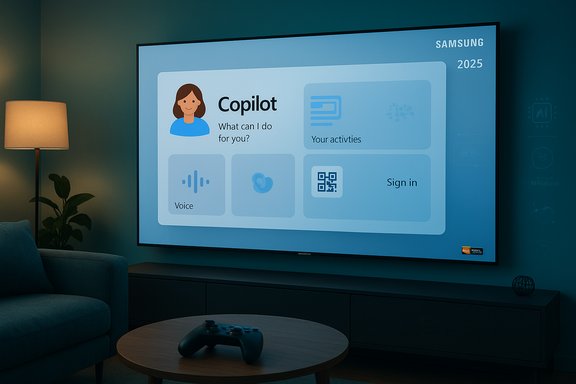
Microsoft and Samsung confirmed that Copilot is available on select 2025 Samsung TVs and Smart Monitors, presented as an integrated app experience on Tizen’s home screen and activatable via the remote’s mic/AI button. Microsoft’s Copilot team detailed a big-screen-optimized interface with voice activation, QR-based sign-in for personalization, and visual “cards” for glanceable results. Samsung’s press release reiterates availability on Micro RGB, Neo QLED, OLED, The Frame (Pro and non-Pro), and select M-series Smart Monitors, with availability expanding by market and model over time. LG also announced Copilot integration for its 2025 lineup, though implementation details differ and have since prompted a user backlash in some markets.How Copilot works on TVs
- Activation: Press the mic or AI button on the TV remote, speak naturally, or tap the Copilot icon in the Apps/AI section.
- Sign-in (optional): Use a QR code to pair your Microsoft account for personalized memory, chat history, and profile-aware suggestions.
- Presentation: Answers appear as a mix of voice and large-screen cards optimized for viewing distance, with an animated Copilot avatar that lip-syncs to replies.
LG vs Samsung: different implementations
- Samsung: Deployed Copilot as a more tightly surfaced Tizen app integrated with Samsung Vision AI features—AI upscaling, Auto-HDR remastering, and adaptive audio are presented alongside Copilot’s conversational features. Samsung frames Copilot as a “companion” for content discovery, translation, and on-screen lookups.
- LG: Initially surfaced Copilot as a home-screen tile/shortcut on webOS, effectively launching the Copilot web app in the TV browser rather than a deep native integration. That distinction turned into a flashpoint when users discovered the tile was added without a removal option—LG later clarified it was a browser shortcut and pledged to allow tile removal in a future update.
Benefits Samsung and Microsoft emphasize
- Shared, big-screen discovery: Use Copilot to find content across services, get scene or actor info, and generate contextual suggestions for groups.
- Utility beyond streaming: Quick weather, calendar, and basic productivity queries from a couch-based interface; optional sign-in unlocks memory and personalization.
- Xbox Cloud Gaming synergy: TVs with Copilot and Game Pass support further blur the line between entertainment and lightweight productivity on large screens.
Privacy, UX, and platform-politics concerns
The LG tile controversy — a test case in UX and consent
Shortly after a webOS update, LG owners found a Copilot tile on their home screens that they could not remove. Critics argued the tile’s appearance felt like a forced bundling of third-party AI, raising questions about forced shortcuts, ad-style placements, and user control. LG’s response clarified that Copilot was a browser-based shortcut, not a deeply embedded app, and said it would provide a removal option in a future firmware update. The episode underscores a few broader themes: proactive rollouts can generate backlash when users perceive loss of choice; transparency about what runs natively versus in-browser matters for privacy; and manufacturers should offer quick opt-outs for preinstalled or surfaced features.Data handling and the Microsoft account trade-off
Copilot’s richer features (memory, personalization, cross-device recollection) depend on optional sign-in. Microsoft’s documentation notes that personalized memory and past chats are tied to account-based experiences, and that microphone use on TVs only activates with user consent. Still, putting a networked AI assistant on a device in shared spaces raises legitimate questions:- What data does Copilot store about viewing habits or spoken queries?
- How long does Copilot retain conversational memory if a user signs in?
- Does the combination of on-device sensors, TV manufacturer analytics, and Microsoft services increase the surface for profiling or targeted recommendations?
Security and attack surface
Smart TVs are internet-connected general-purpose compute devices. Adding an AI assistant—whether as a native app or a web shortcut—raises additional attack vectors:- Browser-based Copilot implementations depend on a secure browser stack; any browser exploit could expose the Copilot context or user tokens.
- Native integrations expand the attack surface of the TV OS itself, potentially increasing the stakes of firmware vulnerabilities.
What this means for Windows users and the ecosystem
For gamers and AMD owners
The KB5041587 backport is an important example of software tuning materially affecting hardware performance. For many Ryzen owners, installing the optional preview could feel like a free upgrade—if they accept the preview risks. The practical guidance is:- Test with backup snapshots if possible before installing preview updates.
- Monitor gaming benchmarks and stability after update; roll back if severe regressions occur.
- Expect heterogeneous outcomes: some titles and setups will benefit substantially; others may not.
For everyday consumers and families
Copilot on TVs pushes Microsoft deeper into the living room and normalizes AI as a shared household utility. For multi-person households, the convenience of voice-based group recommendations, episode recaps, or post-watch context can be compelling. But manufacturers must give users:- Clear opt-out controls for surfaced shortcuts.
- Transparent privacy settings that explain what is processed locally, what’s sent to the cloud, and how account linkage changes behavior.
- Easy removal options for tiles and preloaded shortcuts to preserve user choice.
For the platform landscape
Microsoft’s strategy is clear: extend Copilot across platforms (Windows, Office, Edge, Xbox, and now TVs) to create habit-forming experiences that keep users inside its ecosystem, irrespective of device brand. Samsung’s openness to integrate Copilot into Vision AI is a win for cross-company AI interoperability; LG’s web-app approach highlights that partnerships can take many technical forms. The bigger question is whether consumers will view Copilot as value-add or intrusive marketing—and that judgement will depend on execution detail, privacy clarity, and the degree to which Copilot genuinely improves day-to-day tasks on the big screen.Recommendations and bottom line
- For Ryzen users: if you want the potential performance uplift, treat KB5041587 as an optional preview—install after backing up, and be ready to roll back if you encounter regressions. Keep device firmware and GPU drivers up to date before/after the patch for best results.
- For TV buyers: evaluate whether Copilot’s feature set matters to you. If concerned about baked-in shortcuts or data collection, test the device’s home-screen customization and privacy toggles pre-purchase, and avoid linking your Microsoft account to living-room devices until you’ve read the privacy settings. Watch for firmware updates that add tile removal options (LG pledged such a change).
- For IT and enterprise users: note that consumer TV Copilot experiences are primarily for home and shared living spaces; do not assume parity with Microsoft’s enterprise offering. Ensure that any device used for meetings or screen sharing meets corporate security compliance and disable microphone features or account linking if policies forbid personal data capture.
Final analysis
Microsoft’s recent moves reflect two complementary strategies: fix the foundation where it counts (OS-level performance for CPUs) and expand the reach of its AI assistant into everyday screens (Copilot on TVs). The first is a concrete, measurable improvement with immediate tangible value for a defined user group; the second is a broad platform play that maps Microsoft’s AI ambitions onto new touchpoints in consumers’ lives.Both are defensible business moves and both offer benefits—but they also require careful stewardship. Performance updates delivered as previews must be communicated clearly and restored quickly when problems arise. Meanwhile, the Copilot-on-TV rollout must balance convenience with explicit user control over where AI appears and what data it collects. The companies that get those balances right—delivering real value while preserving user choice and transparency—will set the standard for how AI moves from the workstation to the living room without provoking an avoidable backlash.
Source: Neowin https://www.neowin.net/news/microsoft-weekly-performance-boost-for-windows-and-copilot-invades-tvs/
