

Microsoft’s quiet update to its education documentation has a clear, unavoidable headline for school IT teams: Windows 11 SE will stop receiving feature updates and security support in October 2026, with version 24H2 designated as the edition’s final release. This effectively ends Microsoft’s short-lived, Chromebook‑targeted experiment and forces districts that standardized on SE devices — including the $249 Surface Laptop SE and OEM equivalents — to plan a migration, refresh, or containment strategy well before the end‑of‑support date.
Windows 11 SE was introduced as a purpose‑built, web‑first edition of Windows designed for K–8 classrooms and low‑cost school devices. It shipped with a deliberately locked‑down model: apps had to be approved and installed by IT administrators, Progressive Web Apps and Microsoft 365 were prioritized, and the user surface was simplified to limit distractions and management overhead. The OS was paired with a new hardware lineup — most prominently the Surface Laptop SE — aimed at price‑sensitive education buyers. Microsoft’s education pages now include an explicit notice: “Support for Windows 11 SE will end in October 2026. Microsoft will not release a feature update after Windows 11 SE, version 24H2.” That language is short and definitive: no 25H2 for SE, no rolling feature updates beyond 24H2, and full support (security fixes and technical assistance) ends October 2026. Microsoft also recommends that customers transition to devices that support other editions of Windows 11 to ensure ongoing support and security. The news drew immediate coverage across the tech press because the move removes Microsoft’s most direct Chromebook competitor from active development. Independent reporting confirms that Microsoft updated its official documentation rather than issuing a high‑profile announcement, prompting the conclusion that this was a quiet wind‑down rather than a strategic relaunch.
Microsoft’s support timeline for Windows 11 SE is clear and firm; the operational burden for schools falls to rapid inventory, pragmatic decision‑making, and disciplined execution. Districts that start planning and piloting today will preserve teaching continuity and minimize security and budget shocks when October 2026 arrives.
Source: Geo News https://www.geo.tv/latest/643152-end-of-windows-11-se-likely-in-2026-see-what-it-means-for-schools/
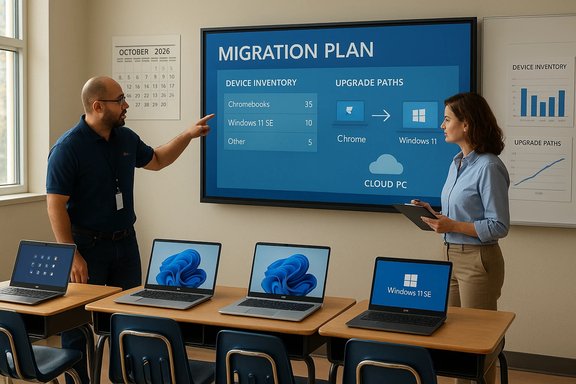 Background / Overview
Windows 11 SE was introduced as a purpose‑built, web‑first edition of Windows designed for K–8 classrooms and low‑cost school devices. It shipped with a deliberately locked‑down model: apps had to be approved and installed by IT administrators, Progressive Web Apps and Microsoft 365 were prioritized, and the user surface was simplified to limit distractions and management overhead. The OS was paired with a new hardware lineup — most prominently the Surface Laptop SE — aimed at price‑sensitive education buyers. Microsoft’s education pages now include an explicit notice: “Support for Windows 11 SE will end in October 2026. Microsoft will not release a feature update after Windows 11 SE, version 24H2.” That language is short and definitive: no 25H2 for SE, no rolling feature updates beyond 24H2, and full support (security fixes and technical assistance) ends October 2026. Microsoft also recommends that customers transition to devices that support other editions of Windows 11 to ensure ongoing support and security. The news drew immediate coverage across the tech press because the move removes Microsoft’s most direct Chromebook competitor from active development. Independent reporting confirms that Microsoft updated its official documentation rather than issuing a high‑profile announcement, prompting the conclusion that this was a quiet wind‑down rather than a strategic relaunch. What this actually means for schools — the immediate facts
- Final feature release: Windows 11 SE devices are effectively locked to Windows 11, version 24H2; they will not be upgraded to 25H2 or later feature updates.
- End of full support: Security updates, non‑security updates, and Microsoft technical assistance for the SE SKU will cease in October 2026. After that date, SE devices will continue to boot and run, but they will be unsupported and unpatched.
- Microsoft guidance: Microsoft recommends transitioning to devices that run other Windows 11 editions (Home, Pro, Education) to retain security updates and support. The company’s documentation does not publish a simple one‑click in‑place upgrade that guarantees conversion from SE to full Windows across all OEM models; administrators should treat migration as a project, not an automatic SKU switch.
- Hardware nuance: Device firmware and driver lifecycles are separate from OS lifecycle. For example, Surface driver and firmware servicing policies continue on their own schedule (Surface Laptop SE is covered by Microsoft’s Surface servicing calendar), but firmware servicing does not extend the OS security patch window. Administrators must evaluate both timelines when making decisions.
Why this is a problem — practical and security risks
Even before the calendar flips to October 2026, the sunset creates a sequence of cascading risks for schools that must be assessed and mitigated:- Unpatched vulnerabilities: Unsupported operating systems become a fast‑growing attack surface. For classroom devices that store or access student data and school networks, missing security updates quickly become compliance and privacy liabilities.
- Application compatibility and management drift: SE’s curated app model simplified management but also meant administrators might not have maintained broader tooling and imaging workflows needed for full Windows SKUs. Migrating to another edition can break assumptions about allowed apps, managed profiles, and low‑memory device behavior.
- Hardware limitations: Many SE devices were specified to be as inexpensive as possible — Intel Celeron CPUs, 4 GB RAM, eMMC storage — meaning they may not meet the full Windows 11 baseline (Secure Boot, TPM 2.0, acceptable storage performance). That eliminates the simplest “reimage and upgrade” option for a non‑trivial portion of fleets.
- Procurement and budget pressure: Replacing thousands of student devices is expensive and time‑consuming; procurement cycles in public education often take months, and budget cycles rarely stretch to cover unplanned refreshes. The October 2026 cutoff compresses timelines and increases short‑term capital pressure.
- Trust and vendor relationship costs: Schools that bought into a Microsoft‑led alternative to Chromebooks now face reputational friction and potential pushback from administrators and stakeholders who planned around SE’s expected lifecycle.
Strengths Windows 11 SE delivered — and why Microsoft built it
Before laying out migration options, it’s important to acknowledge what Windows 11 SE got right in the classroom context:- Simplicity for teachers and younger students: SE’s simplified interface, single‑app focus, and web‑first workflows reduced user confusion — an important consideration for K–8 learners.
- Tighter administrative control: By restricting app installation to IT administrators and emphasizing policies via Intune for Education, SE reduced the incident load for understaffed school IT teams.
- Affordable hardware availability: Microsoft and OEM partners produced a cohort of low‑cost devices (Surface Laptop SE started at $249) aimed at making 1:1 deployments more affordable. That lowered the barrier to access for many districts and families.
Why it ultimately failed (or why Microsoft stopped investing)
A combination of inherent technical constraints and market realities undermined SE’s long‑term viability:- Not lightweight enough: SE was a constrained version of Windows, not a re‑architected lightweight OS. On marginal hardware, this created performance tradeoffs that Chromebooks, built on Chrome OS with a small footprint, handled more gracefully. Multiple independent analyses pointed to this architectural mismatch as a practical weakness.
- App and management friction: Schools still needed certain legacy applications and administrative tools that didn’t play well with SE’s curated approach. Requests for exceptions and special provisioning increased operational overhead for some districts.
- Market momentum for Chromebooks and cloud‑first tools: Chrome OS retained strong traction in K–12, and its admin tooling and low total cost of ownership continued to appeal to education procurement teams.
- History of Microsoft’s lightweight OS attempts: Windows 10 S Mode and the cancelled Windows 10X were earlier efforts that didn’t fully succeed. SE’s retirement fits a pattern where Microsoft tried to counter Chrome OS with constrained Windows variants but ultimately refocused on mainstream Windows and services.
Practical migration options for schools
There is no single “right” answer for every district. The right choice depends on device inventory, budgets, curriculum needs, and network maturity. Below are the realistic migration strategies, with pros and cons.Option A — Upgrade in place to a full Windows 11 edition (where feasible)
This preserves Windows continuity and existing investments in Microsoft 365 and endpoint management.- Benefits:
- Maintains compatibility with legacy Windows apps and Microsoft ecosystem.
- Minimal change to user workflows if hardware performs acceptably.
- Constraints:
- Devices must meet Windows 11 hardware baseline (TPM 2.0 enabled, Secure Boot, UEFI, adequate RAM and storage).
- Microsoft’s documentation does not promise a guaranteed automated conversion for all OEM models; test before committing.
- Technical steps (high level):
- Inventory all SE devices and record model, CPU, RAM, storage, firmware, TPM and Secure Boot status.
- Pilot a conversion on representative models to validate drivers and performance.
- Confirm licensing (Windows 11 Education/Pro) and management profile changes in Intune or your MDM.
- Schedule phased rollouts with teacher and helpdesk training.
Option B — Replace the lowest‑spec SE devices with Chromebooks (or ChromeOS Flex)
This is often the lowest total cost of ownership for web‑first classrooms and aligns with the user experience SE attempted to emulate.- Benefits:
- Chrome OS excels on low‑cost hardware with strong admin tooling for education.
- Many education apps are already web‑native or have Chrome OS equivalents.
- Constraints:
- Migration of non‑web apps and local Windows dependencies requires reconfiguration or new cloud solutions.
- Student and teacher retraining is needed, though many instructional workflows are similar.
- Practical notes:
- ChromeOS Flex can be an interim option for repurposing some older devices, but its manageability and performance vary by hardware.
Option C — Hybrid: keep mid‑range devices on full Windows 11, replace low‑end units with Chromebooks
Many districts will adopt a blended fleet: heavier‑duty Windows devices for labs and staff, Chromebooks for pure student‑centric, web‑first tasks.- Benefits:
- Balances cost and capability.
- Preserves Windows compatibility where necessary.
- Drawbacks:
- Adds heterogeneity and requires dual management strategies (Intune + Google Admin Console).
Option D — Move to cloud‑hosted Windows (Windows 365 / Cloud PC)
For districts with reliable network infrastructure, Cloud PCs provide a path to run full Windows images from thin devices.- Benefits:
- Older hardware can remain useful as thin clients.
- Centralized images, easier patching, and consistent endpoint experience.
- Constraints:
- Ongoing subscription costs.
- Requires robust, low‑latency connectivity across schools and remote learners.
A practical, prioritized migration playbook (step‑by‑step)
- Inventory immediately. Capture model, serial, Windows build, TPM and Secure Boot status, assigned user, and role (classroom, staff, testing). This is the single most important activity.
- Map functions. For each device group, list the apps and tasks they run today (web apps, testing software, Office, grading systems). This drives the target platform decision.
- Evaluate hardware capability. Run automated compatibility checks (e.g., Microsoft Health Check equivalents) to determine which devices can run full Windows 11 SKUs.
- Pilot conversions. Choose representative devices for each hardware class and validate driver support, performance, and imaging procedures.
- Decide target platforms. Choose: full Windows 11 Education/Pro, Chrome OS, ChromeOS Flex, or cloud PC. Balance cost, continuity, and educational requirements.
- Budget and procure. Start procurement now if replacement is required. Public procurement windows can take 6–12+ months.
- Plan deployment waves. Phase rollouts by priority groups: high‑stakes testing devices and staff devices first, general student devices later.
- Train and communicate. Inform teachers, staff, parents and students about changes well in advance. Provide quick reference guides and in‑class support.
- Decommission or isolate SE devices after October 2026. If devices must remain in use, segregate them on a restricted VLAN and deny access to sensitive data indefinitely.
- Reassess management tooling and security posture post‑migration. Update MDM policies, endpoint detection, and compliance baselines.
Cost realities and timelines
Specific costs vary by geography, procurement vehicle, and volume discounts; however, the timing is predictable:- Procurement lead times: public RFPs, vendor selection, and large orders commonly require 3–9 months; bulk provisioning and imaging add time. Starting planning in late 2025 or early 2026 is prudent if large replacements are needed prior to October 2026.
- Total cost of ownership: Chromebooks often present the lowest near‑term capital and support cost for web‑centric use, while full Windows devices preserve legacy app compatibility but usually require higher upfront spend and licensing for Education SKUs.
- Labor and training: Migration labor commonly equals or exceeds hardware line items as a percentage of budget because imaging, staging, testing, and training scale with device counts.
Technical checkpoints — what to test on every SE device
- TPM 2.0 present and enabled (TPM required for many Windows 11 features).
- Secure Boot and UEFI mode enabled.
- Minimum RAM and storage performance (4GB is the published minimum for some Windows 11 SKUs but 8GB is strongly recommended for usable performance).
- Driver availability for full Windows SKUs from the OEM.
- Boot imaging compatibility with existing management tools (Intune, SCCM, third‑party MDMs).
Communication and governance: stakeholder steps
- Create an executive summary for school boards and finance committees that clearly outlines the date (October 2026), the number of affected devices, and the recommended migration approach. Use the Microsoft lifecycle statement as an unambiguous timeline anchor when requesting funds.
- Engage vendors early for quotes and pilot hardware. Ask specifically about warranty, driver support for full Windows SKUs, and managed imaging services.
- Prepare parent facing communications about any implications for home learning if student devices change or are temporarily offline.
Strategic lessons for IT managers and Microsoft
- For IT teams: standardizing on a vendor‑specific OS variant reduces immediate complexity but increases strategic risk when that variant is sunset. Fleets should be evaluated for upgradeability and cross‑platform contingency planning. Microsoft’s SE decision highlights the importance of lifecycle planning as a purchasing criterion.
- For Microsoft (analysis): SE’s retirement underscores the difficulty of delivering a genuinely lightweight Windows experience that competes with Chrome OS on low‑cost hardware. Future success in education may hinge less on distinct SKUs and more on robust cloud tooling, flexible licensing, and hardware partnerships that guarantee upgrade paths and longer support windows. Independent reporting and lifecycle documentation show Microsoft stepping back from SE and encouraging transitions to mainstream Windows SKUs and hardware.
What to watch for next (and what remains unverified)
- Microsoft has not published a one‑size‑fits‑all migration tool that converts SE devices automatically to full Windows 11 editions. Administrators should treat migration as a deployment project rather than an unattended upgrade. Flagged as an operational caveat.
- Firmware/driver servicing for some Surface devices (including Surface Laptop SE) continues on a separate cadence; confirm OEM end‑of‑servicing dates for your hardware. For example, Microsoft’s Surface servicing documentation lists device‑level driver/firmware servicing windows that extend beyond the SE OS lifecycle for some models. That does not, however, substitute for OS security patches.
- Local and state funding programs: several U.S. states and grants fund device refreshes for education. Districts should scan available procurement channels and time requests accordingly. This is highly variable and not a universal solution — confirm applicability locally.
Final verdict — the takeaway for schools
Windows 11 SE’s retirement is a timely reminder that lifecycle commitments matter. The October 2026 end‑of‑support date is not speculative: it is published in Microsoft’s education documentation and aligned with Windows version servicing windows that make 24H2 SE the final SE release. Districts that standardized on SE must act now — inventory, pilot, budget and execute a migration plan — or accept the security, compliance, and operational risks of running unsupported devices in sensitive educational environments. For most districts, the pragmatic path will be a mix of approaches: convert capable devices to full Windows 11 SKUs where hardware permits, adopt Chromebooks for the most cost‑sensitive student use cases, and evaluate cloud PC options where reliable networking exists. Start with inventory and a short pilot today; the calendar is fixed, and the logistics are real.Quick action checklist (for busy IT directors)
- Confirm the number and models of Windows 11 SE devices in your fleet.
- Check each model against Windows 11 baseline requirements (TPM, Secure Boot, RAM).
- Identify high‑risk groups (testing devices, staff laptops with sensitive access).
- Run a 30‑device pilot converting eligible models to full Windows 11.
- Solicit procurement quotes for replacements now; expect 3–9 month lead times.
- Isolate or segment any SE devices that must remain online after October 2026.
- Communicate timelines and impacts to teachers, staff, parents and the school board.
Microsoft’s support timeline for Windows 11 SE is clear and firm; the operational burden for schools falls to rapid inventory, pragmatic decision‑making, and disciplined execution. Districts that start planning and piloting today will preserve teaching continuity and minimize security and budget shocks when October 2026 arrives.
Source: Geo News https://www.geo.tv/latest/643152-end-of-windows-11-se-likely-in-2026-see-what-it-means-for-schools/
