

Windows 11's long-running identity crisis just added another footnote: the ability to rename a local user account — historically tucked away in the legacy Control Panel — has been surfaced in the modern Settings app in the latest Dev-channel preview, but the change is less a finish line than a preview of a work-in-progress. ([windowscentral.comcentral.com/microsoft/windows-11/the-windows-control-panel-is-one-step-closer-to-death-as-account-rename-option-makes-its-way-to-windows-11s-settings-app)
For more than a decade Microsoft has been migrating legacy Control Panel functionality into the modern Settings app, a program of incremental modernization that began in earnest with Windows 8 and accelerated through Windows 10 and Windows 11. The process has never been a clean cut: components move at different paces, some never fully migrate, and others are reimagined entirely. That uneven cadehe jarring user experience many people still encounter — a mixture of polished, modern panes and survival-era Control Panel dialogs.
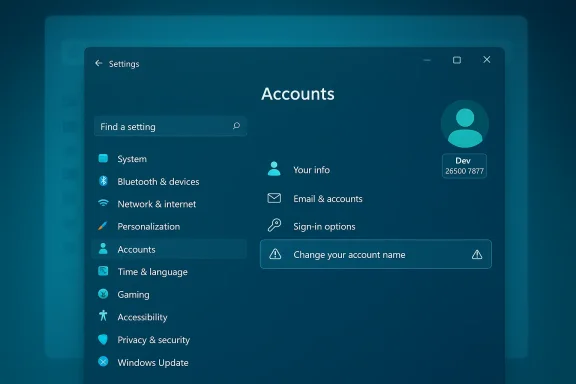
The change drawing attention this week is specific and narrow: the familiar "Change your account name" control — previously accessible only from the Control Panel's User Accounts area — now appears in the Settings app in Windows Insider Preview Build 26300.7877 (Dev channel). Microsoft’s official Insider post confirms the build number and release to the Dev channel, while Windows Central and other outlets documented the discovery after it was flagged by an X (formerly Twitter) user who monitors preview builds.
That dual reaction is visible in Insider discussion threads: users praise the idea of a unified interface but often report broken or missing functionality even after a migration appears complete. The logic is familiar — the visible UI can change faster than the plumbing underneath.
The consequence is predictable: migration work that is primarily cosmetic or incremental (like porting admin dialogs into Settings) will likely be deprioritized in favor of deeper fixes that improve reliability across millions of devices. In plain terms, Microsoft appears to be balancing a triage: fix the foundations first; modernize the surface gradually. That strategy is defensible from an engineering perspective, but it invites criticism from those who see the persistent Control Panel as a stain on Windows 11’s polish.
It’s worth calling out the speculative nature of some coverage that suggests migration could “grind to a halt in 2026” — that’s opinion, not an official Microsoft roadmap. We should treat prognostications about timelines with caution. Microsoft’s public Insider channels show active experimentation and iterative releases; what gets shipped broadly depends on field telemetry, enterprise feedback, and the company’s internal prioritization.
Expect more incremental moves like this — small islands of modernization appearing in preview builds — rather than a clean, rapid migration. For end users, these changes will gradually make Windows easier to manage; for IT administrators, the work of mapping and validating legacy behaviors will continue. Microsoft’s challenge is not simply moving options from one pane to another, but doing so without breaking the complex ecosystem that has grown around decades of Windows installs. If you care about consistency, reliability, and predictability, watch the Insider notes and beta rollouts closely — and treat early previews as design insights, not finished features.
Conclusion: the Control Panel isn’t dead yet, but the corpse is slowly being rearranged — one setting at a time.
Source: TechRadar Microsoft moves a key feature from Control Panel to Settings — but Windows 11 still has a jarring identity crisis here
 Background
For more than a decade Microsoft has been migrating legacy Control Panel functionality into the modern Settings app, a program of incremental modernization that began in earnest with Windows 8 and accelerated through Windows 10 and Windows 11. The process has never been a clean cut: components move at different paces, some never fully migrate, and others are reimagined entirely. That uneven cadehe jarring user experience many people still encounter — a mixture of polished, modern panes and survival-era Control Panel dialogs.The change drawing attention this week is specific and narrow: the familiar "Change your account name" control — previously accessible only from the Control Panel's User Accounts area — now appears in the Settings app in Windows Insider Preview Build 26300.7877 (Dev channel). Microsoft’s official Insider post confirms the build number and release to the Dev channel, while Windows Central and other outlets documented the discovery after it was flagged by an X (formerly Twitter) user who monitors preview builds.
What Microsoft moved — and what still doesn’t work
The visible change
Inside the Settings app, a new UI element for altering the account display name has been added to the Accounts section in the preview build. Visually, it’s promising: the settings surface now exposes a direct entry point for something most users expect to find in a single, modern location. That matters because discovery is half the battle — most everyday users never open the Control Panel anymore.The practical reality
Crucially, the Settings entry in Build 26300.7877 is not yet functional. Early screenshots and reports show the new control present but either inert or wired incorrectly (a duplicated control that opens the account-type dialog instead of a rename dialog)rtant: this is an interface migration in preview, not a finished feature rollout. Test builds may include elements for internal testing, A/B experimentation, or staged rollouts that never reach general availability in exactly the same form.Why this matters: UX, discoverability, and technical debt
At face value, relocating the account-rename option into Settings is low-stakes. But looked at through the wider lens of system coherence, it says a lot about Microsoft’s priorities and the costs of legacy support.- **Discoverability and es and casual consumers rely on Settings. Moving a basic account-management capability out of Control Panel and into Settings reduces friction for non-technical users and aligns the OS around a single primary configuration surface.
- Legacy UI fragmentation: Windows today is a patchwork of old and new. When some features are modernized and others remain in Control Panel, the result is a jarring, inconsistent experience — the identity crisis many commentators note. That inconsistency undermines the polished image Microsoft wants for Windows 11.
- Technical debt and risk: The Control Panel contains options and applets built across decades, some of which touch low-level APIs, enterprise policies, or hardware vendor integrations. Migrating those functions safely is not just a UI exercise — it's a careful engineering task that must respect backward compatibility and enterprise management tooling. That’s why the migration is spread over years and many builds.
The engineering reality: why migration is slow
Microsoft’s migration strategy must reconcile multiple, often conflicting requirements:- Compatibility for enterprises and scripts. Many organizations rely on Control Panel paths, Group Policy behaviors, and legacy management tooling. Removing or altering these interfaces without a clear replacement risks breaking automation and support contracts.
- Localization and accessibility. Full parity with Control Panel requires translation, accessibility testing (screen readers, keyboard navigation), and thorough QA across languages and assistive technologies.
- Driver and OEM dependencies. Certain Control Panel applets interact with OEM-supplied DLLs and drivers. Bringing the same functionality into Settings can involve coordination with hardware partners or reimplementing integration points.
- User profile and file-system implications. Renaming an account’s display name is relatively safe; renaming a profile folder neferences, registry profile entries, and can invalidate tokens or encrypted materials. Microsoft must preserve safe migration semantics and avoid creating new support headaches. Independent explainers and sysadmin guides have long warned that changing display names does not change theolder and that doing so can cause ripple effects.
Community reaction: frustration and resignation
Windows enthusiasts and IT pros have grown used to small, incremental additions to Settings: mouse properties here, keyboard repeat settings there, and now a user-name control. Forum and community threads reflect a mix of appreciation for the gradual consolidation and frustration over the glacial pace. Some see each migrated control as progress toward a cleaner OS; others see cosmetic rearrangement while deeper quality-of-life and reliability issues remain.That dual reaction is visible in Insider discussion threads: users praise the idea of a unified interface but often report broken or missing functionality even after a migration appears complete. The logic is familiar — the visible UI can change faster than the plumbing underneath.
Microsoft’s priorities for 2026: quality first, migration second
Microsoft has publicly signaled that 2026 will focus on fortifying Windows 11’s fundamentals: improving stability, addressing long-standing pain points, and raising quality assurance standards. That prioritization affects the timeline for Control Panel migration.The consequence is predictable: migration work that is primarily cosmetic or incremental (like porting admin dialogs into Settings) will likely be deprioritized in favor of deeper fixes that improve reliability across millions of devices. In plain terms, Microsoft appears to be balancing a triage: fix the foundations first; modernize the surface gradually. That strategy is defensible from an engineering perspective, but it invites criticism from those who see the persistent Control Panel as a stain on Windows 11’s polish.
It’s worth calling out the speculative nature of some coverage that suggests migration could “grind to a halt in 2026” — that’s opinion, not an official Microsoft roadmap. We should treat prognostications about timelines with caution. Microsoft’s public Insider channels show active experimentation and iterative releases; what gets shipped broadly depends on field telemetry, enterprise feedback, and the company’s internal prioritization.
Practical concerns for users and IT admins
The account-rename migration raises a handful of pragmatic questions for everyday users and administrators. Here’s a concise rundown of what matters and recommended practices.What renaming changes (and what it doesn’t)
- Display name: Changing the account display name updates the string shown in Start, the sign-in screen, and other UI surfaces. This is relatively safe.
- Profile folder (C:\Users\name): Renaming the display name does not rename the profile folder. Renaming the folder manually can break installed applications, break paths referenced in scripts, and corrupt user-specific references in the registry. Treat folder renames as advanced operations and avoid them unless you have a tested migration plan.
Recommendations for consumers
- Use the built-in rename control (when it’s functional) to change display names rather than editing profile folders manually.
- If you must change the profile folder name, create a full system backup and test applications for broken references post-change.
- For Microsoft ahat online name changes may not immediately sync to local devices and might require sign-out/sign-in cycles.
Recommendations for IT admins
- Avoid renaming accounts en masse unless you have updated automation scripts and have validated Group Policy outcomes.
- Use management tooling (Azure AD / Entra ID, Active Directory) to manage account attributes centrally when possible.
- Monitor Insider release notes and Flight Hub to track which settings Microsoft is migrating and whether they affect enterprise flows.
The hidden complications: scripts, policies, and third-party integrations
Migrating UI alone is the tip of the iceberg; under the surface lie thousands of scripts, policies, and vendor integrations that assume Control Panel locations and behaviors.- Logon scripts and automation: Many sysadmins automate tasks that call Control Panel applets or rely on legacy control-panel-invocation paths. Those scripts will need updating if the underlying implementation changes.
- Group Policy expectations: Some Group Policy options map to legacy Control Panel behaviors. Microsoft must either expose equivalent policy settings or provide backward-compatible hooks.
- OEM customizations: OEMs often inject points into Control Panel or ship companion software that integrates with legacy dialogs. These dependencies complicate wholesale replacement.
What the preview teaches us about Microsoft’s approach
The presence of non-functional or partially wirennel builds tells us more about process than product. Microsoft uses the Insider Program to:- Validate UI placement and discoverability.
- Test telemetry for feature usage while the implementation is incomplete.
- Collect bug reports and telemetry that inform whether an item should be finished, revised, or pulled.
Timeline and realistic expectations
Predicting when the Control Panel will be fully retired — if ever — is an exercise in uncertainty. Microsoft’s public communications indicate two enduring truths:- The ** long-term primary UI for user-facing configuration.
- The Control Panel will continue to exist while necessary compatibility is preserved.
Strengths
- User-centric discoverability: Centralizing common tasks in Settings benefits most users and reduces support friction for basic tasks.
- Controlled rollout via Insider channels: Preview builds allow Microsoft to iterate and gather telemetry before exposing features broadly.
- Incremental engineering approach: Prioritizing stability and compatibility reduces the chance of large-scale regressions in enterprise environments.
Risks
- Perception of unfinished product: Partial migrations and mixed UI experiences erode brand perception and feed narratives about Windows feeling “unfinished.”
- Hidden breakages: Back-end inconsistencies or missing policy parity risk breaking administrative automation and third-party tools.
- Slow velocity on cosmetic improvements: Users often judge the product by surface polish; slow migration can create dissonance between Microsoft’s public design language and real-world usage.
What to watch next
- Track Insider release notes for mentions of tand any fixes to the account-rename control. The Windows Insider Blog remains the authoritative source for build details and staged-rollout notes.
- Watch for follow-up reporting from major Windows outlets. Windows Central documented the discovery and the non-functional state; subsequent coverage will likely note when the feature becomes functional or when the change rolls to Beta/Release Preview channels.
- Monitor enterprise-focused commentary for policy parity or administrative concerns. When a UI change threatens automation or Group Policy behavior, enterprise IT will be the first to raise alarms and the first to test migrations at scale.
Bottom line
The presence of a rename account control in Windows 11’s Settings is a small but telling development: it demonstrates Microsoft’s continued trajectory toward a unified configuration experience while also exposing the long tail of technical and organizational baggage that makes wholesale change difficult. The control’s appearance in Build 26300.7877 is evidence of steady progress, but the fact that it’s not yet functional reminds us that visible UI changes are only as valuable as the plumbing behind them.Expect more incremental moves like this — small islands of modernization appearing in preview builds — rather than a clean, rapid migration. For end users, these changes will gradually make Windows easier to manage; for IT administrators, the work of mapping and validating legacy behaviors will continue. Microsoft’s challenge is not simply moving options from one pane to another, but doing so without breaking the complex ecosystem that has grown around decades of Windows installs. If you care about consistency, reliability, and predictability, watch the Insider notes and beta rollouts closely — and treat early previews as design insights, not finished features.
Conclusion: the Control Panel isn’t dead yet, but the corpse is slowly being rearranged — one setting at a time.
Source: TechRadar Microsoft moves a key feature from Control Panel to Settings — but Windows 11 still has a jarring identity crisis here
