

Microsoft is quietly testing a substantial redesign of the Windows 11 Start menu across Insider and preview builds — a change that blends the familiar pinned apps surface with an expanded, scrollable “All apps” area, adds multiple app-list views and tighter Copilot/Phone Link integrations, and is being rolled out slowly to users while Microsoft continues to tweak performance, compatibility, and discoverability.
When Windows 11 launched, Microsoft moved the Start menu to the center of the taskbar, removed live tiles, and collapsed the experience into a simplified surface of pinned apps and a small recommendations area. The result was a visually cleaner Start, but many power users and enterprise admins complained about limited customization, poor discoverability of installed apps, and wasted space. That feedback set the stage for a careful re-evaluation of how the Start menu should behave going forward.
Over the last year Microsoft has been experimenting in the Windows Insider program — iterating UI variations in Dev, Beta and Release Preview rings and using server-side, staged rollouts to enable different experiences on different machines. Those experiments have produced a concrete redesign that Microsoft has shipped into preview channels and that is now appearing on a growing number of PCs as part of cumulative preview packages and selective, phased enablement.
That said, Microsoft must not underestimate the ecosystem implications. Start is deeply embedded in user habits, enterprise workflows and third-party tooling. The preview reveals promising directions and real issues in equal measure: better browsing models and AI integration on one side, compatibility and usability regressions on the other.
If Microsoft executes on the feedback loop it has established — fixing regressions, documenting breaking changes, and giving users and admins granular control over layout and AI suggestions — the redesign could become one of the most meaningful improvements to Windows 11 since the OS’s original refresh. If not, users will rightly push back, and enterprises will slow adoption until clarity and stability arrive.
For now, the redesign remains a work in progress: visible in preview, selectively enabled for many systems, and a clear signal that Microsoft sees the Start menu as a primary surface for modern Windows experiences. The prudent path for most users and IT teams is measured testing: try the new Start on non-critical machines, gather feedback, and prepare policies and training before pushing the experience across a production fleet.
The Start menu’s makeover is not just a pixel-tightening exercise; it signals a broader design philosophy shift — one that places choice, contextual intelligence, and integration at the center of the Windows experience. Whether that shift lands as an unambiguously positive win for users will depend on how well Microsoft balances fresh features with the stability and control that long-time Windows users and IT professionals demand.
Source: thewincentral.com Microsoft Testing Major Start Menu Redesign in Windows 11
 Background / Overview
When Windows 11 launched, Microsoft moved the Start menu to the center of the taskbar, removed live tiles, and collapsed the experience into a simplified surface of pinned apps and a small recommendations area. The result was a visually cleaner Start, but many power users and enterprise admins complained about limited customization, poor discoverability of installed apps, and wasted space. That feedback set the stage for a careful re-evaluation of how the Start menu should behave going forward.Over the last year Microsoft has been experimenting in the Windows Insider program — iterating UI variations in Dev, Beta and Release Preview rings and using server-side, staged rollouts to enable different experiences on different machines. Those experiments have produced a concrete redesign that Microsoft has shipped into preview channels and that is now appearing on a growing number of PCs as part of cumulative preview packages and selective, phased enablement.
What’s actually changing in the Start menu
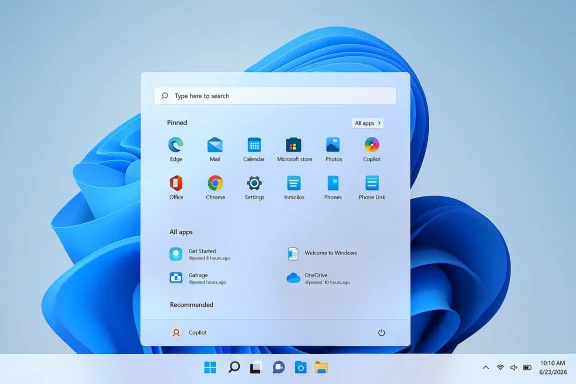
The changes Microsoft is testing are less about a cosmetic facelift and more about reshaping the Start surface for discoverability, organization and future AI-driven experiences. The main changes being evaluated include:- A single, unified, scrollable Start surface that combines Pinned apps, Recommendations and the All Apps list into one contiguous view. This removes the small, separate “All” page in favor of a longer, scrollable canvas.
- Multiple “All apps” views: alphabetical list, grid/app-drawer style layout, and category views that group installed apps into buckets for faster scanning. These are optional ways to browse installed software rather than a single fixed view.
- Smarter recommendations and tighter Copilot integration, including contextual suggestions under pinned apps and experimental AI-driven app/category suggestions in the All apps area. Microsoft has also been exploring deeper Phone Link and mobile companion elements inside the Start surface.
- Faster and more integrated search behavior inside the Start UI, though some of the search experiments (notably how results and web suggestions are blended) have been controversial in tester communities.
- Enterprise and management considerations exposed in the preview builds (policy hooks for pin management, backup/restore behavior during first sign-in, and workspace-preservation features that attempt to keep Start pins consistent for managed devices).
Why Microsoft is redesigning the Start menu now
There are three clear drivers behind the redesign push.- User feedback and complaints. The simplified Windows 11 Start menu solved some design goals but left many users wanting more control and better visibility into installed apps. The new design aims to answer that feedback directly with alternative browsing models and more granular personalization.
- Platform modernization and integration. Microsoft is using the Start menu as an integration point for Copilot features, phone-to-PC workflows, and improved search. Consolidating multiple UI surfaces into one scrollable canvas reduces cognitive overhead and creates a consistent place to surface AI-assisted suggestions and cross-device actions.
- Preparing for future platform updates. Microsoft is reorganizing internal Windows 11 channels and platform baselines (splitting Canary channels and building toward 27H2/26Hx paths). The Start redesign is part of a broader set of “platform changes” that the company is validating before wide deployment. That makes the Start menu an early testbed for changes Microsoft expects to carry into future feature updates.
The testing and rollout story: channels, KBs and a staged rollout
Microsoft’s approach to releasing Start menu changes has been deliberately staged and conservative. The company first surfaced the redesign in Insider builds for months, moved the UI into Release Preview packages as an opt-in preview, and then used server-side gating and gradual rollouts for broad deployment.- The new Start experience began to appear in preview packages (identified in testing windows as KB5067036 and related Release Preview builds) and as optional preview code in late 2025. Microsoft described that deployment as gradual, and indeed many testers saw the UI appear and disappear as server-side gates flipped.
- Microsoft continued to iterate on the feature through December 2025 and into early 2026; some sources reported that the wider distribution arrived via cumulative updates in January 2026, while others documented phased enablement during the November 2025 update window. The important signal is the process: code shipped to Insiders; Microsoft gated delivery to broad users; and the company used multiple channels (Release Preview, Beta, Dev, and Canary splits) to validate performance and compatibility.
- Internally, the company is testing the design across hardware variations (including ARM64 devices) and is using telemetry and feedback from the Insider program to further refine layout, search speed and memory use. Early telemetry reportedly drove changes to reduce Start’s memory overhead and to expose admin controls for organizations that need predictable Start behavior on managed deployments.
Early reactions: praise, confusion and a fair amount of pushback
As the test rollout expanded, reaction split along predictable lines.- Enthusiasts and modernizers praised the new flexibility. The grid and category views were welcomed by users who prefer a more mobile-like app drawer, and many testers appreciated the integrated All apps surface that removes extra clicks. Some users also noted the potential for better Copilot/AI suggestions to surface more relevant apps and actions.
- Power users and admins raised worries. Two common complaints emerged: first, the new Start takes up more screen real estate by default and some testers found it too large, hurting quick keyboard-driven workflows. Second, third-party shell extensions and Start replacement tools can break or behave unpredictably with the redesigned layout, raising compatibility concerns for enterprises and users who rely on customization tools.
- There are real usability friction points in the current preview. Multiple community threads documented bugs — missing apps in category views, Start menu reverting after updates, search regressions, and inconsistent behavior between channels. Some testers reported that the alphabetical All Apps list disappeared for them and they had to rely solely on Search to find newly installed apps. Microsoft appears to be addressing those specific regressions, but the incidents underscore the complexity of changing a core UI surface used by billions.
Enterprise considerations and admin controls
For organizations the Start menu is not a cosmetic detail — it’s a piece of the managed desktop experience. Microsoft is testing and, in many preview builds, exposing policy hooks and backup/restore behaviors intended for enterprise scenarios:- Pin and layout management: Preview builds hint at policy hooks to manage Start pins and to restore them at first sign-in for new devices, which will help organizations maintain consistent app placements for employees. That feature has ties to broader Windows backup/restore improvements Microsoft has been expanding.
- Compatibility and third-party tools: Admins should test any Start customization tools and shell extensions against preview builds. The new layout changes how pins, groups and the All apps surface are rendered; some extensions that manipulate the Start shell may become incompatible unless updated. Microsoft’s advice to enterprise customers is standard: pilot test features in a controlled ring before broad deployment.
- Staged rollout and policy enforcement: Because Microsoft is gating the experience server-side, administrators may see inconsistent behavior unless they control the update and feature enablement process through an internal pilot program. For managed fleets, using Windows Update for Business and ringed deployments remains the safest path.
Privacy, AI and the recommendation layer
One of the most-discussed aspects of the redesign is the AI/recommendation layer embedded into the Start surface.- Microsoft is experimenting with contextual suggestions and Copilot-assisted recommendations inside the Start menu. That creates an opportunity for smarter app suggestions and shortcuts, but it also raises questions about what data is being used to generate those recommendations and how opt-out will be handled for privacy-sensitive environments.
- The company’s public messaging around Copilot and Windows indicates telemetry and interaction signals play a role in shaping suggestions; however, the exact data flows and on-device versus cloud processing details are not uniformly documented in the preview notes. Until Microsoft publishes a clear, granular privacy description for Start-driven AI suggestions, organizations and privacy-conscious users should assume some cloud-assisted processing may be involved and enumerate their requirements accordingly.
- There’s also a UX risk: overzealous recommendations can push down user-controlled pins and increase screen clutter, which undermines the very customization goals the redesign aims to achieve. Microsoft appears to be balancing this by exposing options to hide or minimize recommendations in some builds, but options vary across releases and channels.
Compatibility, bugs and the community’s quick fixes
The preview phase has exposed both regressions and community workarounds.- Bugs reported by testers include missing entries in the All apps views, Start menu disappearing after updates, and inconsistent search results. Microsoft’s staged rollouts mean some testers receive fixes faster than others, but also that regressions can be intermittent while server-side flags change.
- The Windows community responded quickly with third-party utilities and registry tweaks; some users rely on tools like ViVeTool to toggle features off if the new Start appears and they dislike it. That path works for enthusiasts but is unsupported and risky for less technical users. Microsoft has pushed guidance encouraging testers to use the Feedback Hub and to avoid ad-hoc modifications on production systems.
- For organizations, relying on community workarounds is not a substitute for formal validation. Admins should run controlled pilot rings and verify mission-critical workflows on preview builds before permitting broader deployment.
Timeline and what to expect next
Based on Microsoft’s channel activity and reporting from multiple outlets, here’s the likely near-term timeline and what to pay attention to:- Continued phased rollout through 2026. The redesign is already in Release Preview and some stable machines have sporadically received it. Microsoft will continue to expand the staged rollout as telemetry and feedback justify broader enablement.
- Platform alignment with 26Hx/27H2. Microsoft’s internal channel splits and platform rebasings (the Canary fork toward what will likely be 27H2) suggest the Start menu redesign is part of a larger effort to prepare Windows for subsequent feature updates. Expect more experimentation in Canary/Dev leading up to the major 27H2 cycle and smaller, cumulative updates in the meantime.
- Iterative UX and performance fixes. Short-term focus will be on search speed, memory footprint, fix for missing apps in category/grid views, and ensuring enterprise policy hooks work reliably during image deployment and first sign-in scenarios.
- Ongoing AI feature tuning. Microsoft will iterate how Copilot suggestions are surfaced and will likely add granular privacy and opt-out settings to satisfy enterprise compliance needs and privacy-conscious users. Expect clearer documentation around how recommendations are generated and what data is used in future build notes.
Practical guidance: what users and admins should do today
If you want to preview or avoid the new Start menu, here are concrete steps and recommendations:- Want to test it safely? Enroll a non-critical machine into the Windows Insider Beta or Release Preview channel, or create a dedicated VM. Use Feedback Hub aggressively — Microsoft is watching bug trends from Insiders closely.
- Don’t rely on community toggles for production systems. Tools like ViVeTool can flip feature flags, but they are unsupported by Microsoft for enterprise scenarios and may break with future updates. For managed fleets, rely on Windows Update for Business and staged pilot deployments.
- For admins: run tests on your imaging and provisioning pipeline to ensure Start pins, group policies, and custom shell extensions behave as expected after the redesign. If you rely on specific Start layouts for training or kiosk deployments, plan for a validation window before broad adoption.
- If you experience regressions: collect logs, reproduce on a test image, and file a Feedback Hub report with steps to reproduce and attach diagnostic traces when possible. Community threads help, but actionable reports expedite Microsoft’s triage.
A critical analysis: strengths, risks, and what Microsoft must get right
Strengths- Unified browsing model: The single, scrollable Start surface reduces friction between pinned apps and the All apps list, which is a sensible usability improvement for users who prefer a single, glanceable place to find apps.
- Multiple app views: Offering optional grid, list and category views is smart — different users navigate apps differently, and giving choice is better than imposing a single paradigm.
- Integration surface for Copilot and Phone Link: Start is a natural place to surface AI-guided shortcuts and cross-device actions; done well, this can speed common tasks and make contextual suggestions feel genuinely useful rather than intrusive.
- Overreach with screen real estate: For keyboard-focused or small-screen users, a larger Start surface can add friction. Microsoft must provide easy controls to resize or minimize the Start canvas and to keep keyboard-first discoverability intact. Community feedback shows this is already an irritant in preview.
- Compatibility fallout: Changing core shell behaviors risks breaking third-party tooling and enterprise workflows. Microsoft must maintain robust backward-compatibility layers or clearly document breaking changes and migration paths for admins.
- Privacy and telemetry clarity: AI-driven recommendations demand transparent privacy controls and opt-outs. Enterprises will be more comfortable adopting the change if Microsoft publishes a clear data flow description for Start suggestions.
- Quality consistency across channels: The staged server-side gating is useful, but the current A/B behavior has left testers confused when the Start menu appears and disappears after updates. Microsoft needs clearer signals in release notes and more deterministic opt-in paths for Insiders and IT pros.
- Provide simple resize, density and layout toggles that let users choose compact vs expanded Start experiences without jumping through menus.
- Publish a clear privacy matrix for Copilot/AI-driven Start suggestions that explains what data is processed locally versus in the cloud, and allow enterprise opt-out via policy.
- Maintain and document compatibility layers for third-party shell extensions or provide a developer migration guide and time window for updates.
- Improve transparency about staged rollouts — an “I got this feature” diagnostic or admin control that shows why a device received the redesign would reduce uncertainty among testers and admins.
Final thoughts: evolution, not revolution — but a major interface change nonetheless
The Start menu redesign is an important evolutionary step for Windows 11. It addresses several long-standing complaints about customization and discoverability while opening the door to deeper Copilot and cross-device experiences. The technical approach — preview builds, staged server-side enablement and telemetry-driven iteration — is the right one for a surface as central as Start.That said, Microsoft must not underestimate the ecosystem implications. Start is deeply embedded in user habits, enterprise workflows and third-party tooling. The preview reveals promising directions and real issues in equal measure: better browsing models and AI integration on one side, compatibility and usability regressions on the other.
If Microsoft executes on the feedback loop it has established — fixing regressions, documenting breaking changes, and giving users and admins granular control over layout and AI suggestions — the redesign could become one of the most meaningful improvements to Windows 11 since the OS’s original refresh. If not, users will rightly push back, and enterprises will slow adoption until clarity and stability arrive.
For now, the redesign remains a work in progress: visible in preview, selectively enabled for many systems, and a clear signal that Microsoft sees the Start menu as a primary surface for modern Windows experiences. The prudent path for most users and IT teams is measured testing: try the new Start on non-critical machines, gather feedback, and prepare policies and training before pushing the experience across a production fleet.
The Start menu’s makeover is not just a pixel-tightening exercise; it signals a broader design philosophy shift — one that places choice, contextual intelligence, and integration at the center of the Windows experience. Whether that shift lands as an unambiguously positive win for users will depend on how well Microsoft balances fresh features with the stability and control that long-time Windows users and IT professionals demand.
Source: thewincentral.com Microsoft Testing Major Start Menu Redesign in Windows 11
