

Windows 11’s Start menu is having another very public week, and this time the problem is not a cosmetic quibble. Microsoft has already acknowledged that a Bing-related server-side update caused Start menu search to misbehave for some Windows 11 users, and the company has begun rolling back the bad change. The issue is a reminder that Windows Search is no longer just a local feature tucked inside the shell; it is increasingly tied to cloud services, server-side switches, and Microsoft’s broader web-first plumbing. For users, that means a search box that should feel instantaneous can suddenly become unreliable for reasons that are anything but obvious. For Microsoft, it is another trust test at a moment when Windows 11 still depends on proving that it can be both modern and dependable.
Windows has always treated search as one of its most important promises: type a few letters, find the app, file, setting, or document, and keep moving. That promise became even more central as the Start menu evolved from a static launcher into a hybrid surface that blends local results, settings, recommendations, and web content. In Windows 11, that blend has often felt more ambitious than graceful, especially for users who just want to launch something quickly and without surprises. The latest issue fits that pattern because it exposed how much the Start menu now depends on Microsoft’s online systems, even when users think they are interacting with a purely desktop feature.
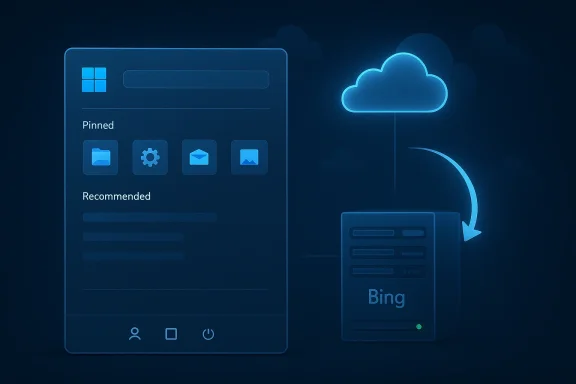
The reports tied to the current issue describe a server-side Bing update that affected Start menu search on some Windows 11 23H2 devices. Microsoft’s response was not a conventional downloaded patch but a rollback on its own side, which is exactly the sort of correction that underscores how cloud-shaped Windows has become. That distinction matters: a server rollback can be fast, but it also reveals that a broken Start menu experience can be caused by infrastructure most users never see. In other words, the fault may show up in the taskbar, but the cause lives somewhere far beyond it.
This is not the first Windows 11 servicing headache of 2026, either. The broader context matters because Microsoft has spent recent months shipping emergency fixes for sign-in problems, installation failures, and other update regressions, all while continuing to refine the shell itself. That background makes the Bing incident feel less like an isolated hiccup and more like part of a larger story about how complicated modern Windows has become. The operating system is no longer just a local platform; it is a service ecosystem with a desktop front end, and that makes reliability harder to reason about and harder to explain.
The timing is also awkward because Microsoft has been trying to present Windows 11 as a more polished and more adaptable desktop than the version that launched in 2021. The company has been testing a Start menu redesign with a scrollable layout and optional recommendations, and it has been signaling a broader willingness to reduce friction in the shell. That makes any search failure especially damaging, because it attacks one of the very pieces Microsoft has been trying to improve. If the entry point to the OS feels shaky, the whole renovation story loses momentum.
The fact that the issue appears tied to Bing is also telling. Microsoft has long used Bing as part of the broader Windows search and discovery stack, but that integration has always been controversial because it blurs the line between system search and web search. When that plumbing misbehaves, users can end up with symptoms that look local but are really service-driven. That makes support harder, because the same problem can feel different depending on network state, region, build version, or rollout ring.
The reports point to Windows 11 23H2 as the affected release, which also matters because it shows Microsoft’s service architecture can expose version-specific problems even when the visible feature is shared. In practice, that means one branch of Windows can inherit a search issue while another branch remains unaffected. Users tend to think of Start menu search as a universal behavior, but Microsoft now treats it more like a feature that can be tuned, served, and adjusted in the background.
The Start menu is also symbolic. It is the first interface many users touch after sign-in, and it sets the tone for how competent the operating system feels. When search blanks out or returns nothing useful, it creates a perception problem as much as a technical one. The user doesn’t think, cloud-service edge case; the user thinks, my PC is broken.
There is also a discoverability issue. Users often do not know whether they are dealing with a Start menu bug, a Windows Search issue, a Bing problem, or a temporary rollout glitch. That ambiguity makes support chatter worse and troubleshooting slower. In traditional software terms, the bug is in search; in modern Windows terms, the bug can be in almost anything between the keyboard and Microsoft’s servers. That is a lot of complexity for a feature people expect to “just work.”
This is why Microsoft’s effort to make the search experience more predictable is so important. The company’s own design leadership has publicly acknowledged that users want more consistency, and that is a clue that Microsoft knows the issue is not just about raw features. It is about trust. Search is supposed to be invisible when it is working and instantly obvious when it is not, which makes it one of the most unforgiving parts of the OS.
At the same time, the invisibility of the fix is part of the problem. Users do not always know whether their machine is affected, whether they need to reboot, or whether the server-side rollback has already reached them. That can create a weird support gap in which the issue seems to disappear for some people while persisting for others. Quiet fixes are good engineering; they are not always great communication.
But the same strategy can frustrate users and IT admins who want deterministic behavior. If the repair depends on backend changes, network conditions, rollout timing, and Microsoft’s own throttling logic, then the user experience may vary from one PC to another. That variability is not catastrophic, but it is exactly the sort of thing that makes Windows feel less transparent than it should. A search box should not require faith.
There is a broader lesson here for enterprise environments. The more Microsoft centralizes behavior in cloud services, the more important service health becomes to desktop reliability. IT teams may need to treat search, identity, and shell behavior as part of service monitoring, not just OS patching. That is a modern reality, but it also raises the maintenance burden for organizations that once thought of Windows issues as something managed mostly by Windows Update.
Earlier Windows 11 update problems have included sign-in failures affecting Microsoft-account-linked apps and an out-of-band repair for an installation error on some systems. Those events matter because they show the same release pattern: Microsoft is willing to patch quickly, but the patches themselves can still reveal fragility in the servicing model. The current Start menu problem is different in symptom and scope, yet it belongs to the same family of trust-eroding incidents.
The ironic part is that Microsoft’s broader direction makes technical sense. Centralized behavior allows faster fixes, more dynamic experimentation, and more consistent delivery across devices. But the human cost is that when one of those shared layers misbehaves, the bug feels more invasive than a traditional local glitch. A remote problem that breaks a local workflow often feels more personal than an old-fashioned crash.
That tension is central to Windows 11’s identity in 2026. Microsoft wants a more intelligent, service-rich operating system that can adapt quickly and surface relevant content. Users, meanwhile, want a desktop that remains predictable, legible, and easy to troubleshoot. The Start menu search incident lands right on that fault line.
For enterprises, the consequences are more serious because search behavior is part of the daily workflow for thousands of users. Even a small rollout problem can create a support spike, generate tickets, and force help desks to explain something that is hard to reproduce. If the issue appears only on certain builds or in certain service states, it can also complicate standard imaging and validation processes.
There is also a governance angle. If search depends partly on Microsoft’s backend services, admins need better visibility into service health, rollout rings, and known issues. That means modern endpoint management is no longer just about patch compliance. It is about understanding how cloud-delivered UI behavior can drift under the hood even when the OS build number looks stable.
Consumer and enterprise concerns overlap in one important way: neither group wants a mystery. If search is broken, people want to know why, how many systems are affected, whether a reboot helps, and when the fix is expected to arrive. That need for clarity is one reason Windows support notes and release-health pages have become so important. The technical fix may be fast, but the communication layer still has to catch up.
This also reinforces the idea that Microsoft is trying to correct course without admitting defeat. The company is not abandoning its cloud-connected direction, but it does appear to be making room for more user control and more practical behavior in the shell. Search reliability, then, becomes part of a larger reconciliation between Microsoft’s platform ambitions and the desktop habits that Windows users still value.
The current Start menu incident suggests that Microsoft still has to prove it can manage both sides of that equation. It needs to ship experiences that feel cleaner and more modern, but it also needs to ensure that the most basic search and launch functions remain boringly reliable. Boring is not glamorous, but in desktop software it is a compliment.
If Microsoft gets this right, the Start menu can become a more trustworthy front door to Windows 11 rather than a recurring source of complaints. If it gets it wrong, every redesign will feel like a layer of polish sitting on top of uncertainty. The difference between those two outcomes is not just aesthetics; it is whether users believe the system is under control.
There is also a strategic lesson for Microsoft’s broader Windows 11 roadmap. Every time the company shifts more responsibility into online services, it gains agility but loses some of the simplicity users associate with the desktop. The next phase of Windows will likely be judged not by how many new surfaces it adds, but by whether the oldest ones still behave with the confidence people expect from Windows.
Source: Mezha Windows 11 Start menu is broken - Microsoft has already released a fix
Source: gHacks Microsoft Fixes Broken Windows 11 Start Menu Search Caused by Faulty Bing Server Update - gHacks Tech News
 Overview
Windows has always treated search as one of its most important promises: type a few letters, find the app, file, setting, or document, and keep moving. That promise became even more central as the Start menu evolved from a static launcher into a hybrid surface that blends local results, settings, recommendations, and web content. In Windows 11, that blend has often felt more ambitious than graceful, especially for users who just want to launch something quickly and without surprises. The latest issue fits that pattern because it exposed how much the Start menu now depends on Microsoft’s online systems, even when users think they are interacting with a purely desktop feature.The reports tied to the current issue describe a server-side Bing update that affected Start menu search on some Windows 11 23H2 devices. Microsoft’s response was not a conventional downloaded patch but a rollback on its own side, which is exactly the sort of correction that underscores how cloud-shaped Windows has become. That distinction matters: a server rollback can be fast, but it also reveals that a broken Start menu experience can be caused by infrastructure most users never see. In other words, the fault may show up in the taskbar, but the cause lives somewhere far beyond it.
This is not the first Windows 11 servicing headache of 2026, either. The broader context matters because Microsoft has spent recent months shipping emergency fixes for sign-in problems, installation failures, and other update regressions, all while continuing to refine the shell itself. That background makes the Bing incident feel less like an isolated hiccup and more like part of a larger story about how complicated modern Windows has become. The operating system is no longer just a local platform; it is a service ecosystem with a desktop front end, and that makes reliability harder to reason about and harder to explain.
The timing is also awkward because Microsoft has been trying to present Windows 11 as a more polished and more adaptable desktop than the version that launched in 2021. The company has been testing a Start menu redesign with a scrollable layout and optional recommendations, and it has been signaling a broader willingness to reduce friction in the shell. That makes any search failure especially damaging, because it attacks one of the very pieces Microsoft has been trying to improve. If the entry point to the OS feels shaky, the whole renovation story loses momentum.
What Microsoft Says Happened
The core explanation is refreshingly specific. Microsoft says a server-side Bing update triggered blank or broken search results for a small number of Windows 11 23H2 users, and the company has already started rolling that change back. That is important because it changes the nature of the problem from a local corruption or a bad cumulative update to a cloud-delivered fault that can be reversed centrally. For affected users, that means the fix is mostly in Microsoft’s hands, not theirs.Why a server rollback matters
A rollback on the server side can be the fastest way to contain damage, especially when only a subset of users is affected. It also suggests Microsoft believed the safest response was to reverse the change rather than wait for a new downloadable package. That is a sensible move, but it also highlights a structural shift in Windows: important parts of the shell can now fail because a backend service changed, which means local troubleshooting may not help much. That is both a strength and a weakness of the modern Windows model.The fact that the issue appears tied to Bing is also telling. Microsoft has long used Bing as part of the broader Windows search and discovery stack, but that integration has always been controversial because it blurs the line between system search and web search. When that plumbing misbehaves, users can end up with symptoms that look local but are really service-driven. That makes support harder, because the same problem can feel different depending on network state, region, build version, or rollout ring.
The reports point to Windows 11 23H2 as the affected release, which also matters because it shows Microsoft’s service architecture can expose version-specific problems even when the visible feature is shared. In practice, that means one branch of Windows can inherit a search issue while another branch remains unaffected. Users tend to think of Start menu search as a universal behavior, but Microsoft now treats it more like a feature that can be tuned, served, and adjusted in the background.
- The fix is being handled server-side, not through a traditional local patch.
- The problem appears tied to a Bing update rather than local corruption.
- The issue reportedly affected only a small number of users, but the impact was visible.
- Windows 11 23H2 appears to have been the main version involved.
- The rollback reinforces that search is now part of a service-dependent desktop.
Why Start Menu Search Still Matters So Much
Search is one of those features people only notice when it fails. In Windows, though, it is more than a convenience; it is a productivity accelerator, a recovery tool, and often the fastest route to settings buried deep in the system. If search is flaky, the entire desktop feels less predictable, because users lose a dependable way to reach the things they need quickly. That is why even a “small number” of affected systems can create outsized frustration.The Start menu is also symbolic. It is the first interface many users touch after sign-in, and it sets the tone for how competent the operating system feels. When search blanks out or returns nothing useful, it creates a perception problem as much as a technical one. The user doesn’t think, cloud-service edge case; the user thinks, my PC is broken.
From launcher to service surface
Windows 11 has been gradually turning the Start menu into something more than a local launcher. Search can pull in app results, settings, recent content, and online material, all within a single interface. That can be useful, but it also raises the stakes whenever Microsoft changes something behind the curtain. The more unified the experience becomes, the more one backend bug can poison the whole flow.There is also a discoverability issue. Users often do not know whether they are dealing with a Start menu bug, a Windows Search issue, a Bing problem, or a temporary rollout glitch. That ambiguity makes support chatter worse and troubleshooting slower. In traditional software terms, the bug is in search; in modern Windows terms, the bug can be in almost anything between the keyboard and Microsoft’s servers. That is a lot of complexity for a feature people expect to “just work.”
This is why Microsoft’s effort to make the search experience more predictable is so important. The company’s own design leadership has publicly acknowledged that users want more consistency, and that is a clue that Microsoft knows the issue is not just about raw features. It is about trust. Search is supposed to be invisible when it is working and instantly obvious when it is not, which makes it one of the most unforgiving parts of the OS.
- Search is a high-frequency workflow, not a novelty.
- Failures undermine the user’s sense of system reliability.
- Search problems are harder to diagnose when they depend on cloud services.
- The Start menu now carries a larger cognitive burden than older Windows versions.
- Even brief outages can damage confidence in the whole shell.
Microsoft’s Fix Strategy: Fast, But Not Always Visible
Microsoft’s response pattern here is classic modern Windows: identify the service-side fault, roll back the offending change, and let the correction propagate without forcing users to manually intervene. That is efficient, especially compared with waiting for a new cumulative update. It is also a sign that the company has built enough control into its cloud infrastructure to change user experience rapidly when needed.At the same time, the invisibility of the fix is part of the problem. Users do not always know whether their machine is affected, whether they need to reboot, or whether the server-side rollback has already reached them. That can create a weird support gap in which the issue seems to disappear for some people while persisting for others. Quiet fixes are good engineering; they are not always great communication.
Why server-side remediation is attractive
From Microsoft’s perspective, a server-side rollback avoids shipping another client update and reduces the risk of creating a second bug while fixing the first. It also lets Microsoft scope the correction more narrowly if the affected population is small. That is especially useful for features embedded in Start menu search, where the company can target backend behavior without forcing a platform-wide install cycle.But the same strategy can frustrate users and IT admins who want deterministic behavior. If the repair depends on backend changes, network conditions, rollout timing, and Microsoft’s own throttling logic, then the user experience may vary from one PC to another. That variability is not catastrophic, but it is exactly the sort of thing that makes Windows feel less transparent than it should. A search box should not require faith.
There is a broader lesson here for enterprise environments. The more Microsoft centralizes behavior in cloud services, the more important service health becomes to desktop reliability. IT teams may need to treat search, identity, and shell behavior as part of service monitoring, not just OS patching. That is a modern reality, but it also raises the maintenance burden for organizations that once thought of Windows issues as something managed mostly by Windows Update.
- Server-side fixes can be fast and low-friction.
- They can also be opaque to end users and admins.
- Rollbacks reduce the need for another client-side update.
- They do not eliminate the need for clear communication.
- They shift part of Windows reliability into cloud operations.
The Bigger Pattern: Windows 11 Keeps Mixing Features and Fragility
The Bing search glitch is not happening in a vacuum. Windows 11 has spent much of the last year in a cycle of feature rollouts, emergency fixes, and design recalibrations. Microsoft has been making the shell more flexible in some areas while also relying more heavily on cloud-connected behavior in others. That combination can make the OS feel more modern, but it also makes it easier for a backend issue to have a visible desktop consequence.Earlier Windows 11 update problems have included sign-in failures affecting Microsoft-account-linked apps and an out-of-band repair for an installation error on some systems. Those events matter because they show the same release pattern: Microsoft is willing to patch quickly, but the patches themselves can still reveal fragility in the servicing model. The current Start menu problem is different in symptom and scope, yet it belongs to the same family of trust-eroding incidents.
The confidence problem
Each new misfire nudges users toward a more cautious view of Windows Update and related background services. That caution can be rational, especially in enterprises where downtime has a cost and unexpected behavior can interrupt business processes. It also weakens enthusiasm for newer Windows features, because users begin to associate innovation with instability rather than improvement.The ironic part is that Microsoft’s broader direction makes technical sense. Centralized behavior allows faster fixes, more dynamic experimentation, and more consistent delivery across devices. But the human cost is that when one of those shared layers misbehaves, the bug feels more invasive than a traditional local glitch. A remote problem that breaks a local workflow often feels more personal than an old-fashioned crash.
That tension is central to Windows 11’s identity in 2026. Microsoft wants a more intelligent, service-rich operating system that can adapt quickly and surface relevant content. Users, meanwhile, want a desktop that remains predictable, legible, and easy to troubleshoot. The Start menu search incident lands right on that fault line.
- Windows 11 is increasingly a service-oriented desktop.
- Service-oriented design creates faster correction paths.
- It also creates more visible failure modes.
- Frequent emergency fixes can reduce confidence in normal servicing.
- Users still expect the Start menu to feel simple and local.
Enterprise vs. Consumer Impact
For consumers, the issue is mostly about annoyance and lost time. A broken Start menu search box interrupts ordinary tasks like opening apps, finding settings, or launching documents. If the problem is transient and the rollback lands quickly, most home users will simply notice that Windows behaved oddly for a while and then move on.For enterprises, the consequences are more serious because search behavior is part of the daily workflow for thousands of users. Even a small rollout problem can create a support spike, generate tickets, and force help desks to explain something that is hard to reproduce. If the issue appears only on certain builds or in certain service states, it can also complicate standard imaging and validation processes.
Why admins care more than home users
Enterprise teams care because search failures erode productivity in a way that is difficult to measure but easy to feel. When the Start menu becomes unreliable, users improvise with shortcuts, desktop icons, or manual navigation, and that wastes time in aggregate. It also increases frustration with the platform itself, which matters when an organization is trying to keep users on a standardized Windows baseline.There is also a governance angle. If search depends partly on Microsoft’s backend services, admins need better visibility into service health, rollout rings, and known issues. That means modern endpoint management is no longer just about patch compliance. It is about understanding how cloud-delivered UI behavior can drift under the hood even when the OS build number looks stable.
Consumer and enterprise concerns overlap in one important way: neither group wants a mystery. If search is broken, people want to know why, how many systems are affected, whether a reboot helps, and when the fix is expected to arrive. That need for clarity is one reason Windows support notes and release-health pages have become so important. The technical fix may be fast, but the communication layer still has to catch up.
- Consumers mostly face frustration and delay.
- Enterprises face ticket volume and productivity loss.
- Admins need better visibility into service-side dependencies.
- A build number alone no longer tells the full story.
- Communication is part of the fix, not an afterthought.
What This Means for Microsoft’s Windows 11 Roadmap
Microsoft has been trying to soften some of the rougher edges of Windows 11’s shell. The company has reportedly been testing a more flexible Start menu with a scrollable app list and the ability to reduce or disable recommendations, which would address some of the most persistent criticisms of the current design. That makes search stability especially important, because the redesigned interface will only be credible if its core discovery mechanism is dependable.This also reinforces the idea that Microsoft is trying to correct course without admitting defeat. The company is not abandoning its cloud-connected direction, but it does appear to be making room for more user control and more practical behavior in the shell. Search reliability, then, becomes part of a larger reconciliation between Microsoft’s platform ambitions and the desktop habits that Windows users still value.
The design tension Microsoft cannot escape
The challenge for Microsoft is that every improvement in flexibility can complicate the system underneath. More options mean more states to test, more backend dependencies to validate, and more chances for a rollout mismatch. Yet if Microsoft keeps the shell too rigid, it risks alienating the power users and IT pros who still shape the broader reputation of Windows. That trade-off is the heart of the Windows 11 story.The current Start menu incident suggests that Microsoft still has to prove it can manage both sides of that equation. It needs to ship experiences that feel cleaner and more modern, but it also needs to ensure that the most basic search and launch functions remain boringly reliable. Boring is not glamorous, but in desktop software it is a compliment.
If Microsoft gets this right, the Start menu can become a more trustworthy front door to Windows 11 rather than a recurring source of complaints. If it gets it wrong, every redesign will feel like a layer of polish sitting on top of uncertainty. The difference between those two outcomes is not just aesthetics; it is whether users believe the system is under control.
- A redesigned Start menu needs dependable search to feel credible.
- More flexibility will increase testing complexity.
- Microsoft must balance modern services with old desktop expectations.
- Power users still shape the OS’s public reputation.
- Reliability is now a design feature, not just an engineering metric.
Strengths and Opportunities
Microsoft’s quick rollback shows that the company can still react fast when a server-side change causes visible disruption, and that is an important operational strength. It also proves that Windows 11’s service model can be corrected without waiting for the next monthly patch, which is useful for minimizing impact. The opportunity now is to use this incident to improve diagnostics, improve communication, and make Start menu search feel more predictable to both consumers and IT teams.- Fast server-side rollback capability.
- Less dependence on waiting for a full client patch.
- A chance to improve service health transparency.
- Momentum for a more predictable search experience.
- A reminder to prioritize reliability over novelty.
- A useful stress test for Microsoft’s rollout controls.
- An opening to rebuild user confidence in the Start menu.
Risks and Concerns
The biggest risk is that users will increasingly see core shell behavior as dependent on remote systems they do not control. That can make Windows feel less like a personal computer platform and more like a service dashboard with a desktop wrapper. A second concern is communication: if Microsoft does not clearly explain scope, timing, and resolution, the confusion can outlast the bug itself and erode trust even after the technical fix lands.- More hidden dependencies in the shell.
- Greater risk of service-induced regressions.
- User confusion over whether the issue is local or cloud-based.
- Reduced confidence in Windows Update and related services.
- Support burden for enterprises and help desks.
- Potential backlash against Bing-linked functionality.
- A widening gap between what users expect and how Windows now behaves.
Looking Ahead
The near-term question is whether Microsoft’s rollback fully clears the issue for affected Windows 11 23H2 users and whether any lingering search instability shows up in adjacent service paths. The longer-term question is more interesting: can Microsoft make Start menu search feel stable while continuing to modernize the shell around it? That will matter even more if the company keeps moving toward a more scrollable, more customizable, and more cloud-aware Start menu design.There is also a strategic lesson for Microsoft’s broader Windows 11 roadmap. Every time the company shifts more responsibility into online services, it gains agility but loses some of the simplicity users associate with the desktop. The next phase of Windows will likely be judged not by how many new surfaces it adds, but by whether the oldest ones still behave with the confidence people expect from Windows.
- Watch for confirmation that the Bing rollback fully resolves the issue.
- Watch for any release health updates from Microsoft.
- Watch whether the problem appears on other Windows 11 builds.
- Watch how Microsoft talks about search predictability going forward.
- Watch whether the redesigned Start menu changes the balance between cloud features and local reliability.
Source: Mezha Windows 11 Start menu is broken - Microsoft has already released a fix
Source: gHacks Microsoft Fixes Broken Windows 11 Start Menu Search Caused by Faulty Bing Server Update - gHacks Tech News
