

Microsoft is quietly recalibrating one of the most controversial parts of Windows 11: its aggressive Copilot push. The company’s latest message to Windows Insiders makes clear that the next phase is not about scattering AI everywhere, but about tightening the operating system around performance, reliability, and what Microsoft calls craft. That shift matters because it signals a broader acknowledgement that some of the most visible Copilot hooks in everyday apps have been adding friction instead of value. Microsoft’s own roadmap now points toward fewer AI entry points, faster core experiences, and a Windows 11 experience that is meant to feel more like a finished product and less like a constant experiment.
For more than two years, Windows 11 has carried two competing identities. On one side, Microsoft has used the platform as the main showcase for its AI strategy, from Copilot branding to Photos, Snipping Tool, Notepad, Widgets and broader system-level integrations. On the other side, users have been asking for a more mundane but far more urgent set of improvements: fewer bugs, faster launches, less update disruption, better stability, and a cleaner interface that does not constantly advertise the latest AI feature. The new message from Microsoft suggests those complaints have finally reached a point where the company can no longer treat them as background noise.
That context is important because Microsoft did not arrive at this position overnight. Throughout 2024 and 2025, the Windows Insider Blog repeatedly showcased Copilot-related features across first-party apps, often alongside creative tools and productivity enhancements. Snipping Tool gained AI-assisted features, Notepad got Copilot-linked functionality, and Photos picked up Copilot button integrations and AI-powered editing experiences. At the same time, Microsoft also kept shipping bug fixes and reliability improvements in Insider builds, especially around File Explorer performance, update behavior, and app stability. The contradiction was obvious: the company was expanding AI while trying to reassure users that Windows quality still mattered.
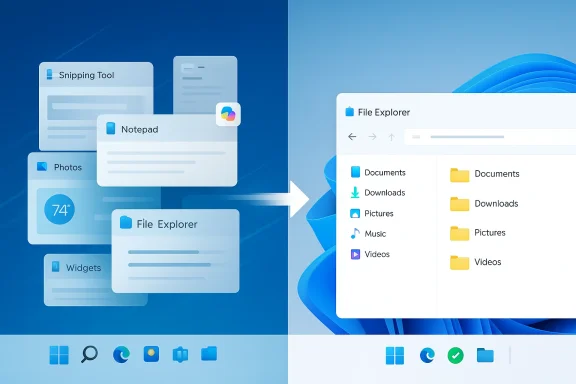
The March 20, 2026 Windows Insider post from Pavan Davuluri, president of Microsoft’s Windows + Devices division, is best read as a course correction rather than a retreat. Microsoft says it will reduce “unnecessary Copilot entry points” in apps such as Snipping Tool, Photos, Widgets and Notepad, while leaning harder into the boring but essential work of making Windows faster, more stable and less intrusive. That is a notable change in tone because it implies Microsoft has concluded that where AI appears is just as important as whether it appears at all.
There is also a business reality behind the rhetoric. Windows remains a platform with enormous reach, but user tolerance for clutter has limits, especially when OS-level changes affect trust. Microsoft’s current emphasis on “craft” suggests a desire to make Windows feel more coherent again, not just more capable. That is a subtle but meaningful admission that the user experience can be damaged when features are added faster than they are integrated.
The bigger lesson is that utility beats novelty in operating systems. A consumer who opens Notepad usually wants plain text editing, not a prompt to summon AI. Likewise, a user in Snipping Tool often wants quick capture and markup, not another layer of assistance that competes for attention. Microsoft is now conceding that the default Windows experience has to respect those expectations.
That distinction matters. AI that helps summarize, search or automate in a context-aware way can add real value, especially for business users who already live inside Microsoft 365 and Windows administration stacks. But the consumer side of the platform has different expectations, and Microsoft seems to recognize that it can’t force the same logic across both audiences without creating resentment.
The significance here is simple: File Explorer is one of the most frequently used surfaces in Windows, and even small delays or inconsistencies create a perception that the entire OS is heavier than it should be. If Microsoft can materially improve Explorer launch times and reduce flicker, it will do more for Windows goodwill than many AI demos ever could. That is especially true for enterprise users managing large file sets, network paths and cloud-synced folders.
That is a useful shift because update friction has both psychological and operational costs. For consumers, it creates the sense that the PC is never fully under their control. For businesses, it complicates endpoint management and can interfere with carefully scheduled maintenance windows. Microsoft has already been exploring more resilient update and recovery strategies across Windows, so this is part of a larger pattern rather than a one-off concession.
The reason this matters is that desktop workflows are deeply personal. Vertical taskbars remain popular among users with widescreen monitors, developers who need vertical space and multitaskers who prefer a more efficient layout. By offering that control again, Microsoft is acknowledging that productivity is not one-size-fits-all.
There is also an implicit competitive angle here. Apple has long sold the Mac experience on polish and consistency, while many Linux desktop environments win respect for flexibility and transparency. Microsoft is trying to occupy both spaces at once, and “craft” may be the label it uses to justify a more deliberate blend of refinement and power.
This also helps restore trust in small applications. Notepad, Snipping Tool and Photos each have distinct purposes, and users are more likely to adopt optional intelligence when it complements those purposes rather than replacing them. In that sense, Microsoft is moving toward a model where AI is a helper, not a billboard.
That matters because operating systems are not apps; they are the foundation everything else sits on. When the foundation feels unstable, every application inherits that anxiety. If Microsoft can reduce that feeling, it will have achieved something more important than one more Copilot feature launch.
That makes the announcement especially relevant for managed devices in education, healthcare and regulated industries. Those environments tend to care deeply about change control, predictable servicing and reduced downtime. A quieter Windows 11 is a more enterprise-friendly Windows 11.
That is a sensible pivot. Enterprises tend to embrace AI more readily when it is connected to governance, context and measurable workflow gains. A less noisy Windows UI may actually help enterprise AI adoption by removing some of the skepticism caused by consumer-facing clutter.
That is a smart move because preview fatigue is real. If Insiders cannot tell what they are testing or what level of stability to expect, feedback quality suffers. Better channel definitions could improve both user satisfaction and the quality of telemetry Microsoft receives.
It also suggests that Microsoft understands the reputational value of direct contact. The company does not just need bug reports; it needs the community to believe that feedback is shaping the roadmap. If these meetings translate into visible product changes, they could become one of the more effective parts of the broader quality initiative.
That does not mean Microsoft is suddenly in a direct aesthetic contest with macOS. But it does mean Windows can win more users by making everyday friction smaller. In a mature PC market, incremental quality often matters more than flashy differentiation.
That could become a competitive advantage if Microsoft executes well. Users may forgive fewer AI touchpoints if the remaining ones are genuinely helpful and the rest of the OS runs better. In other words, restraint may become a form of differentiation.
The other thing to watch is whether Microsoft’s quality agenda holds across the whole stack. Better File Explorer performance, more predictable updates, improved Bluetooth and USB stability, stronger Windows Hello behavior and a clearer Insider program all point toward a platform company trying to reassert discipline. If those promises land, the Copilot pullback will look less like retreat and more like strategic maturity.
Source: Campus Technology Microsoft Reduces Copilot Integrations in Windows 11 -- Campus Technology
 Overview
For more than two years, Windows 11 has carried two competing identities. On one side, Microsoft has used the platform as the main showcase for its AI strategy, from Copilot branding to Photos, Snipping Tool, Notepad, Widgets and broader system-level integrations. On the other side, users have been asking for a more mundane but far more urgent set of improvements: fewer bugs, faster launches, less update disruption, better stability, and a cleaner interface that does not constantly advertise the latest AI feature. The new message from Microsoft suggests those complaints have finally reached a point where the company can no longer treat them as background noise.That context is important because Microsoft did not arrive at this position overnight. Throughout 2024 and 2025, the Windows Insider Blog repeatedly showcased Copilot-related features across first-party apps, often alongside creative tools and productivity enhancements. Snipping Tool gained AI-assisted features, Notepad got Copilot-linked functionality, and Photos picked up Copilot button integrations and AI-powered editing experiences. At the same time, Microsoft also kept shipping bug fixes and reliability improvements in Insider builds, especially around File Explorer performance, update behavior, and app stability. The contradiction was obvious: the company was expanding AI while trying to reassure users that Windows quality still mattered.
The March 20, 2026 Windows Insider post from Pavan Davuluri, president of Microsoft’s Windows + Devices division, is best read as a course correction rather than a retreat. Microsoft says it will reduce “unnecessary Copilot entry points” in apps such as Snipping Tool, Photos, Widgets and Notepad, while leaning harder into the boring but essential work of making Windows faster, more stable and less intrusive. That is a notable change in tone because it implies Microsoft has concluded that where AI appears is just as important as whether it appears at all.
There is also a business reality behind the rhetoric. Windows remains a platform with enormous reach, but user tolerance for clutter has limits, especially when OS-level changes affect trust. Microsoft’s current emphasis on “craft” suggests a desire to make Windows feel more coherent again, not just more capable. That is a subtle but meaningful admission that the user experience can be damaged when features are added faster than they are integrated.
Why Microsoft Is Pulling Back
Microsoft’s phrasing is diplomatic, but the underlying message is blunt: some Copilot placements were simply too eager. The company is now saying it will be more intentional about how and where Copilot appears in Windows, which reads like a response to complaints about intrusive prompts and redundant buttons. In practice, that means the UI itself is being treated as a product boundary, not just a delivery mechanism for features.The UX backlash was predictable
Windows users have long been skeptical of features that feel bolted on. When AI controls show up in places that already have a clear purpose, they can disrupt the flow of routine tasks instead of improving them. Microsoft appears to have learned that a screenshot editor, a note-taking app, or a photo viewer is not automatically a good place to foreground Copilot just because the branding opportunity exists.The bigger lesson is that utility beats novelty in operating systems. A consumer who opens Notepad usually wants plain text editing, not a prompt to summon AI. Likewise, a user in Snipping Tool often wants quick capture and markup, not another layer of assistance that competes for attention. Microsoft is now conceding that the default Windows experience has to respect those expectations.
- Fewer visible AI hooks can reduce cognitive load.
- Cleaner app interfaces are easier to trust.
- Users are more forgiving of hidden intelligence than of repeated prompts.
- Product coherence matters more than feature count.
- Windows apps need to solve the immediate task first.
Copilot is not going away
This is not a wholesale rejection of AI in Windows. Microsoft still wants Copilot woven into enterprise workflows, developer tools and background capabilities where the value proposition is clearer. The company’s repositioning is less about abandoning AI than about stopping the habit of inserting AI where it is only marginally useful.That distinction matters. AI that helps summarize, search or automate in a context-aware way can add real value, especially for business users who already live inside Microsoft 365 and Windows administration stacks. But the consumer side of the platform has different expectations, and Microsoft seems to recognize that it can’t force the same logic across both audiences without creating resentment.
The Performance and Reliability Reset
The most consequential part of the announcement may be the part least likely to generate headlines: Microsoft is re-centering Windows 11 around speed, stability and update predictability. That is the kind of platform work users feel every day, even if they do not notice it in a launch event. It also suggests that Microsoft understands the long-term damage caused when an operating system becomes associated with sluggishness or fragility.File Explorer finally gets the attention users wanted
File Explorer has been a recurring pain point for years, and Microsoft says it is focusing on faster launch times, fewer visual glitches, improved file operations and broader responsiveness. That aligns with recent Insider build notes that repeatedly called out File Explorer performance fixes, including improved reliability for unblocking downloads and better handling of large zip extractions. These are not glamorous upgrades, but they are the kind that change how Windows feels in daily use.The significance here is simple: File Explorer is one of the most frequently used surfaces in Windows, and even small delays or inconsistencies create a perception that the entire OS is heavier than it should be. If Microsoft can materially improve Explorer launch times and reduce flicker, it will do more for Windows goodwill than many AI demos ever could. That is especially true for enterprise users managing large file sets, network paths and cloud-synced folders.
- Faster launches improve perceived quality immediately.
- Fewer glitches reduce support tickets and user frustration.
- Better file handling matters for enterprise workflows.
- Small fixes often have the largest day-to-day impact.
- Explorer stability is a proxy for overall OS health.
Updates need to become less disruptive
Windows Update has long been one of the clearest sources of user irritation, because it still has a habit of interrupting the exact moments when people least want interruption. Microsoft is now talking about giving users more control over when updates install, allowing them to skip updates during setup, restart or shut down without being forced into installation, and pause updates for longer periods when necessary. The company is also promising fewer automatic restarts and fewer notifications.That is a useful shift because update friction has both psychological and operational costs. For consumers, it creates the sense that the PC is never fully under their control. For businesses, it complicates endpoint management and can interfere with carefully scheduled maintenance windows. Microsoft has already been exploring more resilient update and recovery strategies across Windows, so this is part of a larger pattern rather than a one-off concession.
Taskbar and Desktop Control
One of the most requested desktop changes is finally getting another look: taskbar repositioning. Microsoft says it is introducing the ability to move the taskbar to the top or sides of the screen, a feature many power users have asked for repeatedly. That change is more than cosmetic, because it speaks to a broader tension between Microsoft’s desire to simplify the UI and users’ desire to personalize it.A familiar feature becomes a signal
The taskbar position issue may seem minor, but it is a useful symbol of how Microsoft has approached Windows 11. The company has often promoted consistency and simplicity, even when that meant removing legacy flexibility that users still valued. Restoring layout options is a quiet way of saying that Windows is not just a showcase for design opinions; it is also a workspace.The reason this matters is that desktop workflows are deeply personal. Vertical taskbars remain popular among users with widescreen monitors, developers who need vertical space and multitaskers who prefer a more efficient layout. By offering that control again, Microsoft is acknowledging that productivity is not one-size-fits-all.
- Taskbar placement is a power-user quality-of-life issue.
- Vertical layouts are useful on ultrawide monitors.
- Top placement can improve workflow for some users.
- Customization improves perceived ownership.
- Flexibility often matters more than visual uniformity.
Craft as a product principle
Microsoft’s use of the word “craft” is telling. It suggests the company wants Windows to feel polished, not merely packed with features. That implies more attention to transitions, predictable behavior and the kind of coherence that users notice when it is missing but rarely praise when it is present.There is also an implicit competitive angle here. Apple has long sold the Mac experience on polish and consistency, while many Linux desktop environments win respect for flexibility and transparency. Microsoft is trying to occupy both spaces at once, and “craft” may be the label it uses to justify a more deliberate blend of refinement and power.
What Changes Mean for Consumer Users
For consumers, the biggest short-term impact may be relief rather than excitement. Fewer AI entry points mean fewer moments where Windows feels like it is steering the user toward a feature they did not request. If Microsoft follows through, everyday tasks should become calmer and easier to understand.Simpler doesn’t mean less capable
A cleaner consumer Windows experience does not have to mean a weaker one. Microsoft can still ship AI features, but they need to appear in places that make sense and stay out of the way when they are not needed. That approach is more sustainable because it gives users agency instead of assuming they want every workflow assisted.This also helps restore trust in small applications. Notepad, Snipping Tool and Photos each have distinct purposes, and users are more likely to adopt optional intelligence when it complements those purposes rather than replacing them. In that sense, Microsoft is moving toward a model where AI is a helper, not a billboard.
The emotional value of a calmer OS
A lot of Windows quality debates sound technical, but they are emotional too. Users often interpret clutter, lag and surprise prompts as signs that the system is not respecting their time. By emphasizing restraint, Microsoft is attempting to make Windows feel less demanding and more dependable.That matters because operating systems are not apps; they are the foundation everything else sits on. When the foundation feels unstable, every application inherits that anxiety. If Microsoft can reduce that feeling, it will have achieved something more important than one more Copilot feature launch.
What It Means for Enterprise Customers
Enterprise users are likely to view this shift through a different lens. They care less about whether Copilot appears in Photos and more about whether Windows updates are predictable, File Explorer behaves consistently and device reliability improves across fleets. Microsoft’s announcement speaks directly to those priorities, even if the consumer-facing headlines focus on AI pullback.Reliability is an IT control issue
For IT teams, every unnecessary restart, UI surprise or app inconsistency turns into support cost. Microsoft’s promise to reduce update disruptions and improve stability is therefore not just about UX polish; it is about operational resilience. The company has been pushing a broader resilience message across Windows, including hotpatching and recovery improvements, and this new quality-first emphasis fits neatly into that strategy.That makes the announcement especially relevant for managed devices in education, healthcare and regulated industries. Those environments tend to care deeply about change control, predictable servicing and reduced downtime. A quieter Windows 11 is a more enterprise-friendly Windows 11.
- Fewer forced restarts can reduce workflow interruptions.
- Better Explorer reliability helps with file-heavy enterprise work.
- Stronger Windows Hello stability supports authentication use cases.
- Clearer Insider channels make testing more manageable.
- More predictable updates improve admin confidence.
Copilot still matters in business scenarios
Microsoft is not stepping away from enterprise AI. In fact, the company continues to position Copilot and adjacent automation features as strategic tools for productivity, especially where there is a direct return on time saved. The difference now is that Microsoft appears to be narrowing the places where AI is surfaced casually and reserving more ambitious integrations for scenarios with clearer business value.That is a sensible pivot. Enterprises tend to embrace AI more readily when it is connected to governance, context and measurable workflow gains. A less noisy Windows UI may actually help enterprise AI adoption by removing some of the skepticism caused by consumer-facing clutter.
The Insider Program as a Feedback Engine
Microsoft’s announcement also reveals something about how it is using the Windows Insider Program in 2026. The company says it plans to make the program clearer, raise build quality and strengthen feedback signals before broad release. That implies Microsoft sees Insiders less as a novelty preview audience and more as a quality control system that needs refinement itself.Build quality is part of the product story
Insider builds have increasingly become the first place users encounter both new features and regression fixes. Recent builds have included changes to File Explorer reliability, update behavior, display improvements and stability work across the platform. Microsoft’s decision to talk about channel clarity suggests it wants the preview pipeline to feel less random and more deliberate.That is a smart move because preview fatigue is real. If Insiders cannot tell what they are testing or what level of stability to expect, feedback quality suffers. Better channel definitions could improve both user satisfaction and the quality of telemetry Microsoft receives.
Community engagement is becoming more visible
Microsoft also said it has started in-person meetings with a small group of Windows Insiders, beginning in Seattle, with more planned in other cities. That may sound symbolic, but it reflects a broader realization that product trust improves when companies are seen listening in tangible ways. At a time when many users feel Windows development has become too distant, that kind of engagement matters.It also suggests that Microsoft understands the reputational value of direct contact. The company does not just need bug reports; it needs the community to believe that feedback is shaping the roadmap. If these meetings translate into visible product changes, they could become one of the more effective parts of the broader quality initiative.
Competitive Implications
Microsoft’s shift has implications beyond Windows itself. In the operating system market, user trust is one of the hardest things to regain once it erodes. By dialing back visible Copilot clutter and emphasizing platform quality, Microsoft is trying to prevent Windows from being framed as a vehicle for AI marketing at the expense of core usability.Against Apple, stability still sells
Apple has long competed on the idea that the platform disappears into the background and simply works. Microsoft cannot copy that exactly, but it can borrow the underlying principle: users value software that feels coherent, predictable and clean. If Windows 11 becomes less noisy and more reliable, Microsoft can narrow one of the most persistent perception gaps in the market.That does not mean Microsoft is suddenly in a direct aesthetic contest with macOS. But it does mean Windows can win more users by making everyday friction smaller. In a mature PC market, incremental quality often matters more than flashy differentiation.
AI competition is shifting from everywhere to somewhere
The AI race is also entering a more selective phase. Early on, vendors tried to put generative features everywhere. Now the market is learning that omnipresence is not the same thing as usefulness. Microsoft’s move suggests a more mature approach: put AI where it can clearly help, and stop pretending every surface needs it.That could become a competitive advantage if Microsoft executes well. Users may forgive fewer AI touchpoints if the remaining ones are genuinely helpful and the rest of the OS runs better. In other words, restraint may become a form of differentiation.
Strengths and Opportunities
Microsoft’s new direction has several obvious strengths if it is sustained beyond the blog post. It aligns the company more closely with actual user complaints, it gives product teams room to improve the fundamentals, and it reduces the risk that Copilot becomes associated with clutter rather than assistance. It also opens a path for a more credible Windows narrative in both consumer and enterprise markets.- Stronger alignment with user priorities.
- Better odds of improving daily Windows satisfaction.
- Cleaner placement for AI features with higher perceived value.
- More room to fix long-standing platform rough edges.
- A more enterprise-friendly story around reliability.
- Potential to rebuild trust with power users.
- Greater flexibility for future AI integrations that feel optional, not forced.
Risks and Concerns
The biggest risk is execution drift. Microsoft has a history of promising usability improvements while continuing to layer on new ideas faster than older ones can be refined. If the Copilot pullback is only partial, users may still feel they are being marketed to inside the operating system rather than being served by it. There is also a risk that quality work gets crowded out once the next major feature cycle begins.- Announcements can outrun actual shipping changes.
- AI clutter may persist in other parts of Windows.
- Users may remain skeptical without visible follow-through.
- Quality improvements may arrive unevenly across builds.
- Enterprise needs and consumer needs can still diverge.
- Too much repositioning can fragment the UI experience.
- Microsoft could overcorrect and make AI feel hidden rather than helpful.
Looking Ahead
The next few Insider builds will tell the real story. Microsoft says the changes will begin previewing over the coming months, and that means users will be able to judge whether this is a genuine reset or just a temporary rhetorical pivot. The most important metric will not be how many Copilot features exist, but how much smoother Windows 11 feels after those features are reordered and trimmed.The other thing to watch is whether Microsoft’s quality agenda holds across the whole stack. Better File Explorer performance, more predictable updates, improved Bluetooth and USB stability, stronger Windows Hello behavior and a clearer Insider program all point toward a platform company trying to reassert discipline. If those promises land, the Copilot pullback will look less like retreat and more like strategic maturity.
- File Explorer launch and stability improvements.
- Taskbar repositioning support in Insider builds.
- Reduced update interruptions and clearer update controls.
- More deliberate Copilot placement in core apps.
- Better Insider channel definitions and feedback loops.
Source: Campus Technology Microsoft Reduces Copilot Integrations in Windows 11 -- Campus Technology
