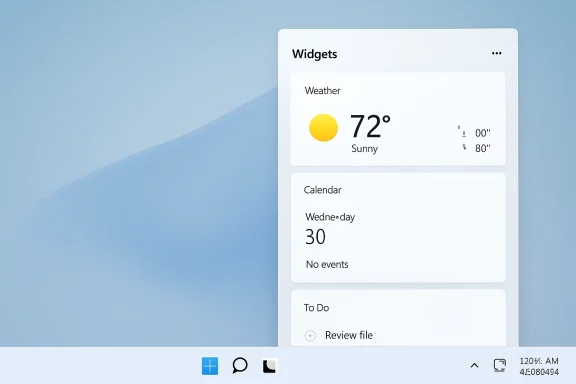
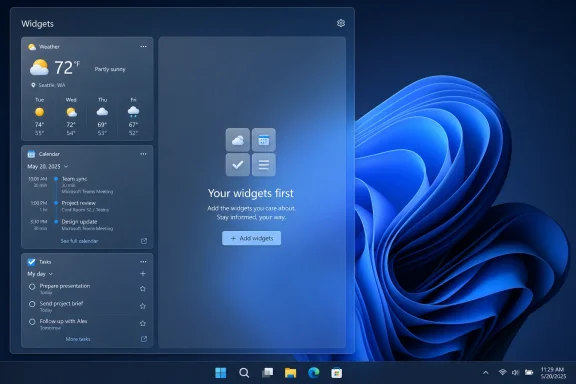
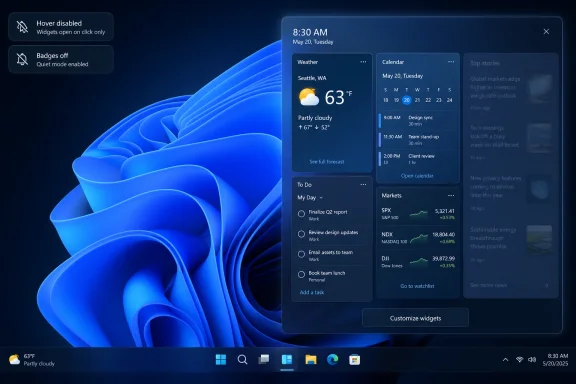
Microsoft is testing a quieter Windows 11 Widgets board in Insider Preview Build 26300.8346, released May 1, 2026, with hover-launch disabled, taskbar badges off, fewer alerts, and a default view that emphasizes widgets rather than the MSN-powered news feed. That is the factual change; the more interesting story is the admission buried inside it. Microsoft is not merely cleaning up a panel. It is conceding that one of Windows 11’s most visible surfaces had become a billboard wearing the costume of a productivity feature.
For years, Windows 11 Widgets occupied an awkward place in the operating system. Microsoft presented the board as a quick-glance surface for weather, calendar, traffic, stocks, and personalized information, but the experience often behaved like a content funnel. The panel appeared when users brushed the taskbar icon, filled itself with news cards, and used badges or alerts to tug attention back toward Microsoft’s services.
The new preview defaults reverse that posture. Widgets no longer open just because the pointer passes over the taskbar button. Badges are disabled by default. Alerts are reduced unless a user has actually shown interest in the feature. Most importantly, the board opens first to the widget experience rather than behaving as though the news feed were the product and the widgets were decorative trim.
That sounds small until you remember how much of modern desktop design has been poisoned by interruption. A quiet taskbar is not a luxury for people who live in Windows all day; it is part of the contract. The operating system should help users recover context, not constantly create new demands on it.
Microsoft’s language is telling. “Less distracting and overwhelming” is not the vocabulary of a company announcing a bold new feature. It is the vocabulary of a company trying to undo an own goal.
That distinction matters because defaults are policy. A setting buried three clicks deep is not equivalent to a respectful first-run experience. When a feature opens on hover, rotates content, shows badges, and pushes an algorithmic feed before the user has asked for it, the operating system is making a claim: your attention is available until you prove otherwise.
Windows 11 has repeatedly suffered from this kind of design overreach. The Start menu’s recommended area, the Edge and Bing prompts, Copilot placements, Microsoft account nudges, and OneDrive setup pressure all come from the same product instinct. Each may be defensible in isolation. Together, they make Windows feel less like a neutral computing environment and more like a negotiated settlement with Microsoft’s growth teams.
That is why this preview change matters beyond Widgets. It is a rare instance of Microsoft moving a default away from engagement and toward restraint. The company is not asking users to find the off switch. It is beginning to ship the off switch as the starting point.
That is an extraordinary place for Windows to be. This is the platform that made Microsoft unavoidable in personal computing, business IT, software development, gaming, and enterprise management. Yet Windows 11 has spent much of its life defending itself from complaints about regressions, hardware requirements, inconsistent UI, broken updates, sluggish shell components, unwanted content, and AI features that arrived before many users saw the everyday fit-and-finish problems solved.
The Widgets change is therefore useful as a test case. If K2 is merely a slogan attached to scattered improvements, it will be forgotten as quickly as previous Windows quality pushes. If it represents a real change in incentives, Microsoft will make more choices like this one: fewer ambushes, fewer content surfaces, fewer defaults that serve engagement metrics over user intent.
The hard part is that trust is not rebuilt by a changelog entry. Windows users have seen Microsoft improve something in one build while adding a different annoyance in another. K2 will only become meaningful if users can feel a sustained reduction in friction across the system.
Microsoft has often leaned on configurability as a defense. If users dislike hover behavior, they can turn it off. If they dislike the feed, they can tune it. If they dislike taskbar content, they can dig through Settings. That argument collapses when the disliked behavior is the starting point.
A good default reduces the number of times a user has to think about the operating system. A bad default turns setup into cleanup. Windows 11 has too often felt like a product that ships with a checklist of things to undo: remove distractions, suppress recommendations, tame notifications, redirect defaults, and disable features that were never requested.
The cleaned-up Widgets board is encouraging because it changes the burden of proof. Instead of assuming users want a feed until they say no, Microsoft is testing a model where the feed has to earn its way into attention. That is how operating systems should behave. Utility first, promotion later — if at all.
That difference is not aesthetic; it is architectural. The Windows shell has privileged placement. It owns the taskbar, Start menu, notification area, search entry points, lock screen, and system surfaces that users cannot fully avoid. When Microsoft uses those surfaces to push content, even benign content, it carries a different weight than a website doing the same thing in a browser tab.
Widgets should have been the perfect Windows 11 feature. A modular board for weather, calendar, tasks, package tracking, system health, Microsoft 365 data, family safety, sports, and device status could be genuinely useful. The concept was not broken. The business model surrounding it was.
That is why the new default view is more than cosmetic. A panel that opens to user-selected widgets is an accessory. A panel that opens to a news feed is a destination. Microsoft now appears to understand that Windows users did not ask their OS to become another destination.
Windows users noticed because the behavior interrupted routine movement. A person aiming for the Start button, a pinned app, or the system tray could summon a panel they did not intend to open. The operating system had converted a passive glance surface into a trapdoor.
That is the sort of annoyance that product teams often underestimate. It does not crash the system. It does not corrupt data. It does not show up as a catastrophic telemetry event. But it trains users to distrust the interface, and distrust is cumulative.
Disabling hover launch by default is a modest repair, but it sends the right signal. The cursor belongs to the user. Movement across the taskbar should not be interpreted as consent.
But Windows’ biggest competitor is not simply another operating system. It is user exhaustion. When people complain about Windows 11, they are often not making a platform-switching argument. They are saying they are tired of being asked to manage the operating system’s priorities instead of their own.
That is a dangerous form of dissatisfaction because it does not always show up as immediate churn. Enterprises remain on Windows because applications, management tooling, identity systems, and hardware fleets are built around it. Gamers remain on Windows because compatibility still matters. Developers remain on Windows when their workflows, devices, and corporate environments require it.
But staying is not the same as liking. Microsoft can retain market share while losing goodwill, and goodwill is what determines whether users accept the next big change. The backlash against AI surfaces in Windows is partly about AI, but it is also about timing. Users who feel the basics are neglected are less willing to tolerate experiments layered on top.
Enterprise Windows has always involved a negotiation between Microsoft’s cloud ambitions and administrators’ need for predictability. Widgets, consumer feeds, Copilot surfaces, account prompts, and content recommendations can create policy headaches because they blur boundaries: work versus personal, managed versus unmanaged, productivity versus engagement.
The new defaults do not eliminate those concerns. Admins will still want clear policy controls, stable documentation, and assurance that consumer content will not creep back into managed environments through a later update. But a quieter default reduces the amount of cleanup required on fresh images and newly provisioned PCs.
That matters because Windows’ enterprise advantage depends on trust at scale. IT departments can tolerate complexity when it buys capability. They are less forgiving when complexity exists to suppress features users never wanted in the first place.
Even if the change ships, Microsoft could still weaken it. The company might keep the quieter defaults only for some regions, some account types, or some configurations. It could later introduce new engagement mechanics under different names. Windows history is full of features that became tolerable only after user backlash, then slowly reacquired promotional habits over time.
That skepticism is healthy. But it should not obscure the fact that this is the right move. Microsoft has spent years telling users that Windows 11 is modern, intelligent, and personalized. The Widgets cleanup suggests the company is rediscovering a more basic virtue: the OS should be calm.
K2, if it is real in practice and not just internal branding, has to address that whole stack. Users need Windows to feel faster, not merely look cleaner. They need updates that inspire less dread. They need interface decisions that seem made by people who use the OS eight hours a day, not by teams optimizing isolated engagement metrics.
The Widgets board became a symbol because it was so visible. It sat on the taskbar, announced itself with weather, and opened into a world of cards that often felt unrelated to the work at hand. Cleaning it up removes an irritant. It does not by itself prove that Microsoft has changed course.
Still, symbols matter. A company that cannot fix the obvious annoyances is unlikely to fix the subtle ones. By that standard, this preview is at least evidence that Microsoft can still hear the room.
The danger is that the steering becomes the experience. If every surface becomes a recommendation surface, every notification a reactivation attempt, and every default a chance to capture attention, Windows stops feeling like infrastructure. It starts feeling like a mall.
Users do not object to integration when it is useful. Clipboard sync, cloud restore, passkeys, device continuity, intelligent search, and contextual help can all be excellent. The objection is to integration that seems designed first for Microsoft’s distribution advantage and only second for the user’s task.
The quieter Widgets board is a retreat from that mistake. It says, at least in one corner of the OS, that Microsoft is willing to give up a little attention harvesting in exchange for a better desktop. Windows needs much more of that trade.
Microsoft’s Widgets cleanup is a small preview change with an outsized message: the company knows Windows 11 has been too noisy, too promotional, and too willing to spend user attention without permission. If that lesson spreads beyond one panel, K2 could become more than a codename attached to reputation repair. If it does not, the quieter Widgets board will be remembered as another moment when Microsoft briefly understood the problem, fixed the symptom, and then went back to mistaking engagement for loyalty.
Source: Pokde.Net Microsoft Debloats Windows 11 Widgets In Preview Builds, UI Significantly Improved - Pokde.Net
 Microsoft Finally Treats Silence as a Feature
For years, Windows 11 Widgets occupied an awkward place in the operating system. Microsoft presented the board as a quick-glance surface for weather, calendar, traffic, stocks, and personalized information, but the experience often behaved like a content funnel. The panel appeared when users brushed the taskbar icon, filled itself with news cards, and used badges or alerts to tug attention back toward Microsoft’s services.The new preview defaults reverse that posture. Widgets no longer open just because the pointer passes over the taskbar button. Badges are disabled by default. Alerts are reduced unless a user has actually shown interest in the feature. Most importantly, the board opens first to the widget experience rather than behaving as though the news feed were the product and the widgets were decorative trim.
That sounds small until you remember how much of modern desktop design has been poisoned by interruption. A quiet taskbar is not a luxury for people who live in Windows all day; it is part of the contract. The operating system should help users recover context, not constantly create new demands on it.
Microsoft’s language is telling. “Less distracting and overwhelming” is not the vocabulary of a company announcing a bold new feature. It is the vocabulary of a company trying to undo an own goal.
The Widgets Board Was a Symptom, Not the Disease
The problem with Windows 11 Widgets was never simply that Microsoft included news. Many users like glanceable headlines, sports scores, market updates, and weather cards. The problem was that Microsoft blurred the line between user utility and corporate inventory, then set the loudest version of that mix as the default.That distinction matters because defaults are policy. A setting buried three clicks deep is not equivalent to a respectful first-run experience. When a feature opens on hover, rotates content, shows badges, and pushes an algorithmic feed before the user has asked for it, the operating system is making a claim: your attention is available until you prove otherwise.
Windows 11 has repeatedly suffered from this kind of design overreach. The Start menu’s recommended area, the Edge and Bing prompts, Copilot placements, Microsoft account nudges, and OneDrive setup pressure all come from the same product instinct. Each may be defensible in isolation. Together, they make Windows feel less like a neutral computing environment and more like a negotiated settlement with Microsoft’s growth teams.
That is why this preview change matters beyond Widgets. It is a rare instance of Microsoft moving a default away from engagement and toward restraint. The company is not asking users to find the off switch. It is beginning to ship the off switch as the starting point.
Windows K2 Is Really a Trust-Rebuilding Exercise
The timing is not accidental. Recent reporting has described “Windows K2” as an internal Microsoft effort to improve Windows 11’s performance, reliability, polish, gaming experience, and user sentiment. Microsoft has not treated K2 as a consumer product name, and it should not be confused with a new Windows version. It is better understood as a quality campaign inside a company that knows Windows has become a drag on its own brand.That is an extraordinary place for Windows to be. This is the platform that made Microsoft unavoidable in personal computing, business IT, software development, gaming, and enterprise management. Yet Windows 11 has spent much of its life defending itself from complaints about regressions, hardware requirements, inconsistent UI, broken updates, sluggish shell components, unwanted content, and AI features that arrived before many users saw the everyday fit-and-finish problems solved.
The Widgets change is therefore useful as a test case. If K2 is merely a slogan attached to scattered improvements, it will be forgotten as quickly as previous Windows quality pushes. If it represents a real change in incentives, Microsoft will make more choices like this one: fewer ambushes, fewer content surfaces, fewer defaults that serve engagement metrics over user intent.
The hard part is that trust is not rebuilt by a changelog entry. Windows users have seen Microsoft improve something in one build while adding a different annoyance in another. K2 will only become meaningful if users can feel a sustained reduction in friction across the system.
Defaults Are Where Microsoft Shows Its Priorities
Power users can disable Widgets. Administrators can use policy. Enthusiasts can remove packages, edit registry keys, or replace Microsoft’s preferred surfaces with third-party tools. But that misses the point. The default Windows experience is what defines the product for hundreds of millions of people.Microsoft has often leaned on configurability as a defense. If users dislike hover behavior, they can turn it off. If they dislike the feed, they can tune it. If they dislike taskbar content, they can dig through Settings. That argument collapses when the disliked behavior is the starting point.
A good default reduces the number of times a user has to think about the operating system. A bad default turns setup into cleanup. Windows 11 has too often felt like a product that ships with a checklist of things to undo: remove distractions, suppress recommendations, tame notifications, redirect defaults, and disable features that were never requested.
The cleaned-up Widgets board is encouraging because it changes the burden of proof. Instead of assuming users want a feed until they say no, Microsoft is testing a model where the feed has to earn its way into attention. That is how operating systems should behave. Utility first, promotion later — if at all.
The MSN Feed Became the Wrong Kind of Windows Integration
Microsoft’s MSN integration was always a strange fit for the desktop. On the web, an algorithmic news feed is expected to compete for time. In an operating system shell, the same feed feels more invasive because it appears inside the environment people use to do everything else.That difference is not aesthetic; it is architectural. The Windows shell has privileged placement. It owns the taskbar, Start menu, notification area, search entry points, lock screen, and system surfaces that users cannot fully avoid. When Microsoft uses those surfaces to push content, even benign content, it carries a different weight than a website doing the same thing in a browser tab.
Widgets should have been the perfect Windows 11 feature. A modular board for weather, calendar, tasks, package tracking, system health, Microsoft 365 data, family safety, sports, and device status could be genuinely useful. The concept was not broken. The business model surrounding it was.
That is why the new default view is more than cosmetic. A panel that opens to user-selected widgets is an accessory. A panel that opens to a news feed is a destination. Microsoft now appears to understand that Windows users did not ask their OS to become another destination.
The Hover Behavior Was the Small Annoyance That Explained Everything
The decision to disable open-on-hover by default deserves special attention because it captures the broader design mistake. Hover activation is rarely neutral. It is useful when the user is exploring a menu or previewing content, but it becomes hostile when a large panel appears because the pointer crossed the wrong patch of taskbar.Windows users noticed because the behavior interrupted routine movement. A person aiming for the Start button, a pinned app, or the system tray could summon a panel they did not intend to open. The operating system had converted a passive glance surface into a trapdoor.
That is the sort of annoyance that product teams often underestimate. It does not crash the system. It does not corrupt data. It does not show up as a catastrophic telemetry event. But it trains users to distrust the interface, and distrust is cumulative.
Disabling hover launch by default is a modest repair, but it sends the right signal. The cursor belongs to the user. Movement across the taskbar should not be interpreted as consent.
The Real Competition Is Not Just macOS or Linux
It is tempting to frame Microsoft’s cleanup as a response to macOS and Linux gaining mindshare, and there is some truth in that. Enthusiasts increasingly talk about Linux as a viable daily driver, especially as gaming support improves through SteamOS, Proton, and handheld PC experimentation. macOS continues to offer a coherent, vertically integrated experience for users who can live inside Apple’s hardware and software boundaries.But Windows’ biggest competitor is not simply another operating system. It is user exhaustion. When people complain about Windows 11, they are often not making a platform-switching argument. They are saying they are tired of being asked to manage the operating system’s priorities instead of their own.
That is a dangerous form of dissatisfaction because it does not always show up as immediate churn. Enterprises remain on Windows because applications, management tooling, identity systems, and hardware fleets are built around it. Gamers remain on Windows because compatibility still matters. Developers remain on Windows when their workflows, devices, and corporate environments require it.
But staying is not the same as liking. Microsoft can retain market share while losing goodwill, and goodwill is what determines whether users accept the next big change. The backlash against AI surfaces in Windows is partly about AI, but it is also about timing. Users who feel the basics are neglected are less willing to tolerate experiments layered on top.
IT Pros Will Read This as a Governance Signal
For home users, quieter Widgets are a quality-of-life improvement. For IT administrators, the change is more interesting as a governance signal. Microsoft is acknowledging that a consumer-style engagement surface can be inappropriate as a default, even if it can be managed after deployment.Enterprise Windows has always involved a negotiation between Microsoft’s cloud ambitions and administrators’ need for predictability. Widgets, consumer feeds, Copilot surfaces, account prompts, and content recommendations can create policy headaches because they blur boundaries: work versus personal, managed versus unmanaged, productivity versus engagement.
The new defaults do not eliminate those concerns. Admins will still want clear policy controls, stable documentation, and assurance that consumer content will not creep back into managed environments through a later update. But a quieter default reduces the amount of cleanup required on fresh images and newly provisioned PCs.
That matters because Windows’ enterprise advantage depends on trust at scale. IT departments can tolerate complexity when it buys capability. They are less forgiving when complexity exists to suppress features users never wanted in the first place.
Preview Builds Are Promises, Not Guarantees
There is a reason to be cautious. Insider Preview builds are not final releases, and Microsoft often tests behavior with subsets of users before deciding what ships broadly. Build 26300.8346 is a preview milestone, not a guarantee that every production Windows 11 machine will soon behave this way.Even if the change ships, Microsoft could still weaken it. The company might keep the quieter defaults only for some regions, some account types, or some configurations. It could later introduce new engagement mechanics under different names. Windows history is full of features that became tolerable only after user backlash, then slowly reacquired promotional habits over time.
That skepticism is healthy. But it should not obscure the fact that this is the right move. Microsoft has spent years telling users that Windows 11 is modern, intelligent, and personalized. The Widgets cleanup suggests the company is rediscovering a more basic virtue: the OS should be calm.
A Cleaner Panel Won’t Fix a Messy Reputation
The risk for Microsoft is that users interpret the Widgets cleanup as too little, too late. Windows 11’s reputation problems are broader than one panel. They include update reliability, File Explorer performance, context menu inconsistencies, taskbar limitations, driver headaches, gaming overhead debates, forced or strongly encouraged account flows, and the uneasy layering of Copilot into places where users may not want it.K2, if it is real in practice and not just internal branding, has to address that whole stack. Users need Windows to feel faster, not merely look cleaner. They need updates that inspire less dread. They need interface decisions that seem made by people who use the OS eight hours a day, not by teams optimizing isolated engagement metrics.
The Widgets board became a symbol because it was so visible. It sat on the taskbar, announced itself with weather, and opened into a world of cards that often felt unrelated to the work at hand. Cleaning it up removes an irritant. It does not by itself prove that Microsoft has changed course.
Still, symbols matter. A company that cannot fix the obvious annoyances is unlikely to fix the subtle ones. By that standard, this preview is at least evidence that Microsoft can still hear the room.
The Desktop Needs Fewer Growth Hacks
The deeper argument here is about the role of an operating system in 2026. Microsoft increasingly wants Windows to be a front door for services: Microsoft 365, OneDrive, Edge, Bing, Copilot, Xbox, Phone Link, and whatever AI agent layer comes next. That strategy is understandable. Windows is valuable not only because people run apps on it, but because it can steer users into Microsoft’s ecosystem.The danger is that the steering becomes the experience. If every surface becomes a recommendation surface, every notification a reactivation attempt, and every default a chance to capture attention, Windows stops feeling like infrastructure. It starts feeling like a mall.
Users do not object to integration when it is useful. Clipboard sync, cloud restore, passkeys, device continuity, intelligent search, and contextual help can all be excellent. The objection is to integration that seems designed first for Microsoft’s distribution advantage and only second for the user’s task.
The quieter Widgets board is a retreat from that mistake. It says, at least in one corner of the OS, that Microsoft is willing to give up a little attention harvesting in exchange for a better desktop. Windows needs much more of that trade.
The First K2 Test Is Whether Microsoft Can Leave Well Enough Alone
The concrete changes in Build 26300.8346 are easy to summarize, but their significance depends on whether Microsoft treats them as a new baseline or a temporary concession. This is the first visible K2-style repair that many users will understand immediately, because it changes something they have touched, cursed at, or disabled.- Windows 11 Widgets are being tested with hover-to-open disabled by default, reducing accidental panel launches from the taskbar.
- Taskbar badging for Widgets is being turned off by default, which lowers the number of unsolicited visual prompts.
- Widget alerts are being minimized unless the user has actively engaged with the feature.
- The board is shifting toward opening first to widgets rather than centering the MSN-powered feed.
- The change is currently in an Insider Preview build, so production rollout details remain uncertain.
- The larger test is whether Microsoft applies the same restraint to Start, Search, Copilot, notifications, and other high-traffic Windows surfaces.
Microsoft’s Widgets cleanup is a small preview change with an outsized message: the company knows Windows 11 has been too noisy, too promotional, and too willing to spend user attention without permission. If that lesson spreads beyond one panel, K2 could become more than a codename attached to reputation repair. If it does not, the quieter Widgets board will be remembered as another moment when Microsoft briefly understood the problem, fixed the symptom, and then went back to mistaking engagement for loyalty.
Source: Pokde.Net Microsoft Debloats Windows 11 Widgets In Preview Builds, UI Significantly Improved - Pokde.Net