

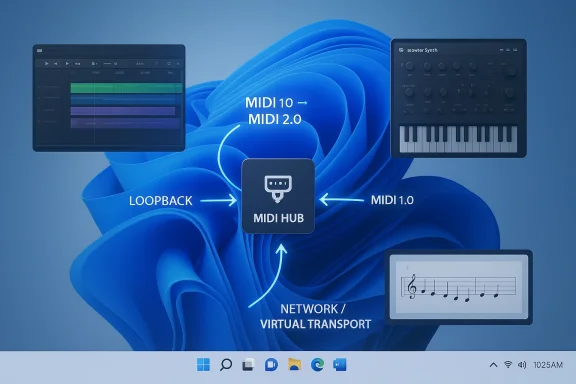
Windows 11’s MIDI stack is finally becoming what musicians have wanted for years: multi-client, class-compliant, and much closer to a true platform feature than a collection of vendor-specific workarounds. Microsoft’s new Windows MIDI Services rollout brings MIDI 2.0 and MIDI 1.0 together in a single system layer, with automatic translation, loopback routing, improved device naming, and built-in support for network and virtual transports. For Windows-based music production, this is not a minor update; it is a structural change that may reshape how DAWs, controllers, and hardware interfaces coexist on the same machine. Microsoft has been laying the groundwork for this for years, but the 2026 rollout turns that groundwork into something that now matters in day-to-day use. (devblogs.microsoft.com)
The immediate significance of the update is simple: multiple apps can now open the same MIDI device at the same time without special vendor drivers or a virtual cable layer. That solves one of the oldest frustrations in Windows music workflows, where a controller or interface would often get monopolized by a single application. If you have ever had to choose between Cubase, Ableton Live, a standalone utility, or a browser-based tool, the new model is designed to remove that tradeoff. (devblogs.microsoft.com)
The broader significance is more strategic. Microsoft is not just adding a new transport; it is replacing an older MIDI plumbing model that had become a limiting factor in modern production setups. The new service can enumerate devices, provide loopback endpoints, expose app-to-app routing, and mediate protocol conversion between MIDI 1.0 and MIDI 2.0 so legacy software and modern hardware can coexist. That is exactly the sort of invisible infrastructure change that tends to look small until it becomes indispensable. (devblogs.microsoft.com)
There is also a clear ecosystem implication. Third-party middleware has long filled gaps in Windows MIDI handling, from virtual patch bays to name translation and routing utilities. Microsoft is not eliminating the need for every specialist tool, but it is shrinking the space where external helpers are mandatory. In practical terms, that lowers setup friction for consumers while reducing the reasons vendors have historically shipped custom drivers just to work around Windows limitations. (devblogs.microsoft.com)
For Windows 11 users, the rollout lands in a world where hardware and OS support are no longer moving at the same pace. Windows 10 remains in circulation, and many studios still rely on older systems for stability. But the new MIDI services are tied to Windows 11’s modern platform path, which means the value proposition is now linked to operating system currency as much as it is to music hardware compatibility. That creates both momentum and pressure for musicians who have delayed upgrades. (devblogs.microsoft.com)
The company’s public work on this space has been visible for years through the Windows MIDI and Music dev blog, Discord community, and open repository. That matters because the project was never framed as a closed, one-off driver release. Instead, Microsoft treated it as a platform initiative with staged previews, SDK tooling, and ongoing partner feedback. The result is a rollout that feels unusually deliberate for a Windows subsystem, even if the pace has frustrated users waiting for production-ready features.
Microsoft’s answer is to let the service handle translation and scaling between generations. That is the kind of compatibility layer that makes new hardware useful immediately instead of only in software that has already been rewritten for MIDI 2.0. The benefit is especially obvious in mixed studios, where a newer controller might sit beside older virtual instruments and still need to behave predictably inside both worlds.
This is why the current rollout has generated so much attention outside the usual IT circles. To a producer, a MIDI port is not a theoretical subsystem; it is the front door to instruments, automation, and sync. A platform that can keep that door open to multiple programs at once is meaningfully different from one that cannot. It is also a strong signal that Microsoft is treating music creation as a first-class Windows workload rather than a niche hobby segment. (devblogs.microsoft.com)
The service also supports multi-client access for both MIDI 1.0 ports and MIDI 2.0 endpoints. That means a controller or interface is no longer effectively locked to the first application that claims it. For users, this changes everyday workflows more than any headline feature about message formats or timing resolution, because the old competition for device ownership was one of the most persistent pain points in Windows audio and music production. (devblogs.microsoft.com)
This also makes the rollout more realistic. Pure “upgrade or lose access” transitions are toxic in pro-audio environments, where stability and repeatability matter more than novelty. Microsoft appears to understand that the only way MIDI 2.0 can actually succeed on Windows is by making it invisible to older apps until those apps are ready to catch up. (devblogs.microsoft.com)
That opens the door to more flexible app chaining. A notation app, a sequencer, a plugin host, and a utility can all participate in the same routing graph without each one needing exclusive rights to the hardware. It also makes browser-based MIDI and WebMIDI-style workflows more practical because the OS now provides a more capable backbone underneath them.
The practical value is less about a single impressive-sounding number and more about consistency. Musicians care whether notes arrive when expected, whether automation is tightly aligned, and whether sync remains stable across a session. A timing engine built into the service layer gives Microsoft one place to optimize those paths rather than scattering responsibility across vendor drivers and application-specific code. (devblogs.microsoft.com)
It is worth noting, though, that timing improvements at the OS layer are only one part of the story. Audio latency, plugin performance, and USB behavior still matter. The new MIDI engine may make control data more stable, but it does not eliminate the broader demands of real-time music computing, where one weak link can still spoil the experience. That distinction matters because users will blame the new MIDI stack for problems that actually come from elsewhere. (devblogs.microsoft.com)
The key point is that vendor drivers are no longer the default answer for class-compliant devices. Microsoft has repeatedly said that most recent USB MIDI hardware works without extra downloads, and Windows MIDI Services extends that logic by making the in-box path both more capable and multi-client. For users, that reduces installer friction. For vendors, it puts more pressure on their software to justify itself rather than simply existing. (devblogs.microsoft.com)
Microsoft has also acknowledged that legacy driver ecosystems can create problems, especially around the old Drivers32 registry model. The company’s own tools now include ways to reset the system to the Windows MIDI Services default, which is a strong sign that Microsoft sees registry clutter as technical debt it wants to actively unwind. That is a healthier platform posture than leaving every workaround in place forever. (devblogs.microsoft.com)
For professional users, the impact is larger but more nuanced. The real win is not just convenience; it is the ability to build more reliable templates, reuse controllers more flexibly, and share devices across specialized applications without compromising a live session. This matters most in studios where a single machine serves multiple roles, from sequencing and editing to performance capture and testing. (devblogs.microsoft.com)
Another consumer benefit is reduced dependence on third-party virtual cable software. That does not mean specialty tools lose value, but it does mean new users will have a saner baseline experience out of the box. In an ecosystem where setup confusion can drive people away, that baseline matters a great deal.
For PC makers and device vendors, the platform implications are even sharper. If Windows can provide better in-box support for MIDI 2.0 and USB MIDI 1.0 devices, hardware companies may have less room to differentiate through drivers alone. They will need to compete more on design, firmware quality, companion software, and workflow value. That is usually a good thing for the market, but it can unsettle vendors who built their support models around custom stacks. (devblogs.microsoft.com)
That matters to developers because it creates a more predictable target. When the OS handles enumeration, translation, and routing consistently, app developers can focus on music features instead of spending engineering time compensating for system-level quirks. In a competitive software market, that can be as valuable as a headline feature because it lowers the cost of building on Windows.
Microsoft has tried to soften that transition with extended security options for Windows 10, but security coverage is not the same thing as feature parity. You can keep an older machine alive for a while, yet you will not get the new MIDI stack that way. That creates a fairly familiar Windows tension: stay put and remain stable, or move forward and gain new capabilities. (devblogs.microsoft.com)
The most likely outcome is a gradual split. Enthusiasts and developers will move first, then more mainstream creators will follow as DAWs, controller utilities, and hardware vendors validate the new path. That slow adoption curve is not a failure; it is exactly how audio ecosystems usually modernize when backward compatibility remains non-negotiable.
The other thing to watch is whether app developers and hardware makers actually adopt the new model quickly enough to matter. If the core service is strong but the surrounding ecosystem lags, users will still rely on old habits and workarounds. If, however, the new service becomes the default expectation inside DAWs, utilities, and controller firmware updates, then this could become the moment Windows MIDI finally stops feeling like a compromise.
Source: Sonicstate Windows11 MIDI Updates Add 2.0, Multi-Clients
 Overview
The immediate significance of the update is simple: multiple apps can now open the same MIDI device at the same time without special vendor drivers or a virtual cable layer. That solves one of the oldest frustrations in Windows music workflows, where a controller or interface would often get monopolized by a single application. If you have ever had to choose between Cubase, Ableton Live, a standalone utility, or a browser-based tool, the new model is designed to remove that tradeoff. (devblogs.microsoft.com)The broader significance is more strategic. Microsoft is not just adding a new transport; it is replacing an older MIDI plumbing model that had become a limiting factor in modern production setups. The new service can enumerate devices, provide loopback endpoints, expose app-to-app routing, and mediate protocol conversion between MIDI 1.0 and MIDI 2.0 so legacy software and modern hardware can coexist. That is exactly the sort of invisible infrastructure change that tends to look small until it becomes indispensable. (devblogs.microsoft.com)
There is also a clear ecosystem implication. Third-party middleware has long filled gaps in Windows MIDI handling, from virtual patch bays to name translation and routing utilities. Microsoft is not eliminating the need for every specialist tool, but it is shrinking the space where external helpers are mandatory. In practical terms, that lowers setup friction for consumers while reducing the reasons vendors have historically shipped custom drivers just to work around Windows limitations. (devblogs.microsoft.com)
For Windows 11 users, the rollout lands in a world where hardware and OS support are no longer moving at the same pace. Windows 10 remains in circulation, and many studios still rely on older systems for stability. But the new MIDI services are tied to Windows 11’s modern platform path, which means the value proposition is now linked to operating system currency as much as it is to music hardware compatibility. That creates both momentum and pressure for musicians who have delayed upgrades. (devblogs.microsoft.com)
Background
MIDI has always been a standard that outlived its assumptions. It was designed for a world of relatively simple controllers and one-app-at-a-time workflows, not for modern setups where a keyboard might feed a DAW, a notation app, a browser synth, a routing utility, and a performance recorder simultaneously. Over time, the Windows implementation accumulated workarounds rather than solving the core architecture problem. Microsoft’s current effort is best understood as a reboot of the underlying model rather than a cosmetic feature refresh.The company’s public work on this space has been visible for years through the Windows MIDI and Music dev blog, Discord community, and open repository. That matters because the project was never framed as a closed, one-off driver release. Instead, Microsoft treated it as a platform initiative with staged previews, SDK tooling, and ongoing partner feedback. The result is a rollout that feels unusually deliberate for a Windows subsystem, even if the pace has frustrated users waiting for production-ready features.
Why MIDI 2.0 matters
MIDI 2.0 is not just “more MIDI.” It brings higher resolution, richer device discovery, better negotiation between endpoints, and a way to express modern control data without forcing everything into 1980s-era assumptions. For software instruments and high-end controllers, that means finer expression and less clumsy scaling. For the operating system, it means the transport layer has to do more work so old software does not break when new gear arrives.Microsoft’s answer is to let the service handle translation and scaling between generations. That is the kind of compatibility layer that makes new hardware useful immediately instead of only in software that has already been rewritten for MIDI 2.0. The benefit is especially obvious in mixed studios, where a newer controller might sit beside older virtual instruments and still need to behave predictably inside both worlds.
Why multi-client support has been so important
The old single-client pattern forced musicians to solve a software problem with hardware or middleware. If one app held the device, another often had to be denied access, bridged through a cable app, or fed through vendor software. That was never elegant, and it made Windows look more fragile than it really was. Microsoft’s new service finally addresses the source of the bottleneck instead of merely masking it. (devblogs.microsoft.com)This is why the current rollout has generated so much attention outside the usual IT circles. To a producer, a MIDI port is not a theoretical subsystem; it is the front door to instruments, automation, and sync. A platform that can keep that door open to multiple programs at once is meaningfully different from one that cannot. It is also a strong signal that Microsoft is treating music creation as a first-class Windows workload rather than a niche hobby segment. (devblogs.microsoft.com)
What Microsoft Actually Changed
The new stack introduces Windows MIDI Services as the core plumbing for MIDI on supported Windows 11 builds. According to Microsoft’s own documentation, the service now handles MIDI device enumeration and can expose built-in transports such as loopback and network MIDI without requiring the old registry gymnastics that used to define the Windows MIDI experience. This is a major philosophical shift: routing is now service-native, not driver folklore. (devblogs.microsoft.com)The service also supports multi-client access for both MIDI 1.0 ports and MIDI 2.0 endpoints. That means a controller or interface is no longer effectively locked to the first application that claims it. For users, this changes everyday workflows more than any headline feature about message formats or timing resolution, because the old competition for device ownership was one of the most persistent pain points in Windows audio and music production. (devblogs.microsoft.com)
Protocol translation and scaling
One of the more user-friendly ideas in the new stack is that you do not need every app to speak the same version of MIDI. If your hardware speaks MIDI 2.0 but your favorite DAW still expects MIDI 1.0, the service can translate the messages and scale values so the device remains usable. That is a significant compatibility win, especially in studios that will not refresh all their software at once.This also makes the rollout more realistic. Pure “upgrade or lose access” transitions are toxic in pro-audio environments, where stability and repeatability matter more than novelty. Microsoft appears to understand that the only way MIDI 2.0 can actually succeed on Windows is by making it invisible to older apps until those apps are ready to catch up. (devblogs.microsoft.com)
Loopback, virtual devices, and app-to-app routing
Microsoft has also built native loopback endpoints into the service. In practice, that means MIDI data can move between applications inside the OS without external cable software doing the bridging job. The company has described these as service-handled transports, which is exactly what users have wanted from Windows for a long time: simple internal routing that does not depend on a separate utility sitting in the middle. (devblogs.microsoft.com)That opens the door to more flexible app chaining. A notation app, a sequencer, a plugin host, and a utility can all participate in the same routing graph without each one needing exclusive rights to the hardware. It also makes browser-based MIDI and WebMIDI-style workflows more practical because the OS now provides a more capable backbone underneath them.
Timing, Scheduling, and Performance
Microsoft is also emphasizing microsecond-level timing accuracy for message handling and scheduling. That matters because timing is where software MIDI systems tend to disappoint users first, especially when multiple applications are involved or when the system is juggling both legacy and modern endpoints. Better scheduling does not magically fix bad driver behavior, but it does give the platform room to behave more predictably under load.The practical value is less about a single impressive-sounding number and more about consistency. Musicians care whether notes arrive when expected, whether automation is tightly aligned, and whether sync remains stable across a session. A timing engine built into the service layer gives Microsoft one place to optimize those paths rather than scattering responsibility across vendor drivers and application-specific code. (devblogs.microsoft.com)
Why precise scheduling matters in studios
In a modern DAW session, timing errors can accumulate into audible problems or workflow headaches. If the system can queue messages with better precision, developers can build more deterministic MIDI behavior on top of it. That is especially important for live performers who rely on layered rigs and for producers automating multiple devices at once.It is worth noting, though, that timing improvements at the OS layer are only one part of the story. Audio latency, plugin performance, and USB behavior still matter. The new MIDI engine may make control data more stable, but it does not eliminate the broader demands of real-time music computing, where one weak link can still spoil the experience. That distinction matters because users will blame the new MIDI stack for problems that actually come from elsewhere. (devblogs.microsoft.com)
Drivers and Compatibility
The introduction of the new usbmidi2.sys class driver is a big part of the story, even if most users will never name it directly. Microsoft says it co-developed the driver with AmeNote, and the company has positioned it as the in-box path for modern USB MIDI hardware while still keeping the legacy usbaudio.sys route for compatibility. That combination suggests Microsoft wants new devices to work better without forcing manufacturers into a hard break with the past.The key point is that vendor drivers are no longer the default answer for class-compliant devices. Microsoft has repeatedly said that most recent USB MIDI hardware works without extra downloads, and Windows MIDI Services extends that logic by making the in-box path both more capable and multi-client. For users, that reduces installer friction. For vendors, it puts more pressure on their software to justify itself rather than simply existing. (devblogs.microsoft.com)
The end of driver dependence?
It would be a mistake to say third-party drivers are dead. Non-class-compliant devices, specialized transport layers, and niche vendor features will still need custom software. But the number of situations where users install a driver simply because “that’s what the box told them to do” is shrinking fast. That alone could reduce support headaches across the industry. (devblogs.microsoft.com)Microsoft has also acknowledged that legacy driver ecosystems can create problems, especially around the old Drivers32 registry model. The company’s own tools now include ways to reset the system to the Windows MIDI Services default, which is a strong sign that Microsoft sees registry clutter as technical debt it wants to actively unwind. That is a healthier platform posture than leaving every workaround in place forever. (devblogs.microsoft.com)
Consumer and Pro Workflows
For home users, the update mostly means less friction. A keyboard can feed a DAW, a browser tab, and a utility app without constant switching. Device names can be customized so the port list is less confusing, and loopback routing can be set up without a separate cable tool. That lowers the barrier to entry for hobbyists who may never want to learn the ugly details of MIDI plumbing. (devblogs.microsoft.com)For professional users, the impact is larger but more nuanced. The real win is not just convenience; it is the ability to build more reliable templates, reuse controllers more flexibly, and share devices across specialized applications without compromising a live session. This matters most in studios where a single machine serves multiple roles, from sequencing and editing to performance capture and testing. (devblogs.microsoft.com)
Consumer-facing benefits
Microsoft’s new MIDI Settings app also addresses one of the small-but-annoying realities of music gear: ugly or generic port names. Being able to preserve classic names for project compatibility, while also assigning custom names and descriptions, is exactly the sort of quality-of-life improvement that reduces mistakes during a session. Small details like this often save more time than flashier features. (devblogs.microsoft.com)Another consumer benefit is reduced dependence on third-party virtual cable software. That does not mean specialty tools lose value, but it does mean new users will have a saner baseline experience out of the box. In an ecosystem where setup confusion can drive people away, that baseline matters a great deal.
Enterprise and Platform Implications
On the enterprise side, the update may look niche, but it is actually a useful signal about how Microsoft is evolving Windows as a platform. The company is now shipping a subsystem that is designed with scripting, diagnostic tooling, and developer-facing visibility in mind, including PowerShell projections and console tools for monitoring traffic and open ports. That is the kind of feature set that tends to matter in managed environments and lab setups, even beyond music production.For PC makers and device vendors, the platform implications are even sharper. If Windows can provide better in-box support for MIDI 2.0 and USB MIDI 1.0 devices, hardware companies may have less room to differentiate through drivers alone. They will need to compete more on design, firmware quality, companion software, and workflow value. That is usually a good thing for the market, but it can unsettle vendors who built their support models around custom stacks. (devblogs.microsoft.com)
Why this matters beyond music
Microsoft’s insistence on a unified transport model also reflects a broader Windows trend: more functionality is moving from opaque kernel-era plumbing into service layers that are easier to maintain and extend. That pattern has already appeared in other parts of the platform, and MIDI is a natural candidate because its user pain has been longstanding and highly visible. The company is essentially showing that it can modernize a legacy subsystem without abandoning compatibility. (devblogs.microsoft.com)That matters to developers because it creates a more predictable target. When the OS handles enumeration, translation, and routing consistently, app developers can focus on music features instead of spending engineering time compensating for system-level quirks. In a competitive software market, that can be as valuable as a headline feature because it lowers the cost of building on Windows.
Windows 10, Windows 11, and the Upgrade Pressure
One unavoidable subplot is the operating system split itself. The new MIDI services are part of Windows 11’s modern path, while a large installed base remains on Windows 10 for compatibility, budget, or simple inertia. That means the users most likely to benefit from the MIDI overhaul are also the ones most likely to need a broader platform upgrade. (devblogs.microsoft.com)Microsoft has tried to soften that transition with extended security options for Windows 10, but security coverage is not the same thing as feature parity. You can keep an older machine alive for a while, yet you will not get the new MIDI stack that way. That creates a fairly familiar Windows tension: stay put and remain stable, or move forward and gain new capabilities. (devblogs.microsoft.com)
The practical migration question
For studios, the migration question is less about ideology and more about whether the benefit justifies the disruption. If your current system is reliable and tied to older plugins or interfaces, upgrading the OS may introduce too much risk for too little gain. But if your workflow is already constrained by single-client MIDI behavior or vendor-driver headaches, the new stack starts to look more compelling. (devblogs.microsoft.com)The most likely outcome is a gradual split. Enthusiasts and developers will move first, then more mainstream creators will follow as DAWs, controller utilities, and hardware vendors validate the new path. That slow adoption curve is not a failure; it is exactly how audio ecosystems usually modernize when backward compatibility remains non-negotiable.
Strengths and Opportunities
The strongest part of Microsoft’s update is that it solves real user pain without forcing a wholesale rewrite of the ecosystem. The platform now looks capable of supporting modern devices and older apps at the same time, which is the only sane way to move MIDI forward on Windows. It also gives Microsoft a chance to reclaim credibility with musicians who have long viewed Windows MIDI support as something to work around rather than trust.- Multi-client access removes one of the oldest workflow bottlenecks.
- MIDI 2.0 translation makes newer gear usable in older software.
- Native loopback reduces dependence on third-party cable tools.
- Improved device naming makes complex rigs easier to manage.
- In-box drivers simplify setup and reduce support burden.
- Scripting support opens doors for automation and diagnostics.
- Network MIDI 2.0 lays groundwork for future remote and distributed workflows.
Risks and Concerns
The biggest concern is that a complex rollout can still feel uneven in the real world, especially when old drivers, phased deployment, and incompatible vendor software collide. Microsoft has already documented known issues, which is good transparency, but it also confirms that the transition is not frictionless. In a field as sensitive as music production, even small regressions can feel disproportionately disruptive.- Legacy vendor drivers can still lock up the service.
- Registry conflicts may confuse users who installed old utilities.
- Phased rollout timing means not everyone sees the same behavior at once.
- Insider build variability can muddy troubleshooting.
- Driver cleanup may be intimidating for nontechnical musicians.
- Non-class-compliant gear will still require special handling.
- Expectation gaps could lead users to blame MIDI for unrelated problems.
Looking Ahead
Microsoft’s next challenge is not proving that the architecture works in a lab; it is proving that it survives messy studio reality. That means mixed hardware, old project templates, poorly maintained vendor utilities, and users who have no interest in reading a registry guide before they write music. The company has already acknowledged that the rollout is staged and that known issues remain, which is the right posture for a system this central. (devblogs.microsoft.com)The other thing to watch is whether app developers and hardware makers actually adopt the new model quickly enough to matter. If the core service is strong but the surrounding ecosystem lags, users will still rely on old habits and workarounds. If, however, the new service becomes the default expectation inside DAWs, utilities, and controller firmware updates, then this could become the moment Windows MIDI finally stops feeling like a compromise.
- Driver updates from major vendors will be a key signal.
- DAW compatibility reports will show whether the rollout is truly ready.
- Network MIDI 2.0 adoption will indicate how ambitious the ecosystem becomes.
- Arm64 support could reshape portable music rigs on Windows.
- User reports after rollout expansion will reveal whether the service is stable in production.
Source: Sonicstate Windows11 MIDI Updates Add 2.0, Multi-Clients
