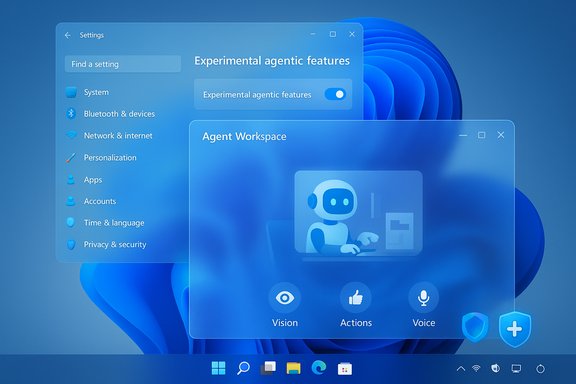
A striking new fan concept called Windows 26 captures a clear counterpoint to Microsoft’s current roadmap: instead of an ever‑present, proactive AI layer, the design imagines a quieter, faster, and more user‑first Windows that returns to polished visuals, consistent themes, and optional, contextual intelligence. The video — a short, high‑polish mock‑up from designer Abdi (known online as AR 4789) — has reignited a wider debate about what users actually want from the next generation of Windows, and why Microsoft’s push toward an “agentic” OS and Copilot+ hardware is triggering fresh skepticism across the enthusiast and enterprise communities.
Microsoft has been explicit about embedding more AI at the heart of Windows. Senior leadership framed the future of the platform with language that became widely discussed and criticized: Windows is “evolving into an agentic OS,” a phrase that implies software capable of acting on the user’s behalf instead of merely responding. That public framing was intended for Ignite announcements and enterprise audiences, but it quickly met a tidal wave of negative reaction online from users worried about autonomy, privacy, and unwanted automation. At the same time, Microsoft and its silicon partners have been defining a new category of hardware — Copilot+ PCs — optimized for local AI inference using dedicated neural processors (NPUs). Microsoft’s Copilot+ branding signals machines designed to run certain AI features with low latency and on‑device privacy guarantees, and the company has published guidance tying those experiences to concrete silicon characteristics: NPUs capable of 40+ TOPS, 16 GB minimum RAM, and 256 GB storage for Copilot+ experiences. Those requirements have reshaped OEM roadmaps and user upgrade decisions. This confluence — a high‑expectation AI vision from Microsoft plus new hardware demands from OEMs — creates both opportunity and friction. Enthusiasts and administrators want a faster, less‑bloated, and more consistent UI; Microsoft is promising a smarter, more proactive platform. The Windows 26 concept is a design response to that tension: it shows how restraint, visual consistency, and optional AI could satisfy a majority of user needs without surrendering control to ever‑present agents.
When that community feedback is loud — as it was after the “agentic OS” phrasing — companies get early warning that messaging, not just engineering, needs work. In short: concept videos influence product direction by calibrating expectations and clarifying what “useful AI” looks like to real people.
Delivering a more intelligent Windows should not be a zero‑sum game where AI features replace basic polish. The fastest path to acceptance is to pair ambitious AI capabilities with the fundamentals users keep asking for: consistent UI, fewer surprises, and explicit controls. The Windows 26 mock‑up is valuable not because it predicts Microsoft’s product plan, but because it shows a pragmatic, user‑centred alternative: smart when asked, spare when not, and always under the user’s control.
Source: Neowin New concept shows what Windows may be like in 2026 and beyond
 Background: the crossroads for Windows — AI acceleration vs. polish
Microsoft has been explicit about embedding more AI at the heart of Windows. Senior leadership framed the future of the platform with language that became widely discussed and criticized: Windows is “evolving into an agentic OS,” a phrase that implies software capable of acting on the user’s behalf instead of merely responding. That public framing was intended for Ignite announcements and enterprise audiences, but it quickly met a tidal wave of negative reaction online from users worried about autonomy, privacy, and unwanted automation. At the same time, Microsoft and its silicon partners have been defining a new category of hardware — Copilot+ PCs — optimized for local AI inference using dedicated neural processors (NPUs). Microsoft’s Copilot+ branding signals machines designed to run certain AI features with low latency and on‑device privacy guarantees, and the company has published guidance tying those experiences to concrete silicon characteristics: NPUs capable of 40+ TOPS, 16 GB minimum RAM, and 256 GB storage for Copilot+ experiences. Those requirements have reshaped OEM roadmaps and user upgrade decisions. This confluence — a high‑expectation AI vision from Microsoft plus new hardware demands from OEMs — creates both opportunity and friction. Enthusiasts and administrators want a faster, less‑bloated, and more consistent UI; Microsoft is promising a smarter, more proactive platform. The Windows 26 concept is a design response to that tension: it shows how restraint, visual consistency, and optional AI could satisfy a majority of user needs without surrendering control to ever‑present agents.What the Windows 26 concept shows
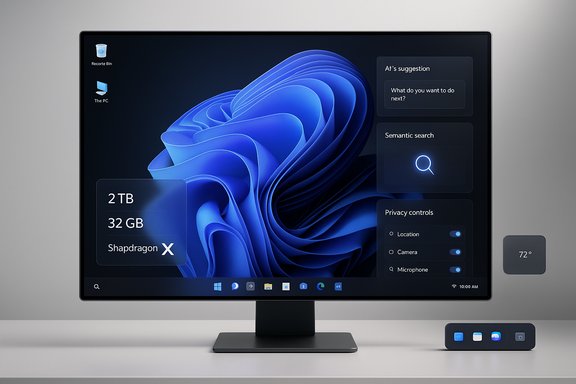
A short list of the concept’s visible priorities
- Liquid‑glass aesthetic that echoes Aero translucency but with modern Fluent sensibilities.
- A shrunken, adjustable Taskbar that reduces clutter while preserving access to core affordances.
- Floating, dockable widgets that act like mini‑apps and can be positioned anywhere on the desktop.
- A consistent, system‑wide dark mode that avoids piecemeal theme inconsistencies.
- Contextual Copilot: AI that appears when useful (semantic search, task automation) rather than an always‑on overlay.
- Illustrative hardware callouts (2 TB, 32 GB RAM, Snapdragon X Elite) presented as aspirational rather than official requirements.
Why that matters
The design’s strengths are pragmatic: rather than chasing novelty, it prioritizes everyday ergonomics — discoverable files, less visual noise, and meaningful AI that helps rather than distracts. These are precisely the complaints that many Windows users have raised repeatedly: inconsistent system theming, feature bloat, and a perception that AI features are sometimes cosmetic or performative rather than productivity multipliers. The concept crystallizes a familiar user demand: make Windows feel fast and under the user’s control again.Verified facts and technical reality
Any meaningful discussion of the concept must separate wishful design from technical constraints and corporate signals. The following claims and numbers have been explicitly verified using Microsoft and industry reporting:- Windows 10 reached end‑of‑support on October 14, 2025, which accelerates the upgrade conversation for many users and organizations. Microsoft’s lifecycle pages and support notices confirm the date and associated upgrade guidance.
- Copilot+ PCs are a recognized category Microsoft is promoting; Microsoft and multiple outlets describe the set of Copilot+ features that initially targeted Qualcomm Snapdragon X devices and later expanded to Intel Core Ultra and AMD Ryzen AI platforms. The Copilot+ callouts include a focus on on‑device inferencing powered by NPUs.
- Industry coverage and OEM briefings indicate Microsoft’s Copilot+ guidance references NPUs rated at roughly 40+ TOPS as an important performance baseline for some Copilot+ experiences, and Microsoft’s Copilot+ pages and Windows update notes were updated to reflect such expectations. Multiple outlet analyses and the Microsoft update notices cohere on this threshold as a practical cutoff for local inference. That cutoff is controversial: it creates a hardware split between older devices and new AI‑capable PCs.
- AMD has publicly positioned its Ryzen AI family as Copilot+ capable and reported NPUs in the 50 TOPS class for its high‑end Ryzen AI APUs; OEMs (Dell, others) have promoted Copilot+ hardware advantages in commercial talks. Those statements confirm that silicon vendors aim to meet Microsoft’s Copilot+ performance guidance. Nonetheless, vendor marketing should not be mistaken for Microsoft’s certification; hardware qualification remains an evolving list.
Why users are pushing back: perception, performance, and trust
Performance and bloat fears
A central piece of the backlash is rooted in real experience: users equate added system services and background AI indexing with slower machines and increased battery drain. For many, the memory of past Windows feature rollouts that impacted performance or introduced regressions shapes the reaction to more AI in the OS. If AI features require more RAM, persistent services, or background indexing, users fear a net slowdown regardless of promised on‑device acceleration. Forum threads and coverage consistently show this worry as the dominant reaction to “agentic” language.Control and privacy
“Agentic” implies initiative. For security‑conscious users and admins, software that can act autonomously raises questions about permission boundaries, telemetry, and auditability. Enterprises in particular require policy control, logging, and predictable behavior; consumer mistrust centers on unexpected automation and opaque data flows. Analysts and community discussions have repeatedly called for granular opt‑in options, transparent indexing UIs, and clear local‑vs‑cloud data policies before agentic features are widely adopted.Monetization optics
A recurring theme in social replies is a perception that Microsoft layers monetization (Microsoft Account nudges, OneDrive upsells, Copilot subscription prompts) onto a platform users already paid for. That perception colors responses to any new feature framing; an “agentic OS” launched with aggressive product integration can feel like a commercialization of core experience rather than a pure quality upgrade.The practical tradeoffs Microsoft must navigate
1) Hardware segmentation vs. broad compatibility
If Copilot+ experiences require 40+ TOPS NPUs, Microsoft divides the install base into tiers: legacy machines, modern Copilot+ PCs, and the ephemeral middle ground. That split has real consequences:- Users with older machines face the cost of hardware refresh or accept a limited feature set.
- OEMs must balance cost, battery life, and NPU capability when designing mainstream SKUs.
- Microsoft must avoid a perception of coercion — that meaningful OS functionality is locked behind new silicon. Multiple industry reports have already flagged this as a political and product challenge.
2) Privacy, governance, and enterprise controls
Agentic agents must be governed. Enterprises will insist on:- Clear group policy and MDM controls for automation features.
- Detailed audit trails and revocation controls for semantic indexing and agentic actions.
- Options for on‑device only inference and explicit cloud fallbacks.
3) Developer ecosystem and compatibility
Changes in the shell, taskbar, or the arrival of floating widgets demand new APIs and compatibility layers. Microsoft will need to ensure legacy Win32 apps and third‑party utilities continue to function predictably, or risk fragmenting the developer ecosystem. Historically, Microsoft has shipped compatibility tools for transitions — those will be essential again.What works in the Windows 26 concept — a critical appraisal
Design strengths worth copying
- Restraint: The concept uses AI to assist, not to dominate. Contextual Copilot, semantic search, and task automation appear only where helpful. This aligns with broad user preference for optional intelligence.
- Visual consistency: A system‑wide dark mode and coherent design language reduce cognitive friction and help accessibility.
- Customization and choice: Floating widgets, taskbar modes, and collect‑zone type features give users the ability to calibrate complexity to their workflow.
Practical risks and blind spots
- Performance assumptions: The concept behaves like it’s running on high‑end, Copilot+ hardware. Real‑world users on midrange or older machines might see a different outcome unless Microsoft commits to a well‑tuned “Lite” path that disables heavy agents by default.
- Implementation complexity: Features like true, system‑wide semantic search (Recall) require robust indexing, clear privacy controls, and solid storage policies. Ship it too soon and the result will be bugs and backlash; ship it late and it will be business‑critical features behind a long wait.
- Expectation management: Design mockups imply immediate availability; product teams must avoid over‑promising. The public reaction to the “agentic” phrasing shows how language alone can drive distrust.
Roadmap recommendations for a user‑first Windows
- Ship agentic features as opt‑in defaults: Make a clear, stepwise opt‑in at OOBE with a plain‑English summary of what an agent can and cannot do.
- Offer a tiered Windows channel (Mainstream, Lite, Copilot+): Provide a “Lite” mode that minimizes background services and an enhanced Copilot+ mode that uses NPUs when present.
- Surface transparent controls: Give users a centralized privacy and indexing dashboard to view, export, or purge what the OS has indexed.
- Add robust enterprise policy coverage: Group Policy and MDM templates must exist before agentic features reach enterprise tenants.
- Keep the UI polish work independent of AI gating: Visual consistency and performance improvements should not be tied exclusively to Copilot+ hardware. Deliver consistent dark mode and taskbar options to all devices.
The bigger picture: why concepts still matter
Design exercises like Windows 26 do real work in the product ecosystem. They crystallize user priorities — restraint, consistency, and control — and force product organizations to defend engineering tradeoffs in public. Concepts distill what power users want and highlight friction points in corporate roadmaps. They also provide a useful imaginal sandbox where the community can test language, affordances, and layout patterns before code is committed.When that community feedback is loud — as it was after the “agentic OS” phrasing — companies get early warning that messaging, not just engineering, needs work. In short: concept videos influence product direction by calibrating expectations and clarifying what “useful AI” looks like to real people.
Conclusion: a practical compromise for the next Windows chapter
The Windows 26 concept offers a lesson that’s both technical and political: users will accept and even embrace AI when it clearly saves time, respects privacy, and stays out of the way. Microsoft’s pursuit of an “agentic” OS and OEMs’ move to Copilot+ silicon are real trends with potential to improve productivity, but they carry serious adoption risks if rollouts ignore performance, transparency, and choice.Delivering a more intelligent Windows should not be a zero‑sum game where AI features replace basic polish. The fastest path to acceptance is to pair ambitious AI capabilities with the fundamentals users keep asking for: consistent UI, fewer surprises, and explicit controls. The Windows 26 mock‑up is valuable not because it predicts Microsoft’s product plan, but because it shows a pragmatic, user‑centred alternative: smart when asked, spare when not, and always under the user’s control.
Quick reference — key verified facts
- Windows 10 end of support: October 14, 2025.
- Copilot+ PC guidance: emphasis on 40+ TOPS NPUs, 16 GB RAM, 256 GB storage for certain on‑device Copilot capabilities.
- Public backlash to “agentic OS” language: widely reported across coverage and community threads.
Source: Neowin New concept shows what Windows may be like in 2026 and beyond