

Microsoft’s move to ship a tiny, locked-down mini‑PC that exists only to connect to Windows 365 is less a nostalgia act and more a strategic reboot: the company has quietly revived the dumb terminal model for the modern enterprise, bundling centralized Windows desktops, cloud-native security, and centralized management into a purpose-built endpoint called Windows 365 Link.
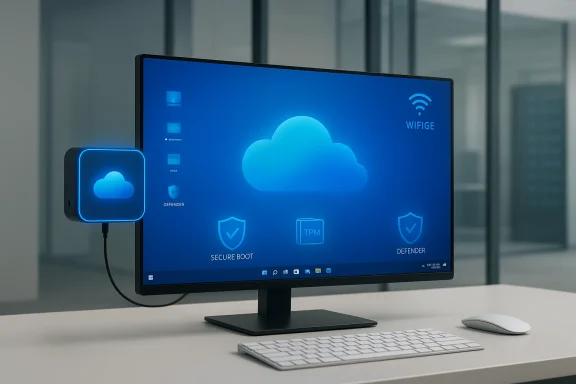
The Windows 365 Link announcement—first shown at Microsoft Ignite and documented in Microsoft’s Windows IT Pro blog—introduces Microsoft’s first Cloud PC device: a compact, fanless mini‑PC that boots a curated, hardened OS whose only role is to connect users to their Windows 365 Cloud PC in seconds. Microsoft positions Link as a secure, easy‑to‑deploy endpoint for desk‑based and frontline workers in shared or hot‑desking environments, priced at $349 with general availability beginning April 2025 for selected markets.
That pitch — a minimal local device that streams a full Windows desktop from the cloud — reads like a direct heir to the classic mainframe/terminal relationship. But Link isn’t a literal step backwards: it combines thin‑client simplicity with modern hardware features (dual‑4K display support, Wi‑Fi 6E, Bluetooth 5.3, local video processing for Teams) and Microsoft’s modern identity and management stack (Microsoft Entra ID, Microsoft Intune, secure boot, TPM, Defender). The result is a deliberately opinionated endpoint that trades local flexibility for predictable security, manageability, and sustainability claims.
For device makers, this is both an opportunity and a challenge: the market for standardized, low‑cost endpoints could grow, but the profit margin and differentiation playbook change when hardware is sold as an accessory to a subscription service rather than a standalone product. For software vendors that integrate at the OS or driver level, Link’s locked‑down model presents a technical and business adjustment.
If Microsoft and OEM partners deliver Cloud PC devices at scale, the industry could bifurcate into two distinct endpoint classes: rich, locally capable machines for creatives and developers, and standardized Cloud PC endpoints for most knowledge work. The resilience story will hinge on hybrid architectures that mix local offline capability with cloud sessions, and on robust network architectures that prioritize low latency and failover.
That said, the choice to standardize on Cloud PCs and Link should be approached pragmatically. The model amplifies the benefits of centralization but also centralizes failure modes: network, subscription economics, and cloud availability become critical risk vectors. Organizations that evaluate Link should do so as part of a broader endpoint and networking strategy, pilot thoroughly, and map real user workflows to the Cloud PC experience before committing to large‑scale rollouts.
Windows 365 Link is neither a panacea nor a fad. It is a calculated reintroduction of terminal‑style computing for an era when identity, cloud scale, and managed security are top priorities — and for organizations that can shoulder the networking and subscription trade‑offs, it may well be the simplest way to make Windows desks both safer and easier to manage.
Source: TechPowerUp Microsoft Brings Back the Dumb Terminal with Windows 365 Cloud PCs | TechPowerUp}
 Background
The Windows 365 Link announcement—first shown at Microsoft Ignite and documented in Microsoft’s Windows IT Pro blog—introduces Microsoft’s first Cloud PC device: a compact, fanless mini‑PC that boots a curated, hardened OS whose only role is to connect users to their Windows 365 Cloud PC in seconds. Microsoft positions Link as a secure, easy‑to‑deploy endpoint for desk‑based and frontline workers in shared or hot‑desking environments, priced at $349 with general availability beginning April 2025 for selected markets.That pitch — a minimal local device that streams a full Windows desktop from the cloud — reads like a direct heir to the classic mainframe/terminal relationship. But Link isn’t a literal step backwards: it combines thin‑client simplicity with modern hardware features (dual‑4K display support, Wi‑Fi 6E, Bluetooth 5.3, local video processing for Teams) and Microsoft’s modern identity and management stack (Microsoft Entra ID, Microsoft Intune, secure boot, TPM, Defender). The result is a deliberately opinionated endpoint that trades local flexibility for predictable security, manageability, and sustainability claims.
Overview: What Windows 365 Link actually is
A modern thin client — not a PC replacement for power users
- Physical form: A compact cube roughly 120 × 120 × 30 mm, fanless and designed to be mounted behind a monitor or carried as a workplace appliance.
- Purpose: Runs a locked-down, minimal Windows-based OS that does not host user apps or persistent data locally; its purpose is to authenticate the user and connect to a Cloud PC instance hosted by Windows 365.
- Connectivity & I/O: Multiple USB ports (3× USB‑A 3.2 + 1× USB‑C 3.2), DisplayPort and HDMI for dual‑4K monitor setups, Gigabit Ethernet, Wi‑Fi 6E, Bluetooth 5.3, and a 3.5mm audio jack.
- Local resources: Sufficient local processing to accelerate video decode/encode for conferencing and to provide a snappy UI while the Cloud PC loads. Microsoft has described the internals as modest but purpose‑built for this gateway role.
Where it fits in Microsoft’s cloud desktop strategy
Windows 365 already offers Cloud PCs as a subscription service that presents a persistent Windows session streamed from Azure. Link is the first hardware endpoint purpose‑built for that service, explicitly designed to bring Cloud PCs into fleet deployments with minimal configuration overhead for IT. Microsoft frames Link as the gateway that makes Windows 365 tangible for enterprise purchasing, security, and sustainability programs.Why Microsoft is reviving the dumb‑terminal idea now
Centralized management and security at scale
After years of decentralized endpoints, organizations are again prioritizing central control of images, data residency, and security posture. Cloud PCs let IT centralize the compute plane while keeping the user interface distributed. The Link device tightens that model: it removes local storage and admin rights, enforces strong hardware‑backed security measures (Secure Boot, TPM, Hypervisor Code Integrity, BitLocker, Defender sensor), and simplifies lifecycle management through Intune. For security‑minded enterprises, that matters.Predictable user experiences in shared and frontline scenarios
Hot‑desking, contact centers, retail checkout, and frontline mobile work are hard to serve with traditional managed PCs. By combining an instantly bootable endpoint with a persistent Cloud PC session, Microsoft argues organizations can reduce downtime and device provisioning complexity. Microsoft says pilot customers reported quick sign‑in and handoff experiences that work well for rotating staff.Economics and lifecycle thinking
Microsoft and its OEM partners are pitching the Link model as simpler for procurement — buy hardware as a standard endpoint, subscribe to Cloud PCs, and keep all user data and apps in Azure. Microsoft’s sustainability claims — high recycled‑material content, Energy Star certification, and the lack of moving parts — are part of the argument that centralized compute reduces environmental impact from device churn. Those claims may appeal to sustainability-minded procurement teams.Technical and operational specifics IT teams care about
Deployment and prerequisites
- Windows 365 subscription (Enterprise, Frontline, or Business editions supported).
- Microsoft Intune for device enrollment and policy management.
- Microsoft Entra ID for identity and sign‑in; passwordless options including passkey/QR and Authenticator are supported.
- Network connectivity sufficient for low‑latency, high‑bandwidth streaming sessions.
Performance profile and peripherals
- Link supports dual 4K monitors and offloads video processing for conferencing locally, which reduces bandwidth and cloud compute needs for video tasks.
- USB port variety and wireless connectivity means standard peripherals (headsets, cameras, keyboards, mice) work, but Microsoft explicitly says Link does not support docks — an important limitation for complex multi‑display or peripheral heavy setups.
Security and compliance
- Built‑in security features are enforced and cannot be disabled. That includes Secure Boot, TPM, Hypervisor Code Integrity, and Defender sensors.
- No local admin accounts or app stores; local data is avoided, reducing the attack surface and simplifying compliance for data residency and governance.
Cross‑checking the claims: what independent reporting confirms
Multiple independent outlets corroborate the core claims and specifications Microsoft published.- The Verge’s hands‑on coverage highlights the $349 price, fanless cube design, port layout, and Microsoft’s intent to keep the local OS minimal while streaming Windows from the cloud.
- Ars Technica frames the device squarely in historical context — calling it a thin client — and confirms the April 2025 GA timing, port lineup, and the device’s role as a Cloud PC gateway.
- Deployment and GA updates from third‑party enterprise outlets (Thurrott, Petri) track Microsoft’s preview timelines and reseller availability. Those outlets also underscore Intune integration and the preview’s geographic availability list.
Strategic strengths: where Link will likely shine
- Security posture: The removed local data footprint, locked‑down OS, and mandatory hardware‑backed protections make Link attractive in regulated environments and high‑security deployments where data leakage risk is a major concern.
- Manageability: Intune‑driven provisioning, auto‑updates, and standardized SKUs reduce desktop lifecycle management complexity and enable turnkey swap/replacement workflows.
- Predictability for frontline workflows: For shift‑based workers, retail kiosks, or sanitized shared workspaces, Link plus Cloud PCs enables immediate handoff without a device‑level context switch.
- Lower local maintenance: Fanless design, few moving parts, and an endpoint that isn’t hosting apps lowers on‑site break/fix overhead. Microsoft’s sustainability pitch also supports longer usage cycles.
- Ecosystem path: Microsoft has indicated Link is the first of several Cloud PC device form factors, and OEM partners are developing similar endpoints — a sign that this could normalize into a device category ment.
Risks and limitations: the case against a wholesale move
1) Network dependence and user experience variability
Moving compute to the cloud centralizes complexity: network outages, congestion, or high latency will directly degrade user experience. While Link offloads local video processing to avoid some session traffic, the core desktop remains a streamed session. Organizations must invest in WAN engineering, local ISPs, and contingency planning; otherwise, productivity is at risk. Independent coverage warns that thin client experiences depend heavily on network quality.2) Subscription economics and lock‑in
A $349 endpoint is only one line on the expense sheet. A Windows 365 Cloud PC subscription is an ongoing cost per user; for many long‑tenured knowledge workers, the total cost of ownership may exceed a traditional PC over time. Additionally, once an organization standardizes on the Microsoft cloud desktop model, migration costs and procedural lock‑in can be significant. These are classic trade‑offs that require careful financial modeling.3) Offline and emergency use
Link is, by design, nearly useless offline. There is no local app stack to continue critical tasks if a cloud session drops and cannot be resumed. For certain roles (field engineers, lab work with intermittent connectivity), this is a non‑starter. Microsoft’s materials make that trade explicit; independent reporting echoes that limitation.4) Peripherals and specialized hardware
Link supports common peripherals, but it does not support docks and won’t match the flexibility of a full Windows workstation for specialized devices (PCIe c instrument drivers, and bespoke hardware). Organizations should validate peripheral compatibility with Windows 365 and test use cases thoroughly.5) Privacy questions and telemetry
Centralized sessions simplify data governance but concentrate telemetry and control with Microsoft and the organization. Some compliance frameworks may prefer on‑prem solutions or require specific audit controls that need to be mapped to Windows 365 and Link behaviors. Independent reporting on the desktop virtualization market highlights these governance trade‑offs; organizations should conduct legal and compliance reviews before mass adoption.How to evaluate Link for your organization: a practical checklist
- Define the target user profiles: frontline rotation? Office knowledge workers? Creative professionals who need local GPU horsepower?
- Measure current network performance at endpoints and test realistic streaming scenarios (e.g., Teams calls + dual 4K content). Stress test during peak hours.
- Calculate TCO including Windows 365 per‑user subscription, Link device cost, Azure compute sizing, and networking. Compare against traditional PC refresh cycles.
- Pilot with a controlled group—use the Intune preview and the Windows 365 management telemetry to collect user experience, login times, and support tickets.
- Validate peripherals and any niche hardware drivers against Windows 365 session support. Flag use cases that require local compute or on‑device hardware access.
- Map compliance controls and audit trails to Windows 365 logging, Defender telemetry, and Intune policies; involve legal and security operations early.
What this means for the broader endpoint market
Microsoft’s Link is a clear signal: cloud desktops are no longer just a software or Azure story — they’re now a full device category. The thin client market has existed for years, but Link blends mainstream Windows UX expectations with modern security and identity features that enterprise buyers understand. Expect OEMs to expand their offerings and large integrators to package Cloud PC + device + networking as turnkey services. Early signs already show partners building Cloud PC–oriented hardware and solutions.For device makers, this is both an opportunity and a challenge: the market for standardized, low‑cost endpoints could grow, but the profit margin and differentiation playbook change when hardware is sold as an accessory to a subscription service rather than a standalone product. For software vendors that integrate at the OS or driver level, Link’s locked‑down model presents a technical and business adjustment.
Longer‑term implications: AI, hybrid compute, and resilience
Microsoft and industry press have already started to map Cloud PCs onto emerging AI PC patterns. Microsoft is advancing Cloud PC types that include AI‑enabled Cloud PCs — instances designed to deliver Windows experiences with on‑cloud AI acceleration — and is positioning Cloud PCs as a conduit to run AI features for users regardless of the local endpoint’s compute capability. That makes the endpoint a thin but crucial portal to AI services; organizations will need to consider compute locality, data residency, and accelerator availability when adopting these features.If Microsoft and OEM partners deliver Cloud PC devices at scale, the industry could bifurcate into two distinct endpoint classes: rich, locally capable machines for creatives and developers, and standardized Cloud PC endpoints for most knowledge work. The resilience story will hinge on hybrid architectures that mix local offline capability with cloud sessions, and on robust network architectures that prioritize low latency and failover.
Final analysis: novelty vs. continuity
Microsoft’s Windows 365 Link is notable not because it invents a brand‑new technical pattern, but because it repackages a proven one — centralized compute with thin endpoints — using modern security, identity, and management assumptions that enterprises recognize. The dumb terminal label is catchy, but Link is a highly opinionated, security‑first thin client that addresses many contemporary pain points: provisioning, data leakage, sustainability, and consistent UX across shared workspaces.That said, the choice to standardize on Cloud PCs and Link should be approached pragmatically. The model amplifies the benefits of centralization but also centralizes failure modes: network, subscription economics, and cloud availability become critical risk vectors. Organizations that evaluate Link should do so as part of a broader endpoint and networking strategy, pilot thoroughly, and map real user workflows to the Cloud PC experience before committing to large‑scale rollouts.
Windows 365 Link is neither a panacea nor a fad. It is a calculated reintroduction of terminal‑style computing for an era when identity, cloud scale, and managed security are top priorities — and for organizations that can shoulder the networking and subscription trade‑offs, it may well be the simplest way to make Windows desks both safer and easier to manage.
Source: TechPowerUp Microsoft Brings Back the Dumb Terminal with Windows 365 Cloud PCs | TechPowerUp}
