Microsoft’s cloud‑first desktop strategy just moved from experiment to product category this week as ASUS and Dell announced purpose‑built endpoints for Windows 365 — the compact ASUS NUC 16 for Windows 365 and the Dell Pro Desktop for Windows 365 — devices designed to boot straight into Cloud PCs, simplify endpoint management for IT, and target scenarios like hot‑desking, contact centers and frontline work.
The idea behind Cloud PCs is simple: decouple the personalized Windows desktop (OS, apps, data, settings) from local hardware and host it in the cloud, streaming the experience to a lightweight endpoint. Microsoft first pushed this vision with Windows 365 and the Windows 365 Link mini‑PC, then broadened the concept by inviting OEMs to build dedicated hardware that ships and boots directly into a Windows 365 Cloud PC session. The most recent announcements bring ASUS and Dell into that OEM fold with devices explicitly engineered as Windows 365 endpoints.
That shift is significant because it reframes the endpoint not as a general‑purpose PC but as a hardened, manageable gateway to a cloud‑hosted user environment. Vendors describe the new machines as compact, mountable, and locked‑down—optimized for enterprise rollouts where centralized management, data protection, and predictable lifecycle costs matter.
If the category succeeds, the long‑term implications are substantial: procurement models will shift toward subscription and managed services, endpoint diversity will increase with specialized “cloud gateways,” and the role of local PC images will shrink. But the fundamental constraints—network quality, application compatibility, and cost discipline—will continue to determine how broadly the Cloud PC model can scale.
For IT leaders, the path forward is clear: run precise pilots mapped to user personas, enforce identity‑first security, model TCO across three years, and insist on vendor transparency around Azure regions, SLAs and peripheral support. The Cloud PC endpoint era is arriving, but success will favor those who pair the new hardware and cloud services with disciplined operational rigor.
Source: iHeart WW 973: Bob's Rumor Store - ASUS & Dell Unveil Windows 365 Cloud PC Devices - Windows Weekly (Audio) | iHeart
 Background / Overview
The idea behind Cloud PCs is simple: decouple the personalized Windows desktop (OS, apps, data, settings) from local hardware and host it in the cloud, streaming the experience to a lightweight endpoint. Microsoft first pushed this vision with Windows 365 and the Windows 365 Link mini‑PC, then broadened the concept by inviting OEMs to build dedicated hardware that ships and boots directly into a Windows 365 Cloud PC session. The most recent announcements bring ASUS and Dell into that OEM fold with devices explicitly engineered as Windows 365 endpoints.That shift is significant because it reframes the endpoint not as a general‑purpose PC but as a hardened, manageable gateway to a cloud‑hosted user environment. Vendors describe the new machines as compact, mountable, and locked‑down—optimized for enterprise rollouts where centralized management, data protection, and predictable lifecycle costs matter.
What exactly was announced?
The devices and their positioning
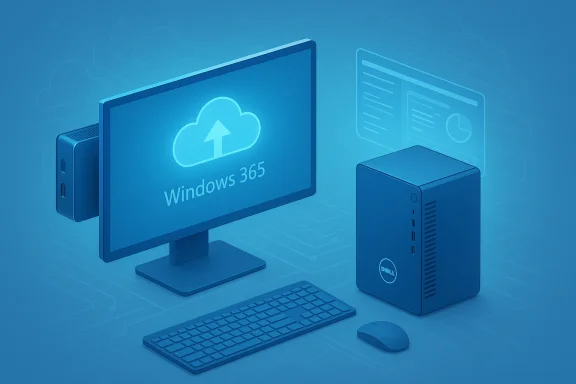
- ASUS NUC 16 for Windows 365: A small form‑factor mini PC purpose‑built to act as a Cloud PC endpoint. Designed for mounting behind monitors or under desks, it prioritizes simplicity and enterprise deployment.
- Dell Pro Desktop for Windows 365: Dell’s compact desktop sibling in the category, also tuned to boot directly into Windows 365 and integrate with enterprise management tooling.
- Hot‑desking and shared workstations
- Contact centers and kiosks
- Frontline and retail workers
- Education labs and other centrally managed deployments
Timeline and availability
Multiple briefing notes indicate the OEM devices are slated for broader enterprise availability in the third quarter of 2026, expanding a product family that began with Microsoft’s 2024/2025 Windows 365 Link rollout and early pilot programs. This timeframe positions the OEM devices as the next phase in the Windows 365 product roadmap rather than a surprise mid‑cycle refresh.Why this matters: benefits and strategic intent
The move from a single vendor device to a multi‑OEM category is more than semantics. It unlocks several concrete advantages for enterprise IT:- Simpler provisioning and lifecycle: IT can ship a uniform endpoint image that boots users into a centrally managed Cloud PC, cutting down device setup time, imaging complexity, and on‑prem asset sprawl.
- Tighter security posture: By keeping apps and data in the cloud and minimizing local attack surface, organizations can reduce endpoint risk and apply centralized policy via Intune, Entra ID and conditional access.
- Predictable, per‑user desktop model: Windows 365 is per‑user and subscription based; having hardware tailored to that model simplifies procurement and capacity planning for certain classes of employees.
- Operational scale for frontline and shared workplaces: Decentralized IT teams gain the ability to replace and redeploy compromised or lost endpoints quickly without user data loss, since state is cloud‑hosted.
Technical implications and integration points
Deploying purpose‑built Windows 365 endpoints touches many layers of an enterprise stack. Key technical implications include:- Identity and access: These endpoints are designed to pair tightly with Microsoft Entra ID (Azure AD) and Intune for enrollment, authentication, and policy enforcement. Expect conditional access, MFA, and device attestation to be central to secure deployments.
- Network demands: A streamed desktop experience requires consistent bandwidth and low latency. IT must plan Azure region selection, VPN/SD‑WAN routing and WAN resilience to meet service‑level expectations for interactive apps.
- Peripheral and hardware support: Thin‑client style endpoints traditionally struggle with specialized peripherals (barcode scanners, industry‑specific interfaces, GPU‑accelerated workloads). Organizations must validate device compatibility for USB, serial, and display setups before large rollouts.
- Management plane: These OEM devices will be designed to integrate with Intune and Microsoft Endpoint Manager to enable zero‑touch provisioning, remote wipe, and monitoring—shifting much of endpoint life cycle into the cloud management plane.
The strengths: where Cloud PC endpoints shine
- Centralized control and policy enforcement
- With everything running in Azure, IT can apply security controls, DLP, and monitoring without relying on heterogeneous local images. This reduces variation and helps compliance programs.
- Fast provisioning and simplified lifecycle
- Replacing a physical endpoint no longer requires reimaging; users sign in and their Cloud PC is ready. That matters for contact centers, shift workers, and labs.
- Reduced local risk
- Local data sprawl and the local attack surface shrink when apps and data remain in Azure. For regulated environments where data residency and RTB (record‑to‑bank) controls matter, this is a clear win—provided cloud resources are correctly configured.
- OEM diversity and procurement flexibility
- OEM endpoints from ASUS and Dell lower single‑vendor risk and provide procurement options for organizations already standardized on those vendors.
The risks and blind spots IT must evaluate
No emerging architecture is risk‑free. Organizations should evaluate these potential pitfalls before committing to a Windows 365 endpoint strategy.- Network dependency and user experience: A cloud‑hosted desktop can become unusable during network outages or high latency. For knowledge workers in metropolitan offices this may be manageable, but for remote or bandwidth‑constrained environments, the UX risk is real. Conducting a network readiness assessment is mandatory.
- Total cost of ownership (TCO) complexity: Subscription pricing for Cloud PC compute, storage, and licensing can be less predictable than local hardware refresh cycles. The per‑user cost model must be modeled against on‑prem hardware depreciation and support budgets. Expect finance teams to require pilot data to validate ROI.
- Vendor lock‑in and procurement implications: Organizations that move heavily into OEM‑branded Cloud PC devices and Windows 365 may find it harder to shift strategy later without migration costs. Avoid deep coupling in management tooling to keep options open.
- Peripheral and specialized workload fit: GPU‑heavy tasks, specialized hardware integration, or offline workflows may still require traditional PCs. Don’t assume one endpoint model fits every user persona. Pilot diverse roles to find the right mapping.
- Regulatory and data residency concerns: Even when data is centralized in Azure, regulatory controls — data locality, cross‑border access, and auditability — may complicate adoption for highly regulated industries. Validate Azure region coverage and contractual commitments for sensitive workloads.
- Security misconfiguration risk: A surface reduction does not eliminate risk. Misconfigured cloud resources, weak identity controls, or poor monitoring can make Cloud PC deployments as vulnerable as traditional setups. Robust identity‑first security and continuous monitoring are non‑negotiable.
Practical guidance for IT teams: how to pilot Windows 365 OEM endpoints
Below is a recommended, sequenced pilot approach for organizations contemplating a Windows 365 endpoint program.- Define user personas and workload profiles.
- Map users to task, knowledge, and creative/GPU categories. Prioritize shared and frontline scenarios first.
- Run a network readiness assessment.
- Measure bandwidth, jitter, packet loss, and latencies to relevant Azure regions. Validate performance thresholds for interactive apps.
- Choose a small, representative pilot group.
- Start with 20–50 users across two or three high‑value use cases (e.g., contact center agents, retail sales terminals, hot‑desk staff).
- Configure identity and conditional access.
- Enforce MFA, device compliance via Intune, and session controls. Audit login flows and adaptive access triggers.
- Validate peripherals and workflows.
- Test barcode scanners, label printers, VOIP headsets, and any specialized peripherals. Capture failure modes early.
- Measure user experience and economics.
- Use UX metrics (time to interact, app responsiveness), helpdesk ticketing, and a TCO model that includes Azure compute/storage and software licensing. Compare against baseline local PC costs.
- Iterate, document, and expand.
- Lock on a deployment template, build automation for provisioning with Intune and Endpoint Manager, and expand by persona only when KPIs are met.
Security posture: what changes and what remains the same
Adopting Cloud PC endpoints changes where the hard security work happens but does not remove the need for mature security controls.- Shift left on identity: Because access to the Cloud PC is identity‑driven, Entra ID controls and conditional access policies become the first line of defense. Conditional access policies must be granular and continuously tuned.
- Cloud native protections: Use Azure AD logs, Defender for Cloud Apps, and endpoint telemetry to monitor sessions and enforce DLP and egress controls. The cloud offers richer event capture if configured correctly.
- Endpoint attestation: OEM devices designed for Windows 365 should offer attestation capabilities and secure boot paths to reduce tampering risk. Confirm OEM firmware and supply‑chain security practices during procurement.
- Residual threats: Local hardware theft or physical sabotage still presents continuity risks (loss of network access, kiosk tampering). Plan for redundancy, remote lockdown, and replacement workflows.
Business strategy: what this means for OEMs, Microsoft, and the market
The OEM push reshapes vendor dynamics:- Microsoft: Moving Windows 365 from software service to an ecosystem supported by OEM endpoints increases control over the end‑to‑end experience and helps drive Azure consumption. It also reduces friction for customers who want a turnkey Cloud PC option.
- ASUS and Dell: OEMs gain a new SKU category and tie their hardware lifecycle to recurring service consumption, potentially unlocking new revenue streams through managed device programs and bundled services.
- Enterprise buyers: Organizations get more choice and clearer procurement pathways for a Cloud PC strategy. However, they must now weigh vendor ecosystems, pricing models, and integration risk across multiple partners.
Use cases that make sense — and those that don’t
Best fits:- Contact centers and kiosks that prioritize fast recovery and consistent user images.
- Frontline workers who use browser‑based or line‑of‑business apps and benefit from centralized control.
- Education and labs where rapid re‑provisioning reduces admin overhead.
- Creative professionals and engineers requiring local GPU rendering or high I/O storage.
- Remote users with intermittent or low bandwidth connections.
- Highly unique hardware integrations or legacy apps that require local drivers not supported by Cloud PC peripherals.
Cost modeling: posture and pitfalls
Cloud PC economics replace some capital expenses with operational expenses, but the tradeoffs are nuanced:- Consider these cost drivers:
- Azure compute and storage for Cloud PC instances
- Windows and application licensing
- Network infrastructure upgrades and egress charges in some designs
- OEM endpoint purchase and potential managed service fees
- Watch for hidden costs:
- Higher Azure consumption when users require larger instance sizes
- Increased support load during pilot phases
- Dual running costs during migration windows
Questions procurement should ask OEMs and Microsoft
- What Azure regions and resource SKUs will you use for my tenant? How will you guarantee latency thresholds for interactive sessions?
- Which Intune policies and device‑attestation features are preconfigured on the OEM device?
- How will firmware and supply‑chain security be validated during procurement and service life?
- What peripheral devices and drivers are supported out of the box, and how will exceptions be handled?
- Can you provide pilot metrics demonstrating UX, helpdesk impact, and TCO across a comparable enterprise?
The bigger picture: a slow but steady migration to subscription desktops
OEM support signals the move from piloting Cloud PCs toward mainstream enterprise options. Expect a phased adoption pattern: frontline and shared scenarios first, knowledge workers in later stages, and creative/GPU workloads remaining on purpose‑built machines for the foreseeable future. This pragmatic, persona‑based approach reduces risk while enabling IT to capture the management and security benefits of cloud‑hosted desktops.If the category succeeds, the long‑term implications are substantial: procurement models will shift toward subscription and managed services, endpoint diversity will increase with specialized “cloud gateways,” and the role of local PC images will shrink. But the fundamental constraints—network quality, application compatibility, and cost discipline—will continue to determine how broadly the Cloud PC model can scale.
Conclusion
ASUS and Dell stepping into Windows 365 endpoints transforms what was once an intriguing Microsoft experiment into a tangible, multi‑vendor product category. The ASUS NUC 16 and Dell Pro Desktop for Windows 365 crystallize an operational model where the desktop is a cloud service and the endpoint is a managed gateway—simplifying lifecycle management, tightening security posture, and offering clear benefits for frontline and shared‑work scenarios. At the same time, adoption demands careful, methodical planning: pilot performance, network readiness, cost modeling, identity controls and peripheral compatibility are non‑negotiable prerequisites.For IT leaders, the path forward is clear: run precise pilots mapped to user personas, enforce identity‑first security, model TCO across three years, and insist on vendor transparency around Azure regions, SLAs and peripheral support. The Cloud PC endpoint era is arriving, but success will favor those who pair the new hardware and cloud services with disciplined operational rigor.
Source: iHeart WW 973: Bob's Rumor Store - ASUS & Dell Unveil Windows 365 Cloud PC Devices - Windows Weekly (Audio) | iHeart