

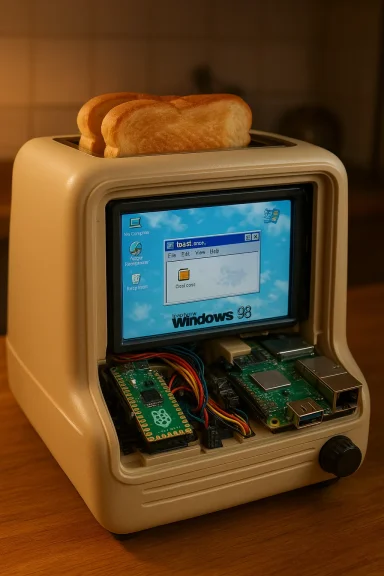
It is a bizarre, unapologetically delightful piece of maker theatre: someone has put a retro Windows 98 desktop inside a consumer smart toaster and wired the toaster’s controls to a pair of Raspberry Pi boards so you can launch a program called toast.exe and, in effect, make breakfast from a 1990s desktop.
For anyone who remembers the late-80s/90s PC era, the image lands immediately: winged toasters from the After Dark “Flying Toasters” screensaver and the tactile drama of clicking through an era of chunky beige hardware. The recent build by YouTuber Throaty Mumbo — filmed and narrated in a long-form video walkthrough of the hack — leans into that nostalgia while also doing the thing modern makers love: combining reverse engineering, embedded control, and a little bit of theatrical whimsy.
At its core the project does two things. First, it intercepts and replaces the factory control electronics inside a modern smart toaster so an enthusiast can programmatically control heating, tray motions, and status feedback. Second, it places a functioning retro desktop — Windows 98 — on a visible display, packaged in a 3D‑printed beige housing, with a click-to-start toast.exe GUI that gives you manual control over the toasting sequence. The result looks like a late‑90s PC married to a kitchen appliance.
This is both a nostalgia play and a practical hardware teardown. It’s also an instructive example of how modern single‑board computers and microcontrollers are used to bridge the gap between old software and new hardware.
More importantly, it illustrates two trends that define contemporary tinkering:
In this build, the maker observed regular packets being transmitted on the bus — reported as approximately every 30 milliseconds — that carried commands and status updates for heating levels, tray motion, and the on‑screen UI. That cadence is plausible for a microcontroller-driven device that needs to remain responsive to user touches and safety interlocks; however, precise timing and packet structure are specific to the model and are the kinds of claims that are best treated as "reported by the builder" unless you replicate the sniff yourself.
Key takeaway: use a logic analyzer. Whether you’re building for fun or research, non-invasive observation of the device’s communications is the safest first step.
Why a microcontroller? Because the Pico is tiny, reliable for real‑time I/O, inexpensive, and well‑documented. It’s not a full PC — it’s intended for deterministic control tasks, which makes it ideal for interrupting and emulating a toaster’s control bus.
Important technical point: the Raspberry Pi 5 is ARM-based (Broadcom BCM2712 with Cortex‑A76 cores on modern models) and cannot natively run x86 Windows 98. To present a genuine Windows 98 desktop you must use emulation or virtualization, or choose a Windows‑like skin. The project’s visible Windows 98 desktop therefore relies on emulation or a similar trick (for example, QEMU or another x86 emulator running on the Pi 5) or — alternately — a themed skin on a Linux desktop. The Pi 5 is capable enough as a desktop-class ARM board — with dual 4K HDMI outputs, NVMe and USB 3 connectivity, and multiple RAM options — that it can plausibly host an emulated Windows 9x session for demonstration, albeit with performance trade-offs.
In short: the Pi 5 plays the part of the “PC” in this narrative, but running legacy x86 software on ARM requires translation (emulation) and that has performance costs.
The name toast.exe is not arbitrary: in Windows driver and sample documentation, “toast.exe” appears as a canonical example for a hypothetical toaster device in Microsoft’s own driver sample materials. Using that filename is an inside joke that links driver dev culture to this hack.
At the same time, this project highlights the boundaries between playful prototyping and safe, certified consumer product design. Replacing or emulating appliance control systems carries electrical and hygiene risk. Running legacy software via emulation can introduce latency and make device behavior feel sluggish. And if you plan to distribute code or images, be mindful of licensing and intellectual property around operating system assets and artwork.
If you appreciate maker culture, the toaster is an excellent case study: it’s equal parts reverse engineering tutorial and art project. If you want to reproduce it, prepare for a meaningful engineering effort and prioritize safety: leave the toaster plugged into the mains only under supervised, experimental conditions and use appropriate insulation, food‑safe materials, and software safeguards.
Source: Windows Central Windows 98 toaster project blends retro computing with breakfast
 Background / Overview
For anyone who remembers the late-80s/90s PC era, the image lands immediately: winged toasters from the After Dark “Flying Toasters” screensaver and the tactile drama of clicking through an era of chunky beige hardware. The recent build by YouTuber Throaty Mumbo — filmed and narrated in a long-form video walkthrough of the hack — leans into that nostalgia while also doing the thing modern makers love: combining reverse engineering, embedded control, and a little bit of theatrical whimsy.At its core the project does two things. First, it intercepts and replaces the factory control electronics inside a modern smart toaster so an enthusiast can programmatically control heating, tray motions, and status feedback. Second, it places a functioning retro desktop — Windows 98 — on a visible display, packaged in a 3D‑printed beige housing, with a click-to-start toast.exe GUI that gives you manual control over the toasting sequence. The result looks like a late‑90s PC married to a kitchen appliance.
This is both a nostalgia play and a practical hardware teardown. It’s also an instructive example of how modern single‑board computers and microcontrollers are used to bridge the gap between old software and new hardware.
Why this matters: nostalgia, maker culture, and the absurd
The story resonates at several levels. On the surface it’s humorous: Windows 98 (an OS long past end-of-life) “running” on a toaster makes for an instantly shareable image. For the maker community, it’s a tidy example of practical skills — soldering, logic analysis, protocol sniffing, embedded programming, 3D printing, and UI work — combined into a single finished object.More importantly, it illustrates two trends that define contemporary tinkering:
- Vintage computing lives on. Old operating systems and aesthetic cues are repurposed into modern projects because they provide a strong cultural hook and a clearly defined set of constraints.
- Modern controllers make appliances malleable. Consumer devices increasingly use microcontrollers and digital control packets rather than simple mains timers. That means a maker can sniff and emulate the communication between a touchscreen and a control board, and take over appliance functions without completely rebuilding the whole product.
The technical anatomy: what Throaty Mumbo did, step by step
Reverse engineering the toaster control bus
Mumbo’s first step was diagnostic: attach a logic analyzer and watch the data flowing between the toaster’s touchscreen and its control board. Modern “smart” toasters typically do not use simple analog thermostats; instead they communicate over an internal serial-like protocol to coordinate heating elements, motorized trays, and the user interface.In this build, the maker observed regular packets being transmitted on the bus — reported as approximately every 30 milliseconds — that carried commands and status updates for heating levels, tray motion, and the on‑screen UI. That cadence is plausible for a microcontroller-driven device that needs to remain responsive to user touches and safety interlocks; however, precise timing and packet structure are specific to the model and are the kinds of claims that are best treated as "reported by the builder" unless you replicate the sniff yourself.
Key takeaway: use a logic analyzer. Whether you’re building for fun or research, non-invasive observation of the device’s communications is the safest first step.
Taking over the control plane with an RP2040 (Raspberry Pi Pico)
After recording the protocol, Mumbo used a Raspberry Pi Pico (RP2040) to emulate the toaster’s control board. The RP2040 is purposely designed for embedded tasks: dual-core Arm Cortex‑M0+ running up to 133 MHz, a modest amount of SRAM and a programmable I/O (PIO) subsystem ideal for reimplementing custom serial-like interfaces. Using a Pico to replace or sit between the touchscreen and the original control board is a standard embedded‑engineering move: unit can consume packets, modify or inject commands, and present safe control hooks to an external computer.Why a microcontroller? Because the Pico is tiny, reliable for real‑time I/O, inexpensive, and well‑documented. It’s not a full PC — it’s intended for deterministic control tasks, which makes it ideal for interrupting and emulating a toaster’s control bus.
Putting Windows 98 on the display — and where the Raspberry Pi 5 fits in
Running Windows 98 in the toaster’s housing is purely an aesthetic and user‑interaction choice. The toaster’s original hardware could never run a decades-old x86 operating system: modern appliance microcontrollers are not x86 CPUs and typically lack the memory and peripheral set required. Mumbo therefore used a secondary, more powerful single-board computer — a Raspberry Pi 5 — as the functional “PC” inside the toaster.Important technical point: the Raspberry Pi 5 is ARM-based (Broadcom BCM2712 with Cortex‑A76 cores on modern models) and cannot natively run x86 Windows 98. To present a genuine Windows 98 desktop you must use emulation or virtualization, or choose a Windows‑like skin. The project’s visible Windows 98 desktop therefore relies on emulation or a similar trick (for example, QEMU or another x86 emulator running on the Pi 5) or — alternately — a themed skin on a Linux desktop. The Pi 5 is capable enough as a desktop-class ARM board — with dual 4K HDMI outputs, NVMe and USB 3 connectivity, and multiple RAM options — that it can plausibly host an emulated Windows 9x session for demonstration, albeit with performance trade-offs.
In short: the Pi 5 plays the part of the “PC” in this narrative, but running legacy x86 software on ARM requires translation (emulation) and that has performance costs.
The UI and toast.exe
To complete the theatrical conceit, Mumbo created a program called toast.exe that appears on the retro desktop. Double-click Start Toast, and the desktop UI maps to the toaster control functions, meaning you can set heating, move the tray, and run the toasting sequence from a 90s‑style GUI.The name toast.exe is not arbitrary: in Windows driver and sample documentation, “toast.exe” appears as a canonical example for a hypothetical toaster device in Microsoft’s own driver sample materials. Using that filename is an inside joke that links driver dev culture to this hack.
Cross‑checking the tech facts (quick verification)
- RP2040 / Raspberry Pi Pico: The RP2040 microcontroller used on the Pico is a dual‑core Arm Cortex‑M0+ device, clocked up to 133 MHz, with a small on‑chip SRAM pool and flexible I/O, including Programmable I/O blocks. That’s precisely the chip you want for deterministic peripheral emulation and is widely used in maker projects for this exact purpose.
- Raspberry Pi 5: The Pi 5 family is an ARM‑based single‑board computer using Broadcom silicon and modern performance characteristics (Cortex‑A76 cores, multiple RAM options, dual 4K capable video out, PCIe/USB 3 connectivity). It’s a capable device for desktop work in Linux, and it can host emulators like QEMU to run non‑native architectures — though emulation adds CPU and I/O cost.
- Windows 98 compatibility: Windows 98 is an x86 operating system and will not run natively on ARM hardware. Any instance of Windows 98 on an ARM‑based Pi requires some form of x86 emulation. That’s a practical reality, not a judgement about the project.
What this build does well
- Showcases practical reverse engineering. The project is a textbook example of how to safely observe and emulate a device’s internal protocol rather than brute-forcing or tearing out mains wiring blindly.
- Uses appropriate hardware. The split responsibilities mirror industry practice: microcontroller for deterministic control and an application-class single‑board computer for user experience and heavier tasks.
- Delivers a coherent UX. Creating a toast.exe GUI that maps desktop interactions to appliance functions is a clever way to make the hack usable and to reinforce the retro aesthetic.
- Educational value. For hobbyists, the build is instructive: logic analyzers, protocol capture, RP2040 programming, and a themed UI are concrete, transferable skills.
- Cultural resonance. Bringing the Flying Toasters-era imagery into a physical, functioning object taps into nostalgia while showing how old software aesthetics remain compelling for modern makers.
Real risks and practical cautions
No maker story is purely whimsical — altering household appliances introduces real safety and legal considerations.Electrical and fire safety
- Consumer toasters run on mains voltages and contain high-current heating elements. Replacing factory control logic or directly controlling heating without appropriate protections can lead to thermal runaway, component failure, or fire. Even if the control path is “only” a low-voltage signal bus, the result of a wrongly-sequenced command can energize unsafely.
- Tampering may void certifications (CE, UL, etc.). Once you alter a device, it's not covered by its original safety certificates and should not be used as an everyday appliance without rigorous testing.
- The builder’s approach of intercepting control packets and leaving safety feedback loop intact is safer than rewiring mains directly, but only if the emulator preserves all hardware safety interlocks and watchdogs. Treat any modified appliance as experimental and keep it supervised.
Food safety and hygiene
- Modding internal electronics can introduce contaminants into an appliance. Dismantling, 3D‑printing parts that come into contact with food, or adding non-food-grade plastics near the toast slots is an immediate hygiene concern. Makers should isolate electronics from food‑contact surfaces and use food‑safe materials for any parts that touch toast or crumbs.
Security concerns
- If the toaster gains network capabilities (for example, through the Pi 5), that opens the usual IoT attack surface: remote control, firmware tampering, or data leakage. A hacked toaster that is network-attached should follow the same security hygiene as any IoT device: minimal open services, network segmentation, and hardened credentials.
Reproducibility and legal concerns
- Recreating the project requires electronics skill and the right tools (logic analyzer, Pico, Pi 5, display, 3D‑printed enclosure). Not every reader will have these, and the build involves hazards that invalidate casual replication.
- There may be licensing issues with distributing unmodified Windows 98 binaries or certain graphics assets (e.g., trademarked logos or proprietary screensaver artwork). Using a themed skin or non‑infringing artwork is the safest path if you intend to share code or images.
The performance angle: why everything feels a bit slow
Multiple observers noted that the toasting sequence felt slower under the new control system. There are a few plausible technical reasons:- Safety buffering. When you place a software layer between the user interface and heating control, the maker may have intentionally slowed timers to preserve safe operation under emulation and testing.
- Emulation overhead. If Windows 98 runs under x86 emulation on an ARM board, UI responsiveness and any scripts that coordinate toasting could be slower than native desktop performance.
- Polling and packet cadence. The maker reported packet transmissions roughly every 30 ms; adding layers between the touchscreen and heating control (logic analyzer, Pico, Pi) can add latency if not carefully engineered for real‑time responsiveness.
Reproducibility: parts, tools, and skills you’ll need
If you’re inspired to try a similar build, here’s a high‑level checklist:- Tools:
- Logic analyzer capable of sniffing the toaster’s internal bus
- Multimeter and soldering station
- Small toolkit for appliance disassembly
- 3D printer (for custom bezels and retro housing)
- Electronics:
- Raspberry Pi Pico (RP2040) or similar microcontroller for real‑time control
- Raspberry Pi 5 or comparable single‑board computer for the desktop UI and heavier tasks
- Small HDMI or DSI display (7-inch or similar for the retro look)
- Wiring harnesses, connectors, and signal-level translators if needed
- Software:
- Microcontroller firmware to emulate the control board
- Linux desktop on the Pi 5, and an emulation layer (if you want to display an x86 Windows desktop)
- A custom GUI (toast.exe in the maker’s demo) to map desktop clicks to toaster commands
- Skills:
- Embedded programming (C, MicroPython, or similar)
- Reverse engineering serial protocols
- Basic mechanical and electrical safety for working with mains-powered appliances
Cultural and community implications
This project sits at the intersection of nostalgia, maker identity, and internet culture. It’s the kind of story that gets circulated because it’s delightful, a little dangerous, and deeply referential. There are a few larger cultural effects worth noting:- It celebrates hardware literacy. Projects like this demystify household devices and show that many “smart” products are not inscrutable — they are programmable and, with the right approach, interoperable.
- It pressures manufacturers — gently — to be more open about device internals and safe upgradeability. When makers can safely interface with appliances, creative reuse becomes possible; when companies lock everything down with proprietary buses and sealed casings, that creativity is curtailed.
- It is a reminder that legacy software still matters. Presenting Windows 98 as a UI is a nostalgic choice, but it also signals that cultural artifacts persist and can be recontextualized into new physical forms.
Final analysis: delightful, instructive, but don’t make this your daily toaster
Throaty Mumbo’s toaster-98 project is a high‑value cultural artifact in maker form: funny, technically competent, and instructive. It demonstrates good embedded engineering practice — sniff the bus, emulate the control logic with a microcontroller, and separate responsibilities between real‑time control and user interface functions. The aesthetic touches (3D‑printed beige case, Windows 98 desktop, toast.exe) are thoughtful and make the build shareable.At the same time, this project highlights the boundaries between playful prototyping and safe, certified consumer product design. Replacing or emulating appliance control systems carries electrical and hygiene risk. Running legacy software via emulation can introduce latency and make device behavior feel sluggish. And if you plan to distribute code or images, be mindful of licensing and intellectual property around operating system assets and artwork.
If you appreciate maker culture, the toaster is an excellent case study: it’s equal parts reverse engineering tutorial and art project. If you want to reproduce it, prepare for a meaningful engineering effort and prioritize safety: leave the toaster plugged into the mains only under supervised, experimental conditions and use appropriate insulation, food‑safe materials, and software safeguards.
Conclusion
The Windows 98 toaster is an object lesson in what happens when nostalgia, embedded engineering, and cheeky creativity collide. It’s not a practical appliance upgrade — it’s a demonstration of the kinds of fun and instructive projects the maker community can produce when modern microcontrollers and single‑board computers are put to work. The build is technically neat, culturally resonant, and a useful prompt: if you’re going to hack a toaster, do it with respect for electrical safety, food hygiene, and the real-world constraints of emulation. The result is a charming, slightly absurd sculpture that toasts bread and memory in equal measure.Source: Windows Central Windows 98 toaster project blends retro computing with breakfast
