

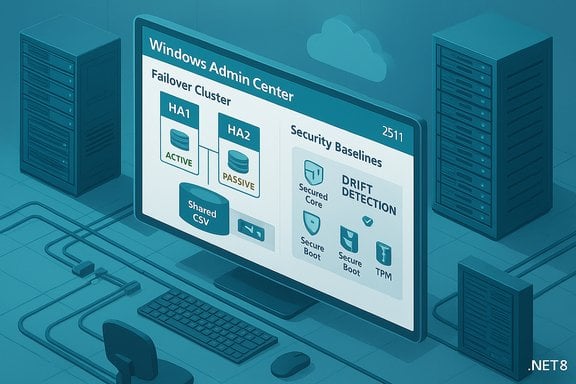
Windows Admin Center’s newest update lands with a big promise for enterprise administrators: the return of supported High Availability plus a broad set of fixes and tooling improvements in the 2511 wave, a release that Microsoft began rolling out in November 2025 and which carries important implications for on‑premises and hybrid datacenter teams.
Background
Windows Admin Center (WAC) has become the primary local management plane for Windows Server and hybrid Windows environments, evolving rapidly since the modernization of its gateway and backend architecture. The product’s recent modernization journey included a major backend migration away from legacy .NET Framework into a modernized gateway built on .NET 8, a move intended to improve performance, reduce latency, and enable a more secure, scalable foundation for the Admin Center ecosystem. That modernization created some transitional wrinkles—most notably, temporary breakage of the High Availability (HA) deployment path that many enterprises rely on for resilient management.On November 19, 2025, the Windows Admin Center team published a release update labeled version 2511 (initially announced as a public preview), describing targeted improvements to core extensions, the installer experience, and the security toolset, plus a roadmap item: HA support would be restored with the forthcoming 2511 general availability release. Administrators tracking the platform should treat public preview notes and general availability status as separate milestones—preview builds introduce features and changes for validation, while GA builds are the supported releases enterprises must use in production.
What’s new in Windows Admin Center 2511
Windows Admin Center 2511 focuses on three intertwined goals: restoring production readiness for enterprise deployment scenarios (including High Availability), refining the management experience for virtualized and secured workloads, and closing several reliability gaps introduced during the backend modernization.Installer and enterprise logging
One of the highest‑profile fixes in 2511 is the improved installer experience. The installer has been updated to:- Write installation events into the Windows Event Log, enabling centralized enterprise logging and easier compliance tracking.
- Offer more configurable options for gateway deployment, such as specifying network access settings and providing a fully qualified domain name (FQDN) for the gateway machine.
- Provide better telemetry and diagnostic output to help troubleshooting failed installs or upgrade attempts.
Backend modernization (.NET 8) and platform stability
The earlier gateway modernization—moving from .NET Framework 4.6.2 to a modernized .NET platform—was intended to deliver improved cryptography, HTTP/2 support, and microservice‑style reliability. 2511 continues to build on that foundation with stability and compatibility updates intended to reduce extension and tooling regressions that surfaced during the migration.Administrators should expect a more responsive UI and lower latency for common operations, but they should also validate any third‑party or custom WAC extensions in a test environment before upgrading production gateways. Extensions that relied on older runtime behavior may require updates to remain compatible.
Virtual Machines tool refinements
Virtual machine management within WAC received a focused refresh:- Improved import/export workflows with clearer destination dialogs and better file location handling.
- Enhanced host settings with more backend validation to prevent misconfiguration.
- An improved workflow for creating and configuring virtual switches, including basic network controller integration.
- Validation around affinity and rule settings to reduce configuration conflicts.
- Performance optimizations resulting in a faster VM list and more responsive UI with clearer error messages.
RDP (Remote Desktop) tool improvements
The Remote Desktop tool addressed two key pain points:- Expanded international keyboard support through improved detection heuristics and layout fallbacks, aiming to reduce mapping errors for global teams.
- A fix for loading stall issues that previously caused the RDP tool to hang during initialization.
Security tooling: baselines, secured‑core visibility and Windows LAPS
Security additions are one of the headline topics for 2511:- Security Baseline tool: Integration with OSConfig enables enforcement of Microsoft‑recommended and industry standards (CIS, DISA STIG, FIPS) and introduces drift detection and remediation capabilities.
- Silicon‑assisted security / Secured‑core visibility: New guidance and UI surfaces details for features such as Virtualization‑based Security (VBS), Secure Boot, and TPM 2.0—helping admins assess whether servers meet secured‑core recommendations.
- Windows LAPS integration: Bulk local administrator password resets and expiry tracking are now surfaced inside Admin Center, giving operators easier controls for rotating local credentials.
SDN and other extensions
The Software‑Defined Networking (SDN) extension saw targeted updates—most notably X.509 client authentication support required by some Azure Local configurations and additional deployment options for specifying OU paths for infrastructure VMs. The Azure extension footprint continues to receive focused updates to improve Azure Local and Arc integration.High Availability: what’s back, what changed
High Availability for Windows Admin Center—deploying the gateway as a clustered, active‑passive service—has been a critical requirement for many organizations that need uninterrupted management access. The HA model for WAC remains an active‑passive failover cluster: only one node is active at a time and the service fails over to a passive node if the active one becomes unhealthy.Key operational points for HA in 2511:
- HA was not supported in the interim modernization releases (notably 2410), and Microsoft documented that HA installation support would be restored in the 2511 GA release.
- The community and documentation emphasize an installation and update path centered on the provided PowerShell install script: Install‑WindowsAdminCenterHA.ps1. The script supports installing with a supplied signed certificate or generating a self‑signed certificate for lab/test environments.
- Prerequisites remain standard for a clustered deployment: a two‑node (or more) failover cluster, a Cluster Shared Volume (CSV) of at least 10 GB for persistent data, and appropriate cluster networking and DNS entries.
- When upgrading existing HA deployments, the same installation script can be run with the new MSI path to update the cluster nodes without losing connection data.
- The HA model remains active‑passive rather than active‑active. This is an important architectural limitation: while failover provides continuity, concurrent active performance scaling across multiple gateway nodes is not part of the supported HA story.
- Certificate lifecycle management matters: the installer can generate self‑signed certs that expire quickly (for example, 60 days in some scripts). Production deployments should use CA‑issued certificates and a plan for periodic rotation.
- Administrators need to ensure that cluster storage and logging locations are resilient and monitored—logs from HA installs are stored in the CSV temp folder and should be aggregated for long‑term analysis.
Major fixes and known issues to watch
2511 addresses multiple quality and reliability issues introduced during the modernization effort. Administrators will find fixes across the VM tool, RDP, installer, and platform stability.Known or persistent limitations highlighted during the 2511 announcement include:
- Azure Government (sovereign cloud) registration remained a limitation in certain builds; some environments could not register WAC gateways in Azure Gov clouds.
- Extension compatibility risks: partners and custom extensions that integrate deeply with the gateway must be validated post‑upgrade.
- HA behavior relies on the cluster ecosystem; failures in cluster prerequisites (DNS, certificate management, CSV availability) remain the typical root causes of HA deployment problems.
Critical analysis — strengths
- Enterprise readiness returns
- The restoration of HA support (in the GA path) materially improves the product’s viability in production datacenters. For teams that paused upgrades because HA was unsupported after the modernization push, 2511 represents a clear re‑entry point.
- Installer and logging improvements
- Writing installer events to the Windows Event Log is a practical, high‑impact enhancement that reduces friction in enterprise rollouts and automations. This change alone simplifies troubleshooting and compliance attestation.
- Security integrations
- Adding security baseline enforcement, secured‑core visibility, and Windows LAPS integration raises Admin Center’s value as a single pane for both management and security posture checks. These are meaningful operational accelerators for SecOps and platform teams.
- Tooling polish for virtualization and RDP
- The VM tool and RDP fixes address frequent operational pain points—import/export friction, virtual switch creation, keyboard layout mismatches—that, while not glamorous, meaningfully improve administrator productivity.
Critical analysis — risks and shortcomings
- Active‑passive architecture limits scale
- The HA model remains an active‑passive failover. For very large environments that expect gateway scale‑out, this model may not meet performance or availability goals during planned maintenance windows or partial outages. Organizations seeking active‑active multi‑gateway redundancy should evaluate additional upstream load balancing or alternative management topologies.
- Extension compatibility and third‑party risk
- The migration to .NET 8 and the modernized gateway changed runtime behaviors. Third‑party and custom extensions can break or require updates. Enterprises must maintain a validation and compatibility testing pipeline before broad rollouts.
- Sovereign cloud gaps
- Limitations with Azure Government registration or other sovereign cloud behaviors leave gaps for public sector and regulated customers. Those organizations should delay upgrades until their required scenarios are explicitly supported or validated.
- Certificate and lifecycle management
- The provided HA installer script supports self‑signed certificates but these are not production‑grade. Organizations lacking a mature certificate lifecycle practice risk outages when short‑lived certs expire. That operational risk must be mitigated with automated certificate renewal and revision control.
- Pace of required updates and support policy
- Windows Admin Center’s support policy requires staying current with the latest non‑preview release to remain supported. That policy, combined with frequent releases, increases upgrade cadence pressure for IT operations teams and the risk of missed upgrades leading to unsupported configurations.
Upgrade checklist and recommended migration steps
- Inventory and test
- Catalog all installed WAC extensions (Microsoft, partner, and custom). Test them against a 2511 preview build in an isolated lab prior to production upgrade.
- Backup current gateway and connection data
- Export or snapshot the gateway configuration and connection metadata if possible. While HA update tools aim to preserve connection data, having an independent backup reduces risk.
- Validate cluster prerequisites for HA
- Confirm failover cluster health, CSV capacity (≥10 GB), DNS entries, and network connectivity. Test the cluster failover behavior under maintenance windows before upgrading.
- Prepare certificates
- Acquire and stage CA‑issued certificates for the HA gateway cluster. Avoid self‑signed certs in production. Document the certificate rotation process and automate renewal where possible.
- Use the provided Install‑WindowsAdminCenterHA.ps1
- For HA installs and upgrades, run the official script with the proper parameters. Use the script’s -WhatIf and -Verbose options during dry runs.
- Monitor logs and post‑upgrade telemetry
- Aggregate event logs generated by the installer and gateway into your SIEM for post‑upgrade analysis. Validate RDP, VM tool workflows, security baseline enforcement, and extension load times.
- Schedule rollback windows
- Plan for rollback and maintain a tested downgrade path when moving from preview to GA or between GA builds. Ensure documentation of any configuration changes performed during upgrade.
Practical recommendations for admins
- Treat 2511 as the restoration of production readiness rather than an expansion of capabilities. The release is primarily a stability and reliability milestone after a disruptive modernization phase.
- Keep a staged upgrade plan: validate extensions, certificate management, and failover behavior in non‑production clusters first.
- Use CA‑signed certificates for HA; configure automated renewal systems to eliminate surprise expirations.
- Integrate installer event logs into centralized monitoring to catch install/upgrade anomalies before they become incidents.
- For organizations operating in regulated or sovereign cloud environments, confirm supportability for your target cloud before upgrading.
Final verdict
Windows Admin Center 2511 represents a measured and necessary corrective step in the product’s modernization journey: it restores enterprise‑grade High Availability, tightens installers and logging, and adds security and virtualization usability improvements that administrators have been asking for. The release signals Microsoft’s intention to stabilize the platform after a major backend migration and to re‑establish the product as the recommended local management plane for Windows Server and hybrid infrastructures.That said, the modernization era leaves a few clear operational responsibilities in the hands of administrators. Extension compatibility testing, certificate lifecycle management, and thoughtful HA planning remain essential. The active‑passive nature of HA and continuing gaps for sovereign clouds mean this update is an important but not final chapter—teams should adopt 2511 after careful validation, with attention to automation and monitoring to avoid inadvertent outages.
For those who paused upgrades because HA was temporarily unsupported, 2511 offers a path back to a supported, manageable environment—provided upgrades are executed with discipline and a focus on compatibility testing and certificate management. The strength of this release is in restoring production confidence; the remaining work belongs to operations teams and the wider partner ecosystem to ensure the end‑to‑end environment meets availability, security, and compliance expectations.
Source: Neowin https://www.neowin.net/news/windows...lable-with-high-availability-and-major-fixes/
