

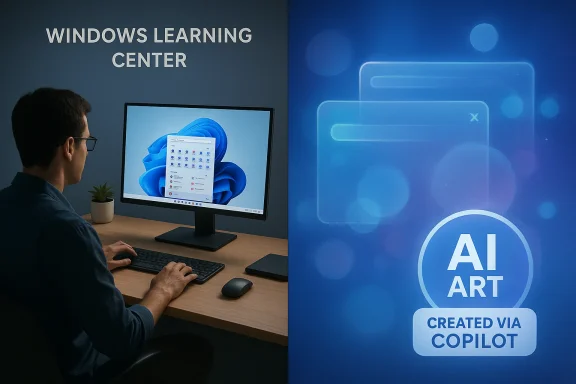
Microsoft’s decision to sprinkle “AI Art Created via Copilot” badges through the Windows Learning Center isn’t a harmless footnote — it’s a public-relations and product-design moment that crystallizes the wider tension around Windows 11’s AI-first push: a company of enormous resources is choosing synthetic imagery to sell built-in features to users who are already skeptical of Copilot and the broader AI framing of the OS.
In recent months Microsoft has accelerated the integration of generative AI into Windows 11, positioning Copilot as a system-level assistant and adding image-generation capabilities to Copilot and related creative tools. Microsoft’s own help pages and how‑to guides now openly surface images labelled “AI Art Created via Copilot,” and Copilot’s image-creation features are documented and promoted on Microsoft.com.
At the same time, community reaction to the broad, aggressive AI integration has hardened. The social-media shorthand “Microslop” — a pejorative shorthand for perceived low-quality or intrusive AI features — has become a recurring meme in forums and threads that track Windows 11’s trajectory. That backlash is not marginal: open-source utilities and community projects have begun to appear that explicitly aim to undo Microsoft’s AI surface area in Windows 11, and community conversations are framing promotional AI imagery as tone-deaf to user sentiment.
For context about the company size and the optics involved: Microsoft’s market capitalization sits in the neighborhood of several trillion dollars, which underscores the dissonance in choosing synthetic images when the company can afford professional photography and casting for promotional creatives. Public market databases and finance trackers list Microsoft’s market cap around the $3 trillion mark in early March 2026.
This practice is distinct from the main featured or header artwork that often appears at the top of the page. In many cases the header/hero image remains a more conventional illustration or photograph (and Microsoft has not consistently applied the same AI tag to those images), while the embedded instructional images are the ones explicitly labelled as Copilot AI art.
The community reaction isn’t abstract. Forum threads and projects in the Windows ecosystem reflect sustained frustration with what many call AI clutter — the proliferation of promoted, opt-in or opt-out AI surfaces — and community tools expressly aim to remove or reduce those surfaces. Deploying AI art inside official help documentation feeds directly into the narrative critics have made about Windows 11 becoming a vehicle for marketing AI features rather than centering human users.
At the same time, Microsoft’s Windows Learning Center pages (official Microsoft-hosted how‑tos) show the same tag under certain illustrative images, and the pages are updated through 2026 with those captions present. Those are first-party confirmations: Microsoft is not hiding the practice and the copy is explicit.
The core issue is not that the images are synthetic; the issue is the match between image function and user expectation. Instructional pages should teach. Marketing pages should inspire. Neither should make ordinary users feel like they are being sold a future they didn’t ask for.
Microsoft can and should keep building Copilot and the creative possibilities it enables. But for the health of the Windows brand, the company should let human creativity and human-centered documentation lead where accuracy and trust matter most, and save synthetic flair for contexts that benefit from imagination rather than instruction.
Source: Windows Latest Microsoft is using AI slop to promote Windows 11 features, and it’s painfully obvious
 Background
In recent months Microsoft has accelerated the integration of generative AI into Windows 11, positioning Copilot as a system-level assistant and adding image-generation capabilities to Copilot and related creative tools. Microsoft’s own help pages and how‑to guides now openly surface images labelled “AI Art Created via Copilot,” and Copilot’s image-creation features are documented and promoted on Microsoft.com.At the same time, community reaction to the broad, aggressive AI integration has hardened. The social-media shorthand “Microslop” — a pejorative shorthand for perceived low-quality or intrusive AI features — has become a recurring meme in forums and threads that track Windows 11’s trajectory. That backlash is not marginal: open-source utilities and community projects have begun to appear that explicitly aim to undo Microsoft’s AI surface area in Windows 11, and community conversations are framing promotional AI imagery as tone-deaf to user sentiment.
For context about the company size and the optics involved: Microsoft’s market capitalization sits in the neighborhood of several trillion dollars, which underscores the dissonance in choosing synthetic images when the company can afford professional photography and casting for promotional creatives. Public market databases and finance trackers list Microsoft’s market cap around the $3 trillion mark in early March 2026.
Overview: What Microsoft is doing with AI images — and where it shows up
Windows Learning Center: tutorial pages with AI art badges
Microsoft’s Windows Learning Center and other official how‑to pages now include embedded images or illustrative visuals tagged plainly with captions such as “AI Art Created via Copilot.” The tag appears under inline or illustrative images that illustrate feature workflows or UI components. That wording, visible on multiple Windows how‑to pages, is unambiguous: the picture is generated by Copilot, not a staged photo.This practice is distinct from the main featured or header artwork that often appears at the top of the page. In many cases the header/hero image remains a more conventional illustration or photograph (and Microsoft has not consistently applied the same AI tag to those images), while the embedded instructional images are the ones explicitly labelled as Copilot AI art.
Why Microsoft can — and likely will — use AI images
- Copilot now includes image-generation capabilities tied to Microsoft’s broader image models (Microsoft references “DALL·E 3” improvements and Copilot image features in its how‑to documentation). Using Copilot to create illustrative images is technically simple and cost-effective inside Microsoft’s ecosystem.
- On a practical level, generating custom visuals for myriad small tutorial pages eliminates scheduling costs for photoshoots, model releases, and location logistics.
- Copilot-produced images are easy to iterate, localize, and refresh — attractive for a living documentation platform that must constantly evolve with Windows updates.
The core problem: perception, trust, and the hallucination risk
Perception and brand optics
Using AI-generated humans to illustrate users interacting with Windows features carries a reputational cost when a sizable portion of the audience already distrusts Microsoft’s AI ambitions. The images, when footnoted with a Copilot badge, instantly telegraph to a skeptical reader that Microsoft is doubling down on synthetic experiences — which, given the cultural moment, reads less like innovation and more like tone-deaf corporate branding.The community reaction isn’t abstract. Forum threads and projects in the Windows ecosystem reflect sustained frustration with what many call AI clutter — the proliferation of promoted, opt-in or opt-out AI surfaces — and community tools expressly aim to remove or reduce those surfaces. Deploying AI art inside official help documentation feeds directly into the narrative critics have made about Windows 11 becoming a vehicle for marketing AI features rather than centering human users.
Hallucinations: when images show things that don’t exist
Image-generation models can hallucinate UI details and function states. That makes them a questionable fit for instructional material intended to show a user how to replicate a given result on their own PC.- If a Copilot-generated image depicts a Windows widget, menu, or app in a form that doesn’t match the live UI shipped to users, the tutorial’s credibility is damaged. Readers expect instructional images to be accurate and reliable.
- For features that vary by hardware, build channel, or Copilot gating (e.g., Copilot+ PCs), using synthetic images without context compounds confusion. The image can imply a capability that is gated, regional, or available only on select hardware. That is a practical UX failure as much as a PR misstep. Microsoft itself includes disclaimers and product caveats in its Copilot documentation, but those generic notes do not solve the immediate issue: the illustrative image still looks like a promise.
Verification: what the official pages actually say
To evaluate the claim that Microsoft is using Copilot to produce images inside learning posts, we checked Microsoft’s own Copilot and Windows pages. Microsoft’s Copilot content includes explicit references to Copilot image generation and repeated use of the phrase “AI art created via Copilot” within illustrative captions. The “How to make AI photos” and Copilot creative guidance pages explain the feature and show examples labelled with that phrase. That confirms Microsoft’s use of AI-generated art as part of Copilot’s public-facing documentation.At the same time, Microsoft’s Windows Learning Center pages (official Microsoft-hosted how‑tos) show the same tag under certain illustrative images, and the pages are updated through 2026 with those captions present. Those are first-party confirmations: Microsoft is not hiding the practice and the copy is explicit.
The flip side: why Microsoft might defend the move
It’s crucial to acknowledge why the team making these choices might view them as sound:- Scalability and speed: The Learning Center hosts hundreds of short help articles. Producing bespoke photography for each small tutorial is costly and slow. AI art delivers volume at speed.
- Localization and iteration: Generative images are easy to adapt to local markets, languages, and new feature states without rebooking photo shoots.
- Product demonstration variety: Copilot can produce variations quickly for A/B testing, accessibility demonstrations, or device-specific illustrations.
Risks and tangible downsides
1) Eroding trust on instructional pages
When users consult a help page, they expect fidelity: a screenshot of a menu should match what’s on their screen. AI-produced images that look convincing but deviate from real UI states create a trust deficit. A single “helpful but wrong” image can do more harm than a dozen accurate, plain photographs.2) Reinforcing the “Microslop” narrative
Community sentiment matters. If users already feel inundated by AI nudges, badges, and persistent Copilot prompts, inserting more visible AI branding into learning content becomes ammunition for critics. In open forums those criticisms evolve into memes, debloat tools, and negative press — all of which shape buying sentiment and brand health.3) Legal / rights and model provenance concerns
Even when a company uses its own model, questions about provenance, model training data, or likeness rights can arise. Microsoft notes best practices and disclaimers on Copilot tooling pages, but prominence of the label alone does not preempt potential legal or ethical queries about image generation and the use of synthetic likenesses.4) Confusion about feature availability
If an AI image implies a capability that is limited to Copilot+ PCs, builds from the Canary channel, or premium subscriptions, unlabelled or insufficiently contextualized visuals will generate support tickets and frustrated users who cannot reproduce the example.Notable strengths of Microsoft’s approach
Despite the risks, Microsoft’s move isn’t entirely misguided. There are defensible advantages:- Honesty through labeling: Microsoft is openly labelling the images as AI-generated. That transparency is better than quietly inserting synthetic content without any disclosure.
- Toolchain integration: Microsoft can generate images that are consistent with its design language quickly and can populate thousands of help pages without recurrent production overhead.
- Iterative creativity: Copilot’s image generation allows rapid creative experimentation, which can be leveraged for scenarios where exact visual accuracy is less critical (e.g., hero art, themed illustrations).
What Microsoft should do next: practical recommendations
- Improve contextual cues for instructional images
- Use screenshot-style images for UI tutorials, not stylized AI renders. When an AI-generated image is used for a conceptual illustration, clearly mark it as illustrative and provide a companion screenshot showing the real UI state.
- Reserve AI art for creative and aspirational content
- Use Copilot art for marketing, hero images, and creative demonstrations — but keep step‑by‑step documentation tied to actual screenshots or screen recordings.
- Add explicit gating and availability labels
- When an example demonstrates a feature available only on Copilot+ PCs, the image caption should state hardware/build/channel requirements in plain language.
- Create an accessibility and accuracy checklist for any illustrative image used in help material
- The checklist should include: Is the UI state accurate? Is the feature generally available? Could this image mislead a novice user? If the answer to any question is “yes,” use a screenshot instead.
- Use human photography where it has PR value
- For marketing and brand-reputation critical pages, invest in professional photography. The optics of real people using real devices still outcompete synthetic images in trust-building.
- Publish a short explainer about why and where AI art will be used
- Rather than hiding the decision in a caption, Microsoft could publish a brief editorial note explaining the policy and the expected contexts for AI-generated artwork. Transparency beyond a single badge reduces suspicion and clarifies intent.
What users and admins can do today
- If you’re a reader who sees an “AI Art Created via Copilot” caption and you need to reproduce a step, look for a screenshot or steps list rather than relying on the illustration alone.
- For IT admins concerned about messaging and brand tone inside the organization, compile a short guidance document for end users explaining the difference between illustrative AI art and real screenshots.
- If you’re a content or UX professional at Microsoft (or any company), implement a two-tier visual standard: screenshots for instructions; AI art for conceptual and creative pieces.
A larger lesson about product trust and human creativity
Microsoft’s Copilot-first Windows strategy is ambitious and, in many ways, impressive. The company is building a coherent set of AI tools at scale and is transparent about Copilot’s creative capabilities. But there is a distinction between tool capability and product messaging. When an operating system — the most intimate software on most people’s computers — starts to wear its AI identity in the interface and in official documentation, the company must take great care not to alienate users who prioritize clarity, control, and predictable behavior.The core issue is not that the images are synthetic; the issue is the match between image function and user expectation. Instructional pages should teach. Marketing pages should inspire. Neither should make ordinary users feel like they are being sold a future they didn’t ask for.
Final analysis: risk vs reward and the pragmatic path forward
Microsoft’s use of Copilot-generated images inside the Windows Learning Center is defensible from an efficiency and scale perspective, but it’s a poor fit for instructional fidelity and for a moment in which public sentiment around in‑OS AI is fragile.- Reward: lower production cost, rapid iteration, and consistent brand styling across thousands of pages.
- Risk: erosion of trust for how‑to documentation, reinforcement of anti-AI narratives in social discourse, and confusion when images deviate from shipped UIs.
- Keep the labels, but strengthen them. A single badge isn’t enough: add explicit context about whether an image is illustrative or a faithful screenshot.
- Reserve Copilot art for non-instructional content and marketing creative that benefits from aspiration rather than precision.
- Publish a public policy and checklist about where AI-generated art is appropriate in product docs, and link that policy to accessibility and accuracy standards.
Conclusion
In the modern software ecosystem, image provenance matters. Labeling an image “AI Art Created via Copilot” is honest, and Microsoft has every right to use the tools at its disposal. But honesty alone is not enough when trust is at stake. The Windows Learning Center should be a place users can rely on for accurate, reproducible instructions — and that reliability is undermined when synthetic art simulates interfaces or device states users won’t find on their screens.Microsoft can and should keep building Copilot and the creative possibilities it enables. But for the health of the Windows brand, the company should let human creativity and human-centered documentation lead where accuracy and trust matter most, and save synthetic flair for contexts that benefit from imagination rather than instruction.
Source: Windows Latest Microsoft is using AI slop to promote Windows 11 features, and it’s painfully obvious
