

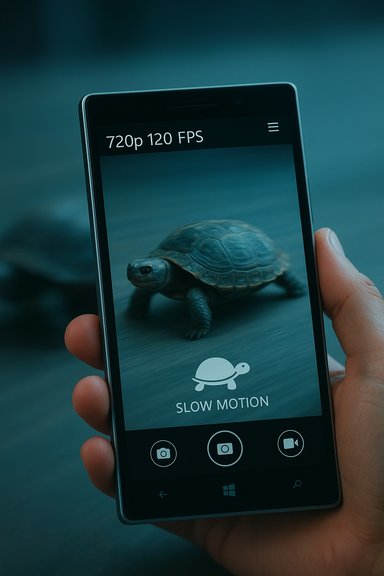
When Microsoft’s updated Windows Camera app added a simple turtle icon for slow‑motion capture, it marked a small but meaningful victory for Windows Phone users: the Lumia 930, Lumia 1520 and Icon could now record at 720p, 120 frames per second, and the phone did the heavy lifting to output a ready‑to‑share slow‑motion clip.
The mid‑2010s were a turning point for smartphone camera features. Manufacturers were racing to add higher frame‑rate capture modes, computational tweaks and built‑in editing so that users could record compelling short clips without a desktop editor. Apple’s early foray into consumer slow‑motion—with the iPhone 5s and later iPhone 6 family—helped popularize the idea that a phone could shoot 120 FPS (and in later models 240 FPS at 720p) and make dramatic slow‑motion a mainstream trick. Microsoft’s Windows Camera update announced in November 2015 landed in that context. Unlike third‑party apps or OEM camera utilities, this was Microsoft shipping slow‑motion capture as a feature of the system camera app that came preinstalled or available through the Store for Windows 10 Mobile Insiders. Enthusiasts and reviewers noted three practical realities right away:
However, from a platform strategy perspective, the rollout also reinforced several long‑term weaknesses of the Windows Phone era:
Windows Camera’s slow‑motion moment is a useful case study in balancing accessibility, hardware limits and creator needs — a balance that every platform still wrestles with today.
Source: Windows Central ON THIS DAY: Windows Camera hands-on with slow motion video
 Background
The mid‑2010s were a turning point for smartphone camera features. Manufacturers were racing to add higher frame‑rate capture modes, computational tweaks and built‑in editing so that users could record compelling short clips without a desktop editor. Apple’s early foray into consumer slow‑motion—with the iPhone 5s and later iPhone 6 family—helped popularize the idea that a phone could shoot 120 FPS (and in later models 240 FPS at 720p) and make dramatic slow‑motion a mainstream trick. Microsoft’s Windows Camera update announced in November 2015 landed in that context. Unlike third‑party apps or OEM camera utilities, this was Microsoft shipping slow‑motion capture as a feature of the system camera app that came preinstalled or available through the Store for Windows 10 Mobile Insiders. Enthusiasts and reviewers noted three practical realities right away:- The capture mode recorded at 1280 × 720 (720p) at 120 FPS, which equates to roughly four times slower playback when conformed to a standard 30 FPS timeline.
- The experience was accessible: enter Video mode, tap the turtle icon, and press Record. The UI emphasized ease over complexity.
- The saved clips that most users imported into PCs were already conformed to 30 FPS, meaning the phone had already “baked” the slow motion into a 30 FPS file for immediate playback and sharing — attractive for casual users but limiting for advanced post production.
Overview: What the Windows Camera slow‑motion feature actually did
Windows Camera’s slow‑motion capture delivered a simple promise: capture motion at a higher temporal resolution and let the user play back parts of the clip in slow motion. The implementation worth remembering included these specifics:- Capture resolution: 720p (1280 × 720)
- Capture frame rate: 120 FPS (frames per second)
- Playback/export: 30 FPS files by default when imported to a PC, with the clips already slowed down for viewing.
Technical deep dive: 120 FPS at 720p and the 30 FPS export tradeoff
How 120 FPS yields four‑times slower motion
Normal video playback on consumer platforms typically runs at 30 FPS. Recording at 120 FPS means the camera captures four times as many frames per second. When those frames are played back at 30 FPS, time is effectively stretched by a factor of four — every second of real time becomes four seconds of playback.- Example: a 2‑second action recorded at 120 FPS contains ~240 frames; played at 30 FPS, those 240 frames occupy 8 seconds of video. The result is smooth slow motion without the need for frame interpolation.
Why phones often export 30 FPS files instead of raw 120 FPS footage
Many reviewers noticed that the files copied from a Lumia to a PC were 30 FPS, not 120 FPS. There are several engineering reasons for that:- Playback compatibility: 30 FPS MP4 files play everywhere without special software or hardware. Packaging a 120 FPS stream would require players or editors that can interpret variable frame timing. The Windows Camera route favored universal playability.
- On‑device processing constraints: storing a full 120 FPS capture at 720p with minimal compression burdened storage and CPU. By pre‑processing and compressing to a 30 FPS file that retains every fourth frame (or applies internal time‑scaling), the device reduced CPU and I/O demands.
- Battery and thermal limits: sustained high‑frame‑rate capture taxes the sensor, ISP and SoC; reducing the final file’s frame rate helps keep the capture pipeline stable and battery consumption reasonable. This is a common device design tradeoff.
The Lumia angle: hardware limits and feature parity
At the time the slow‑motion feature arrived, support was limited to a handful of high‑end Lumia devices running the Windows 10 Mobile Insider builds: the Lumia 930, Lumia 1520, and the carrier‑branded Lumia Icon. Industry coverage and hands‑on posts made clear that Microsoft considered both the sensor and the SoC when enabling the feature; many midrange models lacked the sustained throughput to reliably capture 120 FPS at 720p. Reviewers and insiders speculated that future Lumia flagships — the then‑upcoming Lumia 950 and Lumia 950 XL — might increase the capture resolution or offer better handling, but those were predictions based on expected hardware improvements rather than confirmed specs. That speculation should be treated cautiously: device capabilities depend on camera modules, firmware and driver stack optimization as much as raw SoC power. Flag such claims as unverified unless a manufacturer expressly documents them.Editing on the phone: convenient but lossy
One of the Windows Camera app’s selling points was a built‑in editor for slow‑motion clips. Users could:- Trim the clip
- Apply slow‑motion to selective portions of the timeline (speed ramping)
- Save and share a processed clip directly from the phone
- Re‑encoding artifacts when the edited segment is recompressed on the device
- Use of lower bitrate encoding profiles to reduce file size and processing time
- Loss of the original higher‑frame‑rate data when the app outputs a conformed 30 FPS file
Why developers and advanced users cared about the 120 FPS originals
Professional and advanced editors prefer retaining original high‑frame‑rate footage for several reasons:- Greater control over speed ramps and frame‑accurate edits
- The ability to convert to variable frame rate timelines or do optical flow interpolation with dedicated tools
- Higher‑quality color grading and noise management when working from less compressed or full‑bitrate sources
Strengths: what Microsoft got right
- Ease of use. The turtle icon and single‑tap recording flow made slow‑motion capture trivial for casual users. This lowered the activation energy for experimentation.
- Immediate shareability. By exporting 30 FPS files that were already conformed to slow motion, Microsoft ensured clips would play on desktop and social apps without special handling. This was a pragmatic choice for mainstream users.
- Parity for Windows Phone users. Delivering slow motion inside the native Camera app helped Windows 10 Mobile feel less second‑class compared with iOS and Android at the time. Even if not cutting‑edge, it closed a feature gap.
Weaknesses and risks: where the implementation fell short
- Limited resolution and frame‑rate options. 720p at 120 FPS was good, but competitors were experimenting with 1080p or 240 FPS captures (at least at reduced resolutions). The Lumia lineup’s hardware ceiling prevented a more aggressive offering.
- Lossy phone‑side editing. Built‑in editing introduced visible quality drops, undercutting the value of the captured footage for creators. That quality regression was one of the feature’s most consistent criticisms.
- Lack of raw/high‑FPS export. Not giving advanced users access to the full 120 FPS masters was a strategic compromise that angered prosumers and hobbyists who wanted to finish on a PC.
- Fragmentation risk. Shipping features only to a small number of high‑end Lumia devices — and only on preview builds — risked fragmenting the user base and creating confusion about who could use the feature and how. That’s a perennial hazard for platform owners with diverse hardware lines.
Broader context: how smartphone slow motion evolved after 2015
Slow‑motion capture did not remain static. Across the subsequent years, camera vendors:- Increased accessible frame rates (many devices moved from 120 FPS to 240 FPS at 720p or even 1080p modes at lower frame counts).
- Improved sensor readout and on‑chip processing to permit longer continuous high‑FPS capture without overheating.
- Shifted toward offering both quick, shareable exports and options to preserve masters for advanced editors.
A practical checklist for photographers using vintage Lumia slow‑motion today
For readers still experimenting with Lumia slow‑motion captures on legacy devices, these steps maximize results:- Record in a well‑lit environment to reduce noise at high frame rates.
- Avoid long continuous slow‑motion recordings to limit thermal throttling and saving failures.
- Export the recorded clip to a PC and retain the original file. If the Lumia saves both an original and a conformed file, keep both.
- When possible, prefer desktop editing for final output to avoid recompression artifacts from phone editors.
- If the phone’s editor looks attractive for quick posts, use it for social‑ready versions and keep the master for archive edits.
Critical analysis: feature design, platform strategy, and tradeoffs
Microsoft’s slow‑motion camera rollout illustrates a classic product tradeoff: choose accessibility for the many, or flexibility for the few. The company prioritized the former, delivering a frictionless slow‑motion experience that required no desktop work to view. That decision aligned with the experience expectations of casual mobile users and social sharers.However, from a platform strategy perspective, the rollout also reinforced several long‑term weaknesses of the Windows Phone era:
- Hardware fragmentation limited the reach of new features. Only a subset of flagship devices could host the mode reliably, which narrowed the potential audience and muddied messaging.
- Timing and ecosystem matters: Apple and Android vendors were already iterating on higher frame rates and more flexible export options. Microsoft’s late arrival closed a gap but didn’t leapfrog competitors.
- Quality expectations for video content were rising. Casual users might accept phone‑side reencoding, but creators increasingly demanded preservation of source material. Microsoft’s choice to preconform outputs favored casual content at the expense of prosumer workflows.
What we can learn from this small feature now
- Small features matter: even modest camera additions can meaningfully improve daily user experience and shape perceptions of a platform’s competitiveness. Usability beats specs for many users.
- Preserve options for power users: when offering compressed, shareable outputs, provide an option to retain or export original masters. That dual‑path approach satisfies both casual sharers and creators.
- Communicate device support clearly: limiting features to select hardware is reasonable, but the platform owner must make compatibility and tradeoffs explicit to avoid fragmentation and frustration.
Conclusion
The Windows Camera slow‑motion hands‑on from 2015 was not a headline‑grabbing reinvention of mobile videography. It was, instead, a pragmatic step: adding 720p at 120 FPS capture to the native Camera app, making slow‑motion accessible to Windows Phone users via a single tap, and prioritizing convenient, shareable clips over raw archival fidelity. Reviewers welcomed the parity and the simplicity, but they also pointed out meaningful shortcomings — most notably the phone’s tendency to export conformed 30 FPS files and the loss in quality after phone‑side editing. Seen in the wider arc of mobile camera development, Microsoft’s move was both a catch‑up and an example of pragmatic product design: choose the path that delivers the most value to the broadest set of users. For creators who needed masters, the feature was a compromise; for everyone else, it was an effortless way to make everyday moments look cinematic.Windows Camera’s slow‑motion moment is a useful case study in balancing accessibility, hardware limits and creator needs — a balance that every platform still wrestles with today.
Source: Windows Central ON THIS DAY: Windows Camera hands-on with slow motion video
