

Microsoft’s AI push has shifted from a set of optional helpers to the declared center of Windows’ roadmap, and that pivot is already reshaping what it means to own — and trust — a Windows PC. The MakeUseOf piece captures the unease many users feel: built‑in assistants that watch, index, and in some previews act on your behalf; privacy trade‑offs that are hard to opt out of; and a day‑to‑day OS that still shows signs of instability while the company chases a grander AI vision. The tension between promise and polish is real, and it deserves a calm, evidence‑based look — what’s actually shipping, what’s still experimental, what the risks are, and what practical options users and IT teams have today.
Microsoft has expanded Copilot from a chat-like helper into an umbrella of technologies that now touch system UX, device hardware, management controls, and experimental runtime primitives that let AI agents take multi‑step actions inside the OS. The company’s published materials describe three important components:
Performance and bloat also matter. Many AI features require background processes, indexing and local model resources; that consumption is tolerable on high‑end Copilot+ machines but can be a burden on older or budget devices. This hardware‑differentiated approach risks a perception that Microsoft is building the future for buyers of new hardware while leaving the rest of the installed base to deal with added overhead and less consistent behavior.
Source: MakeUseOf Microsoft’s AI obsession is scaring me
 Background / Overview
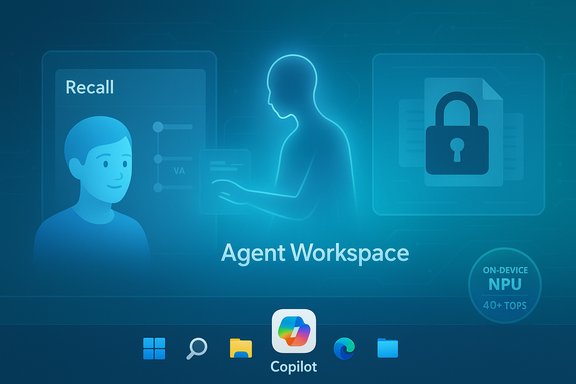
Microsoft has expanded Copilot from a chat-like helper into an umbrella of technologies that now touch system UX, device hardware, management controls, and experimental runtime primitives that let AI agents take multi‑step actions inside the OS. The company’s published materials describe three important components:- Copilot integration across system surfaces — Copilot branded assistance in the taskbar, Notepad, Paint, Settings and many built‑in apps.
- Copilot+ / on‑device AI — a hardware tier for devices with dedicated NPUs (Neural Processing Units) and minimum performance thresholds so some model inference can run locally.
- Experimental agentic features — Agent Workspace, per‑agent accounts, and the Model Context Protocol (MCP) that let agents interact with UI elements, files and connectors as discrete principals. Microsoft’s support documentation makes the agent model explicit and frames these capabilities as experimental and gated.
What’s real today: the most consequential features and their verified properties
Recall: a vivid case study of privacy trade‑offs
Recall is the clearest illustration of both the productivity promise and privacy panic. In plain terms, Recall takes periodic snapshots of the active screen, indexes them for natural‑language search, and offers a timeline to “retrace your steps.” Microsoft’s documentation and product pages confirm the core mechanics: snapshots are opt‑in, stored locally, protected by Windows Hello, and the feature only appears on qualifying Copilot+ PCs. The company says snapshots are encrypted and that search and indexing happen on‑device. Independent reporting and hands‑on coverage reaffirm key technical claims (frequency and storage implications): Recall captures snapshots “every few seconds” (frequently reported as ~5‑second checks) and can produce hundreds of files and multiple gigabytes of index data after a single day of use, depending on activity. Those reports line up with Microsoft’s own wording that snapshots are saved “every few seconds and when the content of the active window changes.” Why this matters: even when encrypted, a local searchable history of everything you see on screen dramatically increases the attack surface. Researchers and privacy‑first apps pushed back; several clients (Signal initially, later Brave and other privacy tools) implemented measures to prevent Recall from capturing their content, and the feature has been paused, altered and redeployed in preview form as Microsoft responded to feedback. That evolution — pause, redesign, preview — is precisely the pattern critics feared.Agentic features and the new threat model
Microsoft’s Experimental Agentic Features documentation is unusually candid: when agents can act, failure modes change. The company explicitly warns that agentic AI “may hallucinate and produce unexpected outputs” and that content surfaces can be weaponized by a class of adversarial attack the company describes as cross‑prompt injection (XPIA). An agent’s ability to read documents, parse rendered web previews, or OCR images creates content-as-command attack vectors where malicious embedded instructions could cause misbehavior, data exfiltration or automated actions. Microsoft’s security write‑ups and the Windows Experience Blog go into these risks and the proposed mitigations (agent isolation, scoped permissions, tamper‑evident logs). The essential shift: the OS threat model stops assuming the human is the final arbiter. When an AI agent can click, type, open files and call connectors without constant explicit human approval, provenance checks, logging and robust governance are no longer optional—they’re mandatory.Copilot+ and the hardware divide
Microsoft has also tied the richest, lowest‑latency AI experiences to Copilot+ hardware that meets an NPU performance threshold (widely reported and reflected in device specs as ~40 TOPS—trillions of operations per second). OEM and Microsoft product pages list Copilot+ device requirements and show NPUs in the 40+ TOPS range on qualifying machines (for example, some Surface devices advertise NPUs at or above this level). That specification is verifiable and widely referenced in device documentation and hands‑on reviews. The effect is a two‑tier Windows experience: older/cheaper hardware will not deliver the same on‑device AI experience.Strengths of Microsoft’s approach — why some of this is compelling
- On‑device privacy and latency potential. When models or indexing run locally, there’s less reliance on cloud round trips for simple, immediate tasks; that can reduce exposure of sensitive content to cloud endpoints if done correctly.
- A coherent platform vision. Owning the OS, productivity apps and cloud means Microsoft can design end‑to‑end scenarios that competitors can’t easily replicate.
- Opportunity for real productivity gains. For professionals who juggle many files, windows and contexts, timeline search and task automation — if implemented robustly — can genuinely save time.
Where the MakeUseOf critique is right — and where it needs nuance
The MakeUseOf argument that “AI is being shoved into Windows” captures a true user sentiment: Copilot signage, prompts and in‑product nudges are pervasive and not always easy to escape. The frustration about opt‑out friction — requiring Group Policy edits, registry workarounds or Pro/Enterprise edition features — is real for many mainstream users. Practical instructions for disabling or at least hiding Copilot exist (Taskbar toggle; Group Policy on Pro/Enterprise; registry edits on Home), but they’re inconsistent and subject to change as Microsoft iterates. That reality underpins the perception of forced AI. Practical guides to hide and disable Copilot are abundant in how‑to coverage. Where the piece overreaches: some claims framed as universal absolutes (for example, blanket statements that “Copilot cannot be disabled” for all users or that every AI feature is enabled by default everywhere) compress a complex, evolving product into a single narrative. Microsoft’s agentic primitives are explicitly experimental and — per Microsoft’s guidance — are off by default and gated behind administrative controls during preview. That nuance matters operationally: the feature set that alarms consumers today is largely previewed to Insider channels, Copilot Labs, or Copilot+ devices and is not yet a universal default on every Windows 11 PC. That doesn’t make the critique invalid — it makes it urgent to distinguish shipping defaults from previewed ambitions.The security picture: hallucinations, XPIA, and realistic attack scenarios
Microsoft isn’t pretending agents are flawless. The firm’s documentation names functional limits and the XPIA threat class; security writers and independent outlets have amplified the warning. In practice, plausible attack scenarios include:- A malicious PDF or web preview contains hidden prompt-like text or obfuscated instructions that an agent ingests as context and executes as part of a multi‑step plan.
- An agent hallucinates a harmful plan (false API endpoint, wrong document selection) and executes it because safeguards were insufficient.
- Locally stored Recall snapshots become a target for malware that can export an indexed corpus of sensitive screenshots if device encryption or access controls are compromised.
Usability and reliability: have core OS problems been sidelined?
One central complaint is not about AI itself but about priorities. While Microsoft races forward with AI experiences, day‑to‑day Windows reliability and polish still generate complaints: File Explorer quirks, rendering regressions in themed UI, sluggish search, and recurring update regressions. Recent preview KBs and community reporting show Microsoft pushing dark‑mode and UI polish updates — and occasionally introducing regressions such as a brief “white flash” in File Explorer’s dark mode on some builds. Those incidents feed user frustration: high‑visibility fixes that remember to ship alongside stable fundamentals rather than replacing them. Community discussions and rollout notes document these quality trade‑offs and known issues in preview builds.Performance and bloat also matter. Many AI features require background processes, indexing and local model resources; that consumption is tolerable on high‑end Copilot+ machines but can be a burden on older or budget devices. This hardware‑differentiated approach risks a perception that Microsoft is building the future for buyers of new hardware while leaving the rest of the installed base to deal with added overhead and less consistent behavior.
Practical, verified steps users and IT admins can take today
The MakeUseOf concern is actionable — here are concrete, verifiable steps to regain control, with references to mainstream how‑to coverage and Microsoft guidance.- Review Copilot visibility settings (Taskbar toggle) — quick hide: Settings > Personalization > Taskbar, toggle Copilot off. This removes the taskbar presence.
- For Pro/Enterprise: use Group Policy to disable Copilot completely: gpedit.msc → User Configuration → Administrative Templates → Windows Components → Windows Copilot → Turn off Windows Copilot → Enabled. This prevents Copilot from launching.
- For Home editions: apply a documented registry policy change to disable Copilot; back up the registry first and follow trusted guides rather than random forum scripts. (Multiple reputable outlets document the registry key approach.
- Treat Recall and similar timeline features as opt‑in: don’t enable them on shared or untrusted devices, and only enable on devices that meet the Copilot+ hardware and security requirements. Microsoft states Recall is opt‑in and protected by Windows Hello; nevertheless, users should only enable it with eyes open about storage and snapshots.
- For enterprises: gate agentic features through MDM/Intune, enable strict deployment rings, enforce least privilege for agent accounts, require human approval policies for destructive actions, and insist on tamper‑evident logs for auditing. Microsoft’s guidance and enterprise documentation signal these management levers are expected.
- Back up images before applying preview or optional feature updates.
- Delay non‑critical feature updates for 2–4 weeks in production rings.
- Audit which devices meet Copilot+ requirements before enabling agentic features en masse.
The trade‑offs Microsoft must address if trust is to be rebuilt
- Make opt‑out persistent and accessible. Users should not need registry hacks to avoid an assistant baked into their OS. Allow uninstallation or a straightforward, persistent opt‑out across updates.
- Default to the safest behavior. Experimental, agentic capabilities should remain opt‑in with clear, persistent prompts and enterprise policy surfaces for governance.
- Be transparent and measurable about reliability. Publish reliability KPIs for core workflows (File Explorer, search, Start menu) and tie AI rollouts to concrete quality targets rather than separate marketing milestones.
- Deliver enterprise‑grade auditability and controls. For agentic actions that touch enterprise data, require mandatory human review, per‑action consent and robust tamper‑evident logs.
Conclusion
The MakeUseOf alarm — that Windows is increasingly an “AI first” experiment platform — captures a valid emotional truth about how these features land for many users: intrusive, confusing, and sometimes hard to remove. But the picture is more nuanced. Many AI capabilities are still previewed and gated; Microsoft is explicit about experimental risks such as hallucinations and cross‑prompt injection; and the company is attempting to build mitigation plumbing. The technical details are verifiable: Recall snapshots happen “every few seconds” when enabled and are stored locally and encrypted; Copilot+ hardware targets NPUs in the ~40 TOPS class; and Microsoft’s Experimental Agentic Features documentation names XPIA and other novel risks explicitly. Those are not mere opinions — they are engineering facts that inform real trade‑offs. The debate should no longer be just about fear of AI. It should be about governance, defaults and measurable safety: how features are shipped, how they can be switched off, how administrators can manage risk at scale, and whether the OS vendor prioritizes daily reliability on the devices people already own. Microsoft has the resources and reach to make agentic computing safe and useful — but only if the company treats security, privacy defaults and baseline quality as the non‑negotiable foundation for any AI‑first future. The alternative is a long‑running erosion of trust that could cost Windows far more than short‑term adoption metrics ever measure.Source: MakeUseOf Microsoft’s AI obsession is scaring me
