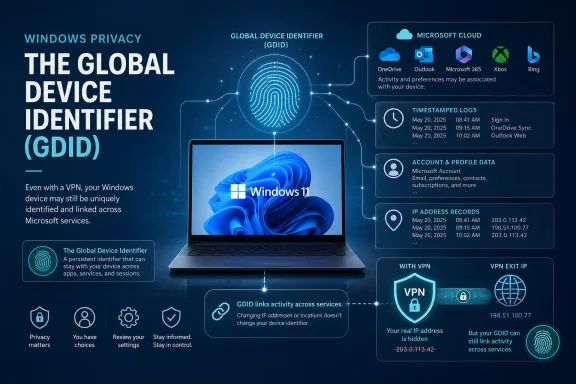
Microsoft’s Windows operating system uses a persistent Global Device Identifier, or GDID, that can distinguish one Windows installation from another across selected Microsoft services—and there is no ordinary privacy switch that lets users disable it. The identifier became a public controversy after a newly unsealed federal complaint described how Microsoft records associated with one GDID helped investigators connect VPN-routed activity, website visits, online accounts, and travel patterns to an alleged member of the Scattered Spider cybercrime group. The disclosure does not prove that Microsoft records every action performed on every Windows PC, but it does reveal a durable identity layer whose operation, retention, and user controls remain poorly explained.
Persistent identifiers are not new to Windows, cloud platforms, mobile operating systems, or enterprise device-management systems. Modern computing services need stable ways to distinguish devices for software licensing, update eligibility, fraud prevention, account security, synchronization, app entitlements, and fleet administration.
Windows already exposes or uses numerous identifiers, including hardware IDs, installation IDs, advertising IDs, Microsoft Entra device IDs, security identifiers, Windows activation records, TPM-backed keys, and identifiers associated with Microsoft accounts. These values serve different purposes and do not necessarily identify the same object.
That wording matters. The GDID is not simply a serial number burned into a motherboard, and describing it as a permanent hardware fingerprint would overstate the available evidence. It follows an operating-system installation rather than necessarily following a physical computer forever.
A single Microsoft user can therefore accumulate multiple GDIDs by reinstalling Windows or using several PCs and virtual machines. Conversely, one Windows installation may continue presenting the same GDID while moving between networks, countries, VPN endpoints, and ordinary user accounts.
The surprise is therefore not merely that Windows contains another identifier. It is that a durable Windows installation identity became understandable to the public mainly through a criminal complaint, rather than through a clear Windows privacy control, architectural document, or consumer-facing explanation.
Stokes is presumed innocent, and a criminal complaint establishes allegations and probable cause rather than guilt. That distinction is essential because the GDID records form only one part of a much broader evidentiary chain described by investigators.
The attackers reportedly demanded approximately $8 million in cryptocurrency. Company F did not pay, but prosecutors say the company incurred at least $2 million in disruption, investigation, and remediation costs.
Scattered Spider has become particularly notorious because its members often defeat organizations through people and processes rather than previously unknown software vulnerabilities. They impersonate employees, manipulate help-desk personnel, reset multifactor-authentication methods, and use legitimate administration tools after obtaining access.
Records showed that the ngrok account associated with the intrusion was created through an IP address assigned to a VPN proxy service. Ordinarily, that proxy would separate the public IP address seen by the service from the user’s underlying residential or mobile connection.
Microsoft’s records added another dimension. According to the complaint, the Windows device that accessed the ngrok registration page carried a specific GDID, allowing investigators to follow the installation rather than relying solely on one IP address.
A GDID identifies a Windows installation across certain Microsoft-connected contexts. It does not, by itself, prove who was sitting at the keyboard. Attribution emerges when the identifier is correlated with account records, IP logs, timestamps, travel data, browser activity, photographs, subscriber information, and other evidence.
According to the complaint, the GDID:
The privacy implications change once a service connects that value to a Microsoft account, IP history, recovery address, subscription, payment method, device registration, browser session, support record, or other known identity. At that point, the GDID becomes an anchor around which otherwise separate events can be organized.
This is why the debate cannot be settled by saying, “It is only a random number.” A random number becomes powerful when a platform can consistently recognize it and attach records to it over time.
The exact values present can vary by account, Windows build, and device configuration. Registry entries should not be edited casually, and removing a local value does not establish that corresponding server-side records have been deleted.
That observation sounds like an off switch, but it is not a supported consumer privacy control. Disabling the service may interfere with Microsoft account authentication, Windows Update feature offers, Store functionality, synchronization, or other cloud-connected components.
Microsoft’s documentation has specifically described cases in which Intune-managed Windows devices stopped receiving feature updates because the MSA service could not obtain and submit a valid Global Device ID. The practical message for administrators is clear: the identifier is tied to operational platform functions, not merely optional advertising telemetry.
A complete technical assessment requires answers to several separate questions:
A VPN does not automatically prevent an operating system, browser, application, or signed-in service from transmitting its own identifiers. If a Windows component connects to Microsoft while carrying a stable GDID, the VPN can obscure the underlying network address without altering that identifier.
A VPN may prevent a local internet provider from directly seeing destination traffic and may prevent a destination service from seeing the user’s residential IP address. It cannot make a user anonymous to a service into which the user signs in, nor can it suppress identifiers deliberately transmitted above the VPN layer.
The complaint described the same Windows installation appearing alongside IP addresses associated with accounts attributed to Stokes. Those overlaps occurred in Tallinn, New York, and Thailand, while other records allegedly placed Stokes in those locations.
Microsoft records also reportedly showed the device accessing the ngrok signup page at the time the relevant account was created. Several hours later, the same GDID was associated with access to Company F’s website through the VPN proxy used in the alleged intrusion.
The investigative value came from convergence. The GDID created continuity, while account records, timestamps, travel information, and service-provider logs supplied context.
The filing says Microsoft records showed the GDID accessing particular websites or pages, including the ngrok signup page and Company F’s domain. It does not fully explain which Windows or Microsoft component generated those records, how URLs were collected, or whether the observations came from browser telemetry, security services, reputation checks, synchronized activity, cloud-based protection, or another mechanism.
Several technical possibilities could produce URL-related records:
Similarly, reducing optional diagnostic data, clearing cloud activity, disabling location access, or using a local Windows account may reduce particular categories of collection without erasing every installation-level identity used by Microsoft services. Privacy controls are usually scoped to specific systems, not universal master switches.
The central policy question is not whether Microsoft should ever assign a device identifier. It is whether the identifier’s scope, visibility, retention, and secondary uses are proportionate and understandable.
A stable identifier can also help distinguish a familiar PC from a session merely presenting the same username and password. When combined with TPM-backed credentials, Windows Hello, passkeys, and risk-based authentication, device identity can improve security.
The identifier may also support:
That invisibility is precisely why the disclosure may damage trust. Microsoft has spent years telling users that Windows privacy can be configured through setup screens and the Privacy & security section, yet those controls do not clearly describe this installation-level identifier.
Random commands circulating on social media deserve particular skepticism. Disabling Connected Devices Platform services, Delivery Optimization, account services, or update components can impair nearby sharing, cross-device features, Store access, feature updates, and system supportability without proving that server-side linkage has ended.
A privacy measure should have a documented effect and a tolerable operational cost. Blindly disabling services offers neither certainty.
However, security teams may not have treated the Windows GDID as a separate privacy and legal category. The complaint demonstrates that Microsoft-held device telemetry can become valuable evidence when correlated with records from external providers.
A device identifier can relate to an employee even when it does not contain a name. If an organization can connect the value to an assigned laptop, user account, office location, or access record, it may function as personal or linkable information.
Organizations should therefore document:
Administrators need to know whether cloned systems receive distinct GDIDs, when identities are regenerated, and whether template mistakes can cause collisions or incorrect attribution. A persistent identifier is useful only when its lifecycle matches the lifecycle of the managed resource.
VDI environments also complicate human attribution. A GDID may identify one Windows instance that is accessed by several users, or an ephemeral desktop that is recreated frequently. Investigators and administrators must avoid treating device identity as conclusive proof of individual action.
The deeper issue is whether users received adequate notice that Windows maintained an identifier capable of organizing activity across multiple services and network locations.
It also creates the risk of function creep. Data collected for one operational purpose can gradually become useful for advertising, profiling, insurance disputes, employment monitoring, civil litigation, political surveillance, or broad government requests.
Strong governance requires more than a lawful basis for collection. It requires limits on reuse, access, retention, and disclosure.
Microsoft has not publicly provided a simple GDID-specific explanation covering:
A responsible disclosure should address both consumer and enterprise deployments without forcing customers to reconstruct Windows identity behavior from criminal filings.
First, the company should define exactly when a GDID is assigned and distinguish local-account, Microsoft-account, domain-joined, Entra-joined, managed, and virtual-machine scenarios. Broad phrases such as “certain Microsoft services and scenarios” are insufficient.
Second, Microsoft should enumerate the service categories that receive or query the identifier. It need not reveal anti-abuse algorithms, but users should know whether the GDID participates in Windows Update, Store licensing, Edge, Defender, account authentication, advertising, synchronization, or other experiences.
Third, Microsoft should provide retention ranges for identifier assignments and linked event categories. Security investigation holds can be treated separately from ordinary service retention.
Fourth, Microsoft should explain whether and how old and new GDIDs are associated after reinstallation, hardware replacement, account migration, virtual-machine cloning, or device resale.
Finally, Windows should offer a supported audit interface. Users and administrators should be able to view the current GDID status, understand its dependencies, retire an installation, and determine whether server-side deletion is available.
The central competitive question will be which platform can provide security and continuity without turning device identity into an opaque, universal tracking key.
Enterprise customers may exert even greater pressure. Large organizations need to complete privacy impact assessments, respond to data-access requests, document employee monitoring, satisfy contractual commitments, and understand where security telemetry is stored.
If Microsoft cannot provide precise answers, organizations may begin treating GDID-related uncertainty as a governance risk. That could encourage stricter network controls, reduced consumer-account integration, greater use of service-specific proxies, or evaluation of alternative endpoint platforms for sensitive workloads.
A better model would combine:
Microsoft’s Global Device Identifier is best understood not as a magical tag that reveals everything a person does, but as a durable Windows installation identity that can make separate records far easier to connect. Its role in tracing an alleged Scattered Spider operator demonstrates genuine security and investigative value, yet the absence of clear documentation and a supported user-facing control leaves Microsoft with a serious trust problem. Windows users deserve to know when their operating system creates a persistent identity, which services can use it, how long associated data survives, and where necessary platform functionality ends and cross-service tracking begins.
The report also says the identifier is represented as a 64-bit value displayed with a
Most importantly, Neowin alleges that GDID may be carried by ordinary Windows diagnostic events and associated with Edge browsing history when enhanced diagnostics are enabled. Microsoft has not published a comprehensive technical explanation confirming those claimed data flows, so they should be treated as reported research findings rather than settled platform documentation.
The outlet also repeats the claim that enhanced Edge diagnostics can associate browsing-history data with the identifier when that optional setting is enabled. These assertions extend the previously reported registration path through Windows’ Connected Devices Platform and Microsoft’s Device Directory Service.
Microsoft has not published a complete technical specification confirming every claimed integration or explaining which event types are retained and correlated. In particular, the report’s suggestion that a Windows reinstall could remain linkable through unchanged hardware should not be treated as confirmed GDID behavior: a reinstall creates a new installation identity, while any subsequent linkage through other Microsoft records remains unclear.
For users and IT administrators, the practical implication is that privacy controls for Edge diagnostics, Store usage, cloud features, and device-management telemetry may affect distinct data flows—but none should be assumed to erase existing GDID-related records.
 Background
Persistent identifiers are not new to Windows, cloud platforms, mobile operating systems, or enterprise device-management systems. Modern computing services need stable ways to distinguish devices for software licensing, update eligibility, fraud prevention, account security, synchronization, app entitlements, and fleet administration.Windows already exposes or uses numerous identifiers, including hardware IDs, installation IDs, advertising IDs, Microsoft Entra device IDs, security identifiers, Windows activation records, TPM-backed keys, and identifiers associated with Microsoft accounts. These values serve different purposes and do not necessarily identify the same object.
What makes the GDID different
Microsoft reportedly described the Windows GDID to federal investigators as a persistent, device-level identifier designed to identify an installation of Windows on a physical device or virtual machine across certain Microsoft services and scenarios. It remains consistent through routine Windows updates but changes when Windows is reinstalled.That wording matters. The GDID is not simply a serial number burned into a motherboard, and describing it as a permanent hardware fingerprint would overstate the available evidence. It follows an operating-system installation rather than necessarily following a physical computer forever.
A single Microsoft user can therefore accumulate multiple GDIDs by reinstalling Windows or using several PCs and virtual machines. Conversely, one Windows installation may continue presenting the same GDID while moving between networks, countries, VPN endpoints, and ordinary user accounts.
Why the disclosure feels new
Microsoft has referenced Global Device IDs in limited technical documentation, particularly in connection with Windows Update and managed-device registration. However, the identifier has not been presented to consumers with the visibility given to the Windows advertising ID, diagnostic-data controls, location permissions, or app-specific privacy settings.The surprise is therefore not merely that Windows contains another identifier. It is that a durable Windows installation identity became understandable to the public mainly through a criminal complaint, rather than through a clear Windows privacy control, architectural document, or consumer-facing explanation.
The Criminal Case That Exposed the Identifier
The GDID received widespread attention following the arrest and extradition of Peter Stokes, a 19-year-old dual citizen of the United States and Estonia. Federal prosecutors allege that Stokes participated in Scattered Spider, a loosely organized cybercriminal group also tracked as Octo Tempest, UNC3944, and 0ktapus.Stokes is presumed innocent, and a criminal complaint establishes allegations and probable cause rather than guilt. That distinction is essential because the GDID records form only one part of a much broader evidentiary chain described by investigators.
The alleged attack
The complaint describes a May 2025 intrusion against a luxury jewelry retailer, identified only as Company F. Attackers allegedly used social engineering against the company’s IT help desk, compromised employee accounts, installed remote-access and tunneling tools, and exfiltrated at least 77GB of data.The attackers reportedly demanded approximately $8 million in cryptocurrency. Company F did not pay, but prosecutors say the company incurred at least $2 million in disruption, investigation, and remediation costs.
Scattered Spider has become particularly notorious because its members often defeat organizations through people and processes rather than previously unknown software vulnerabilities. They impersonate employees, manipulate help-desk personnel, reset multifactor-authentication methods, and use legitimate administration tools after obtaining access.
The ngrok connection
The attackers allegedly installed an ngrok agent on a compromised server. Ngrok is a legitimate development and connectivity service that creates secure tunnels between systems, but threat actors can misuse those tunnels to bypass perimeter controls and maintain remote access.Records showed that the ngrok account associated with the intrusion was created through an IP address assigned to a VPN proxy service. Ordinarily, that proxy would separate the public IP address seen by the service from the user’s underlying residential or mobile connection.
Microsoft’s records added another dimension. According to the complaint, the Windows device that accessed the ngrok registration page carried a specific GDID, allowing investigators to follow the installation rather than relying solely on one IP address.
What the Global Device Identifier Actually Identifies
The most important technical distinction is between a device, an installation, an account, and a person. These concepts are frequently collapsed in privacy discussions, but they are not interchangeable.A GDID identifies a Windows installation across certain Microsoft-connected contexts. It does not, by itself, prove who was sitting at the keyboard. Attribution emerges when the identifier is correlated with account records, IP logs, timestamps, travel data, browser activity, photographs, subscriber information, and other evidence.
Installation identity versus hardware identity
A hardware identifier usually derives from a component, firmware value, manufacturer record, or combination of physical attributes. A Windows installation identifier is assigned to a particular operating-system instance and can change even if the underlying PC remains the same.According to the complaint, the GDID:
- Persists through normal Windows updates, allowing continuity across monthly patches and feature releases.
- Changes after a Windows reinstall, creating a new identity for the new operating-system installation.
- Can represent physical or virtual systems, meaning virtual machines may receive their own identifiers.
- Operates across certain Microsoft services and scenarios, rather than necessarily appearing in every Windows network connection.
- Can coexist with other GDIDs belonging to the same user, because one person may use multiple installations.
A pseudonym can still become personal data
On its own, a long numeric identifier says little about the person using a computer. It is pseudonymous rather than inherently descriptive.The privacy implications change once a service connects that value to a Microsoft account, IP history, recovery address, subscription, payment method, device registration, browser session, support record, or other known identity. At that point, the GDID becomes an anchor around which otherwise separate events can be organized.
This is why the debate cannot be settled by saying, “It is only a random number.” A random number becomes powerful when a platform can consistently recognize it and attach records to it over time.
How the GDID Appears to Work
Reporting and technical examination indicate that the GDID is assigned with involvement from Microsoft’s identity infrastructure and stored locally in Windows. A reported registry location is:HKEY_CURRENT_USER\SOFTWARE\Microsoft\IdentityCRL\ExtendedPropertiesThe exact values present can vary by account, Windows build, and device configuration. Registry entries should not be edited casually, and removing a local value does not establish that corresponding server-side records have been deleted.
The Microsoft Account Sign-In Assistant
Microsoft’s own technical documentation connects Global Device ID assignment to the Microsoft Account Sign-In Assistant service, commonly known as MSA orwlidsvc. On affected managed Windows systems, disabling that service can prevent the Global Device ID from being generated and sent during device registration.That observation sounds like an off switch, but it is not a supported consumer privacy control. Disabling the service may interfere with Microsoft account authentication, Windows Update feature offers, Store functionality, synchronization, or other cloud-connected components.
Microsoft’s documentation has specifically described cases in which Intune-managed Windows devices stopped receiving feature updates because the MSA service could not obtain and submit a valid Global Device ID. The practical message for administrators is clear: the identifier is tied to operational platform functions, not merely optional advertising telemetry.
Local storage is only part of the system
Finding an identifier in the registry does not reveal every service that receives it, every event linked to it, or the length of time Microsoft retains associated records. It also does not show whether a locally removed value will be restored during authentication or device registration.A complete technical assessment requires answers to several separate questions:
- Which Windows component requests or receives the identifier?
- Under what conditions is a new GDID created?
- Which Microsoft endpoints receive it?
- Which categories of service activity can be associated with it?
- How long does Microsoft retain each category of linked data?
- Can old and new GDIDs be connected after a reinstall?
- What user, enterprise, or regional controls govern that processing?
Why a VPN Did Not Break the Trail
A VPN changes how internet traffic reaches external services. It normally replaces the user’s public IP address with an address operated by the VPN provider and encrypts traffic between the device and the VPN endpoint.A VPN does not automatically prevent an operating system, browser, application, or signed-in service from transmitting its own identifiers. If a Windows component connects to Microsoft while carrying a stable GDID, the VPN can obscure the underlying network address without altering that identifier.
Network privacy is not application anonymity
This distinction is fundamental:- A VPN protects traffic on the network path.
- A browser cookie identifies a browser profile to a website.
- An account login identifies a service account.
- A hardware or installation identifier recognizes a device context.
- Behavioral patterns can correlate activities even without an explicit identifier.
A VPN may prevent a local internet provider from directly seeing destination traffic and may prevent a destination service from seeing the user’s residential IP address. It cannot make a user anonymous to a service into which the user signs in, nor can it suppress identifiers deliberately transmitted above the VPN layer.
How correlation strengthened the allegation
Investigators did not simply obtain a GDID and convert it into a person’s name. They reportedly compared records across time and providers.The complaint described the same Windows installation appearing alongside IP addresses associated with accounts attributed to Stokes. Those overlaps occurred in Tallinn, New York, and Thailand, while other records allegedly placed Stokes in those locations.
Microsoft records also reportedly showed the device accessing the ngrok signup page at the time the relevant account was created. Several hours later, the same GDID was associated with access to Company F’s website through the VPN proxy used in the alleged intrusion.
The investigative value came from convergence. The GDID created continuity, while account records, timestamps, travel information, and service-provider logs supplied context.
What Microsoft Could See—and What Has Not Been Proven
Some coverage has interpreted the complaint to mean Microsoft can see everything a Windows user does. That conclusion goes beyond the public evidence.The filing says Microsoft records showed the GDID accessing particular websites or pages, including the ngrok signup page and Company F’s domain. It does not fully explain which Windows or Microsoft component generated those records, how URLs were collected, or whether the observations came from browser telemetry, security services, reputation checks, synchronized activity, cloud-based protection, or another mechanism.
The danger of overclaiming
It is reasonable to be concerned that Microsoft could associate detailed activity with a durable installation identifier. It is not reasonable to assume, without further evidence, that every keystroke, file, private browser session, or network packet is automatically stored under the GDID.Several technical possibilities could produce URL-related records:
- Microsoft Edge services may submit navigation or security information under applicable settings.
- Microsoft Defender SmartScreen may evaluate potentially unsafe sites or downloads.
- Microsoft Defender security products may record web and process activity.
- Microsoft account services may associate authenticated events with a known device.
- Windows diagnostic or connected-experience components may transmit service-specific events.
- Enterprise security systems may collect substantially more data than consumer Windows configurations.
A Global Device ID is not the advertising ID
Windows provides a user-facing control for an advertising identifier that apps can use to personalize advertising. Turning off that advertising ID does not necessarily disable the GDID.Similarly, reducing optional diagnostic data, clearing cloud activity, disabling location access, or using a local Windows account may reduce particular categories of collection without erasing every installation-level identity used by Microsoft services. Privacy controls are usually scoped to specific systems, not universal master switches.
Why Windows Needs Persistent Device Identity
There are legitimate reasons for an operating system vendor to recognize a device consistently. Windows now functions as both local software and an entry point into a large cloud ecosystem, and many of its conveniences depend on durable trust relationships.The central policy question is not whether Microsoft should ever assign a device identifier. It is whether the identifier’s scope, visibility, retention, and secondary uses are proportionate and understandable.
Security and fraud prevention
Persistent identity can help detect suspicious account access. If a Microsoft account suddenly authenticates from an unfamiliar device, the service can demand additional verification, block the sign-in, or alert the account holder.A stable identifier can also help distinguish a familiar PC from a session merely presenting the same username and password. When combined with TPM-backed credentials, Windows Hello, passkeys, and risk-based authentication, device identity can improve security.
Updates and service eligibility
Windows Update must determine whether a machine is entitled to particular releases, subject to a safeguard hold, enrolled in a deployment ring, or already represented in management records. Microsoft’s Intune documentation shows that Global Device ID validation can participate in these processes.The identifier may also support:
- Microsoft Store licensing and application entitlements.
- Device lists presented in Microsoft account portals.
- Cross-device synchronization and account recovery.
- Windows Insider enrollment and controlled update flighting.
- Fraud detection involving subscriptions or digital purchases.
- Enterprise device inventory and compliance reporting.
- Support diagnostics that must distinguish one installation from another.
Consumer Impact
Most home users will not notice the GDID during normal operation. It is not presented during setup as a named choice, and it does not appear as a clearly labeled item in the standard Windows privacy interface.That invisibility is precisely why the disclosure may damage trust. Microsoft has spent years telling users that Windows privacy can be configured through setup screens and the Privacy & security section, yet those controls do not clearly describe this installation-level identifier.
What users can realistically control
Consumers can reduce some Microsoft-connected data flows without destabilizing Windows:- They can disable optional diagnostic data while retaining the required data Microsoft says is necessary to keep Windows secure and functional.
- They can review Edge privacy and security settings, including diagnostic submission, personalization, synchronization, and SmartScreen behavior.
- They can limit Microsoft account use where Windows editions and organizational policies permit a local account.
- They can review the devices associated with their Microsoft account and remove systems they no longer own.
- They can disable unneeded cloud experiences, app permissions, activity-history features, and advertising personalization.
- They can use separate browser profiles or devices for sharply different roles, reducing accidental correlation between work, personal, and sensitive activities.
- They can inspect outbound connections with appropriate administrative tools, although interpreting Windows traffic requires expertise.
Why registry deletion is not a privacy strategy
Removing or modifying a registry value may break authentication or cause Windows to obtain another identifier. It may also leave existing Microsoft-side records untouched.Random commands circulating on social media deserve particular skepticism. Disabling Connected Devices Platform services, Delivery Optimization, account services, or update components can impair nearby sharing, cross-device features, Store access, feature updates, and system supportability without proving that server-side linkage has ended.
A privacy measure should have a documented effect and a tolerable operational cost. Blindly disabling services offers neither certainty.
Enterprise Impact
For organizations, GDID is both less surprising and more consequential. Enterprise administrators already work with device identities through Microsoft Entra ID, Intune, Windows Autopilot, Defender for Endpoint, certificates, management agents, asset inventories, and endpoint-detection platforms.However, security teams may not have treated the Windows GDID as a separate privacy and legal category. The complaint demonstrates that Microsoft-held device telemetry can become valuable evidence when correlated with records from external providers.
Data governance and employee monitoring
Enterprises should determine whether GDIDs appear in their logs, support exports, threat-hunting systems, update reports, or Microsoft service records. They should also establish whether those identifiers qualify as personal data under applicable employment, privacy, and data-protection rules.A device identifier can relate to an employee even when it does not contain a name. If an organization can connect the value to an assigned laptop, user account, office location, or access record, it may function as personal or linkable information.
Organizations should therefore document:
- Which Microsoft services process installation-level identifiers.
- Whether the devices are corporate-owned, personally owned, or shared.
- Which administrators can query corresponding telemetry.
- How long device and security records are retained.
- Whether data crosses regional or national boundaries.
- How law-enforcement and civil discovery requests are handled.
- What employees have been told about endpoint monitoring.
Virtual machines and pooled environments
Microsoft’s description specifically includes virtual machines. That raises operational questions for virtual desktop infrastructure, disposable development environments, Windows 365 Cloud PCs, test labs, and golden-image deployment systems.Administrators need to know whether cloned systems receive distinct GDIDs, when identities are regenerated, and whether template mistakes can cause collisions or incorrect attribution. A persistent identifier is useful only when its lifecycle matches the lifecycle of the managed resource.
VDI environments also complicate human attribution. A GDID may identify one Windows instance that is accessed by several users, or an ephemeral desktop that is recreated frequently. Investigators and administrators must avoid treating device identity as conclusive proof of individual action.
The Broader Privacy and Legal Questions
The controversy is not simply about whether Microsoft complied with lawful process in a serious cybercrime investigation. Technology providers routinely respond to subpoenas, warrants, preservation demands, emergency requests, and court orders.The deeper issue is whether users received adequate notice that Windows maintained an identifier capable of organizing activity across multiple services and network locations.
Purpose limitation
A device ID created for updates, licensing, authentication, or fraud prevention may later prove useful for cybersecurity research and law enforcement. That secondary use can produce substantial public benefit, particularly when investigators are pursuing ransomware operators.It also creates the risk of function creep. Data collected for one operational purpose can gradually become useful for advertising, profiling, insurance disputes, employment monitoring, civil litigation, political surveillance, or broad government requests.
Strong governance requires more than a lawful basis for collection. It requires limits on reuse, access, retention, and disclosure.
Retention matters as much as collection
The complaint reportedly relied on records spanning many months and multiple locations. Long retention periods make correlation more powerful because isolated observations can be assembled into a historical pattern.Microsoft has not publicly provided a simple GDID-specific explanation covering:
- How long identifier assignments are retained.
- How long associated site-access or telemetry events remain available.
- Whether a deleted Microsoft account breaks historical linkage.
- Whether a reinstallation’s new GDID is associated with the previous one.
- Whether users can obtain or delete GDID-linked data.
- Whether retention differs by service, region, account type, or security investigation.
Strengths and Opportunities
The GDID architecture is not inherently malicious. Properly governed, a persistent installation identity can support security, reliability, and accountability while limiting unnecessary personal-data exposure.- Microsoft can use stable device identity to detect account takeover. Familiar-device signals make stolen credentials less useful to attackers and can trigger additional authentication when risk increases.
- Windows Update can maintain dependable deployment state. Device identity helps Microsoft avoid offering incompatible updates, enforce safeguard holds, and track managed rollout outcomes.
- Security researchers can connect campaigns across changing infrastructure. Cybercriminals frequently rotate domains, cloud servers, VPNs, and accounts, making a stable endpoint signal valuable to defenders.
- Law enforcement can investigate serious cybercrime with corroborating evidence. In the Stokes complaint, the GDID reportedly supported a larger pattern rather than operating as the sole basis for attribution.
- Microsoft now has an opportunity to improve transparency. A dedicated technical paper could explain generation, scope, retention, service access, and user controls without exposing sensitive anti-fraud logic.
- Enterprise administrators could receive lifecycle controls. Supported commands or policies for auditing, rotating, retiring, and exporting GDID-related records would be safer than unsupported registry modifications.
- Privacy-preserving design could narrow linkage. Microsoft could issue service-specific identifiers derived from a protected root rather than presenting one broadly reusable value across unrelated contexts.
Risks and Concerns
The public record also exposes significant weaknesses in transparency and control. These concerns remain valid even if the identifier performs necessary platform functions.- Windows provides no clear consumer-facing GDID switch. Users cannot easily see when the identifier was created, which services use it, or what disabling related functionality would break.
- Cross-service correlation can transform metadata into a detailed behavioral record. A durable identifier gains sensitivity when combined with accounts, IP addresses, locations, browsing events, and travel history.
- A reinstall may not erase historical associations. It creates a new GDID, but account logins, hardware information, activation records, and network history could potentially connect the old and new installations.
- Shared computers can produce attribution errors. The identifier establishes continuity for an installation, not certainty about the individual operating it at a particular moment.
- Virtualized environments complicate lifecycle assumptions. Cloned, pooled, restored, and ephemeral Windows instances may not map cleanly to one user or one physical system.
- Unsupported attempts to suppress the identifier can reduce security. Disabling account and update services may leave users with broken features or unpatched systems while failing to delete existing records.
- Secondary uses may expand over time. An identifier justified for servicing or fraud prevention could be applied more broadly unless technical and policy restrictions prevent function creep.
- Government access rules vary internationally. A globally deployed identifier can become subject to different disclosure laws, secrecy requirements, and oversight standards.
What Windows Users Should Do Now
There is no evidence that ordinary users need to reinstall Windows, abandon VPNs, or disable core services in response to the disclosure. The sensible response is to understand what each privacy tool can and cannot accomplish.A practical review process
Windows users who want to reduce unnecessary data sharing can proceed methodically:- Review Windows diagnostic settings. Disable optional diagnostic data and personalized experiences if they do not provide enough value.
- Inspect Microsoft account device records. Remove computers, consoles, and virtual systems that are no longer owned or used.
- Audit Edge and browser synchronization. Decide whether browsing history, open tabs, passwords, extensions, and preferences should synchronize through a Microsoft account.
- Review Windows Security cloud features. Understand the distinction between valuable protections such as SmartScreen and cloud-delivered protection and the data those services may process.
- Restrict application permissions. Disable location, camera, microphone, contacts, account information, and background access for applications that do not need them.
- Separate computing roles where appropriate. Use different profiles, virtual machines, or physical devices for corporate administration, personal activity, research, and high-risk testing.
- Avoid undocumented “debloating” commands. Confirm the purpose and consequences of any service or registry change before applying it.
- Keep Windows patched. Privacy improvements should not come at the cost of missing security updates, especially when endpoint compromise would expose far more information than routine platform telemetry.
What Microsoft Should Explain
The controversy can be resolved only partially through reverse engineering. Microsoft controls the server-side architecture and therefore holds the information needed for a complete explanation.A responsible disclosure should address both consumer and enterprise deployments without forcing customers to reconstruct Windows identity behavior from criminal filings.
Minimum transparency requirements
Microsoft should publish documentation answering at least five core questions.First, the company should define exactly when a GDID is assigned and distinguish local-account, Microsoft-account, domain-joined, Entra-joined, managed, and virtual-machine scenarios. Broad phrases such as “certain Microsoft services and scenarios” are insufficient.
Second, Microsoft should enumerate the service categories that receive or query the identifier. It need not reveal anti-abuse algorithms, but users should know whether the GDID participates in Windows Update, Store licensing, Edge, Defender, account authentication, advertising, synchronization, or other experiences.
Third, Microsoft should provide retention ranges for identifier assignments and linked event categories. Security investigation holds can be treated separately from ordinary service retention.
Fourth, Microsoft should explain whether and how old and new GDIDs are associated after reinstallation, hardware replacement, account migration, virtual-machine cloning, or device resale.
Finally, Windows should offer a supported audit interface. Users and administrators should be able to view the current GDID status, understand its dependencies, retire an installation, and determine whether server-side deletion is available.
Looking Ahead
The Stokes case is likely to intensify scrutiny of operating-system telemetry far beyond Microsoft. Apple, Google, device manufacturers, browser vendors, security companies, and cloud providers all maintain identifiers that can help recognize installations or hardware across time.The central competitive question will be which platform can provide security and continuity without turning device identity into an opaque, universal tracking key.
Pressure from regulators and enterprise customers
Privacy regulators may ask whether Microsoft’s existing notices adequately explain the GDID and whether users have meaningful choices. The answer may differ by jurisdiction, service, account type, and legal basis for processing.Enterprise customers may exert even greater pressure. Large organizations need to complete privacy impact assessments, respond to data-access requests, document employee monitoring, satisfy contractual commitments, and understand where security telemetry is stored.
If Microsoft cannot provide precise answers, organizations may begin treating GDID-related uncertainty as a governance risk. That could encourage stricter network controls, reduced consumer-account integration, greater use of service-specific proxies, or evaluation of alternative endpoint platforms for sensitive workloads.
The future of device identity
The best outcome would not necessarily be the elimination of all persistent identifiers. That would undermine account security, managed updates, licensing, fraud prevention, and incident response.A better model would combine:
- Narrowly scoped identifiers for separate services.
- Short, documented retention periods.
- Strong access controls and audit logs.
- Supported device-retirement procedures.
- Clear separation between security and advertising uses.
- Transparent legal-request reporting.
- User-visible explanations of unavoidable processing.
- Enterprise policies for lifecycle and regional control.
Microsoft’s Global Device Identifier is best understood not as a magical tag that reveals everything a person does, but as a durable Windows installation identity that can make separate records far easier to connect. Its role in tracing an alleged Scattered Spider operator demonstrates genuine security and investigative value, yet the absence of clear documentation and a supported user-facing control leaves Microsoft with a serious trust problem. Windows users deserve to know when their operating system creates a persistent identity, which services can use it, how long associated data survives, and where necessary platform functionality ends and cross-service tracking begins.
Update: Further reporting identifies a possible GDID registration path (July 23, 2026)
Neowin reports that independent researchers have traced a more detailed possible GDID workflow than Microsoft has publicly documented. According to that reporting, Microsoft’s Passport identity service receives the server-generated identifier during Microsoft-account setup and stores it under the Windows registry’s IdentityCRL entries; Connected Devices Platform components may then register it with Microsoft’s Device Directory Service.The report also says the identifier is represented as a 64-bit value displayed with a
g: prefix, and that users can view the locally stored value with PowerShell. This does not establish that deleting or changing that registry entry removes Microsoft-side records or stops future assignment.Most importantly, Neowin alleges that GDID may be carried by ordinary Windows diagnostic events and associated with Edge browsing history when enhanced diagnostics are enabled. Microsoft has not published a comprehensive technical explanation confirming those claimed data flows, so they should be treated as reported research findings rather than settled platform documentation.
Update: Report broadens claimed GDID links to Windows services (July 24, 2026)
Computing reports that Zerotrace Labs’ reverse-engineering attributes the Global Device Identifier to a wider set of Windows-connected functions than previously detailed, including Microsoft Store purchases, licenses and installations, device telemetry, Windows activation, and clipboard-related services.The outlet also repeats the claim that enhanced Edge diagnostics can associate browsing-history data with the identifier when that optional setting is enabled. These assertions extend the previously reported registration path through Windows’ Connected Devices Platform and Microsoft’s Device Directory Service.
Microsoft has not published a complete technical specification confirming every claimed integration or explaining which event types are retained and correlated. In particular, the report’s suggestion that a Windows reinstall could remain linkable through unchanged hardware should not be treated as confirmed GDID behavior: a reinstall creates a new installation identity, while any subsequent linkage through other Microsoft records remains unclear.
For users and IT administrators, the practical implication is that privacy controls for Edge diagnostics, Store usage, cloud features, and device-management telemetry may affect distinct data flows—but none should be assumed to erase existing GDID-related records.
References
- Primary source: extremetech.com
Published: 2026-07-22T13:09:05+00:00
Microsoft Confirms Windows Has a Global Device ID You Can't Turn Off | Extremetech
It's designed to manage software licensing, but Microsoft can also use it to identify individual users.www.extremetech.com - Related coverage: tech.yahoo.com
Microsoft Confirms Windows Has a Global Device ID You Can't Turn Off
It's designed to manage software licensing, but Microsoft can also use it to identify individual users.tech.yahoo.com - Official source: learn.microsoft.com
Reports for Windows Feature Update Policies - Microsoft Intune | Microsoft Learn
Learn about the reports available for Windows feature update policies in Microsoft Intune.learn.microsoft.com - Official source: support.microsoft.com
July 14, 2026—KB5101650 (OS Builds 26200.8870 and 26100.8875) | Microsoft Support
July 14, 2026—KB5101650 (OS Builds 26200.8870 and 26100.8875)support.microsoft.com - Official source: techcommunity.microsoft.com
- Related coverage: lipanisecurity.com
Microsoft Global Device ID Explained - Lipani Security LLC
What is a Microsoft Global Device ID, you ask? A Global Device Identifier (GDID) is a device-level identifier that uniquely identifies an installation of the Windows operating system on a device. Windows has a GDID that Microsoft can use to identify a device (including virtual devices) and to...lipanisecurity.com
Last edited: