

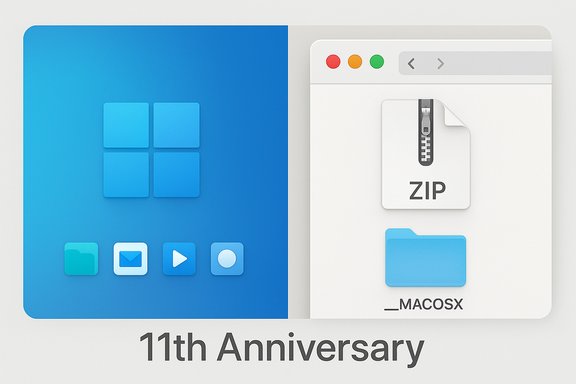
Microsoft’s small, celebratory wallpaper drop for the Windows Insider Program’s 11th anniversary turned into a short-lived internet punchline — not because of the art itself, but because the ZIP file Microsoft published contained a telltale __MACOSX folder that made it obvious the archive had been packaged on a Mac. What began as a Twitter and forum chuckle quickly expanded into a useful conversation about cross‑platform workflows, file metadata, and what an archival artifact does — and does not — tell us about where creative work actually happens.
Microsoft quietly released two theme‑aware desktop and phone wallpapers to mark 11 years of the Windows Insider Program. The assets were provided in light and dark variants and packaged in ZIP archives with multiple aspect ratios so the images display correctly on a wide range of devices. Microsoft’s official wallpaper hub lists the Windows Insider Program 11th Anniversary assets alongside other curated designs from Microsoft Design. Within hours of the ZIPs being shared, users who downloaded and extracted the package on Windows noticed a folder named __MACOSX appearing alongside the image files. That small detail prompted speculation, memes, and commentary across Reddit, community forums, and technology sites: had Microsoft used a MacBook to create Windows’ anniversary art? The story spread because the visible folder is a recognizable signature to many users — but the practical explanation is mundane and technical.
Source: The Mac Observer Microsoft’s Windows 11 Anniversary Wallpaper was created on a MacBook
 Background
Microsoft quietly released two theme‑aware desktop and phone wallpapers to mark 11 years of the Windows Insider Program. The assets were provided in light and dark variants and packaged in ZIP archives with multiple aspect ratios so the images display correctly on a wide range of devices. Microsoft’s official wallpaper hub lists the Windows Insider Program 11th Anniversary assets alongside other curated designs from Microsoft Design. Within hours of the ZIPs being shared, users who downloaded and extracted the package on Windows noticed a folder named __MACOSX appearing alongside the image files. That small detail prompted speculation, memes, and commentary across Reddit, community forums, and technology sites: had Microsoft used a MacBook to create Windows’ anniversary art? The story spread because the visible folder is a recognizable signature to many users — but the practical explanation is mundane and technical. What the __MACOSX folder actually is
The technical origin: AppleDouble and resource forks
The MACOSX directory is an artifact created when macOS writes metadata and resource‑fork information into a ZIP archive. Historically, macOS files used a two‑part model — a data fork and a resource fork — to store file contents and structured metadata. When files are packaged for non‑macOS file systems, macOS uses the AppleDouble format to preserve those metadata bits. Those AppleDouble entries commonly appear in ZIPs inside a top‑level MACOSX folder and as “dot‑underscore” files (for example, ._filename.png). These files are invisible to macOS users but become visible on Windows after extraction.Why you see it on Windows but not on macOS
On macOS, Finder hides filesystem metadata and dotfiles by default, so users typically never notice the extra files. When the same ZIP is extracted on Windows, the operating system does not treat those Apple metadata files as hidden resources, so the __MACOSX folder appears in the extracted tree. The presence of the folder is therefore an indicator of the packaging environment (a ZIP created on macOS), not proof about where the underlying artwork or its pixels were produced.The folder’s contents and safety
Most of the content in __MACOSX is tiny metadata files — thumbnails, extended attributes, and resource fork stubs — and they do not alter the actual image files. Removing the folder on Windows is safe for ordinary use of the images; restoring the files back to macOS could lose some macOS‑specific metadata (tags, Finder icon choices, or custom attributes), but it will not corrupt the main image files. Security‑wise, the folder is not an automatic indicator of malicious intent; the image PNG files inside the archive are what matter. That said, users should always prefer official distribution channels and scan downloads from unfamiliar sources.Why this little folder became news
A cultural shorthand for “made on a Mac”
The internet loves small, visible traces that seem to contradict brand narratives. A Windows wallpaper ZIP containing a macOS artifact is a tidy, memeable contradiction to the traditional Windows vs. Mac rivalry. The __MACOSX folder became a one‑line joke that combined platform tribalism with an easily reproducible technical detail — perfect fodder for Reddit, Twitter, and discussion threads. Community threads noted, with humor, that Microsoft “made Windows wallpapers on a Mac,” and the conversation then broadened into practical clarifications and design‑workflow commentary.It underscores how cross‑platform creative work has become
Beyond the jokes, the incident highlights a real and banal truth: modern creative and marketing teams routinely use multiple operating systems. Designers often prefer macOS for color‑accurate displays and creative suites, while testing and distribution pipelines — especially for Windows assets — require Windows validation. Packaging artifacts like __MACOSX are more about process than preference. Multiple outlets covered the wallpaper release and the ensuing reactions, pointing out that the ZIP’s metadata simply exposes part of Microsoft’s production pipeline rather than revealing a broader strategic shift.Cross‑platform workflows: practical realities for design teams
Why designers use macOS (and why that matters)
- Macs remain popular in creative industries due to consistent color management, industry tooling (creative suites and 3D apps), and hardware choices that many studios standardize on.
- macOS Finder and built‑in Archive utilities produce ZIPs that include AppleDouble metadata by default, so packaging on a Mac will often leave artifacts visible to Windows users.
- Designers need to test deliverables on target platforms. For Windows assets, this typically means toggling between macOS for creation and Windows for verification. The workflow is pragmatic and technology‑agnostic: use the best tool for the task.
Windows remains essential for verification and deployment
- Final QA, packaging automation, and deployment often take place on Windows‑based build servers or developer machines.
- IT and product teams may use Windows machines to confirm theme‑aware behavior (light vs. dark), DPI scaling, multi‑monitor handling, and installer packaging.
- In larger organizations, the handoff between design and engineering crosses OS boundaries naturally. A packaging artifact is often just a trace of that handoff rather than an intentional signal.
Community reaction — amusement, curiosity, and practical advice
Immediate reactions
Social and community outlets treated the discovery as light comedy. Some users saw creative irony in a Microsoft wallpaper ZIP showing macOS metadata; others used the moment to explain what the __MACOSX folder actually means. Community threads and tech commentary quickly moved from mockery to clarification: the folder indicates the ZIP was created on macOS, not that the images were designed in Pages on a MacBook.Forum and moderator notes
Windows community forums, including long‑running threads about Insider wallpapers, recorded the reaction and provided practical guidance: delete the __MACOSX folder if it’s a nuisance, or ignore it — it won’t affect image quality. Community moderators and users also emphasized best practices: download from official sources (Microsoft Design or the Windows Insider hub) and avoid third‑party mirrors to minimize any risk of altered or malicious files.What the episode tells us (and what it doesn’t)
What it tells us
- The packaging environment for at least the ZIP was macOS — that’s the straightforward, verifiable technical statement. The archive format and visible metadata make this provable when you inspect the ZIP.
- Cross‑platform workflows are normal in large organizations that need specialized tools for creative production and different platforms for testing and deployment. The presence of AppleDouble artifacts is an operational footprint of that reality.
What it does not tell us (caution advised)
- The presence of MACOSX is not evidence that the artistic concept was conceived, painted, or finalized on a Mac. Artwork creation often involves many tools (3D apps, texture suites, cloud render farms, and collaboration platforms) that are OS‑neutral or run on dedicated hardware. Any claim that the wallpaper “was made on a Mac” because of the MACOSX folder oversteps what the metadata can prove. That conclusion is plausible but unverifiable from the ZIP alone. Readers should treat such claims as speculative unless an authoring credit or official statement from Microsoft specifies the tools and environment used.
Security, privacy, and practical guidance for users
Is the ZIP or the __MACOSX folder dangerous?
- In isolation, the folder is benign: it’s metadata and small resource fork files created by macOS compression tools. It does not contain executable code by default.
- The important security rule remains unchanged: vet file sources and prefer official downloads. Only download the Windows Insider wallpapers from Microsoft’s official design/wallpaper pages or the Windows Insider hub to avoid tampered archives.
If you’ve already downloaded the ZIP: a short checklist
- Verify you downloaded the archive from an official Microsoft domain or directly via the Windows Insider hub.
- Scan extracted files with an up‑to‑date antivirus tool if you have any doubt.
- If the __MACOSX folder bothers you, delete it — the core image files are unaffected and will work normally on Windows.
- If you plan to re‑use the images on macOS and care about exact Finder tags or resource forks, preserve the original ZIP or don’t delete AppleDouble files until you’ve moved them back to macOS.
Why Microsoft’s design gestures still matter
Releasing wallpaper packs for Insiders is a soft, symbolic gesture that carries disproportionately positive community value. These design tokens are low‑cost, highly visible ways to recognize the program’s community and underscore continuity in the Windows brand language. The 11th‑anniversary assets — following a pattern of earlier anniversary drops — are part ritual, part brand stewardship. They keep a visible link between Microsoft’s design team and the people who test and shape Windows. At the same time, small design gestures do not substitute for product-level changes Insiders may seek (clearer channel governance, faster bug remediation, or substantive roadmap commitments). The wallpaper is a friendly touch, not a strategic roadmap.Quick technical explainer: why macOS adds __MACOSX when zipping
- macOS uses AppleDouble to preserve metadata and resource forks when writing to non‑macOS file systems or packaging files for cross‑platform transfer.
- Many macOS compression tools (including Finder’s built‑in “Compress” command) include these AppleDouble entries inside a __MACOSX folder.
- When extracted on Windows or Linux, these entries are visible and sometimes appear as dot‑underscore prefixed files; they are mostly tiny metadata stubs and can be safely removed on non‑macOS systems.
Lessons for product teams and communicators
- Packaging transparency matters: small artifacts in release packages can invite public scrutiny and jokes, so consider platform‑agnostic packaging steps if the goal is to avoid that attention.
- Use cross‑platform CI: if packaging is intended for broad distribution, use automation that normalizes archives so platform‑specific metadata is suppressed or separated into optional files.
- Anticipate community curiosity: public releases (even wallpapers) will be inspected closely; a short note on the download page explaining that the ZIP was produced on macOS (if true) or that Apple metadata may appear when unzipped on Windows would neutralize speculation and save time for support teams.
- Keep the story focused on the product: emphasize design intent, accessibility, and why assets were provided in multiple aspect ratios and themes — that’s what most users will value long term.
Closing analysis: a small artifact, a useful conversation
A tiny, automatically generated folder — __MACOSX — was enough to make a round of headlines and social‑media jokes. The episode is a reminder that seemingly trivial technical artifacts can become cultural signals in a fast‑moving online community. The correct, verifiable takeaway is straightforward: the archive Microsoft published was packaged on macOS, which left behind AppleDouble metadata visible when unzipped on Windows. That fact is verifiable by inspection of the ZIP and consistent with documented macOS behavior. What is not verifiable from the ZIP alone is where the creative work was primarily executed; claims that the wallpaper was created on a Mac are plausible but unproven without explicit authoring credits or a statement from Microsoft. Ultimately, the 11th‑anniversary wallpapers are what they were meant to be: a modest, well‑crafted design gift for the Windows Insider community. The macOS packaging artifact is a footnote that highlights how modern creative pipelines are fluid across operating systems — and how the internet enjoys a good, lighthearted contradiction when it finds one. Community commentary and the official distribution pages provide the practical context and safe download paths for any Insider who wants to use the images, while documentation about AppleDouble explains the harmless technical origin of the __MACOSX folder. For readers who prefer a simple action plan: download the wallpapers from the official Microsoft Design / Windows Insider hub, set them as your background, and if an extra __MACOSX folder appears after extracting the ZIP on Windows, feel free to delete it — it won’t change the images. The story is a small, educational reminder that the tools we use leave traces; knowing what those traces mean turns a viral moment into a teachable one.Source: The Mac Observer Microsoft’s Windows 11 Anniversary Wallpaper was created on a MacBook
