

Microsoft’s latest Windows Insider shuffle is more than a branding exercise. On April 24, 2026, the company began moving Dev Channel testers into a new Experimental channel, while also preparing a broader split for Canary and Beta participants over the coming weeks. The change is designed to make the Insider program easier to understand, but it also reveals something more important: Microsoft is trying to separate what it is testing now from what it might test next in a way that gives the company more room to maneuver.
For years, the Windows Insider Program has been both a technical test bed and a communication challenge. Microsoft used the Dev, Beta, and Canary labels to signal stability and intent, but in practice those lines often blurred as build branches shifted, feature availability changed, and participants found themselves on versions that did not match their expectations. The result was a program that was useful for enthusiasts and developers, but sometimes difficult to explain even to seasoned Windows observers.
That ambiguity became more visible as Microsoft increased the pace of Windows feature experimentation. The company has been moving toward more granular release controls, including staged feature rollouts, feature flags, and build families that can diverge meaningfully from one another. In February and March 2026, Dev Channel and Canary Channel builds on the 26300 and 28000/29500 series were already showing distinctly different behavior, underscoring that the old channel labels were no longer an accurate shorthand for risk or purpose.
Microsoft acknowledged that problem directly in its April 10 Insider note about improving the Insider experience. The company said some channel transitions could require clean installs or create continuity problems, and it signaled that clearer definitions were coming. Two weeks later, that plan arrived in the form of the new Experimental channel and a reworked Beta experience. The message is obvious: Microsoft wants the Insider program to feel less like a maze and more like a ladder.
There is also a strategic backdrop. Windows 11 development is now split across multiple tracks that can target different delivery goals: retail-adjacent quality updates, feature exploration, and future platform work. The move to Experimental formalizes that split. Instead of treating all Insiders as one broad audience, Microsoft is creating a more explicit hierarchy of near-term polish, mid-term feature work, and longer-horizon platform experimentation.
That sequencing matters because it reveals Microsoft’s internal logic. The company is not simply renaming channels for marketing clarity; it is assigning channels to specific build families and, in the Canary case, to specific platform trajectories. In practice, this gives Microsoft a cleaner way to say whether a build is meant for near-term validation, a 26H1 path, or a still-undefined future platform branch.
The design is also meant to reduce confusion around what users should expect when they opt in. The old model often left testers wondering whether a channel was “more stable” or “more experimental” than another, even when build numbers told a different story. Microsoft’s new approach is not perfect, but it is much easier to describe in one sentence.
The introduction of Experimental (26H1) and Experimental (Future Platforms) adds another layer of precision. The 26H1 labeling suggests Microsoft wants to preserve a route for near-future Windows work, while “Future Platforms” signals a sandbox for work that may be too early, too volatile, or too strategically sensitive to fit neatly into a conventional release train. That is a useful distinction for Microsoft, and a useful warning for testers.
This is also why the company is pushing release notes into the Windows Insider Program Documentation Hub. Microsoft says that move offers easier navigation, better localization, deep linking, and light/dark mode support. Those are user-friendly improvements, but they also help the company pair each channel with a more formal documentation flow, which is exactly what a more segmented Insider program needs.
This is not just about convenience. Update deferral is an important trust signal. When Microsoft gives users more say over when updates happen, it reduces the perception that Windows is acting to the user rather than for the user. That is especially important in an era when update fatigue can make even good security changes feel intrusive.
The upside is obvious: faster testing, cleaner comparisons, and less ambiguity about whether a feature is hidden, staged, or removed. The downside is also obvious: more knobs can mean more complexity, especially for less technical testers who joined the Insider program to see what is new, not to manage a matrix of experiments. Microsoft is betting that the added clarity will outweigh the added complexity.
A few practical implications stand out:
This is useful because the Canary brand has always been a catch-all for “very early” work. But not all early work is equally early. Some branches are closer to productization than others, and Microsoft’s new split effectively admits that the old label was too blunt. The company is now encoding branch maturity into the channel structure itself.
The April 17 build 29570.1000 provides a good example of this branch’s direction. It introduced Xbox mode on Windows 11 PCs and reflected a more ambitious platform experimentation posture than the 28000 branch. A separate 29576.1000 build on April 24 added redesigned volume controls, NPU usage metrics in Task Manager, and point-in-time restore in Windows Recovery Environment. That is the kind of work Microsoft may want isolated in a channel where expectations are deliberately looser.
The key point is that Microsoft no longer wants Canary to imply one thing. It wants Canary to be a routing layer, not a single destination. That is a smart move technically, but it also makes the channel tree feel more like an internal engineering map than a consumer-friendly product ladder. That tension is likely to persist.
The April 24 Beta build 26200.8283 appears consistent with that approach. Microsoft described it as bringing only minor changes for the Start menu and print drivers, which is a far cry from the more aggressive work showing up in Canary and Experimental. That contrast helps define the new shape of the program more clearly than any branding memo could.
For everyday Windows enthusiasts, the practical impact may be modest. For power users and MVPs who rely on specific test features, however, the change could be painful if they had treated Beta as a low-risk home for previewing bleeding-edge functionality. The channel is not becoming less useful, but it is becoming more disciplined.
That balance matters because updates are where trust is won or lost. If Windows can reduce friction without weakening security outcomes, Microsoft will have a stronger answer to years of user frustration. If it overcorrects and makes updates too easy to postpone, it risks the familiar problem of systems staying behind on critical fixes. That is the tightrope.
Microsoft notes that some OOBE update controls are not applicable to commercial devices where setup is managed or where updates are required for functionality. That distinction is important because it shows the company is not trying to break enterprise deployment discipline; it is tailoring the consumer experience while leaving room for admin policy. The Insider program, in that sense, is serving as a test bench for both audiences at once.
What emerges is a more coherent platform message: Windows should be secure, but it should also be less presumptive. Microsoft clearly understands that update friction can become a product-quality issue, not just a support issue.
But the ladder is steeper because the labels no longer do all the work. A tester now has to pay attention to build families, channel variants, and feature flags. For advanced users, that is manageable and even welcome. For mainstream enthusiasts, it may be one more reason to disengage from the program unless they have a clear goal.
That makes the Insider program feel more like a segmented research platform than a single preview lane. For Microsoft, that is a feature. For testers, it is both an opportunity and a warning that the days of casually drifting between channels may be ending.
It also helps Microsoft defend against criticism that Insider builds have become too random or too disconnected from retail reality. By making Beta more retail-like and Experimental more exploratory, the company can argue that each stage now has a clear purpose. That is a better story for admins, enterprise customers, and enthusiast communities alike.
For rivals, the implication is that user-facing testing frameworks need to be clearer, not just more frequent. In a world where features are continuously staged and recut, the companies that win trust will be the ones that make volatility legible. Microsoft is trying to do exactly that here.
There is also a broader question about how much experimentation Microsoft wants to keep visible. The company is clearly moving toward a model where the preview ecosystem is better segmented, the update experience is more controllable, and the path from test build to retail build is easier to explain. That is a mature direction for Windows, but it is also a sign that Microsoft expects the platform to keep changing rapidly. In that sense, Experimental is less a destination than a staging ground.
What to watch next:
Source: Thurrott.com Microsoft Starts Rolling Out New "Experimental" Windows Insider Channel
 Background
For years, the Windows Insider Program has been both a technical test bed and a communication challenge. Microsoft used the Dev, Beta, and Canary labels to signal stability and intent, but in practice those lines often blurred as build branches shifted, feature availability changed, and participants found themselves on versions that did not match their expectations. The result was a program that was useful for enthusiasts and developers, but sometimes difficult to explain even to seasoned Windows observers.That ambiguity became more visible as Microsoft increased the pace of Windows feature experimentation. The company has been moving toward more granular release controls, including staged feature rollouts, feature flags, and build families that can diverge meaningfully from one another. In February and March 2026, Dev Channel and Canary Channel builds on the 26300 and 28000/29500 series were already showing distinctly different behavior, underscoring that the old channel labels were no longer an accurate shorthand for risk or purpose.
Microsoft acknowledged that problem directly in its April 10 Insider note about improving the Insider experience. The company said some channel transitions could require clean installs or create continuity problems, and it signaled that clearer definitions were coming. Two weeks later, that plan arrived in the form of the new Experimental channel and a reworked Beta experience. The message is obvious: Microsoft wants the Insider program to feel less like a maze and more like a ladder.
There is also a strategic backdrop. Windows 11 development is now split across multiple tracks that can target different delivery goals: retail-adjacent quality updates, feature exploration, and future platform work. The move to Experimental formalizes that split. Instead of treating all Insiders as one broad audience, Microsoft is creating a more explicit hierarchy of near-term polish, mid-term feature work, and longer-horizon platform experimentation.
What Microsoft Changed
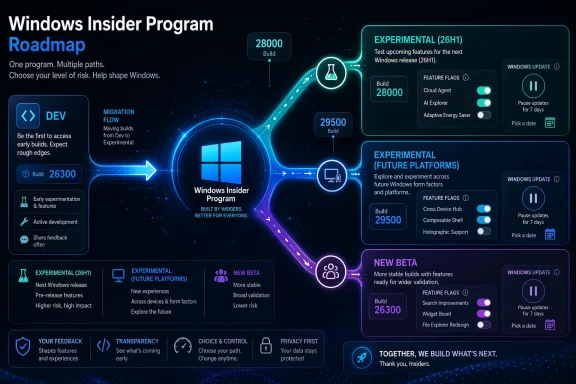
The headline change is simple: Dev Channel users are being moved to Experimental, and they will continue receiving 26300-series builds for now. That means the channel label changes, but the build family remains recognizable to anyone already tracking the Dev branch. The shift is intended to happen gradually, and Microsoft says users who do not see the new channel UI immediately can enable it manually under Settings > Windows Update > Windows Insider Program > Feature flags.A phased migration, not a switch flip
Microsoft is not moving every Insider at once. Instead, it is rolling the transition out in phases to reduce disruption and keep the experience reliable. Dev users go first, then Canary users on the 28000 series move into Experimental (26H1), while Canary users on the 29500 series move to Experimental (Future Platforms). Beta users are also being shifted to the new Beta experience, but that rollout is delayed rather than immediate.That sequencing matters because it reveals Microsoft’s internal logic. The company is not simply renaming channels for marketing clarity; it is assigning channels to specific build families and, in the Canary case, to specific platform trajectories. In practice, this gives Microsoft a cleaner way to say whether a build is meant for near-term validation, a 26H1 path, or a still-undefined future platform branch.
The design is also meant to reduce confusion around what users should expect when they opt in. The old model often left testers wondering whether a channel was “more stable” or “more experimental” than another, even when build numbers told a different story. Microsoft’s new approach is not perfect, but it is much easier to describe in one sentence.
The new channel names are doing real work
“Experimental” is a more honest label than “Dev” for what the program now appears to be. Dev historically implied software engineering momentum, but it also carried a vague promise that the build stream was tied to active development on a coherent product line. The new name is broader and more candid: this is where Microsoft can test ideas before it commits them to a product story.The introduction of Experimental (26H1) and Experimental (Future Platforms) adds another layer of precision. The 26H1 labeling suggests Microsoft wants to preserve a route for near-future Windows work, while “Future Platforms” signals a sandbox for work that may be too early, too volatile, or too strategically sensitive to fit neatly into a conventional release train. That is a useful distinction for Microsoft, and a useful warning for testers.
This is also why the company is pushing release notes into the Windows Insider Program Documentation Hub. Microsoft says that move offers easier navigation, better localization, deep linking, and light/dark mode support. Those are user-friendly improvements, but they also help the company pair each channel with a more formal documentation flow, which is exactly what a more segmented Insider program needs.
Dev Channel Becomes Experimental
For current Dev users, build 26300.8289 is the first visible sign of the transition. Microsoft says the build includes Windows Update improvements, including new options for skipping updates during OOBE and extending pause periods as many times as needed. That may sound mundane, but it is actually a strong clue about Microsoft’s priorities: it is testing not only OS features, but the experience of managing the OS itself.Why update control is a big deal
Windows Update has long been one of the most complained-about parts of Windows. Microsoft’s April 24 update-experience post makes that clear by emphasizing user feedback around untimely updates and limited control. The new OOBE option to defer updates, plus repeated pause extensions, directly addresses a pain point that spans consumer, enthusiast, and enterprise audiences.This is not just about convenience. Update deferral is an important trust signal. When Microsoft gives users more say over when updates happen, it reduces the perception that Windows is acting to the user rather than for the user. That is especially important in an era when update fatigue can make even good security changes feel intrusive.
Feature flags become a first-class tool
One of the more interesting details in the rollout is that Microsoft wants Experimental users to toggle experiences on and off through Feature flags in Windows Update. That is a subtle but significant shift in the Insider model. Instead of passively receiving a build and hoping the relevant code path appears, testers get more direct control over feature exposure.The upside is obvious: faster testing, cleaner comparisons, and less ambiguity about whether a feature is hidden, staged, or removed. The downside is also obvious: more knobs can mean more complexity, especially for less technical testers who joined the Insider program to see what is new, not to manage a matrix of experiments. Microsoft is betting that the added clarity will outweigh the added complexity.
A few practical implications stand out:
- Dev users now have a clearer path into Microsoft’s next-stage experimentation.
- Build 26300 remains the familiar anchor, even though the label changes.
- Feature flags give testers more agency but also more responsibility.
- Update control remains a central theme across Microsoft’s Windows roadmap.
- The Insider program is becoming more modular, not less.
Canary’s Split Personality
The Canary channel is where Microsoft’s new scheme becomes most revealing. Instead of one broad Canary lane, the company is carving it into separate experiences based on build family: 28000-series testers are being moved into Experimental (26H1), while 29500-series testers are moving into Experimental (Future Platforms). That split suggests Microsoft sees a meaningful difference between the two branches, even if both are still pre-release and highly volatile.28000 series: nearer-term platform work
The 28000-series path is tied to 26H1, which suggests a platform line that is still oriented toward a plausible near-future release cadence. Microsoft’s April 17 Canary build 28020.1863 already showed the kind of refinements that fit this category, including changes around gaming and backup behavior. The new naming convention now makes that kind of work easier to classify for testers and observers alike.This is useful because the Canary brand has always been a catch-all for “very early” work. But not all early work is equally early. Some branches are closer to productization than others, and Microsoft’s new split effectively admits that the old label was too blunt. The company is now encoding branch maturity into the channel structure itself.
29500 series: the real bleeding edge
The 29500-series path is more striking because it is labeled Future Platforms. That is an intentionally broad phrase, and it likely exists because Microsoft does not yet want to pin those builds to a specific release horizon. In other words, the channel is a buffer zone for work that may not map cleanly to 26H1 or any other near-term naming scheme.The April 17 build 29570.1000 provides a good example of this branch’s direction. It introduced Xbox mode on Windows 11 PCs and reflected a more ambitious platform experimentation posture than the 28000 branch. A separate 29576.1000 build on April 24 added redesigned volume controls, NPU usage metrics in Task Manager, and point-in-time restore in Windows Recovery Environment. That is the kind of work Microsoft may want isolated in a channel where expectations are deliberately looser.
The key point is that Microsoft no longer wants Canary to imply one thing. It wants Canary to be a routing layer, not a single destination. That is a smart move technically, but it also makes the channel tree feel more like an internal engineering map than a consumer-friendly product ladder. That tension is likely to persist.
Beta Channel Gets Reframed
Beta is also changing, although Microsoft has been more careful here. The company says the new Beta experience will better reflect what is coming to retail in the following weeks, which means Beta is being pushed closer to the mainstream product cadence than before. That is a significant philosophical adjustment, because Beta now feels less like a broad feature lab and more like a retail pre-echo.A smaller, steadier delta from retail
Microsoft’s explanation is explicit: the Beta experience should align more tightly with what lands in retail shortly afterward. That means Beta testers should expect a more predictable relationship between what they see and what consumers will eventually receive. In theory, that reduces surprise. In practice, it also lowers the amount of exploratory work Beta can absorb.The April 24 Beta build 26200.8283 appears consistent with that approach. Microsoft described it as bringing only minor changes for the Start menu and print drivers, which is a far cry from the more aggressive work showing up in Canary and Experimental. That contrast helps define the new shape of the program more clearly than any branding memo could.
What the change means for testers
Microsoft says users who want the best continuity of existing features should consider moving from Beta to Dev before the transition fully lands. That is a telling recommendation, because it implicitly acknowledges that Beta will lose some of its “extra” feature surface as it becomes more tightly aligned with retail. Testers who want breadth should look higher up the stack.For everyday Windows enthusiasts, the practical impact may be modest. For power users and MVPs who rely on specific test features, however, the change could be painful if they had treated Beta as a low-risk home for previewing bleeding-edge functionality. The channel is not becoming less useful, but it is becoming more disciplined.
- Beta is being repositioned as a closer retail proxy.
- Feature deltas should narrow compared with older Beta behavior.
- Users who value continuity may need to re-evaluate channel choice.
- Microsoft is using Beta to reduce uncertainty, not maximize experimentation.
- The new structure makes channel intent easier to communicate.
The Windows Update Story Behind the Story
The Experimental channel launch cannot be separated from Microsoft’s broader Windows Update redesign, which also shipped on April 24. That update adds more control over OOBE update timing, more flexible pause management, and clearer power/restart behavior. This is not accidental timing; it is a coordinated push to show that Windows is becoming more user-directed while still maintaining Microsoft’s security posture.Security and convenience are being rebalanced
Microsoft’s Windows Update post frames the changes as part of the Secure Future Initiative, emphasizing security by design and security by default. At the same time, the company is clearly responding to complaints that updates interrupt work at the wrong moments. The new controls are a direct attempt to balance those two imperatives rather than force users to choose one over the other.That balance matters because updates are where trust is won or lost. If Windows can reduce friction without weakening security outcomes, Microsoft will have a stronger answer to years of user frustration. If it overcorrects and makes updates too easy to postpone, it risks the familiar problem of systems staying behind on critical fixes. That is the tightrope.
Enterprise and consumer needs diverge
For consumers, the big win is control. The ability to skip OOBE updates and extend pauses repeatedly gives users more agency, especially on new PCs where the first-run experience can already feel crowded and overbearing. For enterprises, the story is more nuanced, because managed devices already operate under different policies and expectations.Microsoft notes that some OOBE update controls are not applicable to commercial devices where setup is managed or where updates are required for functionality. That distinction is important because it shows the company is not trying to break enterprise deployment discipline; it is tailoring the consumer experience while leaving room for admin policy. The Insider program, in that sense, is serving as a test bench for both audiences at once.
What emerges is a more coherent platform message: Windows should be secure, but it should also be less presumptive. Microsoft clearly understands that update friction can become a product-quality issue, not just a support issue.
What This Means for Windows Insiders
For Insiders, the new channel map changes how you should think about risk, value, and timing. The old rule of thumb—Dev for new features, Beta for more stability, Canary for chaos—was never fully accurate, but it was good enough for casual use. The new structure is more informative, yet it also asks more of testers who want to place themselves on the right branch.A clearer ladder, but a steeper one
The most obvious upside is transparency. A user can now understand that Dev users are becoming Experimental testers, that Canary is being split into two meaningful sub-tracks, and that Beta is moving closer to retail. That makes it easier to decide where to sit based on tolerance for disruption and appetite for novelty.But the ladder is steeper because the labels no longer do all the work. A tester now has to pay attention to build families, channel variants, and feature flags. For advanced users, that is manageable and even welcome. For mainstream enthusiasts, it may be one more reason to disengage from the program unless they have a clear goal.
Insider choice now has more strategic weight
This matters because channel selection is no longer just a matter of “how early do I want updates?” It is also a matter of what kind of Windows future you want to help validate. If you care about near-term product behavior, Beta and 26H1-oriented paths matter most. If you want to see Microsoft’s longer-range engineering bets, Future Platforms is where that work now appears to be heading.That makes the Insider program feel more like a segmented research platform than a single preview lane. For Microsoft, that is a feature. For testers, it is both an opportunity and a warning that the days of casually drifting between channels may be ending.
- Channel choice now maps more clearly to intent.
- Feature flags matter more than they used to.
- Build series are becoming a critical part of the decision.
- Beta is better for continuity, not maximal novelty.
- Canary is now explicitly split into near-term and future-oriented paths.
Competitive Implications
Microsoft’s move has implications beyond Windows Insiders because it reflects how large platform vendors are adapting to a faster, more modular development reality. Apple, Google, and Microsoft all face the same problem: how to expose unfinished software without confusing users or undermining trust. Microsoft’s answer is to codify experimentation into the channel structure itself.Microsoft is optimizing for governance as much as speed
The new structure gives Microsoft better governance over what is being tested, by whom, and under what assumptions. That matters because modern operating system development is increasingly a matter of feature staging, telemetry, and controlled exposure rather than one big public beta. The more complex the product, the more valuable precise gating becomes.It also helps Microsoft defend against criticism that Insider builds have become too random or too disconnected from retail reality. By making Beta more retail-like and Experimental more exploratory, the company can argue that each stage now has a clear purpose. That is a better story for admins, enterprise customers, and enthusiast communities alike.
The broader market message
The broader market message is that Windows is becoming more layered. Microsoft is not abandoning experimentation; it is organizing it. That is a subtle but important difference, because it suggests the company believes Windows can remain a fast-moving platform without letting the preview experience become chaotic.For rivals, the implication is that user-facing testing frameworks need to be clearer, not just more frequent. In a world where features are continuously staged and recut, the companies that win trust will be the ones that make volatility legible. Microsoft is trying to do exactly that here.
Strengths and Opportunities
Microsoft’s rollout has several strengths that are easy to miss if you focus only on the renamed channels. The company is not merely shuffling labels; it is creating a more interpretable development system that better matches how Windows is actually built today. That should improve tester satisfaction, internal clarity, and the quality of feedback Microsoft receives.- Clearer channel intent should reduce confusion for Insiders trying to choose the right build stream.
- Feature flags give testers more control over exposure and make side-by-side validation easier.
- Beta-to-retail alignment can improve confidence in what users see before public release.
- Separate Canary paths let Microsoft isolate near-term and long-term platform work more cleanly.
- Improved Windows Update controls directly address a long-standing user pain point.
- Documentation Hub migration should make build tracking and release-note navigation easier.
- Phased rollout reduces the chance of a single bad transition affecting the entire Insider base at once.
Risks and Concerns
The same changes that make the Insider program more rational also introduce new risks. More segmentation can create more confusion if Microsoft fails to explain the differences well, and more feature toggles can become a burden if users do not understand what they are enabling or disabling. The success of this redesign depends on communication as much as code.- Channel complexity may increase for casual Insiders who do not follow build families closely.
- Feature-flag sprawl could make troubleshooting harder when users report inconsistent behavior.
- Beta feature reduction may disappoint testers who relied on Beta for broader preview coverage.
- Future Platforms ambiguity could become frustrating if Microsoft does not define the path clearly over time.
- Update postponement controls may be misused by consumers who delay important security fixes too long.
- Documentation fragmentation could happen if release notes are split across too many surfaces without strong linking.
- Transition fatigue is a real risk when multiple channels move at once, even on a phased schedule.
Looking Ahead
The next few weeks will tell us whether Microsoft’s new channel map feels intuitive in practice or merely tidy on paper. The biggest test is whether Insiders understand where they belong once Canary, Dev, and Beta all settle into their new roles. If Microsoft’s messaging holds up, the program could become more useful to both hobbyists and professionals. If not, the new structure may simply replace one set of complaints with another.There is also a broader question about how much experimentation Microsoft wants to keep visible. The company is clearly moving toward a model where the preview ecosystem is better segmented, the update experience is more controllable, and the path from test build to retail build is easier to explain. That is a mature direction for Windows, but it is also a sign that Microsoft expects the platform to keep changing rapidly. In that sense, Experimental is less a destination than a staging ground.
What to watch next:
- The pace of Canary transitions into Experimental (26H1) and Experimental (Future Platforms).
- Whether Microsoft adds more clarity around Future Platforms and how it differs from 26H1.
- How quickly Beta users lose or retain features under the new Beta experience.
- Whether the Documentation Hub becomes the primary source for Insider release tracking.
- How users respond to the new Windows Update controls in everyday use.
Source: Thurrott.com Microsoft Starts Rolling Out New "Experimental" Windows Insider Channel
