

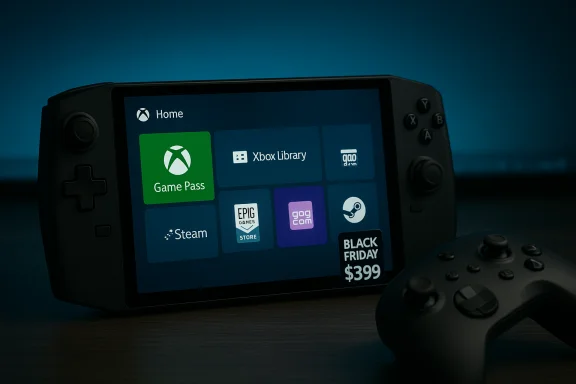
Microsoft’s decision to open the Xbox Full Screen Experience to a wider set of Windows 11 handhelds changes the buying calculus for portable gaming PCs — and it makes a strong case for picking a Windows-flavored Lenovo Legion Go S during Black Friday sales, provided you value broad storefront compatibility and Game Pass integration.
Background / Overview
The Xbox Full Screen Experience (FSE) started life as a tailored, controller-first shell preinstalled on the ASUS ROG Xbox Ally family. Microsoft has now expanded the mode beyond that initial exclusivity, rolling FSE out to Windows 11 handhelds in market and making it available for preview on other Windows form factors through the Windows and Xbox Insider channels. The feature’s stated goals are to provide a console-like front end, reduce desktop overhead during gaming sessions, and surface Game Pass plus other installed storefronts in a single, controller-friendly hub. This is not a new operating system or replacement kernel; it’s a session posture — a full-screen home shell that can boot into the Xbox app, minimize Explorer’s desktop ornaments, and defer non‑essential services to free memory and reduce background wakeups. That design preserves Windows’ compatibility advantage (drivers, anti-cheat, native Windows apps) while delivering a console-like UX on handheld hardware.What exactly the Full Screen Experience does
The Full Screen Experience changes how Windows behaves during a gaming session without altering the underlying OS. Key behaviors include:- A single, full-screen home hub (the Xbox PC app) optimized for controller navigation and large tiles.
- Aggregation of Game Pass titles, Xbox library entries, and discovered games from installed storefronts like Steam and Epic.
- Session-level trimming of non-critical desktop services and visual “ornaments” to free RAM and reduce background CPU wakeups. Independent testing and OEM reporting suggest reclaimed memory can be on the order of gigabytes in some cases, but results vary by device.
- Multiple, simple entry/exit paths: Settings > Gaming > Full screen experience, the Game Bar, Task View, or a hotkey (Win + F11) — and the option to boot directly into FSE on supported OEM-configured devices.
Why this matters for handheld buyers right now
Handheld gaming PCs have lived under two competing UX approaches:- SteamOS and Valve’s Big Picture / Deck UI: a purpose-built console-like layer that makes handheld navigation straightforward and typically gives excellent out-of-the-box ergonomics and battery/performance efficiency for supported titles.
- Windows 11: the familiar PC platform with the broadest software compatibility, but historically hampered on small screens by desktop-first UX assumptions and desktop background noise that hinders sustained performance on constrained handheld APUs.
- Game Pass integration and cloud/streaming options in the same UI as installed PC games.
- Plug-and-play access to the full catalog of Windows-native launchers and DRM systems without the Linux/Wine workarounds SteamOS sometimes requires.
The Lenovo Legion Go S: Windows 11 vs SteamOS — what changed
Lenovo’s Legion Go S is one of the first third‑party devices to ship in both Windows 11 and SteamOS flavors. The hardware across the two OS versions is effectively the same in core components for the configurations most shoppers consider: the Legion Go S commonly ships with a Ryzen Z2 Go APU (or similar Z-series APU), 16GB of RAM and a 512GB NVMe SSD in the mid-tier configuration, plus an 8‑inch / 8.8‑inch ~120Hz WQXGA panel depending on the SKU. That hardware baseline means buyers choose an OS for UX and compatibility reasons as much as for raw specs. Recent retail movement during Black Friday made the decision more interesting:- The SteamOS Legion Go S has seen aggressive discounting that brought it into a budget-favorable band (major retailers like Best Buy have offered SteamOS models around $449.99 during early Black Friday promotions, making it an attractive "Steam Deck alternative").
- The Windows 11 Legion Go S has also been discounted in the same period, but it has generally sat higher than the SteamOS model in baseline price. Some outlets reported the Windows variant at roughly $579.99 during one notable Amazon discount, while Best Buy and other retailers showed differing sale prices depending on the day and SKU. Those price differences matter because they represent the practical premium paid for guaranteed Windows compatibility and, now, a console-like FSE front end.
Technical snapshot: what you get in the mid-tier Legion Go S
- CPU/GPU: AMD Ryzen Z2 Go (Z-series handheld APU) — adequate for many modern titles at handheld settings, but not on the same thermal/power envelope as higher-end Z2 Extreme or Z1 Extreme variants.
- Memory: 16GB LPDDR5(X) typical in mid configs.
- Storage: 512GB NVMe SSD (expandable via microSD on many handhelds).
- Display: ~8–8.8-inch WQXGA or WUXGA panel, 120Hz variable refresh rate depending on model.
- Form factor notes: white/glacier color options on Windows units; SteamOS often ships in different finish or same shell depending on region and retailer.
Strengths: Why the Windows Legion Go S with FSE is attractive
- Broad, native compatibility. Want to run Epic, GOG, Battle.net, Ubisoft Connect, or older Windows-only titles? Windows runs them natively; SteamOS users often need Wine/proton tweaks for parity. That matters if your backlog includes Windows-native games or launchers.
- Game Pass convenience. Game Pass is tightly integrated into the Xbox app; FSE surfaces Game Pass prominently, which is a win if you subscribe and favor browsing/running those titles quickly.
- Console-like UX without losing Windows. FSE reduces the desktop friction that historically made Windows handhelds awkward; you get a Big Picture-style home that’s easy to navigate with sticks and bumpers.
- One OS, all storefronts. While SteamOS can be made to access other stores, Windows does it out of the box—no workaround, no compatibility layer for most titles. That simplifies maintenance and reduces the chance of edge-case issues with anti-cheat or DRM that sometimes break on Wine-based setups.
Trade-offs and risks you should weigh
FSE is a pragmatic improvement, but it’s not a panacea. Important caveats:- Variable performance gains. FSE’s memory and background-trimming benefits are real but inconsistent. The size of the win depends on the device’s firmware, drivers, and the games you play. For some titles the minimum framerate improves measurably; for others the change is negligible. Do not treat FSE as a guaranteed uplift in every scenario.
- OEM gating and fragmentation. Microsoft delivers the FSE plumbing via Windows updates and Insider builds, but OEMs decide when and how to enable it on specific models. That means two identical-spec devices from different vendors might have different release timing or OEM-specific optimizations. Expect inconsistent availability early in the rollout.
- Anti-cheat and overlays. FSE does not change kernel drivers or anti-cheat systems; some overlays, capture hooks, or anti-cheat interactions could behave differently under a trimmed session. Third-party vendor validation remains crucial. Until OEMs and publishers fully validate headless/trimmed sessions for specific titles, edge cases will exist.
- Price premium vs SteamOS. If the Windows model remains consistently more expensive than SteamOS, some buyers will rationally choose the cheaper SteamOS variant and accept occasional compatibility workarounds—especially if they primarily use Steam. Black Friday fluctuations can change that calculus quickly.
- Privacy/telemetry perceptions. Any tighter integration with Xbox services means more surface area for telemetry and account linkage. For most users this is a non-issue, but privacy-concerned buyers should review account sync and cloud save settings. (This is a general caution; telemetry specifics vary by build and Microsoft disclosure. Flagging because telemetry expectations differ across user groups.
Practical buying checklist: how to decide between Windows (FSE) and SteamOS for a Legion Go S
- Prioritize Windows (FSE) if:
- You subscribe to Xbox Game Pass and want one-click access to that library.
- You rely on multiple Windows-native launchers (Epic, GOG Galaxy, Ubisoft, Battle.net).
- You need to run Windows-only utilities, emulators, or mod tools without Wine/proton workarounds.
- You prefer buying a handheld today and want the convenience of FSE without the hassle of configuring a Linux stack.
- Prioritize SteamOS if:
- Your library is overwhelmingly Steam-centric and you prefer Valve’s handheld UX out-of-the-box.
- You want the best possible price/performance ratio and are comfortable with occasional compatibility work.
- You’re willing to accept a narrower set of native apps in exchange for an experience optimized for handheld gaming.
- If price is the deciding factor:
- Watch retailers closely: early Black Friday cuts made SteamOS models extremely competitive (e.g., deals in the $449–$549 range), while Windows SKUs dipped but usually maintained a premium. These dynamics change rapidly during holiday promotions; if the Windows unit drops to parity with SteamOS, the compatibility argument becomes the dominant tie-breaker.
A few scenarios and recommended choices
- Casual player with Game Pass and multiple storefronts: Windows Legion Go S with FSE — convenience + compatibility.
- Steam-first buyer on a tight budget: SteamOS Legion Go S during steep discounting — better immediate value.
- Power user who loves tinkering and maximum control: Either OS will work, but SteamOS requires more setup for non-Steam titles; Windows gives instant access to everything with fewer hacks.
- Someone who values long-term stability for specific competitive titles with sensitive anti-cheat: Lean toward Windows because compatibility and anti-cheat support are less likely to surprise you than a Wine-based workaround, but verify publisher support for the FSE posture first.
What to expect next and how Microsoft/OEMs will shape the landscape
Expect a few immediate developments:- OEM firmware and driver optimizations targeted to FSE. Vendors will tune thermal profiles, power limits, and driver behavior to get the best results in the trimmed session.
- More consistent OEM gating and clearer compatibility documentation. Microsoft and major partners will surface per-device guidance (supported games, known issues, and recommended firmware) over the coming months.
- Continued feature convergence between SteamOS and Windows front ends. Valve and Microsoft both have reasons to make handheld play approachable; that will spur parallel innovations in UX and runtime behavior.
Conclusion
Microsoft’s Full Screen Experience materially reduces one of Windows’ longstanding UX disadvantages on handhelds: the desktop-first, mouse-and-keyboard skin that made portable PCs feel clumsy. By offering a console-like, controller-first shell and surfacing Game Pass and other storefronts, FSE brings Windows handhelds closer to a “best of both worlds” result: the convenience of a console front end with Windows’ unmatched compatibility underneath.That shift makes the Windows 11 Lenovo Legion Go S a more compelling buy during sale windows like Black Friday, particularly when its price approaches parity with the SteamOS version. If you value instant access to Game Pass, the Epic/GOG ecosystem, and native Windows utilities, the Windows unit — now with FSE — is an attractive and pragmatic choice. If the lowest possible price and Valve-native ergonomics are your priority, the SteamOS Legion Go S still stands as the better value on paper.
This is a transitional moment for handheld gaming PCs: the choice between Windows and SteamOS is less about UX compromises and more about which ecosystem you prefer to live inside. FSE narrows the gap; pricing and personal library composition close the deal.
Source: GamesRadar+ https://www.gamesradar.com/hardware...sider-picking-up-this-windows-11-alternative/
