

Microsoft is quietly turning parts of Windows into a modular on‑device AI platform, and the mechanism it uses — Execution Provider (EP) components — demands that anyone who builds, manages, or relies on AI features on Windows treat those components as first‑class, versioned runtime dependencies rather than opaque background updates. erview
Microsoft’s modern on‑device AI stack is built on a managed inference runtime (ONNX Runtime) that can hand subgraphs of a neural network to specialized, vendor‑provided backends known as Execution Providers. These EPs encapsulate hardware‑specific kernels, compilers, and optimization logic so that the same model can run efficiently on CPUs, GPUs, NPUs, or other accelerators. ONNX Runtime documents this architecture and lists the set of supported EPs; Microsoft’s Windows ML uses the same model and makes many EPs available to Windows 11 devices.
Over the last 12–18 months Microsoft began shipping many of those EPs and higher‑level image/vision models as discrete Windows components via Windows Update (component KBs). That shift lets Microsoft and silicon vendors iterate on performance and correctness without waiting for full OS feature releases, but it also raises new operational requirements for IT teams and developers: validate compatibility, monitor behavioral changes, and plan rollouts deliberately. Community tracking and Microsoft’s KB notices confirm this modulm public summary, automatic Windows Update delivery, prerequisite of the latest cumulative update).
This component model enables faster iteration and cross‑vendor coordination, but it also centralizes risk: a single EP component update can simultaneously affect many apps and built‑in Windows features that share the runtime. Community monitoring of Microsoft KB activity shows a steady cadence of targeted EP updates and per‑rs — evidence that Microsoft is treating EPs as independent, maintainable artifacts.
At the same time, it creates new operational responsibilities. Sparse KB changelogs, driver dependencies, potential numeric drift, and the risk of cross‑app impact mean that IT teams, integrators, and developers must treat EPs as first‑class platform components: inventory devices, align drivers, pilot updates, add model‑level validation to CI, and maintain rollback plans. The smartest organizations will automate validation and monitoring so they can reap the benefits of on‑device AI without being surprised by subtle behavioral changes.
For anyone building or deploying AI on Windows: assume the runtime can change underfoot, plan for it, and make EP updates part of your release and testing pipeline.
Source: Microsoft Support Windows Execution Provider components - Microsoft Support
Microsoft’s modern on‑device AI stack is built on a managed inference runtime (ONNX Runtime) that can hand subgraphs of a neural network to specialized, vendor‑provided backends known as Execution Providers. These EPs encapsulate hardware‑specific kernels, compilers, and optimization logic so that the same model can run efficiently on CPUs, GPUs, NPUs, or other accelerators. ONNX Runtime documents this architecture and lists the set of supported EPs; Microsoft’s Windows ML uses the same model and makes many EPs available to Windows 11 devices.
Over the last 12–18 months Microsoft began shipping many of those EPs and higher‑level image/vision models as discrete Windows components via Windows Update (component KBs). That shift lets Microsoft and silicon vendors iterate on performance and correctness without waiting for full OS feature releases, but it also raises new operational requirements for IT teams and developers: validate compatibility, monitor behavioral changes, and plan rollouts deliberately. Community tracking and Microsoft’s KB notices confirm this modulm public summary, automatic Windows Update delivery, prerequisite of the latest cumulative update).
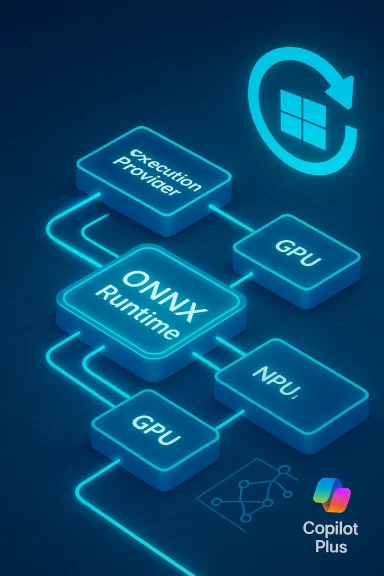 What exactly is an Execution Provider?
The EP layer in plain language
An Execution Provider is the adapter between a generic ONNX model graph and the concrete hardware/runtime that will execute it. The EP:- Inspects and partitions the ONNX graph, deciding which nodes or subgraphs should run on the accelerator.
- Compiles or prepares accelerator‑specific artifacts (for example, JIT‑compiled engines or context binaries).
- Caches those compiled artifacts to speed subsequent runs.
- Exposes options for precision, profiling, and performance modes.
Why EPs matter beyond performance
Because EPs can change how operators are placed, compiled, or quantized, version bumps can affect more than latency: they can produce different numeric outputs, change first‑run compilation times, or alter memory and caching behavior. For image pipelines this can mean subtle shifts in segmentation masks, inpainting fill patternscts that downstream automation or user expectations rely on. Microsoft and vendor EP updates therefore have both UX and engineering surface area.How Microsoft distributes EPs and AI components on Windows
Componentized updates via Windows Update
Instead of bundling EP upgrades into large OS releases, Microsoft now ships vendor EPs (for example, NVIDIA TensorRT‑RTX, AMD MIGraphX / Vitis AI, Intel OpenVINO, Qualcomm QNN) and higher‑level image/model components as modular KB packages that are delivered automatically through Windows Update to eligible devices. These KBs typically state the new version number and that the update “includes improvements” without a lchangelog. The packages require the latest cumulative update (LCU) for the target Windows 11 branch before they will apply.This component model enables faster iteration and cross‑vendor coordination, but it also centralizes risk: a single EP component update can simultaneously affect many apps and built‑in Windows features that share the runtime. Community monitoring of Microsoft KB activity shows a steady cadence of targeted EP updates and per‑rs — evidence that Microsoft is treating EPs as independent, maintainable artifacts.
Copilot+ PCs and hardware gating
Microsoft’s Copilot+ PC classification ties many on‑device AI features to devices that meet specific hardware thresholds — most notably NPUs capable of 40+ TOPS. Copilot+ devices run Windows 11 and expose a System → AI components page in Settings so users and administrators can view installed on‑device AI components. Components and EPs are packaged per silicon family, which is why Microsoft releases separate KBs fom/Arm systems even when the high‑level feature set is the same.Technical deep dive: what happens when you run a model on Windows
- The app or OS invokes ONNX Runtime (or Windows ML).
- ONNX Runtime queries registered Execution Providers via the GetCapability interface to determine which nodes/subgraphs each EP can handle.
- The selected EP compiles a runtime representation (JIT/AOT engine, context file) for the subgraph and may cache the compiled artifact on disk.
- Subsequent inferences reuse cached artifacts, reducing latency.
- EPs may fall back to CPU or another EP for unsupported operators; the runtime records such fallbacks in logs that are useful for debugging.
Real‑world examples: component KBs you should know about
- Microsoft has distributed NVIDIA’s new TensorRT‑RTX EP as a Windows ML runtime component (consumer‑focused TensorRT for RTX builds), describing it as optimized for Ampere and later RTX GPUsler footprint and faster compile times. The ONNX Runtime documentation and Microsoft KB notices both confirm the EP’s consumer‑GPU focus. ([onnxruntime.ai](NVIDIA - TensorRT RTX MIGraphX / Vitis AI EPs have been shipped as targeted component updates, with Microsoft explicitly replacing prior KBs and moving to a cadence of smaller, per‑vendor releases. These updates matter for Ryzen AI and AMD NPU platforms.
- Intel’s OpenVINO EP and Qualcomm’s QNN EP follow the same pattern: EP version bumps are packaged as modular KBs and delivered via Windows Update to devices running Windows 11 24H2/25H2 and later, subject to LCU prerequisites. These KBs rarely include operator‑level diffs.
Benefits: what this model buys users and developers
- **Faster fixes and improvd EP updates let Microsoft and silicon partners ship bug fixes, performance tweaks, and model improvements more quickly than waiting for major OS feature updates.
- Per‑vendor tuning: Vendors can optimize quantization, operator kernels, and compilation strategies specifically for their NPUs/GPUs, improving inference efficiency on eligible hardware.
- On‑device privacy and low latency: Running models locally on a Copilot+ PC’s NPU avoids cloud roundtrips for many features, improving responsiveness and limiting data sent to the cloud. This is a central design point for Copilot+ devices.
- Unified delivery: Shipping EPs as OS components means multiple apps and Windows features share a single, validated runtime — which reduces packaging duplication and maintenance complexity for ISVs.
d what can go wrong
- Sparse public changelogs. Microsoft’s KB entries often use terse language like “includes improvements” without operator‑level diffs, making root‑cause analysis harder for regressions. This opacity shifts the burden of validation onto IT and development teafirmware mismatches.** EP updates frequently expect matching GPU/NPU drivers and firmware; updating only the EP while leaving older driver stacks in place can cause performance regressions or failures. Ensure OEM and vendor drivers are aligned before broad rollout.
- **Behavioral d that expect bit‑identical outputs (rare but real for some automated imaging workflows), EP updates can change numerical results due to different operator mappings or quantization strategies. Validate downstream aute tests.
- Operational complexity. Component packages (MSU) can be large; offline deployments via WSUS/ConfigMgr must account for bandwidth and storage. Differential and express updates help, but planning is required.
- Security and audit concerns. A single runtime binary distributed to many apps means a faulty or malicious EPe surfaces. While vendors and Microsoft control these binaries, organizations with high security assurance needs should insist on vendor release notes and may need to quarantine updates until validated.
Practical guidance: how to treat EP components in your environment
1. Inventory and eligibiliich machines in your fleet are Copilot+ PC eligible (check NPU TOPS rating, Windows 11 build). Use Settings → System → AI components to inspect installed components on a device.
2. Alare
- Before applying EP KBs, update GPU/NPU drivers to the vendor‑recommended versions and follow OEM guidance. Many EP updates assume a matching driver stack.
3. Pilot on representative hardware
- Create a small pilot ring that mirrors your fleet’s diversity (external webcams vs integrated, differnd monitor for regressions over 48–72 hours. Test critical AI workflows (segmentation, upscaling, camera pipelines, local assistant tasks).
4. Add model and app validation to CI
- Integrate acceptance tests that exercise your most important models and compare outputs pre/post update. For image tasks, include visual diffs and quantitative checks (IoU for segmentation, PSNR/SSIM for super‑rinistic outputs are required, consider pinning to a vendor release and rejecting EP updates without test confirmation.
5. Monitor logs and telemetry
- After installing, review Windows Update history, Event Viewer, and ONNX Runtime logs for EP registration, fallback events, or compilation errors. The EPs often log whether they fell back to CPU or another provider, which is key diagnostic information.
6. Plan rollback and runbooks
- Maintain playbooks for uninstalling component updates and restoring previous drivers, and test recovery steps before an image or snapshot strategy for rapid rollback in production.
Developer and ISV considerations
- If your app explicitly selects an EP in ONNX Runtime, you should test against the versions Microsoft distributes and be explicit about minimum EP versions in your compatibility matrix. ONNX Runtime and Windows ML documentation describe how to register and configure EPs across language bindings.
- Be prepared for first‑run latency changes on user devices after an EP update: JIT/AOT compilation and cache warm‑up may increase session creation times on first use. Provide UX messaging or pre‑warm caches where latency is critical.
- Use provider options exposed by EPs to control precision and performance modes (for example, enabling FP16 where supported) and expose toggles in your app’s advanced settings for enterprise customers who need reproducibility.
Security, privacy, and governance implications
- On‑device inference reduces cloud exposure of user data for many scenarios, increasing privacy guarantees for sensitive imagery or voice data. That advantage is a principal motivation for Copilot+ hardware and local model execution.
- However, moving more logic into OS‑level components increases the attack surface of the endpoint. Ensure your org’s update and app‑whitelisting policies account and that you have forensic and monitoring capabilities to detect regressions or anomalous model behavior.
- Confirm licensing terms for third‑party EPs — ONNX Runtime and Windows ML guidance remind developers to read vendor licenses before using an EP. That’s practical legal hygiene when you distribute apps that rely on vendor runtimes.
A measured, practical example: handling the TensorRT‑RTX EP update
Microsoft’s KB entries for EP updates (for example, the TensorRT‑RTX packaging) typically note the EP version, supported Windows 11 builds, automatic delivery, and LCU prerequisites. For admins expecting to see a performance uplift on RTX machines, the right sequence is:- Confirm target machines are on Windows 11 24H2/25H2 and have the latest LCU.
- Update NVIDIA drivers to the versions TensorRT‑RTX targets.
- Pilot the KB on a representative RTX device and measure model latency, memory, and quality before broader rollout.
Where transparency is weak — and what to ask vendors
Microsoft’s public KBs are intentionally concise. When your workflows demand clarity, ask these questions of your vendor or Microsoft support:- Which ONNX Runtime and EP versions correspond to the component KB?
- What driver and firmware versions are recommended or required?
- Are there known operator mapping or quantization changes that could affect numerical outputs?
- Can we obtain engineering release notes, or a list of CVEs/security mappings if any native code changed?
Conclusion
Windows’ shift to modular, vendor‑specific Execution Provider components is a strategic enabler for faster, more private, and better‑tuned on‑device AI — particularly on Copilot+ PCs that bring dedicated NPUs and a hardware baseline (40+ TOPS) for richer local experiences. That evolution delivers clear benefits: shorter update cycles, per‑vendor optimization, and improved responsiveness for AI features.At the same time, it creates new operational responsibilities. Sparse KB changelogs, driver dependencies, potential numeric drift, and the risk of cross‑app impact mean that IT teams, integrators, and developers must treat EPs as first‑class platform components: inventory devices, align drivers, pilot updates, add model‑level validation to CI, and maintain rollback plans. The smartest organizations will automate validation and monitoring so they can reap the benefits of on‑device AI without being surprised by subtle behavioral changes.
For anyone building or deploying AI on Windows: assume the runtime can change underfoot, plan for it, and make EP updates part of your release and testing pipeline.
Source: Microsoft Support Windows Execution Provider components - Microsoft Support
