
Verdict: do not schedule Windows Server 2016 Extended Security Updates as a July 2026 cutover. Microsoft’s current product timeline separates the two 2016 deadlines: SQL Server 2016 reaches its Extended Security Updates transition on July 14, 2026, while Windows Server 2016 remains a January 2027 server operating system deadline. If you run both in the same application stack, treat them as two related but separate projects. The practical move is to split the plan: SQL Server 2016 is the July 2026 problem; Windows Server 2016 is the January 2027 problem; each workload needs a decision now on whether it will be upgraded, migrated, retired, or temporarily covered by paid security updates.
Operator checklist:
The confusion is understandable because Microsoft often discusses SQL Server and Windows Server modernization together. In real estates, they often live together too: a single virtual machine may host Windows Server 2016, SQL Server 2016, an old vendor application, backup agents, monitoring tools, and middleware that no one has touched in years.
But the products do not share one lifecycle date. SQL Server 2016 and Windows Server 2016 are separate products with separate support timelines. If an internal calendar says “2016 ESU starts July 2026” without naming the product, it is too vague to be useful and may be wrong for the server operating system.
For planning purposes, avoid surfacing competing January day numbers in every project document. Use the clearer operational statement: Windows Server 2016 is a January 2027 support-transition event, not a July 2026 one. For formal compliance evidence, confirm the exact date against Microsoft’s lifecycle records and your account materials before filing final audit documentation.
The more important implication is sequencing. A server that runs both products can have two deadlines. The database layer may need a funded path by July 2026, while the operating system remains a separate January 2027 decision. That split should shape budgets, change windows, exception records, and risk sign-off.
SQL Server 2016 needs the earlier decision path. Windows Server 2016 gives administrators more time, but not enough time to wait until the end of 2026 and discover the application vendor still has not certified a newer OS.
A useful inventory should separate:
WindowsForum readers have already seen a consumer-scale version of this problem in our Windows 10 Extended Security Updates coverage. In the Windows 10 end-of-support ESU guide, the practical issues were not limited to Microsoft’s headline date. The work was inventory, eligibility, enrollment, user impact, and the path away from the aging platform. Our follow-up pieces on Windows 10 ESU enrollment and extending security updates to October 2026 made the same point from the desktop side: a paid security bridge helps only if the device is known, eligible, enrolled, and still moving toward a supported future.
Server estates are less forgiving. One misclassified machine may be a domain-adjacent workload, a vendor appliance, a reporting database, or the back end for a revenue system. If that host runs both Windows Server 2016 and SQL Server 2016, the database deadline does not disappear because the OS has a later date.
That is why July 14, 2026 should not be dismissed simply because it is not the Windows Server 2016 operating system deadline. It remains a real SQL Server 2016 deadline. If your Windows Server 2016 estate includes SQL Server 2016, July 2026 is still a service-window planning event — just not the OS event.
The service calendar should therefore include two tracks:
Use product-specific language in tickets, change records, CMDB entries, and risk registers. Say “SQL Server 2016 reaches its support transition on July 14, 2026.” Say “Windows Server 2016 reaches its support transition in January 2027.” If a workload depends on both, write down both dates.
If the application has a seasonal freeze, a regulated release calendar, or a dependency on old middleware, the useful planning window is shorter than the calendar suggests.
The risk of the July 2026 mix-up is not only that it causes panic. It can also create planning fatigue. Teams that are incorrectly told Windows Server 2016 must move by July may rush into a combined remediation plan, then later discover the OS date was different and lose confidence in the whole lifecycle effort.
Good lifecycle management is precise:
For administrators, the question is not simply “Can we buy paid updates?” It is “What failure are we trying to avoid by buying them?”
If the answer is “we need six more months to complete application testing,” a temporary security-update bridge can be rational. If the answer is “nobody owns the application and we hope nothing happens,” the paid program becomes a paper control that may satisfy a budget line without reducing operational risk enough.
Security-only coverage should not be confused with a full support lifecycle. It is not an application certification program, not a compatibility guarantee, and not a substitute for validating workloads on a supported operating system and database combination.
That distinction matters in audit conversations too. A system receiving post-support security updates may still need a documented exception, compensating controls, owner sign-off, and a target exit date. The update stream lowers one category of risk; it does not make the old platform strategically healthy.
But no serious server estate is one-size-fits-all.
A lightly used internal service may be retired. A vendor-supported line-of-business system may need an application upgrade before the OS can move. A database-heavy workload may need SQL remediation before anyone touches the server layer. A latency-sensitive or data-sovereignty-sensitive workload may stay on premises while still needing a supported platform path.
That is why paid post-support updates should be budgeted by exception, not by reflex. Buying time for a small set of hard cases is governance. Treating the program as a blanket renewal for every Windows Server 2016 machine is delay with an invoice.
WindowsForum’s Windows 10 ESU coverage is useful here because it shows the same operational pattern in a more familiar setting. Our guide to enrolling in Windows 10 Extended Security Updates before support ends emphasized that eligibility, enrollment, and the length of protection matter as much as the headline date. Our related Windows 10 ESU articles also showed that Microsoft’s bridge programs are specific to product, edition, user type, and enrollment route. The desktop program and the server program are not interchangeable, but the lesson carries over: classify first, buy second.
That can be useful, but it does not change the lifecycle split. Azure Arc does not move SQL Server 2016 into the Windows Server 2016 calendar, and it does not turn July 2026 into the Windows Server 2016 OS deadline.
The practical implication is simple: if you expect to use Azure Arc for eligible on-premises servers, verify before the deadline that each target machine can be connected, inventoried, tagged, assigned to the right subscription, governed by the right owner, and updated through the intended process.
Do not wait until the support cliff to discover that firewall rules, subscription ownership, agent deployment, policy configuration, or change approval blocks the plan.
The purchasing and management route should support the architecture decision, not replace it. Some systems should be upgraded. Some should be migrated. Some should be decommissioned. A smaller number may deserve temporary security-only coverage because immediate change carries more business risk than a time-limited bridge.
Server licensing can depend on edition, core counts, Software Assurance, Enterprise Agreement status, hosting model, Azure placement, and reseller terms. A post-support security update program adds another layer: how it is purchased, how it is assigned, how it is billed, and how updates are delivered may vary by environment.
The planning response is to build a system inventory first and a price model second. If procurement is asked for “Windows Server 2016 ESU” without a defensible list of machines, editions, owners, placement, and retirement candidates, the likely outcomes are overbuying, underbuying, or last-minute exceptions.
A better request looks like this:
Teams should identify which Windows Server 2016 machines are receiving regular updates now, which are already failing maintenance, and which are excluded from reboots because the application is fragile. A server that cannot take normal supported updates in 2026 is not magically ready for security-only servicing in 2027.
Service-window planning should account for separate database and OS maintenance events where both products exist. SQL Server 2016 may require database-layer validation and downtime planning in the July 2026 wave. Windows Server 2016 may require OS-layer validation and continued monthly servicing discipline in the January 2027 wave.
The sharper question is whether the organization can patch these machines reliably at all. Paid updates do not help if they are not deployed, if reboots are permanently deferred, or if application teams refuse validation windows.
This is where administrators should push for written ownership. Every Windows Server 2016 machine should have:
Start with inventory, then add classification:
Finally, tie decisions to service windows. An upgrade path is not real until it has a test window, a production window, a rollback plan, and an owner who can approve the change. A paid security-update bridge is not real until eligibility, purchasing route, deployment method, and patch operations are confirmed.
Use product-specific wording:
Security teams should care for the same reason. Threat exposure is product-specific. A supported operating system does not make an unsupported database acceptable, and a database security-update plan does not resolve the looming OS deadline.
WindowsForum has seen the same pattern in community interest around Windows 10 ESU. In our Windows 10 enrollment coverage, the key questions were practical: who is eligible, how enrollment works, how long protection lasts, and what it does not cover. Server planning deserves the same skepticism, with higher stakes.
The habit to build is simple: write lifecycle notes as full sentences.
Do not write:
The next steps are straightforward:
Operator checklist:
- Inventory every affected host and mark whether it runs Windows Server 2016, SQL Server 2016, or both.
- Separate OS owners from database owners, even when the same application team depends on both.
- Choose a disposition for each system: upgrade, migrate, retire, or use Extended Security Updates as a temporary bridge.
- Confirm the licensing and enrollment route through Microsoft, your reseller, Azure, Azure Arc, or Volume Licensing channels as applicable.
- Set two deadlines in the project plan: July 14, 2026 for SQL Server 2016 decisions, and January 2027 for Windows Server 2016 decisions.
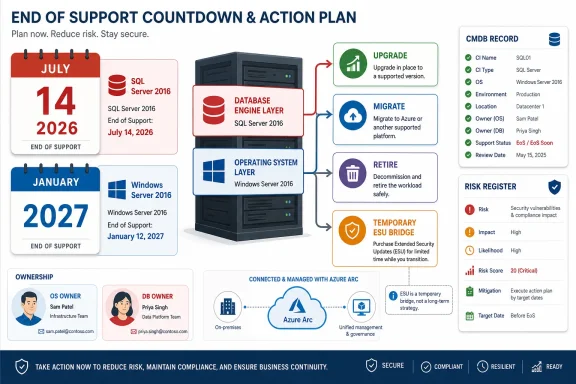 Microsoft’s Calendar Has Two 2016 Cliffs, Not One
The confusion is understandable because Microsoft often discusses SQL Server and Windows Server modernization together. In real estates, they often live together too: a single virtual machine may host Windows Server 2016, SQL Server 2016, an old vendor application, backup agents, monitoring tools, and middleware that no one has touched in years.But the products do not share one lifecycle date. SQL Server 2016 and Windows Server 2016 are separate products with separate support timelines. If an internal calendar says “2016 ESU starts July 2026” without naming the product, it is too vague to be useful and may be wrong for the server operating system.
For planning purposes, avoid surfacing competing January day numbers in every project document. Use the clearer operational statement: Windows Server 2016 is a January 2027 support-transition event, not a July 2026 one. For formal compliance evidence, confirm the exact date against Microsoft’s lifecycle records and your account materials before filing final audit documentation.
The more important implication is sequencing. A server that runs both products can have two deadlines. The database layer may need a funded path by July 2026, while the operating system remains a separate January 2027 decision. That split should shape budgets, change windows, exception records, and risk sign-off.
Start by Separating the OS From the Database
The cleanest recommendation is this: if a workload runs Windows Server 2016 and SQL Server 2016, plan it as one application stack with two lifecycle tracks, not as one generic “2016” system going out of support.SQL Server 2016 needs the earlier decision path. Windows Server 2016 gives administrators more time, but not enough time to wait until the end of 2026 and discover the application vendor still has not certified a newer OS.
A useful inventory should separate:
- Operating system version and edition
- SQL Server version and edition
- Application owner
- Business owner
- Database owner
- Infrastructure owner
- Hosting location
- Backup and monitoring dependencies
- Vendor support status
- Internet exposure
- Data sensitivity
- Upgrade, migration, retirement, or security-update bridge decision
WindowsForum readers have already seen a consumer-scale version of this problem in our Windows 10 Extended Security Updates coverage. In the Windows 10 end-of-support ESU guide, the practical issues were not limited to Microsoft’s headline date. The work was inventory, eligibility, enrollment, user impact, and the path away from the aging platform. Our follow-up pieces on Windows 10 ESU enrollment and extending security updates to October 2026 made the same point from the desktop side: a paid security bridge helps only if the device is known, eligible, enrolled, and still moving toward a supported future.
Server estates are less forgiving. One misclassified machine may be a domain-adjacent workload, a vendor appliance, a reporting database, or the back end for a revenue system. If that host runs both Windows Server 2016 and SQL Server 2016, the database deadline does not disappear because the OS has a later date.
July 2026 Belongs to SQL Server 2016
For many organizations, SQL Server 2016 will be the earlier and harder conversation. Databases sit at the center of vendor-certified stacks, reporting jobs, stored procedures, licensing assumptions, and maintenance windows that application owners often resist reopening.That is why July 14, 2026 should not be dismissed simply because it is not the Windows Server 2016 operating system deadline. It remains a real SQL Server 2016 deadline. If your Windows Server 2016 estate includes SQL Server 2016, July 2026 is still a service-window planning event — just not the OS event.
The service calendar should therefore include two tracks:
- Database track: Can SQL Server 2016 be upgraded, migrated, retired, or covered by its own paid security update path by July 14, 2026?
- Operating system track: Can Windows Server 2016 be upgraded, migrated, retired, or temporarily protected by Windows Server Extended Security Updates by January 2027?
Use product-specific language in tickets, change records, CMDB entries, and risk registers. Say “SQL Server 2016 reaches its support transition on July 14, 2026.” Say “Windows Server 2016 reaches its support transition in January 2027.” If a workload depends on both, write down both dates.
January 2027 Is Close in Enterprise Time
January 2027 can sound distant until it is mapped to enterprise change control. A serious Windows Server migration program needs discovery, application owner sign-off, vendor support checks, test environments, backup validation, rollback planning, security review, procurement, and production maintenance windows.If the application has a seasonal freeze, a regulated release calendar, or a dependency on old middleware, the useful planning window is shorter than the calendar suggests.
The risk of the July 2026 mix-up is not only that it causes panic. It can also create planning fatigue. Teams that are incorrectly told Windows Server 2016 must move by July may rush into a combined remediation plan, then later discover the OS date was different and lose confidence in the whole lifecycle effort.
Good lifecycle management is precise:
- Put SQL Server 2016 in the July 2026 decision wave.
- Put Windows Server 2016 in the January 2027 decision wave.
- Map application stacks to both dates.
- Identify which component is driving the earlier risk.
- Keep ownership and funding attached to each track.
Extended Security Updates Buy Security Time, Not Engineering Capacity
Microsoft’s message is familiar: upgrade where possible, move to Azure where that fits, and use Extended Security Updates when business-critical workloads need more time. That is a bridge, not a modernization plan.For administrators, the question is not simply “Can we buy paid updates?” It is “What failure are we trying to avoid by buying them?”
If the answer is “we need six more months to complete application testing,” a temporary security-update bridge can be rational. If the answer is “nobody owns the application and we hope nothing happens,” the paid program becomes a paper control that may satisfy a budget line without reducing operational risk enough.
Security-only coverage should not be confused with a full support lifecycle. It is not an application certification program, not a compatibility guarantee, and not a substitute for validating workloads on a supported operating system and database combination.
That distinction matters in audit conversations too. A system receiving post-support security updates may still need a documented exception, compensating controls, owner sign-off, and a target exit date. The update stream lowers one category of risk; it does not make the old platform strategically healthy.
The Upgrade Path Is a Portfolio Decision
Microsoft would prefer the clean answer to be a newer Windows Server release or Azure. In many estates, that will be right for part of the portfolio. Some workloads are good candidates for in-place modernization, some should move to new virtual machines, and some may fit a cloud migration.But no serious server estate is one-size-fits-all.
A lightly used internal service may be retired. A vendor-supported line-of-business system may need an application upgrade before the OS can move. A database-heavy workload may need SQL remediation before anyone touches the server layer. A latency-sensitive or data-sovereignty-sensitive workload may stay on premises while still needing a supported platform path.
That is why paid post-support updates should be budgeted by exception, not by reflex. Buying time for a small set of hard cases is governance. Treating the program as a blanket renewal for every Windows Server 2016 machine is delay with an invoice.
WindowsForum’s Windows 10 ESU coverage is useful here because it shows the same operational pattern in a more familiar setting. Our guide to enrolling in Windows 10 Extended Security Updates before support ends emphasized that eligibility, enrollment, and the length of protection matter as much as the headline date. Our related Windows 10 ESU articles also showed that Microsoft’s bridge programs are specific to product, edition, user type, and enrollment route. The desktop program and the server program are not interchangeable, but the lesson carries over: classify first, buy second.
Azure Arc Changes the Mechanics, Not the Deadline
Microsoft’s current messaging highlights Azure Arc for on-premises and hosted environments. The operational idea is that organizations may be able to use Azure-based management and billing mechanisms rather than treating Extended Security Updates only as a traditional licensing purchase.That can be useful, but it does not change the lifecycle split. Azure Arc does not move SQL Server 2016 into the Windows Server 2016 calendar, and it does not turn July 2026 into the Windows Server 2016 OS deadline.
The practical implication is simple: if you expect to use Azure Arc for eligible on-premises servers, verify before the deadline that each target machine can be connected, inventoried, tagged, assigned to the right subscription, governed by the right owner, and updated through the intended process.
Do not wait until the support cliff to discover that firewall rules, subscription ownership, agent deployment, policy configuration, or change approval blocks the plan.
The purchasing and management route should support the architecture decision, not replace it. Some systems should be upgraded. Some should be migrated. Some should be decommissioned. A smaller number may deserve temporary security-only coverage because immediate change carries more business risk than a time-limited bridge.
Pricing and Eligibility Need Account-Specific Confirmation
One of the planning gaps is the lack of a simple public matrix that answers every Windows Server 2016 eligibility and pricing scenario for every customer. Do not fill that gap with guesses.Server licensing can depend on edition, core counts, Software Assurance, Enterprise Agreement status, hosting model, Azure placement, and reseller terms. A post-support security update program adds another layer: how it is purchased, how it is assigned, how it is billed, and how updates are delivered may vary by environment.
The planning response is to build a system inventory first and a price model second. If procurement is asked for “Windows Server 2016 ESU” without a defensible list of machines, editions, owners, placement, and retirement candidates, the likely outcomes are overbuying, underbuying, or last-minute exceptions.
A better request looks like this:
- These hosts are confirmed Windows Server 2016.
- These hosts also run SQL Server 2016.
- These workloads are retiring.
- These workloads are upgrading.
- These workloads are migrating.
- These workloads need temporary security-only coverage.
- These are the licensing assumptions that require confirmation.
Patch Cadence Planning Starts Before the Paid Program
Because post-support coverage is security-focused, the patching conversation should become more disciplined, not less.Teams should identify which Windows Server 2016 machines are receiving regular updates now, which are already failing maintenance, and which are excluded from reboots because the application is fragile. A server that cannot take normal supported updates in 2026 is not magically ready for security-only servicing in 2027.
Service-window planning should account for separate database and OS maintenance events where both products exist. SQL Server 2016 may require database-layer validation and downtime planning in the July 2026 wave. Windows Server 2016 may require OS-layer validation and continued monthly servicing discipline in the January 2027 wave.
The sharper question is whether the organization can patch these machines reliably at all. Paid updates do not help if they are not deployed, if reboots are permanently deferred, or if application teams refuse validation windows.
This is where administrators should push for written ownership. Every Windows Server 2016 machine should have:
- An application owner
- A business owner
- A technical owner
- A database owner if SQL Server is present
- A declared disposition
- A target date
- A rollback or retirement plan
The Best Calendar Is a Decision Register
A countdown page is not enough. The useful artifact is a decision register that ties every Windows Server 2016 instance to an outcome and every SQL Server 2016 instance to its own outcome. If both products live on the same machine, the register should show two lifecycle rows, not one combined “2016” entry.Start with inventory, then add classification:
- Which systems run Windows Server 2016?
- Which systems run SQL Server 2016?
- Which run both?
- Which are production, disaster recovery, test, or abandoned but still reachable?
- Which are internet-facing?
- Which are identity-adjacent?
- Which process sensitive data?
- Which are vendor-controlled?
- Which have no clear owner?
Finally, tie decisions to service windows. An upgrade path is not real until it has a test window, a production window, a rollback plan, and an owner who can approve the change. A paid security-update bridge is not real until eligibility, purchasing route, deployment method, and patch operations are confirmed.
A Bad Date Can Become a Bad Audit Finding
Compliance teams care about evidence. If a risk register says Windows Server 2016 reaches its paid security update transition on July 14, 2026, that statement confuses the Windows Server date with the SQL Server date. The error can cascade into inaccurate exception records, mistimed compensating controls, and awkward audit conversations.Use product-specific wording:
- “SQL Server 2016 extended support ends July 14, 2026.”
- “Windows Server 2016 extended support ends in January 2027.”
- “This workload depends on both products and therefore has two lifecycle deadlines.”
Security teams should care for the same reason. Threat exposure is product-specific. A supported operating system does not make an unsupported database acceptable, and a database security-update plan does not resolve the looming OS deadline.
WindowsForum Readers Should Watch the Wording
The lesson is broader than Windows Server 2016. Microsoft lifecycle pages and announcements often bundle products, migration paths, Azure incentives, and security-update mechanics into one modernization story. That can be useful, but administrators need to read the product names as carefully as the dates.WindowsForum has seen the same pattern in community interest around Windows 10 ESU. In our Windows 10 enrollment coverage, the key questions were practical: who is eligible, how enrollment works, how long protection lasts, and what it does not cover. Server planning deserves the same skepticism, with higher stakes.
The habit to build is simple: write lifecycle notes as full sentences.
Do not write:
- “2016 ESU starts July 2026.”
- “SQL Server 2016 reaches its support transition on July 14, 2026.”
- “Windows Server 2016 reaches its support transition in January 2027.”
- “This application depends on both, so it has two deadlines.”
Frequently Asked Questions
Does Windows Server 2016 ESU start in July 2026?
No. July 14, 2026 is the SQL Server 2016 support-transition date. Windows Server 2016 is a January 2027 server operating system deadline under Microsoft’s current guidance.Why are people mixing up SQL Server 2016 and Windows Server 2016?
Because the products are often discussed together and often run together. A single aging application stack may include Windows Server 2016 as the operating system and SQL Server 2016 as the database engine. That does not mean they share one lifecycle date.If a server runs both Windows Server 2016 and SQL Server 2016, which deadline matters?
Both. The SQL Server 2016 layer needs a decision by July 14, 2026. The Windows Server 2016 operating system needs its own decision by January 2027. The earlier database deadline may drive the first service window, but the OS still needs a separate plan.Does buying Extended Security Updates mean the server is fully supported?
No. Paid security updates should be treated as a temporary security bridge. They do not modernize the application, certify compatibility, solve ownership gaps, or remove the need to migrate, upgrade, or retire the workload.Should every Windows Server 2016 machine get paid security updates?
No. Start with inventory and classification. Retire what can be retired, upgrade what can be upgraded, migrate what should move, and reserve paid security-only coverage for documented exceptions with named owners and exit dates.What should administrators verify if they plan to use Azure Arc?
Verify that target servers can be connected, inventoried, tagged, assigned to the right subscription, governed by the right owner, and updated through the intended process. Also confirm that procurement, licensing, and change-control teams understand the route before the deadline.How should this be represented in a CMDB or risk register?
Use separate fields or rows for operating system lifecycle and database lifecycle. A host running both Windows Server 2016 and SQL Server 2016 should not be represented as one generic “2016” lifecycle item.Action Summary
There are three honest paths for Windows Server 2016 now: upgrade, migrate, or buy temporary security-update coverage while executing a documented exit plan. SQL Server 2016 may force an earlier database-layer decision, but it should not scramble the Windows Server OS timeline.The next steps are straightforward:
- Treat July 14, 2026 as the SQL Server 2016 deadline.
- Treat January 2027 as the Windows Server 2016 deadline.
- Inventory hosts by product, not by vague “2016” shorthand.
- Separate OS and database ownership.
- Confirm which systems are retiring, upgrading, migrating, or temporarily covered.
- Validate licensing and enrollment routes before procurement pressure arrives.
- Build service windows for database remediation and OS remediation separately.
- Keep paid security updates tied to named owners, approved exceptions, and exit dates.
References
- Primary source: learn.microsoft.com
Ending Support in 2026 - Microsoft Lifecycle | Microsoft Learn
Find out which products will retire, reach end of support or move from mainstream support to extended support in 2026.learn.microsoft.com - Independent coverage: microsoft.com
Extended Security Updates for SQL Server and Windows Server | Microsoft
Find answers to commonly asked questions about end of support for SQL Server and Windows Server.www.microsoft.com
- Independent coverage: support.microsoft.com
- Independent coverage: techcommunity.microsoft.com
- Independent coverage: pcworld.com
Microsoft offers extended security updates to more Windows versions | PCWorld
Microsoft is expanding its ESU program by adding extended support for additional Windows versions.www.pcworld.com - Independent coverage: windowscentral.com
Windows 10 LTSB (LTSC) will get Extended Security Updates | Windows Central
Windows 10 2016 LTSB support ends in 2026. Microsoft details ESU costs, deadlines, and upgrade paths to LTSC and Server 2025.www.windowscentral.com

- Independent coverage: anglepoint.com
Windows Server 2016 End of Support Guide
Windows Server and SQL Server 2016 reach end of support soon. Learn the essential steps to stay secure, manage risk, and build a ESU plan. www.anglepoint.com
- Primary source: WindowsForum
Windows 10 End-of-Support Extended Security Updates (ESU) Guide for 2025-2026 | Windows Forum
As the October 14, 2025, end-of-support date for Windows 10 approaches, Microsoft has introduced the Extended Security Updates (ESU) program to provide...windowsforum.com
