

Microsoft has denied that “WSL 3” is an announced or shipping product, with WSL product manager Craig Loewen saying on June 23, 2026, that the reports confused a real Build 2026 feature called WSL Containers with a nonexistent version upgrade. The distinction matters because this is not a branding quibble; it is a map of Microsoft’s Windows developer strategy. WSL Containers may be less flashy than a generational “3.0” label, but it could be more consequential for day-to-day Windows development than another architecture reset. Microsoft is not replacing WSL 2. It is making WSL harder to avoid.
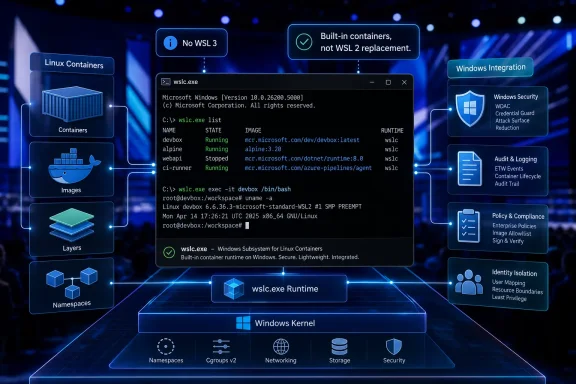
The most important sentence in the latest WSL dust-up is also the simplest: there is no WSL 3. Loewen’s public correction was aimed at a wave of coverage that treated Microsoft’s new container work as a successor to WSL 2, rather than as a capability layered onto the WSL platform Windows already ships.
That correction is worth taking seriously because Windows history is full of version names that become folk knowledge before the product team ever blesses them. Once a phrase like “WSL 3” enters headlines, it can harden into expectation. Users start asking when they get it, admins start wondering what it breaks, and developers start assuming a migration is coming.
Microsoft’s answer, at least for now, is no. WSL Containers is not a new WSL generation. It is a built-in way to create, run, and interact with Linux containers on Windows, using a new command-line surface and an API for Windows applications.
That may sound like a smaller announcement. It is not. It simply belongs to a different category of change: less constitutional amendment, more new federal agency. WSL 2 remains the foundation; Microsoft is building a container workflow on top of it.
WSL 2 changed the bargain. Instead of translating Linux system calls, Microsoft shipped a real Linux kernel running inside a lightweight managed virtual machine. That gave Windows users full system call compatibility, improved Linux-side file performance, and made serious container workflows possible in a way WSL 1 never could.
So when Microsoft shows off a new Linux container feature at Build, it is easy to see why observers reached for the next version number. Containers were one of the canonical reasons WSL 2 mattered. A built-in container runtime sounds, at first glance, like the kind of thing that would justify a WSL 3 badge.
But the architecture tells a different story. WSL Containers does not appear to replace the WSL 2 model; it exploits it. Microsoft is taking the VM-backed Linux substrate that already exists and exposing a more direct container experience from Windows itself.
That makes the mislabeling understandable but still wrong. WSL 1 and WSL 2 described how Linux itself ran on Windows. WSL Containers describes what Windows can now do with that Linux substrate.
But it is also a separate product with separate management, separate updating, separate licensing considerations, and a separate place in enterprise governance. For a hobbyist, that may be barely visible. For a company with thousands of developers, it becomes procurement, compliance, desktop engineering, security review, help desk runbooks, and policy exceptions.
WSL Containers attacks that gap directly. The new
That does not mean Docker disappears. Docker is more than a local runtime; it is tooling, registries, workflows, orchestration integrations, and an ecosystem. Many teams will keep using Docker Desktop because it is the thing their developers already know and their pipelines already assume.
The change is that Docker Desktop may no longer be the default answer to the narrower question: “How do I run a Linux container on this Windows 11 machine?” Microsoft is trying to move that answer into the operating system’s orbit.
If WSL Containers required developers to learn a strange Windows-only grammar, it would be another worthy subsystem with limited uptake. By making the command surface familiar to people who already know container workflows, Microsoft is reducing the psychological switching cost. The pitch is not “learn Microsoft’s container model.” The pitch is “do the thing you already do, but from Windows, without extra scaffolding.”
That matters because developer platforms are won through defaults and friction. Windows does not need to be the most ideologically pure place to run Linux workloads. It needs to be good enough, fast enough, and already installed on the machine issued by IT.
There is a broader pattern here. Windows Terminal made the command line feel less like an archaeological exhibit. Winget gave Windows a more credible package-management story. WSL made Linux tooling a first-class citizen on Windows machines. Coreutils for Windows, announced around the same Build wave, brings familiar Unix-style commands directly to Windows without requiring a Linux environment at all.
The result is a Windows that increasingly absorbs the ergonomics developers once left Windows to get. Microsoft is not trying to turn Windows into Linux. It is trying to make that distinction matter less during the workday.
Third-party container tooling has always sat awkwardly in managed Windows environments. Security teams want visibility into what is running. Platform teams want predictable configuration. Compliance teams want to know where images come from and what policies govern them. Desktop administrators want fewer privileged installers and fewer background services that sit outside familiar Windows management channels.
A built-in WSL container feature gives Microsoft a chance to turn local containers into something Windows can manage as Windows. That could mean policy-based enablement, integration with mobile device management, image-source restrictions, audit visibility, and eventually a cleaner security story than a patchwork of locally installed developer tools.
That last part should not be oversold before the feature is in broad use. Container security is not magic, and “built in” is not a synonym for “safe.” A bad image is still a bad image. A leaky development workflow is still a leaky development workflow. A developer who pulls random containers from the internet can still create a problem for the organization.
But Microsoft has a structural advantage if it can put container execution under the same administrative umbrella as the rest of Windows. Enterprise IT does not simply want fewer tools. It wants fewer tools that live outside its control plane.
Microsoft has spent the past several years pushing Windows as a platform for on-device AI, Copilot+ PCs, NPUs, GPU acceleration, and developer workflows that bring model experimentation closer to the endpoint. Those workloads are messy. They depend on fast-moving Python packages, Linux-first tooling, GPU libraries, and reproducible environments. That is container territory.
WSL already gave Windows users a credible way to run Linux AI stacks. WSL Containers makes the packaging story cleaner. A developer or application can spin up a Linux container for a local model, a test pipeline, or a data-processing job without requiring the user to install and maintain a separate container platform.
That is where the API matters. Microsoft is not just targeting developers typing commands into a terminal. It is preparing for Windows apps that quietly use Linux containers behind the scenes, treating them as an implementation detail rather than a user-visible environment.
That will make some purists uncomfortable, and not without reason. The more invisible the Linux layer becomes, the harder it may be for users to understand what is installed, what is running, and what is consuming resources. But invisibility is often the final stage of successful platform integration. Nobody celebrates TCP/IP on a desktop anymore; it just has to work.
A “WSL 3” announcement would imply migration. It would invite comparison charts, compatibility questions, and anxiety about whether WSL 2 workloads are now legacy. Developers would ask whether existing distros need conversion. Enterprises would ask when WSL 2 support ends. Linux users would ask what kernel changes justify the number.
By calling it WSL Containers, Microsoft keeps the blast radius small. This is a new capability, not a forced architecture transition. It can ship as a WSL update rather than as a Windows feature-update milestone. It can improve independently. It can fail in preview without poisoning the WSL 2 brand.
That last point matters. WSL’s credibility has been earned through years of incremental improvements after the WSL 2 transition. Networking got better. GUI app support matured. Systemd support arrived. Installation became less arcane. The subsystem became more open and more visible to the developer community.
A version bump would spend some of that credibility. A feature release preserves it.
But Microsoft’s affection for Linux is not charity. It is retention.
Modern development is Linux-shaped even when the laptop is not. Cloud deployment targets are commonly Linux. CI systems are commonly Linux. Open-source infrastructure is commonly Linux. AI tooling is overwhelmingly optimized around Linux assumptions. The developer who cannot comfortably use Linux workflows on Windows has an obvious escape route: buy a Mac, install Linux, or run a separate Linux machine.
WSL was Microsoft’s answer to that pressure. WSL Containers extends the answer from shells and packages to the containerized workflows that define contemporary development. Coreutils for Windows pushes in the same direction from the other side, bringing Linux-style command-line habits into native Windows.
The strategic goal is not to win an argument about operating-system purity. It is to make Windows acceptable to developers who do not want to think about Windows while they work. That is a subtler, more durable play than trying to persuade them that Windows tooling is inherently superior.
Developers may now face a choice between Docker Desktop, Podman, Rancher Desktop, direct Linux Docker Engine inside WSL, and WSL Containers. Tutorials will lag reality. Corporate images will standardize slowly. Bugs will be difficult to triage when a container behaves differently under one runtime than another.
There is also the question of compatibility. Docker-compatible command syntax is not the same thing as perfect behavioral equivalence. The edge cases will matter: networking, bind mounts, file-change notification, GPU access, permissions, image formats, registry authentication, and integration with existing compose-based workflows. The closer Microsoft gets to the Docker user experience, the more users will expect every Docker-shaped workflow to behave identically.
That is a hard standard. Local container runtimes are full of details that only become visible when something breaks on a Friday afternoon.
For Windows admins, the biggest challenge may be policy granularity. If WSL Containers becomes popular, organizations will need sane defaults. They will need to decide who can run containers, which registries are trusted, whether GPU access is allowed, how logs are collected, and how container images are scanned. Microsoft can provide hooks, but enterprises still have to do the work.
This is especially true for organizations. A feature that arrives through WSL can spread faster than a traditional Windows platform change, but operational confidence still comes from testing. Developers may be ready to try
 Microsoft Kills the WSL 3 Story Before It Becomes Product Lore
The most important sentence in the latest WSL dust-up is also the simplest: there is no WSL 3. Loewen’s public correction was aimed at a wave of coverage that treated Microsoft’s new container work as a successor to WSL 2, rather than as a capability layered onto the WSL platform Windows already ships.That correction is worth taking seriously because Windows history is full of version names that become folk knowledge before the product team ever blesses them. Once a phrase like “WSL 3” enters headlines, it can harden into expectation. Users start asking when they get it, admins start wondering what it breaks, and developers start assuming a migration is coming.
Microsoft’s answer, at least for now, is no. WSL Containers is not a new WSL generation. It is a built-in way to create, run, and interact with Linux containers on Windows, using a new command-line surface and an API for Windows applications.
That may sound like a smaller announcement. It is not. It simply belongs to a different category of change: less constitutional amendment, more new federal agency. WSL 2 remains the foundation; Microsoft is building a container workflow on top of it.
The Confusion Was Predictable Because WSL Has Always Been an Architecture Story
The reason “WSL 3” sounded plausible is that WSL’s two real eras were architectural. WSL 1, which arrived in the Windows 10 era, was a translation layer. It let Linux user-space tools run on Windows by translating Linux system calls into Windows behavior, an impressive trick that also exposed hard limits.WSL 2 changed the bargain. Instead of translating Linux system calls, Microsoft shipped a real Linux kernel running inside a lightweight managed virtual machine. That gave Windows users full system call compatibility, improved Linux-side file performance, and made serious container workflows possible in a way WSL 1 never could.
So when Microsoft shows off a new Linux container feature at Build, it is easy to see why observers reached for the next version number. Containers were one of the canonical reasons WSL 2 mattered. A built-in container runtime sounds, at first glance, like the kind of thing that would justify a WSL 3 badge.
But the architecture tells a different story. WSL Containers does not appear to replace the WSL 2 model; it exploits it. Microsoft is taking the VM-backed Linux substrate that already exists and exposing a more direct container experience from Windows itself.
That makes the mislabeling understandable but still wrong. WSL 1 and WSL 2 described how Linux itself ran on Windows. WSL Containers describes what Windows can now do with that Linux substrate.
The Real News Is Docker Desktop Becoming Optional
For many developers, Linux containers on Windows have meant Docker Desktop. Docker Desktop has done the hard work of making containers approachable on Windows, and its WSL 2 backend became the default path for many modern development setups. It is familiar, polished, and deeply embedded in tutorials, team onboarding guides, and developer muscle memory.But it is also a separate product with separate management, separate updating, separate licensing considerations, and a separate place in enterprise governance. For a hobbyist, that may be barely visible. For a company with thousands of developers, it becomes procurement, compliance, desktop engineering, security review, help desk runbooks, and policy exceptions.
WSL Containers attacks that gap directly. The new
wslc.exe command-line interface is designed to let developers build, run, and deploy Linux containers directly from Windows without first installing Docker Desktop or another third-party container stack. Microsoft has also described an API that allows native Windows applications to invoke Linux containers programmatically.That does not mean Docker disappears. Docker is more than a local runtime; it is tooling, registries, workflows, orchestration integrations, and an ecosystem. Many teams will keep using Docker Desktop because it is the thing their developers already know and their pipelines already assume.
The change is that Docker Desktop may no longer be the default answer to the narrower question: “How do I run a Linux container on this Windows 11 machine?” Microsoft is trying to move that answer into the operating system’s orbit.
The Command Line Is the Product Strategy
The new feature’s most revealing detail is not the container API. It is the existence ofwslc.exe. Microsoft understands that a developer feature lives or dies by whether it fits into muscle memory.If WSL Containers required developers to learn a strange Windows-only grammar, it would be another worthy subsystem with limited uptake. By making the command surface familiar to people who already know container workflows, Microsoft is reducing the psychological switching cost. The pitch is not “learn Microsoft’s container model.” The pitch is “do the thing you already do, but from Windows, without extra scaffolding.”
That matters because developer platforms are won through defaults and friction. Windows does not need to be the most ideologically pure place to run Linux workloads. It needs to be good enough, fast enough, and already installed on the machine issued by IT.
There is a broader pattern here. Windows Terminal made the command line feel less like an archaeological exhibit. Winget gave Windows a more credible package-management story. WSL made Linux tooling a first-class citizen on Windows machines. Coreutils for Windows, announced around the same Build wave, brings familiar Unix-style commands directly to Windows without requiring a Linux environment at all.
The result is a Windows that increasingly absorbs the ergonomics developers once left Windows to get. Microsoft is not trying to turn Windows into Linux. It is trying to make that distinction matter less during the workday.
Containers Are Also an Enterprise Control Surface
The developer story is the easy sell. The enterprise story is the more interesting one.Third-party container tooling has always sat awkwardly in managed Windows environments. Security teams want visibility into what is running. Platform teams want predictable configuration. Compliance teams want to know where images come from and what policies govern them. Desktop administrators want fewer privileged installers and fewer background services that sit outside familiar Windows management channels.
A built-in WSL container feature gives Microsoft a chance to turn local containers into something Windows can manage as Windows. That could mean policy-based enablement, integration with mobile device management, image-source restrictions, audit visibility, and eventually a cleaner security story than a patchwork of locally installed developer tools.
That last part should not be oversold before the feature is in broad use. Container security is not magic, and “built in” is not a synonym for “safe.” A bad image is still a bad image. A leaky development workflow is still a leaky development workflow. A developer who pulls random containers from the internet can still create a problem for the organization.
But Microsoft has a structural advantage if it can put container execution under the same administrative umbrella as the rest of Windows. Enterprise IT does not simply want fewer tools. It wants fewer tools that live outside its control plane.
Local AI Gives the Container Story a 2026 Edge
If this were only about web developers running Nginx locally, WSL Containers would still be useful. But the timing points to a larger ambition: local AI workloads.Microsoft has spent the past several years pushing Windows as a platform for on-device AI, Copilot+ PCs, NPUs, GPU acceleration, and developer workflows that bring model experimentation closer to the endpoint. Those workloads are messy. They depend on fast-moving Python packages, Linux-first tooling, GPU libraries, and reproducible environments. That is container territory.
WSL already gave Windows users a credible way to run Linux AI stacks. WSL Containers makes the packaging story cleaner. A developer or application can spin up a Linux container for a local model, a test pipeline, or a data-processing job without requiring the user to install and maintain a separate container platform.
That is where the API matters. Microsoft is not just targeting developers typing commands into a terminal. It is preparing for Windows apps that quietly use Linux containers behind the scenes, treating them as an implementation detail rather than a user-visible environment.
That will make some purists uncomfortable, and not without reason. The more invisible the Linux layer becomes, the harder it may be for users to understand what is installed, what is running, and what is consuming resources. But invisibility is often the final stage of successful platform integration. Nobody celebrates TCP/IP on a desktop anymore; it just has to work.
The Ghost of WSL 1 Still Explains Microsoft’s Caution
Microsoft’s refusal to call this WSL 3 is not only technically correct. It is also politically prudent.A “WSL 3” announcement would imply migration. It would invite comparison charts, compatibility questions, and anxiety about whether WSL 2 workloads are now legacy. Developers would ask whether existing distros need conversion. Enterprises would ask when WSL 2 support ends. Linux users would ask what kernel changes justify the number.
By calling it WSL Containers, Microsoft keeps the blast radius small. This is a new capability, not a forced architecture transition. It can ship as a WSL update rather than as a Windows feature-update milestone. It can improve independently. It can fail in preview without poisoning the WSL 2 brand.
That last point matters. WSL’s credibility has been earned through years of incremental improvements after the WSL 2 transition. Networking got better. GUI app support matured. Systemd support arrived. Installation became less arcane. The subsystem became more open and more visible to the developer community.
A version bump would spend some of that credibility. A feature release preserves it.
Microsoft’s Linux Strategy Is Less Romance Than Retention
Every Microsoft Linux announcement still triggers the same cultural whiplash. Older Windows users remember a company that treated Linux as a competitive threat. Modern developers work in a world where Azure runs huge amounts of Linux, Visual Studio Code is everywhere, and Microsoft employees routinely talk about Linux tooling without visible discomfort.But Microsoft’s affection for Linux is not charity. It is retention.
Modern development is Linux-shaped even when the laptop is not. Cloud deployment targets are commonly Linux. CI systems are commonly Linux. Open-source infrastructure is commonly Linux. AI tooling is overwhelmingly optimized around Linux assumptions. The developer who cannot comfortably use Linux workflows on Windows has an obvious escape route: buy a Mac, install Linux, or run a separate Linux machine.
WSL was Microsoft’s answer to that pressure. WSL Containers extends the answer from shells and packages to the containerized workflows that define contemporary development. Coreutils for Windows pushes in the same direction from the other side, bringing Linux-style command-line habits into native Windows.
The strategic goal is not to win an argument about operating-system purity. It is to make Windows acceptable to developers who do not want to think about Windows while they work. That is a subtler, more durable play than trying to persuade them that Windows tooling is inherently superior.
The Risk Is Another Layer Nobody Fully Owns
The case for WSL Containers is strong, but the risks are real. Windows development environments are already layered: Windows, Hyper-V, WSL, Linux distributions, language runtimes, package managers, IDE integrations, cloud CLIs, container tools, and security agents. Adding a native container path could simplify some setups while complicating others.Developers may now face a choice between Docker Desktop, Podman, Rancher Desktop, direct Linux Docker Engine inside WSL, and WSL Containers. Tutorials will lag reality. Corporate images will standardize slowly. Bugs will be difficult to triage when a container behaves differently under one runtime than another.
There is also the question of compatibility. Docker-compatible command syntax is not the same thing as perfect behavioral equivalence. The edge cases will matter: networking, bind mounts, file-change notification, GPU access, permissions, image formats, registry authentication, and integration with existing compose-based workflows. The closer Microsoft gets to the Docker user experience, the more users will expect every Docker-shaped workflow to behave identically.
That is a hard standard. Local container runtimes are full of details that only become visible when something breaks on a Friday afternoon.
For Windows admins, the biggest challenge may be policy granularity. If WSL Containers becomes popular, organizations will need sane defaults. They will need to decide who can run containers, which registries are trusted, whether GPU access is allowed, how logs are collected, and how container images are scanned. Microsoft can provide hooks, but enterprises still have to do the work.
The Week WSL Containers Arrives, the Sensible Move Is Patience
The practical lesson for WindowsForum readers is not to chase the phantom version number. The useful thing to watch is how Microsoft ships the preview, how quickly the WSL team iterates, and how much of the existing container workflow survives contact with a built-in Windows runtime.This is especially true for organizations. A feature that arrives through WSL can spread faster than a traditional Windows platform change, but operational confidence still comes from testing. Developers may be ready to try
wslc.exe immediately. Enterprise IT should be ready to measure it before blessing it.- WSL 3 is not an announced Microsoft product, and current reports using that name are describing WSL Containers instead.
- WSL Containers is a new built-in capability for running Linux containers on Windows, not a replacement architecture for WSL 2.
- The new
wslc.execommand line is designed to make container workflows feel familiar to developers who already know Docker-style commands. - Docker Desktop is not suddenly obsolete, but it may no longer be required for many basic local Linux container scenarios on Windows 11.
- Enterprise adoption will depend less on the demo and more on policy controls, auditability, registry governance, networking behavior, and compatibility with existing workflows.
- The most strategic use case may be local AI and app-integrated Linux workloads, where containers become a hidden execution layer inside Windows applications.
References
- Primary source: Windows Latest
Published: Sat, 27 Jun 2026 23:00:57 GMT
Microsoft denies WSL 3 exists, reveals Windows 11's WSL Containers ship next week
Microsoft's WSL team has confirmed WSL 3 doesn't exist. It was mistaken for WSL Containers, which is arriving in few days as a WSL update www.windowslatest.com
- Official source: news.microsoft.com
- Official source: blogs.windows.com
Build 2026: Furthering Windows as the trusted platform for development
Build is one of our favorite moments each year - a chance to connect with the global developer community and share what we’ve been building. Over the past year, we have connected with many developers pushing the boundaries of what’s possible onblogs.windows.com - Related coverage: allthings.how
WSL Containers: How Windows Runs Linux Containers With wslc
Microsoft's new wslc tool and NuGet API let Windows apps build and run Linux containers without separate software.allthings.how - Related coverage: windowscentral.com
I break down 4 new Windows 11 tools from Build 2026 that genuinely stood out and show where the OS is heading | Windows Central
Microsoft unveiled a lot of AI projects at Build 2026, but these four Windows 11 tools caught my attention the most.www.windowscentral.com - Related coverage: heise.de
Microsoft brings Linux containers to WSL | heise online
Microsoft is integrating its own container platform into the Windows Subsystem for Linux – complete with CLI, API, and SDK for Windows applications. www.heise.de

- Related coverage: pureinfotech.com
Microsoft's WSL Containers could make Linux an invisible layer inside Windows - Pureinfotech
Microsoft unveils WSL Containers for Windows, bringing built-in Linux containers, GPU support, APIs, and enterprise controls. pureinfotech.com
- Official source: developer.microsoft.com
Microsoft Build 2026 recap: vision, launches, and top sessions - Microsoft for Developers
Catch up on Microsoft Build 2026 with the vision lead-off, top developer announcements, and must-watch sessions across the Microsoft developer ecosystem.developer.microsoft.com - Related coverage: tutos-informatique.com
Microsoft prépare WSL 3 et les conteneurs WSL pour Windows
Microsoft prépare WSL 3 et les conteneurs WSL pour Windows : accès GPU/NPU amélioré, wslc.exe et conteneurs Linux natifs.www.tutos-informatique.com - Related coverage: falcao.org
WSL Containers: What Actually Changes If You Already Live in WSL2 · Danilo Falcão da Silva
Microsoft did not announce WSL 3 at Build 2026 — it announced WSL containers. If you already run kubectl, Podman, or Docker Desktop from WSL2, here is what wslc.exe, the new API, and enterprise policy mean in practice, without the press-release fiction.falcao.org - Related coverage: techtimes.com
WSL 3 at Build 2026: Near-Native GPU and NPU Passthrough Brings Local AI to Windows
WSL 3 GPU passthrough for Windows arrives at Microsoft Build 2026, letting developers run Ollama, PyTorch, and llama.cpp inside Linux on Windows at near-native GPU and NPU speed. Qualcomm Snapdragonwww.techtimes.com - Official source: cdn.techcommunity.microsoft.com