

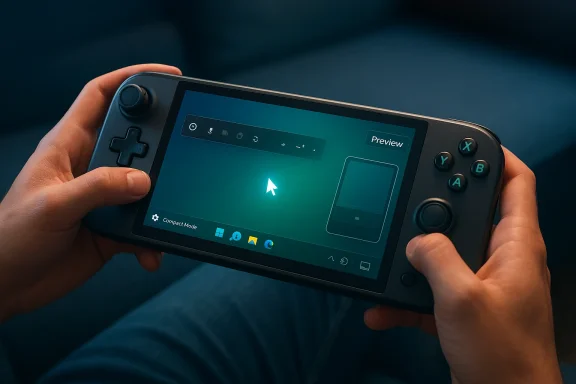
Xbox has spent the last year trying to make Windows handhelds feel less like miniature PCs and more like purpose-built gaming devices, and the new Gamepad Cursor toggle in Game Bar is the clearest sign yet that Microsoft is finally fixing the basics. The feature lets the left thumbstick act like a mouse pointer, turns the right stick into a scroll wheel, and maps the A button to clicks, giving handheld owners a far more natural way to move around Windows overlays and Xbox UI. It is only in preview for Xbox Insiders right now, but the feature lands inside a broader handheld-first strategy that already includes Compact Mode in Game Bar and the Full Screen Experience that Microsoft began rolling out for handheld PCs last year.
For years, Windows handhelds have been sold on a simple promise: you get the power and flexibility of a PC in a device that fits in your hands. The problem has always been that the software stack underneath that promise was still Windows, with all of its desktop assumptions, tiny hit targets, awkward pointer logic, and layers of UI that were never designed for thumbs. Microsoft has been slowly chiseling away at that mismatch with controller-friendly front ends, but the latest cursor toggle shows that a lot of the work still involves very unglamorous, very necessary quality-of-life fixes.
That matters because handheld gaming is no longer a novelty category. It is a serious part of the PC gaming market, driven by devices such as the ROG Ally family, the Xbox Ally line, and Lenovo’s Legion Go machines, all of which sit in the awkward middle ground between console simplicity and desktop complexity. Microsoft’s response has been to build more console-like layers on top of Windows rather than replacing Windows itself, which is why Game Bar, Compact Mode, and the new full-screen gaming shell keep showing up as incremental steps instead of one giant rewrite.
The cursor toggle is also a reminder that the best UX improvements are often the least flashy ones. A mouse pointer controlled by a thumbstick sounds almost mundane, but on a handheld it can determine whether a session feels frictionless or fiddly. Microsoft appears to be using preview channels as a proving ground for these controller-first refinements, which is a sensible way to gather feedback before broad rollout, especially on devices where every extra tap or swipe feels more expensive than it does on a desktop.
From there, Microsoft kept extending the idea of a controller-first Windows gaming experience. In late 2025, it launched the Full Screen Experience for Windows 11 PCs in preview, describing it as a controller-navigable, gaming-first environment designed to make handhelds feel more like consoles. By the time Microsoft later broadened that effort into Xbox Mode, the strategy was clear: simplify the front door, reduce desktop clutter, and let players move between libraries and games with fewer interruptions.
That history explains why a cursor toggle is more important than it first appears. If Microsoft wants players to use Game Bar and Xbox’s overlay surfaces as primary navigation layers, it has to make those layers usable without a keyboard or trackpad. Thumbstick-based pointer control is not a novelty; it is part of the software infrastructure required to make Windows handhelds feel coherent. Without it, the company risks building beautiful controller-centric shells that still collapse the moment a player needs to manage settings, scroll lists, or click through a pop-up.
This is also why fans are asking why it took so long. The need has been obvious for years, and third-party tool makers have been filling the gap with their own solutions. Microsoft’s challenge is that it cannot ship a half-finished controller cursor and call it progress; handheld users will notice immediately if the behavior feels laggy, imprecise, or inconsistent across screens. The bar is high because the use case is physical.
It also helps reduce context switching. Many of the roughest moments on Windows handhelds come when the user moves from game launch to settings to store pages to launcher overlays, each with a slightly different input expectation. A unified cursor behavior helps make those transitions feel less like jumping between product teams and more like moving through one coherent system.
The feature is not revolutionary, but it is the kind of fix that makes a device feel finished. That distinction matters because handheld buyers do not always judge products on raw specs alone. They judge them on whether the software respects the form factor, and a thumbstick cursor is a direct acknowledgement that a handheld should behave like a handheld.
That approach also lets Microsoft test features without overhauling the entire OS shell every time it wants to improve usability. Instead of rebuilding all of Windows for handhelds overnight, the company can refine the entry points players touch most often. It is a pragmatic strategy, even if it can feel annoyingly slow to users who just want the basics fixed now.
That legacy creates a product gap that companies like ASUS and others have tried to solve with their own software. ASUS’s Armoury Crate and desktop modes help, but they are still manufacturer-specific solutions wrapped around a larger Windows problem. Microsoft’s move is important because it attacks the issue closer to the platform level, which is where the best long-term fixes tend to live.
It is also possible that Microsoft deliberately staged this in order of complexity. Compact Mode came first, then the full-screen shell, then broader Windows handheld integration, and now cursor input. That sequence suggests a company trying to reduce risk by solving the most obvious navigation issues before tackling deeper shell-level consistency. That may be sensible engineering, but it has not always felt fast to users.
That makes the Insider route more understandable, even if it is still irritating. Microsoft appears to prefer proving these features in the wild before expanding them widely, which fits a broader pattern of feature toggles and staged rollouts across Windows and Xbox surfaces. It is a cautious product strategy, but one that can feel painfully incremental to fans who can already see the obvious end state.
That broader direction has obvious appeal for players who want their handhelds to boot fast, stay focused, and avoid Windows desktop clutter. But it also changes how Microsoft has to think about device design. If the controller is the primary input, then every overlay, menu, and sign-in screen has to be tuned for thumb use rather than cursor precision.
The key competitive point is that Microsoft is not just chasing SteamOS-style simplicity; it is trying to keep the Windows ecosystem intact while making it feel less like a compromise. That is a harder problem, but it also gives the company a wider hardware reach if it can get the software right.
It is also a reminder that the handheld race is now about ecosystems. ASUS can build good hardware, but Microsoft has to provide the software layer that makes the hardware feel special. If Game Bar, Xbox app, and Xbox Mode all become smoother, the entire category benefits. If they remain fragmented, consumers will keep drifting toward whichever platform feels least like work.
It also reduces the learning curve for new users. Not everyone buying a handheld wants to become a Windows power user, and not everyone wants to pair external accessories just to manage basic UI tasks. The more Microsoft can make controller navigation self-explanatory, the more approachable the category becomes for mainstream buyers.
That is especially valuable for people who use their handheld as an all-purpose portable machine. Those users bounce between Steam, Xbox, browser-based tasks, launchers, and system overlays far more than traditional console owners do. Better cursor behavior makes that juggling act less exhausting.
It also creates a feedback loop between consumer gaming features and broader UI research. A cursor system that works well on handhelds may influence accessibility, tablet, and touch interactions elsewhere in Windows. Microsoft has a long history of letting one input innovation spill into adjacent product surfaces, and handheld gaming appears to be the latest laboratory.
That could pressure other handheld ecosystems to improve their own software polish. The market will not reward raw horsepower alone for long if basic navigation remains clumsy. In a category where convenience sells, Microsoft understands that the UI is part of the product, not a cosmetic layer on top of it.
The bigger story, though, is still the consolidation of Xbox and Windows into a more seamless gaming platform. Microsoft has already shown that it is willing to invest in a full-screen handheld shell, broaden controller-first experiences, and keep refining the overlay layer in public preview. If it follows through, the next phase of handheld gaming on Windows may feel less like a workaround and more like an actual product category.
Watch for these developments next:
Source: Windows Central Xbox handhelds finally get a proper cursor toggle for handhelds and fans are asking why it took this long
 Overview
For years, Windows handhelds have been sold on a simple promise: you get the power and flexibility of a PC in a device that fits in your hands. The problem has always been that the software stack underneath that promise was still Windows, with all of its desktop assumptions, tiny hit targets, awkward pointer logic, and layers of UI that were never designed for thumbs. Microsoft has been slowly chiseling away at that mismatch with controller-friendly front ends, but the latest cursor toggle shows that a lot of the work still involves very unglamorous, very necessary quality-of-life fixes.That matters because handheld gaming is no longer a novelty category. It is a serious part of the PC gaming market, driven by devices such as the ROG Ally family, the Xbox Ally line, and Lenovo’s Legion Go machines, all of which sit in the awkward middle ground between console simplicity and desktop complexity. Microsoft’s response has been to build more console-like layers on top of Windows rather than replacing Windows itself, which is why Game Bar, Compact Mode, and the new full-screen gaming shell keep showing up as incremental steps instead of one giant rewrite.
The cursor toggle is also a reminder that the best UX improvements are often the least flashy ones. A mouse pointer controlled by a thumbstick sounds almost mundane, but on a handheld it can determine whether a session feels frictionless or fiddly. Microsoft appears to be using preview channels as a proving ground for these controller-first refinements, which is a sensible way to gather feedback before broad rollout, especially on devices where every extra tap or swipe feels more expensive than it does on a desktop.
Background
Microsoft’s handheld gaming push has been building in layers rather than leaps. The company first introduced Compact Mode in Game Bar to make the interface easier to navigate on smaller screens and with a controller, explicitly calling out Windows handhelds as a target use case. That was a meaningful shift because it acknowledged that the standard Game Bar layout, while fine on a desktop, was not ideal for compact, gamepad-led devices.From there, Microsoft kept extending the idea of a controller-first Windows gaming experience. In late 2025, it launched the Full Screen Experience for Windows 11 PCs in preview, describing it as a controller-navigable, gaming-first environment designed to make handhelds feel more like consoles. By the time Microsoft later broadened that effort into Xbox Mode, the strategy was clear: simplify the front door, reduce desktop clutter, and let players move between libraries and games with fewer interruptions.
That history explains why a cursor toggle is more important than it first appears. If Microsoft wants players to use Game Bar and Xbox’s overlay surfaces as primary navigation layers, it has to make those layers usable without a keyboard or trackpad. Thumbstick-based pointer control is not a novelty; it is part of the software infrastructure required to make Windows handhelds feel coherent. Without it, the company risks building beautiful controller-centric shells that still collapse the moment a player needs to manage settings, scroll lists, or click through a pop-up.
Why the timing matters
The timing is especially revealing because Microsoft is no longer treating handheld gaming as an edge case. The company has expanded its broader Windows gaming efforts around handheld compatibility, controller-first navigation, and more integrated Xbox services across PC devices. In that context, the cursor toggle looks less like a standalone feature and more like one more brick in a larger platform wall.This is also why fans are asking why it took so long. The need has been obvious for years, and third-party tool makers have been filling the gap with their own solutions. Microsoft’s challenge is that it cannot ship a half-finished controller cursor and call it progress; handheld users will notice immediately if the behavior feels laggy, imprecise, or inconsistent across screens. The bar is high because the use case is physical.
What the Gamepad Cursor Actually Changes
At the practical level, the new toggle is simple: enable it in Xbox Game Bar settings, and the left joystick becomes a cursor, the right stick works as a scroll wheel, and the A button acts as click. That sounds almost trivial on paper, but it changes the rhythm of handheld navigation dramatically. Instead of reaching for touch input or wrestling with an awkward desktop cursor, players can stay in the controller mindset longer.A better fit for handheld ergonomics
This matters because handhelds are not just small PCs; they are a different physical interaction model. If a user is lying on a couch, on a commute, or simply holding a device in both hands, the most natural input should be the one already in their grip. Thumbstick cursor control fits that posture much better than the old assumption that the user will always want to touch the screen or pair a mouse.It also helps reduce context switching. Many of the roughest moments on Windows handhelds come when the user moves from game launch to settings to store pages to launcher overlays, each with a slightly different input expectation. A unified cursor behavior helps make those transitions feel less like jumping between product teams and more like moving through one coherent system.
The feature is not revolutionary, but it is the kind of fix that makes a device feel finished. That distinction matters because handheld buyers do not always judge products on raw specs alone. They judge them on whether the software respects the form factor, and a thumbstick cursor is a direct acknowledgement that a handheld should behave like a handheld.
Why Microsoft is doing this through Game Bar
Microsoft’s choice to put the toggle inside Game Bar is also strategic. Game Bar already acts as the control layer for captures, widgets, and system overlays, so it is the most obvious place for controller-centric input changes to live. In other words, Game Bar is becoming one of the key places where Microsoft translates Windows into handheld language.That approach also lets Microsoft test features without overhauling the entire OS shell every time it wants to improve usability. Instead of rebuilding all of Windows for handhelds overnight, the company can refine the entry points players touch most often. It is a pragmatic strategy, even if it can feel annoyingly slow to users who just want the basics fixed now.
- The left stick becomes the pointer.
- The right stick handles scrolling.
- The A button performs clicks.
- The toggle is available only to Xbox Insiders for now.
Why It Took So Long
The frustration around this feature is easy to understand. Handheld users have been asking for a more natural cursor solution since the first wave of Windows gaming handhelds showed how awkward traditional desktop assumptions can be when shrunk into a portable form factor. Microsoft has had years to see the problem, and only now is it shipping a more elegant answer.The legacy of desktop-first design
Windows was not born with handhelds in mind, and that legacy still shows everywhere. Menus assume precise pointing, dialogs assume a mouse, and many apps assume the user has a keyboard ready. Even when Microsoft layers controller support on top, the deeper structure often remains stubbornly desktop-first, which is why small interactions can feel disproportionately clumsy.That legacy creates a product gap that companies like ASUS and others have tried to solve with their own software. ASUS’s Armoury Crate and desktop modes help, but they are still manufacturer-specific solutions wrapped around a larger Windows problem. Microsoft’s move is important because it attacks the issue closer to the platform level, which is where the best long-term fixes tend to live.
It is also possible that Microsoft deliberately staged this in order of complexity. Compact Mode came first, then the full-screen shell, then broader Windows handheld integration, and now cursor input. That sequence suggests a company trying to reduce risk by solving the most obvious navigation issues before tackling deeper shell-level consistency. That may be sensible engineering, but it has not always felt fast to users.
The business logic behind patience
There is also a business reason for caution. Any input system that becomes foundational on handhelds has to work across a broad range of devices, button maps, overlays, display sizes, and accessibility needs. If Microsoft shipped a cursor feature too early and it broke across vendors, it would damage trust in the entire handheld strategy.That makes the Insider route more understandable, even if it is still irritating. Microsoft appears to prefer proving these features in the wild before expanding them widely, which fits a broader pattern of feature toggles and staged rollouts across Windows and Xbox surfaces. It is a cautious product strategy, but one that can feel painfully incremental to fans who can already see the obvious end state.
How This Fits the Xbox-Handheld Strategy
The new cursor toggle is not just about a convenience feature in Game Bar. It is another signal that Microsoft wants handheld gaming to feel like an Xbox-native experience, even when the underlying device is a Windows PC from ASUS, Lenovo, or another partner. That is why the company keeps describing features in controller-first terms and why the interface language increasingly borrows from console design.Xbox Mode as the bigger picture
The Xbox Mode / Full Screen Experience effort matters because it reframes Windows as a front-end for gaming, not just an operating system that happens to run games. Microsoft is trying to make launching, browsing, and switching between titles feel closer to a console dashboard. The cursor toggle helps by smoothing one of the most common awkward moments: leaving the pure game context and entering UI-heavy territory.That broader direction has obvious appeal for players who want their handhelds to boot fast, stay focused, and avoid Windows desktop clutter. But it also changes how Microsoft has to think about device design. If the controller is the primary input, then every overlay, menu, and sign-in screen has to be tuned for thumb use rather than cursor precision.
The key competitive point is that Microsoft is not just chasing SteamOS-style simplicity; it is trying to keep the Windows ecosystem intact while making it feel less like a compromise. That is a harder problem, but it also gives the company a wider hardware reach if it can get the software right.
Why this helps the Xbox Ally and similar devices
For devices such as the Xbox Ally and the broader ROG Ally family, this is particularly relevant because those handhelds live or die by user experience polish. Hardware strength alone does not guarantee satisfaction if the software makes simple tasks annoying. A more intuitive cursor helps the device feel more integrated and less like a miniaturized desktop with gaming branding pasted on top.It is also a reminder that the handheld race is now about ecosystems. ASUS can build good hardware, but Microsoft has to provide the software layer that makes the hardware feel special. If Game Bar, Xbox app, and Xbox Mode all become smoother, the entire category benefits. If they remain fragmented, consumers will keep drifting toward whichever platform feels least like work.
- Controller-first navigation is now a core feature, not a side experiment.
- Game Bar is becoming the main bridge between Windows and handheld gaming.
- Xbox Mode gives Microsoft a full-screen gaming shell to align with that strategy.
- The cursor toggle reduces the need to touch the screen or attach peripherals.
Consumer Impact
For consumers, the benefits are straightforward. The handheld experience should feel less clunky, less interrupt-driven, and more consistent whether you are launching a game, changing a setting, or moving through the Xbox overlay. That kind of polish improves the perceived value of the hardware as much as any spec bump.It also reduces the learning curve for new users. Not everyone buying a handheld wants to become a Windows power user, and not everyone wants to pair external accessories just to manage basic UI tasks. The more Microsoft can make controller navigation self-explanatory, the more approachable the category becomes for mainstream buyers.
The hidden benefit: fewer moments of friction
The biggest consumer benefit may be invisible until it is missing. A good handheld interface disappears into the background and lets the user think about games, not inputs, menus, or workarounds. A thumbstick cursor helps achieve that by making the transition from gameplay to system UI feel continuous rather than disruptive.That is especially valuable for people who use their handheld as an all-purpose portable machine. Those users bounce between Steam, Xbox, browser-based tasks, launchers, and system overlays far more than traditional console owners do. Better cursor behavior makes that juggling act less exhausting.
Enterprise and Platform Implications
There is a secondary story here that gets less attention: Microsoft is once again proving that its platform strategy depends on gradual UI convergence. Even though handheld gaming is a consumer story, the engineering patterns behind it matter to the broader Windows ecosystem because Microsoft is using preview channels, feature flags, and shell-level enhancements as a repeatable launch model.Lessons for Microsoft’s wider Windows play
That matters for enterprise because it shows Microsoft’s comfort with shipping modular improvements instead of huge monolithic changes. The company is increasingly treating Windows as a layered platform where different experiences can be optimized for different device classes without rewriting the base OS. In practice, that can make rollout management easier and user training more predictable.It also creates a feedback loop between consumer gaming features and broader UI research. A cursor system that works well on handhelds may influence accessibility, tablet, and touch interactions elsewhere in Windows. Microsoft has a long history of letting one input innovation spill into adjacent product surfaces, and handheld gaming appears to be the latest laboratory.
The competitive platform angle
For competitors, the implication is clear: Microsoft is trying to make Windows the most flexible gaming platform without surrendering console-like ease. That is the real long game. If it can make Windows handhelds easy enough, then OEMs get a stronger sales pitch and Microsoft keeps players inside the Xbox ecosystem even when they are not on an actual Xbox console.That could pressure other handheld ecosystems to improve their own software polish. The market will not reward raw horsepower alone for long if basic navigation remains clumsy. In a category where convenience sells, Microsoft understands that the UI is part of the product, not a cosmetic layer on top of it.
Strengths and Opportunities
Microsoft’s handheld work is starting to show a more coherent vision, and the cursor toggle is a small but meaningful proof point. It suggests the company understands that handheld gaming needs more than marketing and hardware partnerships; it needs a tightly integrated interaction model that respects the form factor. The opportunity is to turn Windows handhelds into devices that feel purpose-built rather than merely adapted.- Improved ergonomics for controller-only navigation.
- Less reliance on touch for system-level tasks.
- Better continuity between Game Bar, Xbox Mode, and game launching.
- Stronger appeal for casual handheld buyers.
- A cleaner path for Microsoft to unify Xbox and Windows UX.
- Potential accessibility gains for users who prefer controller input.
- A competitive differentiator against less polished software stacks.
Risks and Concerns
The biggest concern is that Microsoft could keep solving obvious problems one at a time while never fully addressing the underlying mess. A cursor toggle helps, but it does not fix every awkward dialogue, launcher quirk, or app that still assumes a mouse and keyboard are nearby. If the deeper Windows experience remains fragmented, users may see the improvements as welcome but insufficient.- Features in preview can still be unstable or change before release.
- Inconsistent behavior across OEM devices could confuse users.
- Third-party launcher and overlay compatibility may remain uneven.
- Microsoft may still rely too heavily on staged rollouts.
- The full Windows desktop can still leak through and break immersion.
- Some users may prefer vendor tools over Microsoft’s built-in options.
- Delayed polish can make the platform feel reactive instead of visionary.
Looking Ahead
The immediate thing to watch is whether the Gamepad Cursor toggle stays confined to Insiders or moves quickly toward broader release. If it performs well, Microsoft could use it as a template for other controller-centric navigation improvements across Game Bar and the Xbox app. That would be the right kind of momentum: quiet, useful, and directly tied to the way people actually use handheld PCs.The bigger story, though, is still the consolidation of Xbox and Windows into a more seamless gaming platform. Microsoft has already shown that it is willing to invest in a full-screen handheld shell, broaden controller-first experiences, and keep refining the overlay layer in public preview. If it follows through, the next phase of handheld gaming on Windows may feel less like a workaround and more like an actual product category.
Watch for these developments next:
- A wider rollout from Xbox Insiders to more users.
- Further refinements to Game Bar Compact Mode.
- More controller-first improvements in the Xbox app.
- Better integration between Xbox Mode and OEM handheld tools.
- Additional accessibility and input enhancements for small-screen Windows devices.
Source: Windows Central Xbox handhelds finally get a proper cursor toggle for handhelds and fans are asking why it took this long
