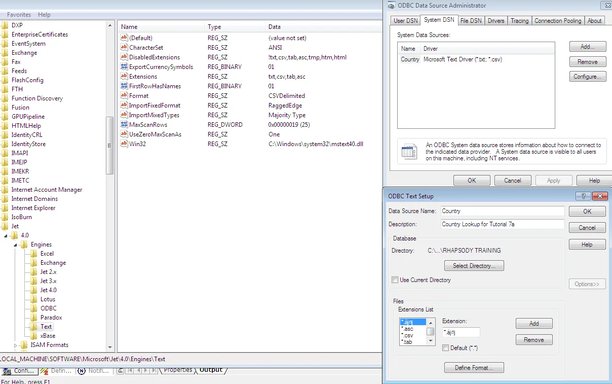
Hi, I have an application which uses sun.jdbc.odbc.JdbcOdbcDriver to bridge from JDBC to ODBC. First I created a simple CSV file and registered it as a Text Data Source using the ODBC Data Source Administrator.
Now whenever I try to change the file extension list for this data source to only include *.csv it sometimes seems to save ok, other times it displays a message box saying "Invalid setting in Excel key of the Engines section of the Windows Registry". When it appears to save ok, if I run my application a runtime exception is generated with the same error message as above.
I searched this error and came across Link Removed and Link Removed. However these problems are different or the solution has already been applied.
I tried setting the data source again and noticed that all the default extensions that I had removed were back again, and it also included another one which had a few strange characters in it. This can be seen in the attached screenshot.
After spotting this bit of weirdness I tried just going with the default extension . and then it seemed to work fine. Why am I seeing this strange behaviour?
Now whenever I try to change the file extension list for this data source to only include *.csv it sometimes seems to save ok, other times it displays a message box saying "Invalid setting in Excel key of the Engines section of the Windows Registry". When it appears to save ok, if I run my application a runtime exception is generated with the same error message as above.
I searched this error and came across Link Removed and Link Removed. However these problems are different or the solution has already been applied.
I tried setting the data source again and noticed that all the default extensions that I had removed were back again, and it also included another one which had a few strange characters in it. This can be seen in the attached screenshot.
After spotting this bit of weirdness I tried just going with the default extension . and then it seemed to work fine. Why am I seeing this strange behaviour?