
📎 AI Summary:
The thread discusses issues with accessing Windows 11 system features, such as Control Panel and system settings, in a VMware virtual machine, with initial reports of errors and inability to open default programs. Contributors mention that Windows 11 is moving toward deprecated Control Panel use, favoring the Settings app, and share experiences with different builds and upgrade methods; one user successfully resolves the issues by performing a clean install with a newer Insider preview build, which restores normal functionality. Overall, the conversation indicates that the problems may be related to specific preview builds, and a clean installation of an updated version can improve system access.

stds9

Senior Member
Joined
Dec 10, 2016
Messages
5
Thread Author #1
I'm playing around with Windows 11 in a VMWare virtual machine. Installed fine. Edge browser works fine. But, any time I try to right-click to display settings, or go to the control panel I get a "This file does not have an app associated with it for performing this action. Please install an app or, if one is already installed, create an association in the Default Apps Settings page" (see pic). The problem is if I go to the Control Panel - Default Programs, when I click on "Associate a file type or protocol with a program" or "Set your default programs" nothing comes up.

In fact, there was a simple text file. I double click on it and expected it to launch Notepad and show the content. I get the same app not associated error. I had to launch Notepad first, then go open the text file.

I thought I do a check updates to bring Windows 11 to the latest preview version. But, when I use the magnify glass and type in 'check for updates' , it shows 'Check for updates' in the System settings. But, when I click on it nothing shows up.

If I go to the Control Panel - System and Security and click on System, nothing shows up.

It's almost as if Windows 11 does not allow me get into any system related features. Anyone know why?
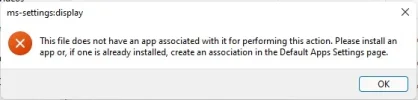
 

Attachments

  • windows11error.webp
    windows11error.webp
    8.9 KB · Views: 129

Neemobeer

Windows Forum Team
Staff member
Joined
Jul 4, 2015
Messages
8,995
Microsoft is deprecating Control Panel any settings changes should be done through system settings. Hot key is [Windows key + i]
 

Dave Win

New Member
Joined
Aug 31, 2021
Messages
6
I'm playing around with Windows 11 in a VMWare virtual machine. Installed fine. Edge browser works fine. But, any time I try to right-click to display settings, or go to the control panel I get a "This file does not have an app associated with it for performing this action. Please install an app or, if one is already installed, create an association in the Default Apps Settings page" (see pic). The problem is if I go to the Control Panel - Default Programs, when I click on "Associate a file type or protocol with a program" or "Set your default programs" nothing comes up.

In fact, there was a simple text file. I double click on it and expected it to launch Notepad and show the content. I get the same app not associated error. I had to launch Notepad first, then go open the text file.

I thought I do a check updates to bring Windows 11 to the latest preview version. But, when I use the magnify glass and type in 'check for updates' , it shows 'Check for updates' in the System settings. But, when I click on it nothing shows up.

If I go to the Control Panel - System and Security and click on System, nothing shows up.

It's almost as if Windows 11 does not allow me get into any system related features. Anyone know why?
Hi. I am not clear on all of what you say but all that I have tried have worked for me. I am using VMware and on build 22000.168
Dave
 

stds9

Senior Member
Joined
Dec 10, 2016
Messages
5
Thread Author #4
Hi. I am not clear on all of what you say but all that I have tried have worked for me. I am using VMware and on build 22000.168
Dave
That's what I thought. The Windows 11 build I have is 21996.1. Can you give me the link to your ISO? I'll try to rebuild the virtual machine and see if will work better. Thanks.
 

Dave Win

New Member
Joined
Aug 31, 2021
Messages
6
That's what I thought. The Windows 11 build I have is 21996.1. Can you give me the link to your ISO? I'll try to rebuild the virtual machine and see if will work better. Thanks.
I don't have an ISO. I signed up to the Windows 11 Insider Preview Beta Channel and have updated to the latest build.
The only change to my settings that I had to make was to turn on sending optional diagnostic data under Privacy & Security. You will then be able to update. Not sure where I started from. Maybe a Win 10 ISO
Let me know how it goes
 

Neemobeer

Windows Forum Team
Staff member
Joined
Jul 4, 2015
Messages
8,995
You can download the ISO from Microsoft now as long as your in the Insider Preview program
 

stds9

Senior Member
Joined
Dec 10, 2016
Messages
5
Thread Author #7
I don't have an ISO. I signed up to the Windows 11 Insider Preview Beta Channel and have updated to the latest build.
The only change to my settings that I had to make was to turn on sending optional diagnostic data under Privacy & Security. You will then be able to update. Not sure where I started from. Maybe a Win 10 ISO
Let me know how it goes
So if you have a licensed Windows 10 PC and you upgrade to this preview version of Windows 11, will it stay licensed? Or, do you have to go buy a Windows 11 license when it's finally released?
 

stds9

Senior Member
Joined
Dec 10, 2016
Messages
5
Thread Author #9
I don't have an ISO. I signed up to the Windows 11 Insider Preview Beta Channel and have updated to the latest build.
The only change to my settings that I had to make was to turn on sending optional diagnostic data under Privacy & Security. You will then be able to update. Not sure where I started from. Maybe a Win 10 ISO
Let me know how it goes
Did another clean virtual machine build using Windows 11 build 22000.132 (through Windows Insider preview program) then everything works as expected. Thanks for the pointer.