
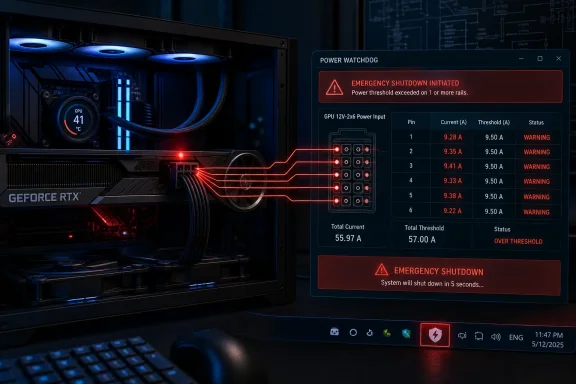
A newly published Windows watchdog called 12VHPWR Guard can force an emergency shutdown when one of the six monitored 16-pin GPU power contacts remains above a configured current limit, but it is a narrowly targeted software alarm, not a general fix for RTX 5090 connector failures. The project is aimed at owners of ASUS ROG Astral RTX 5080 and RTX 5090 cards that expose individual pin-current telemetry; its default response is to shut down the whole PC after a pin exceeds 9.5 amps for 15 seconds.
Wccftech first highlighted the tool after its creator, Reddit user CoolerThanNos, posted it to the Nvidia subreddit. The developer’s GitHub repository confirms the basic design: a Windows tray application polls the card twice per second, reads its sensor chip directly over the GPU’s I2C bus through Nvidia’s NVAPI interface, and invokes a forced Windows shutdown when an over-current condition persists.
The useful part is straightforward. ASUS has already put pin-by-pin monitoring hardware and warning functions into its ROG Astral cards through GPU Tweak III’s Power Detector+ feature. ASUS’s implementation can flash a red LED, show an on-screen warning, and issue a popup with audio. 12VHPWR Guard turns that observability into an automated action for people who cannot—or will not—watch a telemetry overlay while playing.
It also comes with a much sharper operational consequence than a vendor warning: its default shutdown path force-closes applications. Anyone deploying it on a Windows gaming or workstation PC should treat it as a last-resort circuit breaker and save work accordingly. It may spare connector hardware in an actual sustained-current event, but it can also discard unsaved files.
The project’s name uses the older 12VHPWR shorthand, but the RTX 50-series generation commonly uses the revised 12V-2x6 implementation of the 16-pin connector. The technical issue behind both names is the same practical concern: a connector can carry enormous total power while an abnormal share of current is concentrated at one contact.
The 9.2A figure is not arbitrary. Intel’s published ATX design material lists 9.2 amps per power-pin position for the 12V-2x6 connector under specified thermal conditions. ASUS uses that same 9.2A point for its Power Detector+ warning. The guard’s 9.5A default is therefore slightly above ASUS’s warning threshold and requires a continuous 15-second breach before it acts.
That timing is where the project becomes more complicated than its headline suggests. A pin-current reading is a proxy for a developing connector problem, not a direct measurement of heat at the plastic housing, the terminal, the cable wire, or the PSU-side connector. The software can identify a sustained imbalance that may raise risk, but it cannot establish the connector’s actual temperature or confirm that damage has begun.
The repository acknowledges the boundary in its own disclaimer. It says the software does not guarantee protection against every failure mode and should not serve as the sole safety mechanism. That caution is justified: the code can only respond to telemetry that the card exposes, and a fault outside that telemetry path may not present as one sensor reading above 9.5A for 15 uninterrupted seconds.
This is particularly relevant because 12V-2x6 failures are not all identical. Poor seating, cable damage, contact resistance, bends near the connector, a defective cable, or a problem at the power-supply end can produce different electrical and thermal signatures. A per-pin guard may catch one class of developing problem, but it cannot inspect the physical connection for the user.
That is substantially better instrumentation than most high-end GPUs offer. Most RTX 5080 and RTX 5090 owners do not have access to six individual connector-current values through their card hardware, which is why the developer’s software cannot simply be repackaged for every 16-pin GeForce model.
Yet ASUS’s own documented response is limited to warning the user: check that the cable is seated, use an appropriate cable, and contact support if necessary. For a system under a desk, a full-screen game, a remote desktop session, or an unattended compute job, a popup and a red LED have obvious limits.
12VHPWR Guard closes that gap by turning ASUS’s monitoring channel into an automatic intervention. It is an understandable response to the awkward reality that a premium graphics card can detect an imbalance but otherwise relies on a human noticing it in time.
There is a catch: an operating-system shutdown is not instantaneous in the electrical sense. A commenter on the original Reddit post pointed out that a better first response could be immediately reducing the Nvidia GPU power limit, followed by shutdown only if the abnormal condition continues. The project’s author agreed and said that approach was planned for a future version.
That proposed change would materially improve the design. Cutting the card’s power draw should reduce current immediately and may avoid both ongoing stress and the loss of unsaved work. But it is not in the currently published watchdog behavior described in the repository, so buyers should assess the tool on the shutdown mechanism it has today—not on a possible next release.
That means the project’s stated scope is not merely a generic “Astral 5080/5090” category. It depends on specific cards carrying the ITE IT8915FN monitoring chip and exposing the required telemetry through the expected interface. A user with an ASUS-branded RTX 5090 should not assume compatibility from the badge alone.
There is another mismatch worth noting. ASUS says Power Detector+ also works with the previous-generation ROG Matrix RTX 4090 Platinum. The guard’s published compatibility table does not list that card. ASUS telemetry compatibility, in other words, does not automatically mean 12VHPWR Guard compatibility.
The repository’s restrictions are actually a strength compared with many hobbyist hardware utilities: on unsupported systems, it is designed to report that it has no usable sensor source rather than silently declaring the machine protected. Its tray icon uses distinct states for an active monitor, an over-threshold reading, a shutdown trigger, no sensor source, missing sensors, and a paused monitor.
Still, this is an open-source project released with only a small public commit history and no formal binary release. It requires Python 3.10 or newer, administrator privileges for its installer features, and a Task Scheduler entry to launch it at logon and restart it after failures. That is appropriate territory for technically capable enthusiasts, not a turnkey safeguard for every PC owner.
It does not prove that a 9.5A threshold plus a 15-second delay prevents melting. The public documentation describes no controlled connector-heating test, no deliberately induced persistent imbalance, no thermal probe data, and no validation across multiple card, cable, and power-supply combinations. Nor should anyone expect a developer to conduct destructive tests on a several-thousand-dollar GPU—but the distinction matters.
The GitHub readme states that the code was developed with AI assistance, reviewed by its author, and cross-checked against LibreHardwareMonitor and a Rust proof of concept for the sensor protocol. That is a better disclosure than simply calling the project “vibe-coded” and leaving it there. It also does not amount to an independent security audit or a hardware-safety certification.
Wccftech additionally describes the project as “35MB in size.” The repository says it uses about 35MB of RAM, which is a different claim. Given that the tool is a Python application with dependencies and a virtual environment created by its installer, prospective users should not read the RAM figure as a total installation footprint.
It should not be installed as permission to relax on cable installation. ASUS’s own guidance still applies: fully seat the connector at both the GPU and PSU ends, avoid undue strain near the plug, use a suitable native 12V-2x6 cable where possible, and investigate any Power Detector+ warning instead of simply resetting the system and continuing to game.
The bigger story is that a community developer has built an emergency action around telemetry that ASUS already collects but does not automatically enforce. Until GPU vendors tie per-pin anomaly detection to a rapid power-limit reduction or hardware-level cutoff, owners of these unusually power-dense cards are left choosing between watching a warning and trusting a watchdog that may shut down Windows first and ask questions later.
The useful part is straightforward. ASUS has already put pin-by-pin monitoring hardware and warning functions into its ROG Astral cards through GPU Tweak III’s Power Detector+ feature. ASUS’s implementation can flash a red LED, show an on-screen warning, and issue a popup with audio. 12VHPWR Guard turns that observability into an automated action for people who cannot—or will not—watch a telemetry overlay while playing.
It also comes with a much sharper operational consequence than a vendor warning: its default shutdown path force-closes applications. Anyone deploying it on a Windows gaming or workstation PC should treat it as a last-resort circuit breaker and save work accordingly. It may spare connector hardware in an actual sustained-current event, but it can also discard unsaved files.
 The tool monitors current; it does not measure connector temperature
The project’s name uses the older 12VHPWR shorthand, but the RTX 50-series generation commonly uses the revised 12V-2x6 implementation of the 16-pin connector. The technical issue behind both names is the same practical concern: a connector can carry enormous total power while an abnormal share of current is concentrated at one contact.The 9.2A figure is not arbitrary. Intel’s published ATX design material lists 9.2 amps per power-pin position for the 12V-2x6 connector under specified thermal conditions. ASUS uses that same 9.2A point for its Power Detector+ warning. The guard’s 9.5A default is therefore slightly above ASUS’s warning threshold and requires a continuous 15-second breach before it acts.
That timing is where the project becomes more complicated than its headline suggests. A pin-current reading is a proxy for a developing connector problem, not a direct measurement of heat at the plastic housing, the terminal, the cable wire, or the PSU-side connector. The software can identify a sustained imbalance that may raise risk, but it cannot establish the connector’s actual temperature or confirm that damage has begun.
The repository acknowledges the boundary in its own disclaimer. It says the software does not guarantee protection against every failure mode and should not serve as the sole safety mechanism. That caution is justified: the code can only respond to telemetry that the card exposes, and a fault outside that telemetry path may not present as one sensor reading above 9.5A for 15 uninterrupted seconds.
This is particularly relevant because 12V-2x6 failures are not all identical. Poor seating, cable damage, contact resistance, bends near the connector, a defective cable, or a problem at the power-supply end can produce different electrical and thermal signatures. A per-pin guard may catch one class of developing problem, but it cannot inspect the physical connection for the user.
ASUS already provides the sensor hardware, but its response stops at alerts
ASUS’s April 2025 Power Detector+ documentation explains why this utility can exist at all. The company says its compatible Astral cards measure current flowing through individual power pins, flash a red warning LED on an abnormality, and expose live readings in GPU Tweak III and its on-screen display.That is substantially better instrumentation than most high-end GPUs offer. Most RTX 5080 and RTX 5090 owners do not have access to six individual connector-current values through their card hardware, which is why the developer’s software cannot simply be repackaged for every 16-pin GeForce model.
Yet ASUS’s own documented response is limited to warning the user: check that the cable is seated, use an appropriate cable, and contact support if necessary. For a system under a desk, a full-screen game, a remote desktop session, or an unattended compute job, a popup and a red LED have obvious limits.
12VHPWR Guard closes that gap by turning ASUS’s monitoring channel into an automatic intervention. It is an understandable response to the awkward reality that a premium graphics card can detect an imbalance but otherwise relies on a human noticing it in time.
There is a catch: an operating-system shutdown is not instantaneous in the electrical sense. A commenter on the original Reddit post pointed out that a better first response could be immediately reducing the Nvidia GPU power limit, followed by shutdown only if the abnormal condition continues. The project’s author agreed and said that approach was planned for a future version.
That proposed change would materially improve the design. Cutting the card’s power draw should reduce current immediately and may avoid both ongoing stress and the loss of unsaved work. But it is not in the currently published watchdog behavior described in the repository, so buyers should assess the tool on the shutdown mechanism it has today—not on a possible next release.
The compatibility claim is narrower than Wccftech’s headline suggests—and broader in the repository
Wccftech described the tool as working with ASUS Astral RTX 5080 and RTX 5090 cards, which is broadly correct but omits important model distinctions. The GitHub project identifies supported hardware through PCI subsystem IDs and lists the ROG Astral RTX 5090 OC, RTX 5090D OC, RTX 5090 LC, RTX 5080 OC, and the ROG Matrix RTX 5090.That means the project’s stated scope is not merely a generic “Astral 5080/5090” category. It depends on specific cards carrying the ITE IT8915FN monitoring chip and exposing the required telemetry through the expected interface. A user with an ASUS-branded RTX 5090 should not assume compatibility from the badge alone.
There is another mismatch worth noting. ASUS says Power Detector+ also works with the previous-generation ROG Matrix RTX 4090 Platinum. The guard’s published compatibility table does not list that card. ASUS telemetry compatibility, in other words, does not automatically mean 12VHPWR Guard compatibility.
The repository’s restrictions are actually a strength compared with many hobbyist hardware utilities: on unsupported systems, it is designed to report that it has no usable sensor source rather than silently declaring the machine protected. Its tray icon uses distinct states for an active monitor, an over-threshold reading, a shutdown trigger, no sensor source, missing sensors, and a paused monitor.
Still, this is an open-source project released with only a small public commit history and no formal binary release. It requires Python 3.10 or newer, administrator privileges for its installer features, and a Task Scheduler entry to launch it at logon and restart it after failures. That is appropriate territory for technically capable enthusiasts, not a turnkey safeguard for every PC owner.
Its reading accuracy was tested; its damage-prevention claim was not
The developer says the direct I2C readings were checked against HWiNFO during idle and gaming loads of roughly 500 watts, with readings matching within 0.02A. That comparison is meaningful: it supports the claim that the software is probably reading the same pin telemetry as a well-known hardware-monitoring utility.It does not prove that a 9.5A threshold plus a 15-second delay prevents melting. The public documentation describes no controlled connector-heating test, no deliberately induced persistent imbalance, no thermal probe data, and no validation across multiple card, cable, and power-supply combinations. Nor should anyone expect a developer to conduct destructive tests on a several-thousand-dollar GPU—but the distinction matters.
The GitHub readme states that the code was developed with AI assistance, reviewed by its author, and cross-checked against LibreHardwareMonitor and a Rust proof of concept for the sensor protocol. That is a better disclosure than simply calling the project “vibe-coded” and leaving it there. It also does not amount to an independent security audit or a hardware-safety certification.
Wccftech additionally describes the project as “35MB in size.” The repository says it uses about 35MB of RAM, which is a different claim. Given that the tool is a Python application with dependencies and a virtual environment created by its installer, prospective users should not read the RAM figure as a total installation footprint.
A reasonable extra layer, with the physical installation still doing the real work
For an owner of a supported ASUS ROG Astral card who understands Python, Task Scheduler, elevated permissions, and the prospect of a forced shutdown, 12VHPWR Guard is a sensible extra layer. It addresses the practical weakness in ASUS’s current approach: a red warning or overlay cannot help if nobody sees it.It should not be installed as permission to relax on cable installation. ASUS’s own guidance still applies: fully seat the connector at both the GPU and PSU ends, avoid undue strain near the plug, use a suitable native 12V-2x6 cable where possible, and investigate any Power Detector+ warning instead of simply resetting the system and continuing to game.
The bigger story is that a community developer has built an emergency action around telemetry that ASUS already collects but does not automatically enforce. Until GPU vendors tie per-pin anomaly detection to a rapid power-limit reduction or hardware-level cutoff, owners of these unusually power-dense cards are left choosing between watching a warning and trusting a watchdog that may shut down Windows first and ask questions later.
References
- Primary source: Wccftech
Published: 2026-08-06T15:30:57+00:00
Loading…
wccftech.com - Related coverage: tomshardware.com
Loading…
www.tomshardware.com - Related coverage: rog.asus.com
Loading…
rog.asus.com - Related coverage: zentalk.asus.com
Loading…
zentalk.asus.com - Related coverage: rog-forum.asus.com
Loading…
rog-forum.asus.com - Related coverage: notebookcheck.net
Loading…
www.notebookcheck.net - Related coverage: tomshardware.com
Loading…
www.tomshardware.com - Related coverage: rog-forum.asus.com
Loading…
rog-forum.asus.com - Related coverage: techradar.com
Loading…
www.techradar.com - Related coverage: pcgamer.com
Loading…
www.pcgamer.com - Related coverage: edc.intel.com
Loading…
edc.intel.com - Related coverage: pcworld.com
Loading…
www.pcworld.com - Related coverage: hardforum.com
Loading…
hardforum.com - Related coverage: devtest.gamersnexus.net
Loading…
devtest.gamersnexus.net - Related coverage: videocardz.com
Loading…
videocardz.com - Related coverage: overclock3d.net
Loading…
overclock3d.net - Related coverage: hothardware.com
Loading…
hothardware.com - Related coverage: neowin.net
Loading…
www.neowin.net