
This is not a value-oriented gaming tower, nor does Acer pretend otherwise. The reported Australian pricing starts at AU$7,999 RRP, with a reviewed sale price of AU$6,199, placing the Predator Orion 7000 in a rarefied category where buyers are paying not merely for frame rates, but for a factory-integrated platform, extreme cooling capacity, high-end connectivity, and a meaningful path for storage and memory expansion.
For Windows enthusiasts, the important point is that this is a fully fledged performance desktop, not a laptop-class design placed in a large enclosure. Acer has built the current Predator Orion 7000 family around socketed desktop silicon, a 1,200W power supply, substantial airflow, liquid CPU cooling, and the RTX 5090—the flagship GeForce card built on NVIDIA’s Blackwell architecture.
The result is a prebuilt gaming PC that can credibly serve as a high-frame-rate gaming machine, a video-editing workstation, and a creator platform. Its limitations are just as clear: the case is huge, the hardware can become loud under the most aggressive fan profiles, and the price makes sense only for buyers who will consistently use its extraordinary headroom.
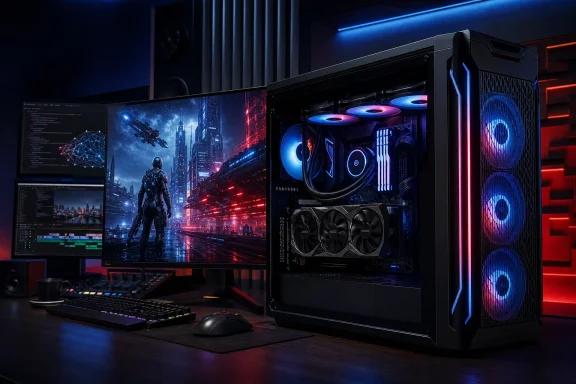 Overview: A No-Compromise Predator Desktop
The Acer Predator Orion 7000 is the flagship-sized model in Acer’s Predator desktop range. The current PO7-667 generation is officially specified with configurations reaching an Intel Core Ultra 9 285K, GeForce RTX 5090 graphics, up to 128GB of DDR5-7200 XMP RGB memory, and up to 6TB of SSD storage, with optional hard-drive capacity on top.
That specification sheet explains the intended customer. This is a system for gamers who want to drive a 4K high-refresh display, creators who prefer rapid render and export times, and users whose workloads can exploit the RTX 5090’s 32GB of GDDR7 video memory. NVIDIA specifies that the RTX 5090 carries 21,760 CUDA cores, 680 fifth-generation Tensor Cores, 170 fourth-generation RT Cores, a 512-bit memory bus, and 1,792 GB/s of memory bandwidth.
Acer’s pitch is therefore not simply “fast gaming PC.” It is a turnkey answer to the questions that arise when buying the most demanding components separately: can the chassis feed a 575W-class graphics card with enough air, can the power supply support the load, can the motherboard offer modern storage and networking, and can the entire system remain serviceable after purchase? The Orion 7000 addresses most of those questions convincingly, even if its physical scale will rule it out for many desks.
The reviewed configuration uses 64GB RAM and a 2TB SSD, a sensible starting point in a system whose potential goes far beyond conventional gaming. Acer’s published ceiling of 128GB RAM gives the Orion 7000 more flexibility than many premium gaming desktops, particularly for users running virtual machines, editing high-bitrate footage, compiling large projects, or working with memory-intensive creative tools.
Hardware That Matches the Ambition
Intel Core Ultra 9 285K: Desktop-Class Muscle
At the center of the reviewed machine is Intel’s Core Ultra 9 285K, a desktop processor from the Core Ultra Series 2 family. Intel lists it as a 24-core part with eight Performance-cores and 16 Efficient-cores, a maximum turbo frequency of up to 5.7GHz, 36MB of Intel Smart Cache, and a recommended customer price of $589 to $599 for the processor alone.
The 285K is especially appropriate in a system like this because the Orion 7000 is not designed around a minimalist thermal envelope. Intel’s Series 2 desktop product brief describes the 285K with a maximum turbo power of 250W, illustrating why a high-capacity cooler and a serious chassis matter when sustained performance—not just short benchmark bursts—is the goal.
Acer also highlights the processor’s integrated NPU, which contributes to the platform’s AI capabilities. The processor is rated for 36 overall peak TOPS in Intel’s specifications, though prospective buyers should avoid equating that figure directly with real-world performance in every application; AI workloads depend heavily on software support, model type, precision format, memory capacity, and whether the work is executed on the CPU, NPU, or discrete GPU.
In practical terms, the Core Ultra 9 285K is a strong companion for the RTX 5090 because it prevents the desktop from becoming a graphics-only purchase. Gaming is the headline use case, but streaming, recording, editing, browser-heavy multitasking, and media workloads all benefit from the platform’s CPU and memory resources.
RTX 5090: The Reason This System Exists
The GeForce RTX 5090 is the defining component in the highest-end Orion 7000 configurations. Its 32GB of GDDR7 memory is particularly important because modern high-resolution gaming, intensive ray tracing, GPU-accelerated creative applications, and local generative AI can all be constrained by VRAM before conventional GPU compute performance becomes the limiting factor.
NVIDIA rates the RTX 5090 at 575W total graphics power, a dramatic figure that puts the Predator Orion 7000’s 1,200W power supply into perspective. This is not excessive overbuilding; it is prudent platform engineering when the GPU itself can consume so much power and the CPU may also sustain very high loads.
The card also introduces the practical appeal of the RTX 50-series generation: DLSS 4 with Multi Frame Generation. NVIDIA says the technology can generate up to three additional frames for each traditionally rendered frame on compatible RTX 50-series hardware, with the company positioning it as a route to extremely high frame rates in supported games.
That distinction is important. A frame-rate figure achieved with Multi Frame Generation is not interchangeable with fully native rendering performance, because generated frames are part of an AI-assisted rendering pipeline. However, when paired with a high-refresh 4K display and a game that supports the technology well, it can make an already powerful GPU feel even more capable. The Orion 7000 has the graphics hardware to take full advantage of that ecosystem.
Eftm’s month-long hands-on report says the review unit delivered more than 110 frames per second in titles including Crimson Desert, Cyberpunk 2077, and Crysis Remastered, while Crysis reportedly exceeded 240 fps in its “Can it run Crysis” mode and NBA 2K26 peaked at 240 fps. Those results should be read as configuration- and settings-dependent observations rather than universal expectations, particularly because resolution, ray-tracing settings, DLSS mode, driver version, and display configuration materially alter game performance.
Cooling and Acoustics: Performance Has a Sound
Acer’s thermal solution is one of the Predator Orion 7000’s most consequential design features. The company combines a 360mm CPU liquid cooler with its proprietary Predator CycloneX 360 fan system, which uses a distinctive three-fan layout and open-channel design to drive air through the chassis.
Acer claims the CycloneX 360 arrangement improves cooling efficiency by 15% and reduces motherboard temperature by up to 9°C. Those are manufacturer figures rather than independently standardized test results, but the underlying design logic is sensible: high-power CPU and GPU components need a chassis that can move large amounts of air without simply recirculating heat around the motherboard.
The review found that the desktop remains comparatively restrained in its Quiet and Balanced performance modes. That is a meaningful strength, because a system of this specification could easily be unpleasant in day-to-day use if its fans constantly behaved as though it were in a stress test.
The trade-off appears in Performance and Turbo modes. Eftm reports that fan noise can exceed 75dB at full speed—loud enough that users who work, stream, or game without a headset will notice it immediately.
That should not be treated as a flaw in isolation. A 575W graphics card, a 250W-capable desktop processor, and a densely equipped chassis create an immense thermal load. The relevant question is whether the system allows the owner to choose between acoustic comfort and maximum sustained performance. On the available evidence, Acer does: quieter profiles for normal use and aggressive cooling modes for long rendering jobs, hot ambient conditions, or benchmark-oriented gaming sessions.
Thermal Control Through PredatorSense
The PredatorSense utility is central to the ownership experience. Acer includes it as the software hub for selecting performance modes, monitoring the system, checking installed games, and controlling lighting.
Preinstalled control software can be a source of frustration when it is bloated or redundant, but PredatorSense performs a role that is genuinely useful in a performance desktop. Fan behavior, lighting, performance profiles, and basic machine status are all functions that owners would otherwise need to manage across multiple utilities or firmware menus.
Its presence also matters because the Orion 7000 is a prebuilt system. A self-built PC owner may be comfortable adjusting BIOS fan curves, RGB controller settings, and GPU power targets individually. Acer’s target buyer may be less interested in that level of configuration and more interested in a coherent dashboard that exposes the practical controls without requiring a full custom-build education.
Chassis, Expansion, and Serviceability
At roughly 485mm by 219mm by 504.8mm and approximately 18kg, the Predator Orion 7000 is a substantial gaming tower. Eftm characterizes the enclosure as approximately 67 liters, which is a useful shorthand for its scale: this is a desktop that demands floor space or a very deep, sturdy desk.
The visual design follows familiar Predator principles. A tempered-glass side panel displays the major components, while the front panel offers a view into the intake system and RGB lighting. Acer’s ARGB implementation, branded Pulsar Lighting, can be customized through PredatorSense across elements such as the fans, cooler, and memory.
There is no pretending that the Orion 7000 is subtle. For buyers who want a machine that looks as expensive as its specification, that is part of the appeal. For users building a quiet, understated office or studio environment, the combination of glass, illumination, and physical bulk could be a reason to consider a more restrained workstation design.
Storage Expansion Is a Major Advantage
One of the strongest arguments for a desktop at this price is expandability, and the Orion 7000 fares well in that respect. Acer lists the PO7-667 with one PCIe Gen 5 x4 M.2 slot, two PCIe Gen 4 x4 M.2 slots, and support for up to two 3.5-inch SATA hard drives.
The review describes additional M.2 and 2.5-inch mounting possibilities depending on configuration, plus tool-less 3.5-inch drive racks and a top-mounted hot-swap storage caddy. Acer’s own regional specification pages show that installed storage can vary substantially by SKU, including configurations with two 2TB SSDs and a 2TB 7,200rpm hard drive.
That variation is worth emphasizing. Buyers should check the exact model number rather than assuming every Predator Orion 7000 contains the same number of populated slots, drive bays, memory modules, or storage devices. The platform’s expansion potential is clear, but regional configurations and retail SKUs can differ in meaningful ways.
The top-mounted removable storage feature is an intriguing differentiator. Eftm describes it as a USB-C-connected caddy that can be used with a user-supplied M.2 SSD for portable data access. That could be useful for transporting game libraries, media projects, or large archives, although buyers should verify the precise bay format and included accessories on the specific regional model before purchasing.
Upgradeability Has Real-World Limits
The Orion 7000 is more upgradeable than an all-in-one PC or gaming laptop, but “upgradeable” should not be mistaken for “unconstrained.” The huge RTX 5090 physically occupies considerable space, and the review notes that it can obscure otherwise available PCIe expansion space.
That is not unique to Acer. Flagship graphics cards increasingly turn conventional PCIe expansion into a planning exercise, especially in prebuilt systems where motherboard layout and cabling are fixed. The practical upgrades for most owners will be additional RAM, M.2 storage, SATA storage, and eventually a compatible graphics replacement—not an array of add-in cards.
Acer’s inclusion of a modular 1,200W power supply is nevertheless reassuring. It gives the system a better foundation for future storage additions and component servicing than a proprietary, low-capacity unit would.
Connectivity: Well Equipped for a Modern Windows Setup
The Predator Orion 7000 is properly equipped for a desktop that may function as both gaming machine and workstation. Acer lists Thunderbolt 4, Wi-Fi 7, 2.5Gb Ethernet, Bluetooth connectivity, multiple USB Type-A ports, and front-accessible USB-C connectivity on the platform.
The network options are particularly welcome. A 2.5Gb Ethernet connection will not improve an internet connection that is slower than that, but it can be very useful for transferring game captures, media assets, or backups across a fast local network. Wi-Fi 7 provides a forward-looking alternative for rooms where wired networking is impractical.
The supplied report lists front and top access for three USB 3.2 Gen 1 Type-A ports, one USB 3.2 Gen 1 Type-C port, microphone and headphone jacks, along with rear USB, audio, Ethernet, HDMI, and DisplayPort connectivity. Acer’s official PO7-667 press specification lists a different mix of front USB generations and counts, reinforcing the importance of checking a retailer’s exact configuration sheet rather than relying on a general product-family description.
This is a small but important caveat in the prebuilt market. System names often remain constant while internal boards, included ports, storage layouts, and bundled peripherals change by territory or sales channel. The Predator Orion 7000 is clearly well connected, but fine details should be verified before a buyer bases a purchase decision on a particular Thunderbolt, USB-C, or storage-bay requirement.
Windows 11 and the Preinstalled Software Question
The Predator Orion 7000 ships with Windows 11 Home in Acer’s official specification. For a consumer gaming system, Home is not inherently a problem: it provides the gaming stack, DirectX support, Windows Security, Game Bar features, and broad hardware compatibility expected from a contemporary PC.
The supplied review says the machine arrived with Windows 11 Home and the 25H2 feature update. That version does not, however, receive Home and Pro updates through October 2028 as the review suggests. Microsoft’s lifecycle documentation lists October 12, 2027 as the end-of-updates date for Windows 11 Home and Pro version 25H2, while version 26H1 is supported through March 14, 2028 for those editions.
This is not a meaningful buying concern for a new high-end PC, since Windows 11 Home devices ordinarily receive newer feature updates before a current version reaches end of servicing. Still, it is a worthwhile correction because support dates are not cosmetic: they determine when a particular Windows release stops receiving security updates.
The software image also includes NVIDIA’s application and Intel utilities, both expected and useful for driver management. DTS:X software is included for audio-related features, and PredatorSense handles Acer-specific tuning and lighting controls.
Less welcome are the third-party promotional installs. The review identifies Dropbox with a storage offer and McAfee trial software, with the latter generating the familiar stream of subscription-oriented prompts until it is activated or removed.
For a desktop priced in this territory, that is a poor aesthetic choice. Buyers spending flagship money should not need to clean promotional security software from a new Windows installation. The remedy is simple—uninstall unwanted software and rely on Microsoft Defender or a preferred security package—but Acer would make a better first impression by reducing the commercial clutter.
Who Should Buy the Acer Predator Orion 7000?
The best candidate is a buyer who wants the capabilities of a flagship custom desktop without personally sourcing, assembling, cable-managing, cooling, validating, and troubleshooting every component. Acer delivers a fully integrated platform with a mature feature set:
- Core Ultra 9 285K desktop processor for high-end multitasking and CPU-heavy work.
- RTX 5090 graphics with 32GB GDDR7 VRAM for 4K gaming, ray tracing, GPU rendering, and local AI experimentation.
- 64GB to 128GB-class memory potential for creative work and heavy multitasking.
- Extensive SSD and HDD capacity options for growing game libraries and large media collections.
- 360mm liquid CPU cooling and CycloneX 360 airflow designed for sustained high-load operation.
- Wi-Fi 7, 2.5Gb Ethernet, and Thunderbolt 4 for a modern desktop environment.
- PredatorSense controls for performance modes, monitoring, and RGB customization.
It is less appropriate for users who primarily play esports titles at 1080p, need a compact PC, have strict noise requirements, or simply will not benefit from the graphics card’s enormous compute and memory capacity. A lower-tier GPU and smaller desktop can provide an excellent experience for far less money in those scenarios.
The same applies to buyers who enjoy building their own systems. A carefully chosen custom build may offer more control over motherboard selection, storage layout, acoustics, case style, and future expansion. Yet the value proposition of a machine like the Predator Orion 7000 is convenience with serious hardware, not the lowest possible cost per frame.
Final Verdict
The Acer Predator Orion 7000 is exactly what a premium gaming desktop should be: unapologetically large, aggressively specified, and built around components that still have room to stretch. Its Core Ultra 9 285K and GeForce RTX 5090 combination puts it in the highest performance tier for Windows gaming, GPU-accelerated production work, ray tracing, and AI-enhanced workflows.
Acer deserves credit for treating cooling, power delivery, connectivity, and storage expansion as core parts of the product rather than afterthoughts. The 1,200W PSU, liquid CPU cooling, CycloneX airflow system, Wi-Fi 7, 2.5Gb Ethernet, Thunderbolt 4, and flexible drive support help turn raw component power into a complete high-end desktop platform.
The caveats are uncomplicated. It consumes a lot of physical space, aggressive performance modes can be loud, preinstalled promotional software undermines the premium experience, and its price demands that the buyer actually needs this level of capability. Exact port, storage, and expansion details should also be confirmed against the specific SKU being purchased.
For serious gamers and creators who want elite desktop performance without undertaking a custom build, the Predator Orion 7000 stands out as a formidable prebuilt Windows PC. It is not designed to be modest, portable, or economical. It is designed to be powerful for years—and on that central promise, it delivers.
