
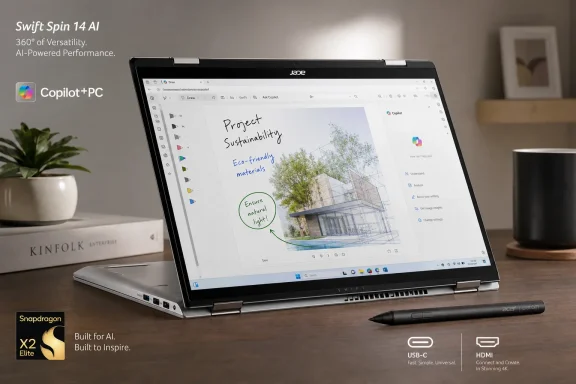
Acer has opened U.S. preorders for the Swift Spin 14 AI (SFSP14-Q51T), a $1,499.99 Copilot+ PC due to ship August 16 with a 360-degree hinge and bundled Wacom AES 2.0 Active Pen. As reported by TechTimes, it is currently the only announced U.S. Snapdragon X2 convertible to pair tablet-mode hardware with an included pressure-sensitive stylus.
That combination is the whole pitch. Buyers can use the 14-inch machine as a conventional laptop, fold it into tent mode for presentations, or turn it into a Windows tablet for note-taking, PDF markup, and sketching without adding a separate pen to the bill.
The Swift Spin uses Qualcomm’s 12-core Snapdragon X2 Elite X2E-78-100, which tops out at 4.0GHz and includes an 80-TOPS Hexagon NPU. Qualcomm’s product brief positions it below the 18-core X2E-88-100 used in ASUS’s 2026 Zenbook A14, which can boost to 4.7GHz and carries a faster Adreno X2-90 GPU.
That matters because the Zenbook A14 configuration has been sold around $1,349, or roughly $150 less than Acer’s convertible. Users compiling large projects, rendering video, or regularly pushing sustained multi-core workloads will get more headroom from ASUS’s higher-tier chip. For Office, browser-heavy work, video calls, and Windows’ on-device Copilot+ features, the practical difference should be less dramatic.
Acer’s answer is clear: the Zenbook is a lightweight clamshell, while the Swift Spin is designed around touchscreen and pen interaction. The right comparison is not merely CPU versus CPU, but whether those features will actually be used several times a week.
The bundled Active Pen supports 4,096 pressure levels and tilt detection, while the chassis includes a garage for storing it. That is a meaningful distinction from a passive capacitive stylus: Windows Ink, handwriting, annotation, and basic artwork benefit from the active digitizer.
Acer also avoided the port austerity common in thin ARM laptops. The Swift Spin includes two USB4 Type-C ports, two USB-A ports, HDMI 2.1, and a headphone jack, alongside Wi-Fi 7 and Bluetooth 6.0. For a Windows user who regularly connects flash drives, projectors, or external displays, that could eliminate a dock from the everyday carry.
The Swift Spin weighs 2.95 pounds and measures up to 16.5mm thick. It is not in the sub-1kg class occupied by the Zenbook A14, but the added mass reflects the reinforced convertible hinge, touchscreen, and pen hardware.
The device is a Copilot+ PC, so its 80-TOPS NPU exceeds Microsoft’s 40-TOPS threshold for local features such as Recall, Live Captions translation, Windows Studio Effects, and Click to Do. As with every Windows on ARM purchase, enterprise buyers should still validate specialty VPN clients, kernel-level security tools, legacy peripherals, and anti-cheat-dependent games before ordering.
For buyers who genuinely need a pen-enabled Windows tablet that can still replace a full notebook, Acer’s $1,499.99 configuration fills a narrow but credible gap. For everyone else, the cheaper Zenbook A14’s faster Snapdragon X2 Elite and OLED display make the convertible premium harder to defend.
 Acer’s premium is for the hinge and pen, not peak performance
The Swift Spin uses Qualcomm’s 12-core Snapdragon X2 Elite X2E-78-100, which tops out at 4.0GHz and includes an 80-TOPS Hexagon NPU. Qualcomm’s product brief positions it below the 18-core X2E-88-100 used in ASUS’s 2026 Zenbook A14, which can boost to 4.7GHz and carries a faster Adreno X2-90 GPU.That matters because the Zenbook A14 configuration has been sold around $1,349, or roughly $150 less than Acer’s convertible. Users compiling large projects, rendering video, or regularly pushing sustained multi-core workloads will get more headroom from ASUS’s higher-tier chip. For Office, browser-heavy work, video calls, and Windows’ on-device Copilot+ features, the practical difference should be less dramatic.
Acer’s answer is clear: the Zenbook is a lightweight clamshell, while the Swift Spin is designed around touchscreen and pen interaction. The right comparison is not merely CPU versus CPU, but whether those features will actually be used several times a week.
The screen and ports define the practical trade-off
Acer specifies a 14-inch, 1,920 × 1,200 IPS touchscreen with a 120Hz refresh rate, full sRGB coverage, and 300 nits of brightness. The panel should be suitable for indoor office and classroom use, but 300 nits is modest at a $1,500 price point and will be limiting outdoors. Buyers prioritizing media playback and contrast will find OLED alternatives in competing clamshells.The bundled Active Pen supports 4,096 pressure levels and tilt detection, while the chassis includes a garage for storing it. That is a meaningful distinction from a passive capacitive stylus: Windows Ink, handwriting, annotation, and basic artwork benefit from the active digitizer.
Acer also avoided the port austerity common in thin ARM laptops. The Swift Spin includes two USB4 Type-C ports, two USB-A ports, HDMI 2.1, and a headphone jack, alongside Wi-Fi 7 and Bluetooth 6.0. For a Windows user who regularly connects flash drives, projectors, or external displays, that could eliminate a dock from the everyday carry.
Battery claims still need independent testing
Acer rates the 65Wh battery for up to 23 hours of local video playback and up to 16.5 hours of web browsing. Those figures are vendor test results rather than independent measurements, but they are plausible goals for a Snapdragon X2 system under light workloads.The Swift Spin weighs 2.95 pounds and measures up to 16.5mm thick. It is not in the sub-1kg class occupied by the Zenbook A14, but the added mass reflects the reinforced convertible hinge, touchscreen, and pen hardware.
The device is a Copilot+ PC, so its 80-TOPS NPU exceeds Microsoft’s 40-TOPS threshold for local features such as Recall, Live Captions translation, Windows Studio Effects, and Click to Do. As with every Windows on ARM purchase, enterprise buyers should still validate specialty VPN clients, kernel-level security tools, legacy peripherals, and anti-cheat-dependent games before ordering.
For buyers who genuinely need a pen-enabled Windows tablet that can still replace a full notebook, Acer’s $1,499.99 configuration fills a narrow but credible gap. For everyone else, the cheaper Zenbook A14’s faster Snapdragon X2 Elite and OLED display make the convertible premium harder to defend.
References
- Primary source: Tech Times
Published: 2026-07-31T15:44:54+00:00
Acer Swift Spin 14 AI Opens Preorders: Only Snapdragon X2 Convertible With Bundled Stylus
Acer Swift Spin 14 AI preorders are open in the US at $1,499.99, shipping August 16 — the first Snapdragon X2 Elite convertible with a bundled Wacom stylus. Powered by the Snapdragon X2 Elitewww.techtimes.com - Related coverage: acer.com
- Related coverage: de-press.acer.com
Acer erweitert Notebook-Portfolio um neue Copilot+ PCs mit Snapdragon® Plattformen
• Das neue Acer Swift Spin 14 AI kombiniert Snapdragon® X2 Prozessoren mit integrierter Qualcomm® Hexagon™ NPU und bis zu 80 TOPS AI‑Leistung in einem 360‑Grad‑Convertible-Design.de-press.acer.com - Related coverage: acerid.com
Acer Perluas Portofolio dengan Dua Laptop Baru yang Ditenagai Prosesor Snapdragon Generasi Terbaru
Acer hadirkan Swift Spin 14 AI dan Aspire Go 15 berbasis Snapdragon dengan fitur AI dan baterai tahan lamawww.acerid.com
- Related coverage: t3.com
"Using a matte screen is so refreshing": How Acer's AI laptop stands apart from Microsoft – and costs way less, too | T3
Long battery life, a matte display and great price point – what's not to like?www.t3.com