
The AI Economy reports that Adobe has made AI Collaborators generally available following the April 2026 introduction of the Workflow Optimization Agent, now apparently recast under the collaborator name. Its description is significant because it positions Workfront less as another chatbot surface and more as a control plane: a Workfront task carries the brief, project context, brand guidance, and assignment history to an underlying AI system, then returns work to the familiar review workflow.
Adobe’s own public documentation confirms much of that direction, but it also reveals a material gap between the broad product vision and the currently documented feature set. As of Adobe’s latest Workfront setup documentation, the only explicitly available collaborator type is Content Reviewer, which evaluates material against configured brand guidelines. Adobe says additional collaborator capabilities are planned; it does not, in that document, list a broadly available third-party task-execution collaborator powered by Copilot Studio, Claude, or Writer.
For administrators, that distinction is more than terminology. A reviewer that scores an asset against a defined brand standard is a bounded workflow feature. A task agent that can create copy, build campaign deliverables, update projects, and coordinate work across connected systems is a substantially different security, data-governance, and change-management proposition.
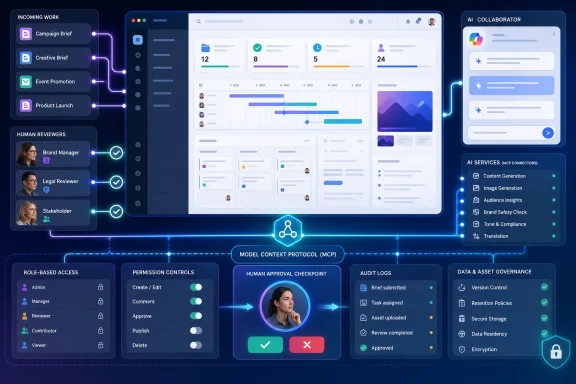 Workfront is becoming a governed front end for agents
The core idea described by The AI Economy is not that Workfront has invented another large language model. It is that an organization can register an AI collaborator in Workfront, define its role and instructions, connect it to an agent service, then assign it work in the same place it assigns work to people.
That architecture addresses a real operational problem. Teams experimenting with Copilot, ChatGPT, Claude, and specialized writing or creative agents usually rebuild context for every request: locate the latest brief, extract relevant files from SharePoint or a document repository, paste brand rules into a prompt, explain the desired deliverable, then move the output back into the project-management system. The output may be useful, but the process is informal, hard to reproduce, and often invisible to a manager reviewing a project’s status.
Workfront can reduce that manual packaging because the project record already contains the work object: task description, owner, due date, attached documents, approvals, and sometimes brand guidance. Adobe’s product materials say its collaborators can work from project structures, tasks, timelines, custom forms, assignments, and history. In the best implementation, the agent receives the same context a new human assignee would need, without relying on a user to reconstruct it in a fresh prompt.
The catch is that this does not make the connected model reliable by itself. It makes the handoff repeatable. A flawed prompt, an overly broad data connection, or weak brand rules can now produce mistakes with less friction and at greater volume. Workfront’s value is therefore the ability to identify which agent acted, what work it was assigned, what information it was allowed to access, and who approved the result—not a guarantee that the result is correct.
The publicly documented collaborator is a brand reviewer
Adobe’s April Workfront release notes say the Content Review AI Collaborator reached production for all customers on April 16, 2026. It can be configured with brand guidelines and assigned in Workfront similarly to a user. The reviewer then participates in document review and approval flows, providing a compliance score and feedback shortly after a review request is submitted.
That is a useful, tangible release for teams that already use Workfront to route creative assets through legal, brand, regional, or product-marketing approval. It can flag issues before a human reviewer finishes, allowing a team to focus attention on assets that need correction. Adobe documents support for brand-voice review, while image-guideline review is still identified as beta and requires a separate beta agreement.
The implementation also comes with prerequisites that matter during procurement and rollout. Adobe says organizations need a signed Adobe generative AI agreement. The organization must configure brands in Workfront, and the Content Reviewer’s documented setup requires a Workfront Standard, Prime, or Ultimate package, a Standard license, and a system administrator. Adobe also ties some reviewer capabilities to its unified review-and-approval experience and GenStudio Foundation provisioning.
Those requirements mean this is not a feature a department can quietly enable after an employee discovers it in a menu. Workfront administrators need to decide which brand rules are authoritative, who maintains them, where reviewers may be assigned, and whether automated feedback becomes advisory or a required gate before publication.
The AI Economy’s report goes beyond that currently published documentation by describing task agents and project coordinators, along with connectors to Microsoft Copilot Studio, Anthropic Claude, and Writer. Adobe’s broader Workfront marketing page describes a central registry for creating and managing collaborators and says they can be assigned routine work. Yet Adobe’s more detailed administrator guidance still says Content Reviewer is the only available collaborator type. Adobe has not publicly explained the difference in scope, rollout stage, or licensing between those pages.
Until Adobe updates its technical documentation, customers should not assume that a general-purpose Copilot Studio worker can be registered as a Workfront assignee merely because the broader AI Collaborator concept is marketed as generally available.
Workfront MCP is a separate capability, and it already has limits
Adobe’s Workfront MCP server is related to the collaborator strategy but is not the same product motion. MCP, or Model Context Protocol, is a standard way for an AI client to call into an external service. Adobe’s documentation says the Workfront MCP server allows compatible AI platforms to find, create, update, manage, and in some configurations delete Workfront items using natural-language requests.
For example, a user could ask an AI client for active projects, alter a task finish date, or remind approvers. The AI tool acts with the connected user’s Workfront access level and object permissions, while the Workfront administrator determines which MCP actions are permitted. That is an important control boundary: MCP does not automatically confer administrative access just because an employee connected a capable AI client.
Microsoft shops should view this as the immediately usable connection point. Adobe’s third-quarter 2026 release notes say Workfront MCP can connect Workfront Workflow and Workfront Planning to MCP-compatible platforms including Claude, ChatGPT, Copilot, and Gemini. Adobe lists production availability for all customers beginning July 16, 2026, which means the MCP server was already in production nearly a month before The AI Economy’s August 13 report.
There is a major deployment constraint omitted from the submitted report: Adobe’s documentation says the Workfront MCP server is currently available only to customers using AWS. That condition matters for enterprises running Workfront in other hosting arrangements, and it should be confirmed before any Copilot, ChatGPT, or Claude integration is presented as a company-wide option.
MCP also changes the risk profile from content generation to system action. A connected client may have the ability to edit schedules, create records, post comments, change approvals, or retrieve project information. Microsoft Copilot and other AI clients can make these operations easier to request, but Workfront administrators still need to configure least-privilege permissions, limit enabled MCP tools, and test whether their approval model stops unwanted updates before they propagate.
Audit trails do not replace permission design
Adobe says AI Collaborators inherit the enterprise controls Workfront customers already use, including role-based access, defined actions, logging, auditability, and human oversight. Those are necessary foundations, particularly for marketing operations that handle embargoed campaigns, unreleased product materials, customer data, and regulated claims.
But an audit record helps investigators understand a bad action after it happens; it does not prevent a collaborator from receiving the wrong task context or an MCP-connected agent from operating with excessive privileges. Enterprises should model AI collaborators as non-human service identities, with a narrow function, limited project access, a named owner, a review schedule, and an explicit offboarding path.
A workable initial deployment would keep agents out of publication and destructive project actions. Use the Content Reviewer on a small set of high-volume, low-risk approvals first. For MCP, enable read-only retrieval or tightly controlled updates for a pilot group before exposing broad Workfront functions through Copilot or another client. Log the inputs, outputs, action attempts, and human overrides, then use those records to decide whether the automation is saving time or simply moving review work downstream.
Adobe’s actual advance is its attempt to put AI work inside the same operational record as human work. The near-term reality is more restrained: the documented production collaborator is a controlled brand reviewer, while Workfront MCP is the path by which Copilot and other compatible clients can act on Workfront data. Organizations planning around a fleet of autonomous project workers should wait for Adobe to publish the missing details on supported agent connections, availability, permissions, licensing, and the status of the promised task and coordinator roles.
