
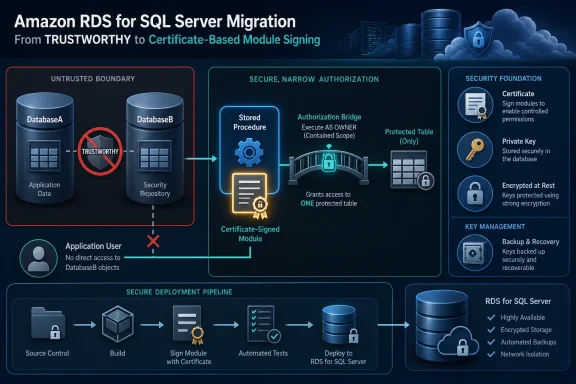
TRUSTWORTHY to make stored procedures reach into another database now have an AWS-supported path that keeps the permission boundary at the procedure level: certificate-based module signing. AWS documented the approach on August 24, showing how a signed stored procedure in one RDS database can receive only the rights granted to a certificate-mapped user in another database.
The immediate practical issue is migration. Fully managed Amazon RDS for SQL Server does not support the TRUSTWORTHY database property, and AWS’s RDS documentation separately lists it among unsupported SQL Server features because enabling it requires the sysadmin server role. The RDS master user is deliberately not a sysadmin. A workload that succeeds on self-managed SQL Server because DatabaseA is marked trustworthy can therefore fail after migration with error 916 when an application user executes a procedure that references DatabaseB.
AWS’s new walkthrough is valuable because it does more than suggest “use certificates.” It tackles the awkward part of that design on a managed SQL Server instance: getting a certificate and its private key from the database that owns the target permissions into the database that owns the signed module, without direct access to SQL Server’s Windows filesystem.
 Why
Why TRUSTWORTHY Is the Wrong Migration Dependency
TRUSTWORTHY is an instance-level statement of confidence in an entire database and the objects inside it. Microsoft’s SQL Server documentation warns that it opens a route for privilege escalation when a database owner can introduce code into a trusted database owned by a sysadmin-level principal. In a conventional cross-database design, it has often been used as the expedient answer to stored procedures that use EXECUTE AS, Service Broker activation, or three-part object names.
That convenience disappears on Amazon RDS for SQL Server. Attempting ALTER DATABASE ... SET TRUSTWORTHY ON as the RDS master account produces error 15247 because the operation requires permissions RDS does not expose. This is a managed-service constraint, not an edition quirk: AWS says the restriction applies across Express, Web, Standard, and Enterprise deployments on RDS.
The AWS pattern replaces the broad database trust relationship with an explicit capability. A procedure such as DatabaseA.dbo.GetSecretData is signed with CrossDBCert; a user created from that same certificate in DatabaseB receives, for example, SELECT only on DatabaseB.dbo.SecretData. When an ordinary application login invokes the signed procedure, SQL Server adds the certificate user’s relevant permission to the execution context for that module.
The application login does not become a user in DatabaseB, and an otherwise identical unsigned procedure still fails with error 916. That is the meaningful security property here: the entitlement follows the signed code, rather than the caller or the whole source database.
The RDS-Specific Step Is Certificate Transfer
On self-managed SQL Server, many DBAs would export the certificate and key with BACKUP CERTIFICATE ... TO FILE, then import them into the calling database from files. AWS correctly points out that this is not a usable pattern on fully managed RDS for SQL Server: customers do not receive arbitrary filesystem access to the underlying Windows host. RDS Custom is different, because it provides operating-system-level access, but it is not the service discussed in this guidance.
AWS’s workaround uses SQL Server’s own binary certificate functions. CERTENCODED() returns the public portion of a certificate as binary data, while CERTPRIVATEKEY() returns the protected private key. The blog converts those values to 0x hexadecimal literals and assembles a CREATE CERTIFICATE ... FROM BINARY ... WITH PRIVATE KEY command, then executes it in the calling database through DatabaseA.dbo.sp_executesql.
Microsoft’s SQL Server documentation supports the underlying mechanics: certificates can be created from binary representations, and CERTENCODED() together with CERTPRIVATEKEY() is a documented method for copying a certificate between databases. The important implementation detail is that the caller database needs the private key to add the signature, while the target database needs the matching certificate to recognize the certificate-mapped user and its grants.
This eliminates a fragile manual process in which an administrator copies a long hex blob out of SSMS or sqlcmd, risks output truncation, and pastes it into a separate deployment script. It also avoids putting a certificate file on a client workstation or an intermediary share simply because the database server’s local disk is unavailable.
Signing Is an Authorization Event, Not a One-Time Migration Task
The operational catch is easy to miss: a SQL Server module’s signature is dropped when the module changes. Microsoft documents that every character of the stored procedure definition contributes to its signature calculation, including whitespace and line breaks. An ALTER PROCEDURE deployment removes the signature, so the next application call can lose cross-database access immediately.
This turns module signing into a release-engineering requirement. Any CI/CD pipeline that deploys a signed procedure must add the signature after the final CREATE OR ALTER PROCEDURE statement has completed. The deployment should also verify the result from sys.crypt_properties, rather than treating a successful schema publish as proof that the permission model remains intact.
A sensible deployment sequence is short but must be enforced:
- The pipeline should create or alter the procedure before applying
ADD SIGNATURE. - The pipeline should test execution using the same low-privilege application login or role used in production.
- The pipeline should query
sys.crypt_propertiesand fail the release if the expected procedure and certificate thumbprint are absent. - The pipeline should test a comparable unsigned procedure or a direct
SELECTas the application login to confirm that cross-database access has not accidentally become broad access.
AWS notes that modules can carry multiple signatures. That makes certificate rotation less disruptive than many teams assume: add a replacement certificate and matching certificate user grants, sign affected modules with the new certificate, validate application behavior, then remove the old signature and retire the old certificate. The overlap is intentional; it prevents a certificate expiry or rotation event from becoming an outage.
The Migration Inventory Needs a Human Review Pass
AWS recommends scanning for databases where is_trustworthy_on = 1, modules using EXECUTE AS, and cross-database references found through sys.sql_expression_dependencies. Those queries are useful starting points, but they should not be mistaken for a complete migration inventory.
Microsoft describes sys.sql_expression_dependencies as tracking dependencies where a referenced entity appears by name in a persisted SQL expression. That captures ordinary static references such as DatabaseB.dbo.SecretData. It cannot reliably reveal a database or object name assembled at runtime through dynamic SQL, application-generated statements, synonyms that obscure a remote target, or code paths reached only through SQL Agent jobs and external automation.
For a real migration, DBAs should pair the catalog scan with a review of stored procedure definitions for sp_executesql, EXEC(), three-part naming conventions, and EXECUTE AS. Application owners should also identify integrations that connect with different SQL logins than the primary application account. A module-signing design that is perfect for the visible reporting procedure will not repair an overlooked dynamic statement in a month-end process.
The AWS post’s own test is a good acceptance criterion: grant the application principal EXECUTE on the signed procedure and no direct access to the target database. If the signed procedure works while a duplicate unsigned procedure and a direct query fail, the least-privilege boundary is doing its job.
Certificates Bring a Key-Lifecycle Obligation
The design deliberately narrows permissions, but it also creates cryptographic material that must be managed like production credentials. AWS recommends specifying an explicit certificate EXPIRY_DATE, storing database master key and certificate-transfer passwords in AWS Secrets Manager, and documenting recovery steps. Those are baseline requirements, particularly because the transfer step handles the private key.
One nuance in Microsoft’s documentation is worth emphasizing: SQL Server does not automatically enforce a certificate’s expiration date for its signing and encryption functions. Expiration is therefore a governance and operations deadline, not a switch SQL Server will necessarily flip for administrators. Teams need monitoring and a rotation runbook rather than assuming an expired certificate will safely stop granting access.
The more restrictive procedure grant is only as narrow as the certificate user’s permissions. Avoid mapping that user to broad fixed database roles or granting it schema-wide rights when a table-, view-, or procedure-level grant will do. If a signed procedure needs access to several databases, each target database must independently contain the matching certificate and a certificate-mapped user with only the necessary rights.
AWS’s procedure is a sound replacement for a managed-service limitation that frequently surfaces late in SQL Server migrations. The immediate action for RDS teams is to inventory TRUSTWORTHY dependencies now, convert each legitimate cross-database workflow into a signed-module design, and make re-signing part of every stored procedure deployment before the first production schema release strips a critical permission signature.