
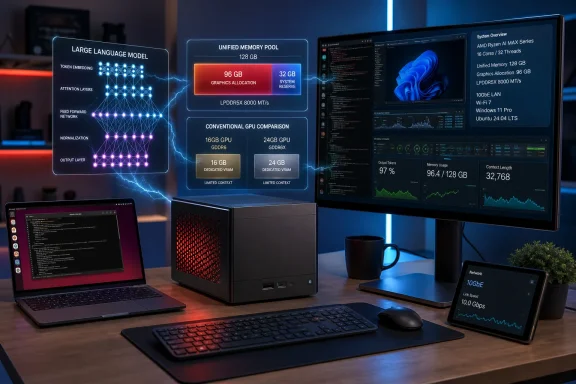
AMD’s Ryzen AI Halo developer platform can reserve up to 96GB of its 128GB LPDDR5X-8000 unified memory for graphics, giving local-LLM users a much larger model-loading pool than a conventional GPU with 16GB or 24GB of VRAM. But the practical buying decision is less about a headline “96GB VRAM” figure than it is about accepting a 120W integrated-graphics machine with 256GB/s of shared-memory bandwidth, a fixed 128GB memory ceiling, and a software stack that still asks developers to make deliberate OS, driver, and framework choices.
Geeky Gadgets’ report correctly identifies the headline configuration: the $3,999 Ryzen AI Halo uses AMD’s Ryzen AI Max+ 395, Radeon 8060S integrated GPU, 2TB SSD, 128GB of LPDDR5X memory, 10GbE, Wi-Fi 7, and Windows 11 or Linux. AMD’s own documentation and Micro Center’s setup guide confirm that Windows users can change the dedicated graphics allocation from a 64GB default to 96GB through AMD Software: Adrenalin Edition, then reboot.
The important correction is that 96GB is a reservation within unified memory, not 96GB of separate GDDR or HBM attached to a discrete accelerator. Reserve the maximum and Windows, the CPU, applications, file cache, and background tools share the remaining 32GB. That is viable for a focused local inference box, but it makes the machine a poor fit for running a huge model alongside memory-intensive data preparation, containers, browser workloads, or a full desktop development environment.
AMD says Ryzen AI Halo can run models of up to 200 billion parameters locally. That claim needs more qualification than most launch coverage gives it. A 200B-parameter model cannot fit as ordinary FP16 weights in 128GB, and even 4-bit weights alone would consume roughly 100GB before accounting for model metadata, runtime overhead, context cache, and the operating system. In other words, “up to 200B” means a sufficiently compressed or sparse model under a favorable runtime configuration; it is not a promise that any 200B model will be usable at a useful context length and interactive speed.
The Ryzen AI Halo’s core advantage is that the CPU and Radeon 8060S GPU access one unified LPDDR5X pool. There is no PCIe transfer step between system RAM and a separate GPU VRAM pool, and the configurable graphics-memory reservation helps Windows software expose a larger contiguous GPU-accessible allocation to AI tools.
For local AI inference, that can be decisive. Many quantized 70B- to 120B-class models are simply out of reach on mainstream consumer cards because the model does not fit in available VRAM. Micro Center says that assigning 96GB is advisable for GPT-OSS-120B and GLM Air 4.5 workloads, reporting roughly 45 tokens per second for the former and 25 tokens per second for the latter under its tested setup. Those are useful figures for a local coding assistant, document Q&A service, or private chat endpoint, though they are vendor-retailer guidance rather than an independently standardized benchmark.
The cost is visible the moment the box becomes a Windows workstation instead of a headless inference appliance. With 96GB dedicated to graphics, the remaining 32GB must cover Windows 11 Pro, the selected model runtime, Python environments, model-management applications, browser tabs, IDEs, and any local vector database or container workload. AMD’s own guide acknowledges the trade-off: its Variable Graphics Memory controls separately adjust dedicated VRAM and shared video memory, warning that higher GPU allocations reduce memory available elsewhere.
For administrators, that means the right deployment model is straightforward: assign 96GB to graphics when Halo is a dedicated local model server, then access it remotely over 10GbE or Wi-Fi. Do not treat it as a 128GB general-purpose Windows desktop that also happens to have a 96GB GPU.
Those omissions matter more than the parameter count. A dense model’s nominal parameter total does not describe its memory footprint once quantization, tokenizer assets, runtime buffers, KV cache, and offloading choices enter the picture. Mixture-of-experts models further complicate the comparison: they may carry a very large total parameter number while activating far fewer parameters per token.
The useful question for a buyer is therefore not, “Can it run a 200B model?” It is: “Can it run the exact GGUF, safetensors, or other model build I need, at the precision and context size my application requires, fast enough for the people using it?” AMD has published tests against Nvidia’s DGX Spark using GPT-OSS-120B, Qwen 3.5-122B-A10B, Qwen 3.6-35B-A3B, and GLM 4.7 Flash-30B-A3B. Those are more meaningful workload references than the 200B ceiling, but they remain AMD-produced comparisons on a pre-production Halo platform and a 100-token context.
A 120B model at a useful speed is a credible target for this hardware. A generic 200B promise should be treated as a capacity demonstration until AMD publishes the model, quantization, context window, runtime, and sustained measurements that make it reproducible.
However, the “single USB-C cable” framing leaves out a consequential detail: AMD’s official user guide lists a supplied power adapter and separate power cord in the box. The rear port is documented as a power-only DC-in connection, and AMD instructs owners to use the provided adapter. This is a small desktop system with a 120W TDP, not a device intended to be powered from an arbitrary USB-C port on a laptop dock or monitor.
That does not diminish the compact form factor, but it changes the portable-AI pitch. Carrying the 1.2kg box is easy; deploying it still requires its power brick, mains access, cooling clearance, network connectivity, and sufficient local storage for models that can each consume tens of gigabytes.
For Windows-focused developers and IT teams, this is more than a checkbox. AMD’s Developer Center supplies setup material, software updates, model-management features, remote-access controls, AMD Sync, and configurable graphics-memory settings. It comes with launch helpers and playbooks for tools including LM Studio, Ollama, PyTorch, QLoRA, vLLM, and ComfyUI. The box can also be used as a local OpenAI-compatible endpoint, allowing a Windows desktop to call a model served from Halo through tools such as Ollama.
The software experience is not entirely automatic. Micro Center’s own Windows guide tells users to update the pre-installed AI software after first boot, manually change the graphics-memory allocation for larger models, accept Windows Firewall prompts, and enable SSH before AMD Sync can remotely access a Windows Halo system. AMD’s documentation also makes clear that an “Update All” action creates a whole-system snapshot and that rollback affects the entire machine, not only a single AI package.
Geeky Gadgets cites The Stack for claims of frequent driver regressions and inconsistent results, but the report does not identify the affected driver versions, operating systems, applications, or benchmark methodology. That makes the warning directionally sensible—ROCm support on consumer integrated Radeon hardware remains a moving target—but too vague to use as a purchasing conclusion. The practical safeguard is to pin a known-good AMD driver and runtime combination once a production workflow is validated, test updates on a staging image, and retain a rollback path.
ServeTheHome’s hands-on review reached the same practical distinction. It found a compact AMD-branded local-AI system with 128GB of memory and 10GbE, but noted the absence of the 200GbE ConnectX-7 networking included with DGX Spark hardware. Nvidia’s platform also supports two Spark units as a 405B-capable configuration; AMD has not supplied an equivalent integrated clustering story for Halo.
That makes Ryzen AI Halo a defensible purchase for teams that need x86 compatibility, Windows support, 10GbE local serving, and the ability to keep quantized large models on-premises without buying a rack server or a multi-GPU tower. It is a weak fit for CUDA-dependent software, large-batch inference, image and video generation where raw accelerator throughput dominates, or any workflow requiring a fully documented enterprise support matrix.
The immediate action for Windows users is to decide whether the box will be a personal workstation or a dedicated local AI endpoint. If it is the latter, allocate 96GB to graphics, keep the remaining Windows installation lean, serve the model over the LAN, and validate the precise model/runtime/driver combination before relying on AMD’s 200B headline.
The important correction is that 96GB is a reservation within unified memory, not 96GB of separate GDDR or HBM attached to a discrete accelerator. Reserve the maximum and Windows, the CPU, applications, file cache, and background tools share the remaining 32GB. That is viable for a focused local inference box, but it makes the machine a poor fit for running a huge model alongside memory-intensive data preparation, containers, browser workloads, or a full desktop development environment.
AMD says Ryzen AI Halo can run models of up to 200 billion parameters locally. That claim needs more qualification than most launch coverage gives it. A 200B-parameter model cannot fit as ordinary FP16 weights in 128GB, and even 4-bit weights alone would consume roughly 100GB before accounting for model metadata, runtime overhead, context cache, and the operating system. In other words, “up to 200B” means a sufficiently compressed or sparse model under a favorable runtime configuration; it is not a promise that any 200B model will be usable at a useful context length and interactive speed.
 The 96GB setting is useful, but it is not a free 96GB GPU upgrade
The Ryzen AI Halo’s core advantage is that the CPU and Radeon 8060S GPU access one unified LPDDR5X pool. There is no PCIe transfer step between system RAM and a separate GPU VRAM pool, and the configurable graphics-memory reservation helps Windows software expose a larger contiguous GPU-accessible allocation to AI tools.For local AI inference, that can be decisive. Many quantized 70B- to 120B-class models are simply out of reach on mainstream consumer cards because the model does not fit in available VRAM. Micro Center says that assigning 96GB is advisable for GPT-OSS-120B and GLM Air 4.5 workloads, reporting roughly 45 tokens per second for the former and 25 tokens per second for the latter under its tested setup. Those are useful figures for a local coding assistant, document Q&A service, or private chat endpoint, though they are vendor-retailer guidance rather than an independently standardized benchmark.
The cost is visible the moment the box becomes a Windows workstation instead of a headless inference appliance. With 96GB dedicated to graphics, the remaining 32GB must cover Windows 11 Pro, the selected model runtime, Python environments, model-management applications, browser tabs, IDEs, and any local vector database or container workload. AMD’s own guide acknowledges the trade-off: its Variable Graphics Memory controls separately adjust dedicated VRAM and shared video memory, warning that higher GPU allocations reduce memory available elsewhere.
For administrators, that means the right deployment model is straightforward: assign 96GB to graphics when Halo is a dedicated local model server, then access it remotely over 10GbE or Wi-Fi. Do not treat it as a 128GB general-purpose Windows desktop that also happens to have a 96GB GPU.
AMD’s 200B-model claim leaves out the settings that determine whether it matters
AMD has made the 200B-parameter claim since introducing Ryzen AI Halo at CES 2026, and its current product page still presents the device as supporting models up to that size. Neither AMD’s product page nor the supplied Geeky Gadgets report identifies the model format, quantization level, context length, batch size, prompt-processing speed, or tokens-per-second result behind that ceiling.Those omissions matter more than the parameter count. A dense model’s nominal parameter total does not describe its memory footprint once quantization, tokenizer assets, runtime buffers, KV cache, and offloading choices enter the picture. Mixture-of-experts models further complicate the comparison: they may carry a very large total parameter number while activating far fewer parameters per token.
The useful question for a buyer is therefore not, “Can it run a 200B model?” It is: “Can it run the exact GGUF, safetensors, or other model build I need, at the precision and context size my application requires, fast enough for the people using it?” AMD has published tests against Nvidia’s DGX Spark using GPT-OSS-120B, Qwen 3.5-122B-A10B, Qwen 3.6-35B-A3B, and GLM 4.7 Flash-30B-A3B. Those are more meaningful workload references than the 200B ceiling, but they remain AMD-produced comparisons on a pre-production Halo platform and a 100-token context.
A 120B model at a useful speed is a credible target for this hardware. A generic 200B promise should be treated as a capacity demonstration until AMD publishes the model, quantization, context window, runtime, and sustained measurements that make it reproducible.
The portable-box description needs one correction
The Ryzen AI Halo is indeed compact. AMD lists it at 150 × 150 × 45.4 mm and less than 1.2kg, nearly the same physical class as Nvidia’s DGX Spark. It also has three USB-C data ports, HDMI 2.1b, 10GbE, Wi-Fi 7, Bluetooth 5.4, and a fourth USB-C port for power input.However, the “single USB-C cable” framing leaves out a consequential detail: AMD’s official user guide lists a supplied power adapter and separate power cord in the box. The rear port is documented as a power-only DC-in connection, and AMD instructs owners to use the provided adapter. This is a small desktop system with a 120W TDP, not a device intended to be powered from an arbitrary USB-C port on a laptop dock or monitor.
That does not diminish the compact form factor, but it changes the portable-AI pitch. Carrying the 1.2kg box is easy; deploying it still requires its power brick, mains access, cooling clearance, network connectivity, and sufficient local storage for models that can each consume tens of gigabytes.
Windows support is real, and it is AMD’s clearest differentiator
AMD’s Halo is offered in Windows 11 Pro and Linux variants, while Nvidia’s DGX Spark software environment is Linux-based. Tom’s Hardware reported that Micro Center began taking U.S. preorders in June at $3,999 for otherwise identical Windows and Linux configurations, with the first local pickup date set for July 10.For Windows-focused developers and IT teams, this is more than a checkbox. AMD’s Developer Center supplies setup material, software updates, model-management features, remote-access controls, AMD Sync, and configurable graphics-memory settings. It comes with launch helpers and playbooks for tools including LM Studio, Ollama, PyTorch, QLoRA, vLLM, and ComfyUI. The box can also be used as a local OpenAI-compatible endpoint, allowing a Windows desktop to call a model served from Halo through tools such as Ollama.
The software experience is not entirely automatic. Micro Center’s own Windows guide tells users to update the pre-installed AI software after first boot, manually change the graphics-memory allocation for larger models, accept Windows Firewall prompts, and enable SSH before AMD Sync can remotely access a Windows Halo system. AMD’s documentation also makes clear that an “Update All” action creates a whole-system snapshot and that rollback affects the entire machine, not only a single AI package.
Geeky Gadgets cites The Stack for claims of frequent driver regressions and inconsistent results, but the report does not identify the affected driver versions, operating systems, applications, or benchmark methodology. That makes the warning directionally sensible—ROCm support on consumer integrated Radeon hardware remains a moving target—but too vague to use as a purchasing conclusion. The practical safeguard is to pin a known-good AMD driver and runtime combination once a production workflow is validated, test updates on a staging image, and retain a rollback path.
A $3,999 developer appliance, not a broadly faster AI workstation
Ryzen AI Halo’s 256GB/s unified-memory bandwidth is its governing constraint. It gives the system far more accessible memory than typical consumer GPUs, but it is far below the bandwidth of high-end discrete AI accelerators with GDDR7 or HBM. Large-model inference is often memory-bandwidth-bound, so the Halo is built to fit models that other small systems cannot, rather than to outpace a well-equipped CUDA workstation on throughput-heavy workloads.ServeTheHome’s hands-on review reached the same practical distinction. It found a compact AMD-branded local-AI system with 128GB of memory and 10GbE, but noted the absence of the 200GbE ConnectX-7 networking included with DGX Spark hardware. Nvidia’s platform also supports two Spark units as a 405B-capable configuration; AMD has not supplied an equivalent integrated clustering story for Halo.
That makes Ryzen AI Halo a defensible purchase for teams that need x86 compatibility, Windows support, 10GbE local serving, and the ability to keep quantized large models on-premises without buying a rack server or a multi-GPU tower. It is a weak fit for CUDA-dependent software, large-batch inference, image and video generation where raw accelerator throughput dominates, or any workflow requiring a fully documented enterprise support matrix.
The immediate action for Windows users is to decide whether the box will be a personal workstation or a dedicated local AI endpoint. If it is the latter, allocate 96GB to graphics, keep the remaining Windows installation lean, serve the model over the LAN, and validate the precise model/runtime/driver combination before relying on AMD’s 200B headline.
References
- Primary source: Geeky Gadgets
Published: 2026-08-04T09:17:00+00:00
Loading…
www.geeky-gadgets.com - Related coverage: tomshardware.com
Loading…
www.tomshardware.com - Related coverage: techradar.com
GMKtec launches the new Evo-X1 Pro with an early bird deal | TechRadar
The AI mini PC packs 64GB of RAM, Radeon 890M graphics, and a 55 TOPS NPU inside the chassis.www.techradar.com - Related coverage: amd.com
AMD Ryzen™ AI Halo for AI Developers
Comes with preconfigured software to build, run, and scale AI locally. AMD Ryzen™ AI Halo delivers predictable cost per token, avoiding cloud cost uncertainty.www.amd.com - Related coverage: servethehome.com
AMD Ryzen AI Halo Developer System Review AMD Goes for Local AI - ServeTheHome
We test the AMD Ryzen AI Halo developer system and see how AMD is putting its spin on a 128GB local AI dev boxwww.servethehome.com
- Related coverage: amd.com
Loading…
www.amd.com - Related coverage: t3.com
Loading…
www.t3.com - Related coverage: pcworld.com
AMD unveils Ryzen AI Halo, an uber-powerful mini PC for AI | PCWorld
AMD announced the Ryzen AI Halo at CES 2026, a reference design for a mini PC based on its Ryzen AI Max+ chip.www.pcworld.com - Related coverage: compute-market.com
Loading…
www.compute-market.com - Related coverage: microcenter.com
Loading…
www.microcenter.com - Related coverage: digitalcitizen.life
Loading…
www.digitalcitizen.life - Related coverage: gadgetsnow.indiatimes.com
Loading…
gadgetsnow.indiatimes.com - Related coverage: techshowup.com
Loading…
techshowup.com - Related coverage: newsbytesapp.com
Loading…
www.newsbytesapp.com - Related coverage: storagereview.com
Loading…
www.storagereview.com - Related coverage: pcworld.com
Loading…
www.pcworld.com - Related coverage: tomshardware.com
AMD challenges Nvidia's DGX Spark with $3,999 Ryzen AI Halo with Windows 11 support — Strix Halo desktop undercuts Nvidia by $700, packs 128GB of unified memory | Tom's Hardware
The AI mini PC supports both Linux and Windows 11.www.tomshardware.com - Related coverage: podcasts.apple.com
Loading…
podcasts.apple.com - Related coverage: ir.amd.com
Loading…
ir.amd.com - Related coverage: globenewswire.com
Loading…
www.globenewswire.com - Related coverage: notebookcheck.net
Loading…
www.notebookcheck.net - Related coverage: codersera.com
Loading…
codersera.com