
ASUS has expanded its Prime chassis line with the Prime AP304, a panoramic ATX mid-tower designed around a lower “slot vent” that feeds cool air toward the graphics card without sacrificing the uninterrupted curved-glass look popular in showcase PC builds. The key practical appeal is straightforward: builders can fit a current-generation, up-to-420mm graphics card in a case intended to give that GPU a more direct intake path than a conventional sealed glass-front layout.
As first reported by Wccftech, the AP304 pairs its floating, dual-chamber visual design with a patented graphics-card slot clamp for tool-free retention at the rear of the case. ASUS’s own product materials confirm the broader configuration: curved tempered glass across the front and left side, a three-sided lower ventilation structure, support for ATX motherboards and 360mm top radiators, plus black and white editions.
For builders who have watched modern triple- and quad-slot GPUs grow hotter, longer, and heavier, the AP304 is ASUS attempting to solve three problems at once: airflow to the card, anti-sag support, and presentation.
The AP304’s defining design choice is a curved tempered-glass panel that wraps from the front into the side panel, creating a pillarless panoramic view of the motherboard, graphics card, and lighting. In the current chassis market, that look often comes with an engineering compromise: the front of the case becomes a display surface instead of a major source of fresh air.
ASUS’s answer is to move much of the active intake strategy elsewhere. The AP304 has a vented gap between its lower power-supply chamber and the main component chamber. ASUS calls this a patented slot vent, describing it as a three-sided intake structure that lets air enter from below and travel toward the graphics card area.
That matters because the GPU is usually the most thermally demanding component in a gaming PC, particularly in systems using large axial-fan cards that recirculate some exhaust inside the chassis. A bottom-to-GPU airflow path can reduce the card’s reliance on warmed internal air, assuming the case has adequate clearance from the desk or floor and its filters remain clean.
ASUS recommends an aggressively populated layout: three 120mm bottom intake fans, up to three side fans, one rear fan, and a 360mm radiator exhausting through the top. That arrangement separates the cooling jobs reasonably well. Bottom fans supply the GPU zone, while top exhaust carries heat upward and out of the case; the side mounts provide flexibility for additional airflow or, on the ARGB model, arrive populated.
There is an important caveat. ASUS has described the slot vent as improving GPU cooling, but it has not published comparative temperature data against a conventional front- or side-intake panoramic case. The design is mechanically sensible, but prospective buyers should treat the cooling advantage as a layout proposition rather than a measured performance result until independent reviews test it with comparable GPUs, fan curves, and room temperatures.
The move from a more compact motherboard format to ATX is meaningful beyond expansion slots. An ATX chassis can accommodate the larger boards, full-length graphics cards, more elaborate cable runs, and top-mounted liquid-cooling hardware that define many high-end DIY builds. ASUS lists compatibility for ATX, Micro-ATX, and Mini-ITX boards, CPU coolers up to 175mm tall, power supplies up to 200mm long, and graphics cards up to 420mm long.
That last number deserves a close read. The supplied reporting initially emphasized a 360mm support figure around the reinforced GPU bracket, while ASUS’s current compatibility specification says the chassis can accept cards up to 420mm long. The distinction is likely practical rather than contradictory: a builder needs to account for installed front-side hardware, power-cable bend radius, and the particular card’s cooler dimensions. In other words, “420mm supported” is not the same as “every 420mm card will be effortless to cable in every configuration.”
Still, the ceiling is generous. It covers virtually all standard air-cooled consumer cards, including oversized board-partner designs. The physical case itself is substantial at 240mm wide, 535mm high, and 450mm deep, according to Japanese retail reporting from AKIBA PC Hotline! That is not a compact tower masquerading as one; builders should check desk space before assuming its broad glass presentation will fit comfortably beside a monitor.
This is more than a convenience flourish. Large graphics cards can put real leverage on a motherboard’s PCIe slot and on their own I/O bracket, especially when systems are transported or repeatedly opened for upgrades. A case-integrated retention system can make installation neater and may add protection against card movement, though it is not a replacement for properly seating the GPU, connecting power safely, and avoiding tension from heavy 12V-2x6 or 12VHPWR cable bundles.
The real value will depend on implementation. Tool-free mechanisms are welcome when they provide a positive lock and do not become awkward around thick card brackets or vertical cable runs. ASUS’s combination of the rear clamp and separate reinforcement bracket gives the AP304 a more convincing answer than a cosmetic anti-sag stand alone, but hands-on reviews will need to establish whether the system accommodates the broad range of aftermarket GPU shapes cleanly.
For routine service, ASUS also specifies an easy-detach rail for the curved panel and tool-less access for the side panels. Curved glass makes handling more consequential than with a small flat side window: its cost and shape make a safe removal system an important practical feature, not just a spec-sheet line.
Japanese distributor information published in July listed the standard model at roughly ¥21,980 and the ARGB model at roughly ¥26,480, with a July 17 release in that market. AKIBA PC Hotline! independently reported the same split and pricing. Those figures should not be read as U.S. MSRP or converted directly into a purchasing recommendation, since regional tax, distribution, and retail pricing can change the final number substantially.
As of August 1, ASUS has not published U.S. pricing or retail availability on its global AP304 product page. That means North American builders should avoid treating Japanese street pricing as a promise of a sub-$150 U.S. chassis, particularly once the included fan set is factored in.
The fanless version could be attractive for enthusiasts who already own premium PWM fans or plan a carefully tuned custom loop. But its lower entry price can be misleading if the buyer must add six or more fans to realize the airflow layout ASUS itself recommends. The ARGB edition is the simpler path for a first build, although the included side fans are oriented around ASUS’s visual and airflow design rather than around maximum user choice.
Cable management is also unusually relevant in a panoramic case, where a messy interior is harder to hide. ASUS specifies 33mm of rear cable-routing space, removable dust filters, and storage support configurable as two 3.5-inch drives or three 2.5-inch drives. That storage allocation will suit a modern NVMe-first build, although builders keeping several SATA SSDs and hard drives should map their drive needs before committing.
The integrated ARGB light band runs near the bottom edge, visually marking the separation between chambers and the airflow slot. It works with Aura Sync, so Windows users already running ASUS’s lighting ecosystem can synchronize it with compatible motherboards, graphics cards, and fans. Others should remember that lighting control is separate from thermal control: sensible BIOS or fan-controller curves remain more valuable than a perfectly synchronized color profile.
The Prime AP304’s eventual test will be whether its open lower channel and side-mounted fan approach can deliver better GPU thermals without the noise penalty of running every mount at high speed. ASUS has supplied a chassis architecture that makes that outcome plausible. The next meaningful milestone is independent thermal testing—and, for U.S. builders, the still-unannounced local price and availability that will decide whether this floating showcase design is a compelling build platform or simply a handsome enclosure.
For builders who have watched modern triple- and quad-slot GPUs grow hotter, longer, and heavier, the AP304 is ASUS attempting to solve three problems at once: airflow to the card, anti-sag support, and presentation.
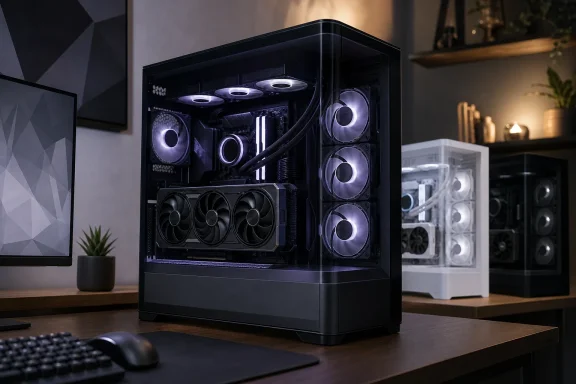 The Glass Is Not Supposed to Dictate the Airflow
The AP304’s defining design choice is a curved tempered-glass panel that wraps from the front into the side panel, creating a pillarless panoramic view of the motherboard, graphics card, and lighting. In the current chassis market, that look often comes with an engineering compromise: the front of the case becomes a display surface instead of a major source of fresh air.ASUS’s answer is to move much of the active intake strategy elsewhere. The AP304 has a vented gap between its lower power-supply chamber and the main component chamber. ASUS calls this a patented slot vent, describing it as a three-sided intake structure that lets air enter from below and travel toward the graphics card area.
That matters because the GPU is usually the most thermally demanding component in a gaming PC, particularly in systems using large axial-fan cards that recirculate some exhaust inside the chassis. A bottom-to-GPU airflow path can reduce the card’s reliance on warmed internal air, assuming the case has adequate clearance from the desk or floor and its filters remain clean.
ASUS recommends an aggressively populated layout: three 120mm bottom intake fans, up to three side fans, one rear fan, and a 360mm radiator exhausting through the top. That arrangement separates the cooling jobs reasonably well. Bottom fans supply the GPU zone, while top exhaust carries heat upward and out of the case; the side mounts provide flexibility for additional airflow or, on the ARGB model, arrive populated.
There is an important caveat. ASUS has described the slot vent as improving GPU cooling, but it has not published comparative temperature data against a conventional front- or side-intake panoramic case. The design is mechanically sensible, but prospective buyers should treat the cooling advantage as a layout proposition rather than a measured performance result until independent reviews test it with comparable GPUs, fan curves, and room temperatures.
An ATX Follow-Up to the Smaller AP202
The AP304 is effectively the ATX-sized continuation of the Prime AP202 concept. Overclocking.com and Chinese outlet IT Home both noted the relationship in June, identifying the same curved glass, lower airflow break, and integrated lighting treatment in a larger seven-slot platform.The move from a more compact motherboard format to ATX is meaningful beyond expansion slots. An ATX chassis can accommodate the larger boards, full-length graphics cards, more elaborate cable runs, and top-mounted liquid-cooling hardware that define many high-end DIY builds. ASUS lists compatibility for ATX, Micro-ATX, and Mini-ITX boards, CPU coolers up to 175mm tall, power supplies up to 200mm long, and graphics cards up to 420mm long.
That last number deserves a close read. The supplied reporting initially emphasized a 360mm support figure around the reinforced GPU bracket, while ASUS’s current compatibility specification says the chassis can accept cards up to 420mm long. The distinction is likely practical rather than contradictory: a builder needs to account for installed front-side hardware, power-cable bend radius, and the particular card’s cooler dimensions. In other words, “420mm supported” is not the same as “every 420mm card will be effortless to cable in every configuration.”
Still, the ceiling is generous. It covers virtually all standard air-cooled consumer cards, including oversized board-partner designs. The physical case itself is substantial at 240mm wide, 535mm high, and 450mm deep, according to Japanese retail reporting from AKIBA PC Hotline! That is not a compact tower masquerading as one; builders should check desk space before assuming its broad glass presentation will fit comfortably beside a monitor.
A Tool-Free Clamp Meets the Modern GPU Weight Problem
The AP304’s other notable feature is its patented graphics card slot clamp. Rather than requiring the usual screws at the rear expansion slots, the builder seats the card in the PCIe x16 slot and locks it in place through the clamp mechanism. ASUS also includes a reinforced internal graphics-card bracket intended to stabilize the card and limit movement or sag.This is more than a convenience flourish. Large graphics cards can put real leverage on a motherboard’s PCIe slot and on their own I/O bracket, especially when systems are transported or repeatedly opened for upgrades. A case-integrated retention system can make installation neater and may add protection against card movement, though it is not a replacement for properly seating the GPU, connecting power safely, and avoiding tension from heavy 12V-2x6 or 12VHPWR cable bundles.
The real value will depend on implementation. Tool-free mechanisms are welcome when they provide a positive lock and do not become awkward around thick card brackets or vertical cable runs. ASUS’s combination of the rear clamp and separate reinforcement bracket gives the AP304 a more convincing answer than a cosmetic anti-sag stand alone, but hands-on reviews will need to establish whether the system accommodates the broad range of aftermarket GPU shapes cleanly.
For routine service, ASUS also specifies an easy-detach rail for the curved panel and tool-less access for the side panels. Curved glass makes handling more consequential than with a small flat side window: its cost and shape make a safe removal system an important practical feature, not just a spec-sheet line.
Two Configurations Change the Real Starting Cost
ASUS is offering standard Prime AP304 TG models and AP304 TG ARGB models, each in black or white. The distinction is not merely lighting. The regular model ships without case fans, while the ARGB version comes with four 120mm ARGB fans: three on the side and one at the rear.Japanese distributor information published in July listed the standard model at roughly ¥21,980 and the ARGB model at roughly ¥26,480, with a July 17 release in that market. AKIBA PC Hotline! independently reported the same split and pricing. Those figures should not be read as U.S. MSRP or converted directly into a purchasing recommendation, since regional tax, distribution, and retail pricing can change the final number substantially.
As of August 1, ASUS has not published U.S. pricing or retail availability on its global AP304 product page. That means North American builders should avoid treating Japanese street pricing as a promise of a sub-$150 U.S. chassis, particularly once the included fan set is factored in.
The fanless version could be attractive for enthusiasts who already own premium PWM fans or plan a carefully tuned custom loop. But its lower entry price can be misleading if the buyer must add six or more fans to realize the airflow layout ASUS itself recommends. The ARGB edition is the simpler path for a first build, although the included side fans are oriented around ASUS’s visual and airflow design rather than around maximum user choice.
The Quietly Useful Builder Details
Beyond the headline glass and GPU cooling scheme, the AP304 includes several details that will matter during assembly. ASUS rates the top for a 120mm, 240mm, or 360mm radiator; the side, bottom, and top can collectively accommodate up to ten 120mm fans. The front I/O includes a USB Type-C port rated at up to 20Gbps, two 5Gbps USB Type-A ports, and combined audio connectivity.Cable management is also unusually relevant in a panoramic case, where a messy interior is harder to hide. ASUS specifies 33mm of rear cable-routing space, removable dust filters, and storage support configurable as two 3.5-inch drives or three 2.5-inch drives. That storage allocation will suit a modern NVMe-first build, although builders keeping several SATA SSDs and hard drives should map their drive needs before committing.
The integrated ARGB light band runs near the bottom edge, visually marking the separation between chambers and the airflow slot. It works with Aura Sync, so Windows users already running ASUS’s lighting ecosystem can synchronize it with compatible motherboards, graphics cards, and fans. Others should remember that lighting control is separate from thermal control: sensible BIOS or fan-controller curves remain more valuable than a perfectly synchronized color profile.
The Prime AP304’s eventual test will be whether its open lower channel and side-mounted fan approach can deliver better GPU thermals without the noise penalty of running every mount at high speed. ASUS has supplied a chassis architecture that makes that outcome plausible. The next meaningful milestone is independent thermal testing—and, for U.S. builders, the still-unannounced local price and availability that will decide whether this floating showcase design is a compelling build platform or simply a handsome enclosure.
References
- Primary source: Wccftech
Published: 2026-08-01T14:45:57+00:00
Loading…
wccftech.com - Related coverage: asus.com
Loading…
www.asus.com - Related coverage: asus.com
Loading…
www.asus.com - Related coverage: technetbooks.com
Loading…
www.technetbooks.com - Related coverage: overclocking.com
Loading…
overclocking.com - Related coverage: rog.asus.com
Loading…
rog.asus.com