
The important finding is narrower — and more useful — than the claim that Microsoft simply deletes graphics drivers “without warning.” Windows has a documented mechanism for removing unused device nodes and driver packages. What the G14 report appears to show is a failure at the boundary between that cleanup policy and an Asus laptop feature that can power-gate a built-in discrete GPU so completely that Windows regards it as disconnected hardware.
Microsoft has not acknowledged this as a Windows 11 bug, published an advisory for Eco-mode laptops, or confirmed the reported 15-day timer. The original poster supplied excerpts from setupapi.dev.log showing a 15-day timeout applied to the Nvidia PCI device, followed by removal of the device and an Nvidia INF package. Those logs are persuasive evidence for that machine, but they are not independent proof that every laptop with a disabled dGPU will behave the same way.
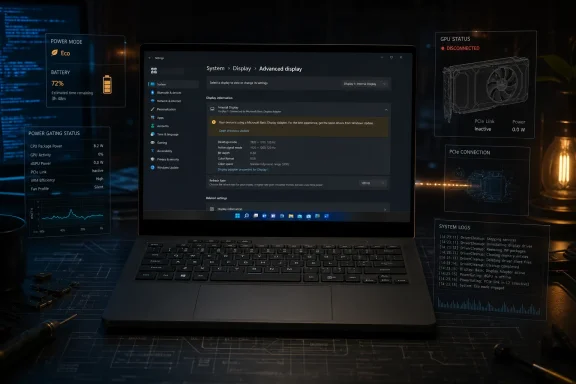 The driver removal requires two cleanup steps
The distinction between uninstalling a device and deleting its driver package matters here. Microsoft’s driver documentation says removing a device normally breaks its association with the driver while leaving the package in the Driver Store. If Plug and Play sees the hardware again, Windows can treat it as a new device and install the retained driver package.
That is not what this G14 owner encountered. Their log excerpts show an additional search for unused drivers after the device removal, then deletion of an Nvidia INF package. Once that package is gone, re-enabling the RTX GPU does not necessarily restore the Nvidia stack; Windows can fall back to Microsoft Basic Display Adapter until a suitable driver is installed again.
Microsoft’s own support documentation confirms that pnpclean.dll can remove drivers from the INF cache. A Microsoft article about a historical Windows 10 update-reliability problem documents rundll32.exe invoking pnpclean.dll with device and driver cleanup parameters, and says the remediation tool could silently remove USB driver packages. That was a separate, older update scenario, not evidence that the same task caused the G14 incident. It does, however, establish that this Windows component is designed to clean devices and driver packages rather than merely catalog them.
The practical implication is that a missing GPU driver after a mode switch may not be an Nvidia installer failure or proof of defective hardware. It may be evidence that Windows first removed the dGPU’s device instance and then discarded the only local package that could automatically bind the proper driver when the GPU reappeared.
Eco mode can make an internal GPU look absent
On compatible Asus ROG systems, Eco mode disables the discrete GPU to reduce idle power consumption. The original reporter describes that state as power-gating the GPU off the PCIe bus. Whether that implementation is identical across Asus models, or across AMD and Nvidia designs, remains unverified.
G-Helper’s own public documentation confirms the basic condition: on laptops that expose Eco mode, the dGPU can be disabled, and the project already warns of a separate Nvidia-driver problem when a machine is shut down or restarted with the GPU disabled. Its public FAQ does not currently document the 15-day pnpclean.dll theory or the registry change being circulated alongside it. That absence is worth noting: the cleanup explanation has not yet become a documented G-Helper support position.
A commenter in the same Reddit thread said they had experienced similar missing-dGPU symptoms on a 2022 G14 with Radeon RX 6700S graphics after an extended period with the discrete GPU off. That is a useful lead, but not confirmation of the same cleanup sequence. The commenter had not yet checked SetupAPI logs, and the original author’s claim that AMD hardware is affected remains an inference.
The evidence currently supports a warning for a specific group: owners of laptops whose vendor software genuinely removes the discrete GPU from Windows’ view for prolonged periods. It does not support a claim that Windows 11 will routinely remove drivers from any PC simply because a GPU has been idle, sleeping, or not used by a game.
Check the record before reinstalling anything
Users who switch from Eco to Standard or hybrid graphics mode and find a Microsoft Basic Display Adapter, Device Manager Code 10 or Code 28, a missing GPU in Task Manager, or Nvidia software reporting an incompatible driver should check the installation record first. Reinstalling the vendor driver may restore functionality, but it also overwrites useful evidence about what Windows did.
The original report suggests searching current and archived SetupAPI logs for an Nvidia or AMD PCI vendor ID and removal language. Nvidia hardware uses VEN_10DE; AMD uses VEN_1002.
Select-String -Path C:\Windows\INF\setupapi.dev*.log `
  -Pattern "(VEN_10DE|VEN_1002).*(was removed|timeout period)"
A second search can identify cleanup of unused INF packages:
Select-String -Path C:\Windows\INF\setupapi.dev*.log `
  -Pattern "unused drivers|INF oem\d+\.inf .*removed"
These commands only search text logs; they do not alter the system. They are a better first step than assuming every Code 10 or Basic Display Adapter state has the same cause. A GPU can also fail to start because of a damaged installation, a firmware problem, a bad driver release, an incomplete Windows update, a power-management fault, or actual hardware trouble.
For an inventory of third-party driver packages still in the Driver Store, Microsoft recommends pnputil. An elevated Command Prompt or PowerShell session can run:
pnputil /enum-drivers
The resulting list includes published INF names, providers, class information, versions, and dates. Administrators should save that output before and after a suspected cleanup event. It gives a defensible record of whether a vendor package was actually removed rather than merely no longer associated with an active device.
The registry workaround trades convenience for retention
The Reddit post recommends changing the Autorun value under the Disk Cleanup handler for “Device Driver Packages” to 0, which would stop that handler from participating in automatic cleanup:
Set-ItemProperty `
  "HKLM:\SOFTWARE\Microsoft\Windows\CurrentVersion\Explorer\VolumeCaches\Device Driver Packages" `
  -Name Autorun -Value 0
That may be a reasonable mitigation for an affected test machine, but it should not be presented as a universal fix. The reporting has not established which Windows maintenance path invoked cleanup on the G14, whether the registry value controls every relevant cleanup scenario on current Windows 11 builds, or whether the setting will persist through feature updates and OEM software changes.
The cost is also real. Device-driver cleanup exists to remove abandoned packages and stale device records. Disabling automatic cleanup can leave more old driver packages in the Driver Store, consuming disk space and increasing the inventory administrators must audit. On managed devices, a local registry tweak may also conflict with configuration baselines or cleanup procedures.
For most affected Asus owners, the lower-risk workaround is operational: periodically switch out of Eco mode long enough for Windows to enumerate the dGPU, then return to the preferred power mode. The original reporter says this resets the absence timer on their system. That advice should be treated as a practical precaution, not a Microsoft-confirmed policy.
A quiet cleanup policy needs a visible exception
Windows is behaving according to a cleanup design built around removable or permanently absent devices. Asus Eco mode creates the awkward condition: a soldered-in GPU can be intentionally made invisible for long enough to resemble one of those abandoned devices.
That is where the product design falls short. A laptop’s built-in dGPU should not be indistinguishable from a forgotten USB adapter merely because the owner selected a vendor-supported battery-saving mode. At minimum, Microsoft and OEMs need to determine whether an intentionally power-gated PCI device can be exempted from long-absence cleanup, or whether Windows can retain the associated driver package when such hardware returns.
Until either company documents a fix, owners of Asus laptops using Eco mode for weeks at a time should retain a current Nvidia or AMD installer locally, preserve SetupAPI logs when the failure occurs, and avoid treating a suddenly generic display adapter as routine driver corruption.
