
ASUS announced the Gjallar on July 9, and Best Buy currently lists the black S701 ROG Gjallar model at $599.99. The retailer’s page also shows it as sold out at publication time, so “available” should be read as a U.S. retail launch rather than a guarantee that a unit can be ordered immediately. Tom’s Hardware and GamingTrend, both of which published reviews on August 24, identify that date as the product’s U.S. release.
For Windows gamers, the Gjallar’s appeal is less about the ROG lighting strip than the effort to consolidate several troublesome pieces of a desk setup: speakers, subwoofer, input switching, USB dongle access and, in theory, multiplayer voice chat. ASUS has built a real desktop-oriented product rather than simply rebadging a living-room soundbar. Its practical limits, however, matter more than the headline specification.
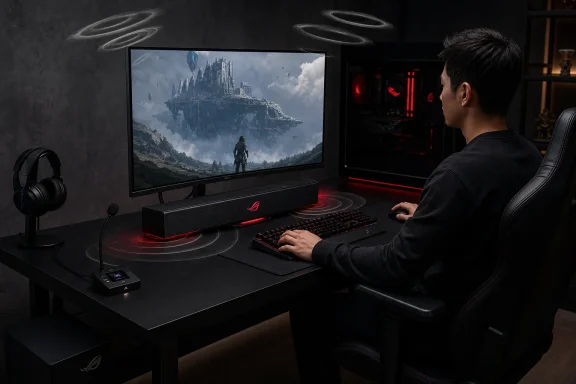 A 2.1.2 soundbar cannot replace physical surround speakers
The Gjallar uses four 50 mm full-range drivers, two 27 mm tweeters and two upward-firing channels in a 607 mm-wide soundbar, paired with a separate 165 mm, 65-watt subwoofer. ASUS calls the arrangement 2.1.2 Dolby Atmos surround sound; technically, it is a soundbar system that decodes or processes Atmos material and uses upward-facing drivers to create height effects through reflections.
That is useful for a desk, provided the room cooperates. The upward drivers depend on a reasonably reflective ceiling and a listening position in front of the bar. They do not add discrete rear channels, so they cannot deliver the behind-the-player placement that a true surround configuration can provide. A gaming soundbar also has little room to create the left-right separation of properly spaced bookshelf speakers.
Early listening impressions support that distinction. Tom’s Hardware found that the Gjallar handled game details and directional effects competently after EQ adjustments, but described its overall soundstage as limited and said its results were not markedly ahead of other premium gaming soundbars. GamingTrend was more positive about its bass, highs and game immersion, but likewise noted that the bar does not supply the full spatial picture of surround sound, particularly for sounds behind the listener.
So the honest expectation is better-than-monitor audio with a space-saving Atmos effect, not desktop home theater. That can still be a good trade-off for a single-monitor gaming desk, but buyers should not mistake Dolby Atmos support for the speaker placement they would get from a 5.1 or 7.1 arrangement.
The microphone hub is the Gjallar’s riskiest promise
ASUS’ most distinctive design choice is the wired Audio Control Hub. It puts physical controls and an LCD screen on the desk, but also houses beamforming microphones with acoustic echo cancellation, or AEC. ASUS says the system removes sound played through the Gjallar from the microphone signal while focusing pickup on the player, allowing multiplayer chat without a boom mic or headset.
The need is real. Many PC players prefer speakers for single-player games, streaming and music, but switch back to a headset whenever Discord, in-game chat or a work call begins. A speaker system that could prevent feedback while retaining intelligible speech would remove that friction.
The independent reporting does not yet establish that ASUS has solved the problem. Tom’s Hardware tested the microphones harshly, calling them useless in its review. GamingTrend reached a less severe conclusion, finding the microphone serviceable for gaming with friends but not comparable to a dedicated microphone. Those are subjective reviews, not laboratory tests, but their shared conclusion is material: users should treat the hub as a convenience feature rather than a replacement for an Elgato Wave, a USB microphone, or a quality headset boom.
This is where ASUS’ marketing is strongest and the real-world evidence is weakest. The Gjallar may allow casual headset-free chat in a quiet room, but players who need clean comms for ranked play, streaming or meetings should assume they will still need separate capture hardware until broader testing proves otherwise.
HDMI 2.1 is useful, but the wiring has a catch
The Gjallar supports HDMI 2.1 input and eARC, with ASUS and Best Buy specifying up to 4K at 120 Hz video passthrough. That capability makes the soundbar more credible for PlayStation 5, Xbox Series X, and PC users who route a source through an audio device before it reaches a television or compatible monitor. A soundbar limited to older HDMI bandwidth could force a choice between higher refresh rates and better audio; the Gjallar does not impose that basic compromise.
The connection selection is broad for a desktop audio component: USB-C, HDMI input, HDMI eARC, optical, 3.5 mm auxiliary and Bluetooth 5.3. ASUS’ own FAQ says a PC can be connected through USB-C or HDMI while a PlayStation 5 or Xbox Series X uses HDMI, with switching controlled at the hub or on the soundbar. This is a meaningful advantage for a desk shared between work PC, gaming PC and console.
But there is a physical limitation hidden behind the multi-platform message. The Gjallar has only one HDMI input and one eARC connection. A user with a desktop PC, a PlayStation 5 and an Xbox Series X cannot directly run all three through the bar without relying on the display for eARC, adding an HDMI switch, or moving cables. The Gjallar makes two-source switching straightforward; it is not an HDMI matrix.
PC owners should also check their display before buying around eARC. Many desktop monitors lack HDMI eARC altogether, so the relevant path will often be direct USB-C audio, optical output, analog audio, or an HDMI passthrough chain. The bar’s HDMI 2.1 capability has the clearest payoff in a TV-based console setup or a monitor that explicitly supports the needed audio return features.
Wireless subwoofer still means two power outlets
The Gjallar’s 5 GHz wireless link removes the cable carrying audio between the bar and its subwoofer. That is useful under a desk, where a thick speaker cable can be awkward to hide and where subwoofer placement is often dictated by where a cable reaches. The 6.5-inch subwoofer can be placed separately, letting the slim main unit stay beneath the display.
It is not cable-free. Both the soundbar and subwoofer require AC power, and the Audio Control Hub is wired to the system. A user should plan for at least two nearby power sockets and a route for the hub cable before treating this as a minimalist installation.
ASUS has already published troubleshooting guidance that tells owners with a disconnected subwoofer or humming noise to update its firmware through the web-based Gear Link tool. That is a routine support step for a first-generation wireless speaker product, but it also means the unit should be updated early rather than left running factory firmware indefinitely. A red blinking indicator on the bar paired with a blue blinking light on the subwoofer indicates a connection problem, according to ASUS.
The company’s support note also reinforces a point that applies to every compact subwoofer: placement will determine much of the result. A sub pushed into a corner or trapped tightly against desk panels can exaggerate bass and resonance. The wireless link gives owners flexibility; it does not remove the need to experiment with placement.
Gear Link reduces one Windows utility, but not all ASUS software
ASUS positions Gear Link as a web-based configuration tool with a companion mobile app for EQ, microphone parameters, lighting and power settings. Tom’s Hardware reports that Gear Link can also change subwoofer level, noise reduction, upmix behavior and sleep timing. For users tired of installing a separate Windows control suite for every peripheral, browser-based device management is a welcome direction.
There is an important exception. Tom’s Hardware reports that synchronized Aura Sync lighting still requires ASUS Armoury Crate. Buyers who only want EQ, inputs and microphone adjustment can avoid making the Gjallar another permanent background application. Buyers who want it synchronized with other ROG hardware cannot fully escape ASUS’ broader software stack.
The side-mounted USB Type-A ports are similarly practical rather than glamorous. They give the soundbar a place for wireless keyboard, mouse or controller receivers, potentially reducing clutter around the PC itself. They do not solve bandwidth or power needs for every peripheral, but they can be valuable on a desktop with limited front-facing USB access.
The $600 question is about integration, not raw audio value
At $599.99, the Gjallar competes against more than other soundbars. It competes with powered desktop speakers, a separate subwoofer, a USB microphone, a compact audio interface and premium gaming headsets. Tom’s Hardware notes that it costs more than twice as much as many 2.1 PC speaker systems, while GamingTrend calls it high-end hardware priced accordingly.
That price makes sense only for a specific buyer: someone who needs a narrow, under-monitor speaker system; wants both PC and console connections; values HDMI 2.1 passthrough; and would use the physical hub often enough to justify it. For music-first listeners with room for two properly placed speakers, or for competitive players already committed to a good headset and microphone, a more conventional audio setup will likely deliver more performance per dollar.
The ROG Gjallar’s strongest accomplishment is acknowledging that a gaming desk is a system of cables, inputs and devices rather than simply a place to put louder speakers. Its weak point is that its most novel feature—the microphone hub—has not earned the same confidence as its connectivity. Buyers should regard the Gjallar as a premium desktop soundbar with unusually good switching and expansion, then count headset-free communication as a feature to test within the return window rather than the reason to buy it.
