
Asus has put the ROG USB-C10G on its global product pages: a 38-gram USB adapter with an RJ45 port rated for 10Gbps Ethernet and a USB 3.2 Gen 2x2 host connection. The practical catch is in the interface requirement. It is only a full 10GbE upgrade when the host can supply a 20Gbps USB-C connection; attaching it through the advertised USB-A option, or through a common 10Gbps USB-C port, will make the Ethernet port the faster side of the link.
Notebookcheck reported on August 3 that the adapter has launched in China at CNY 799, roughly $118, and suggested that it has already surfaced outside China. Asus’s own global ROG listing confirms the product and its basic claims, while separate Asus support records already list the USB-C10G for security support through December 31, 2030 in the UK and Australia. But Asus has not published a U.S. price, U.S. retail listing, or firm U.S. availability date as of August 3.
For Windows users, this is potentially a useful way to add wired 10GbE to a laptop, mini PC, handheld, or desktop without spending a PCIe slot. It is also a product whose marketing needs to be read more carefully than the “USB-C and USB-A” compatibility line suggests.
The naming needs one quick correction: the ROG USB-C10G is a 10GbE adapter, not a Fast Ethernet device. “Fast Ethernet” is the older 100Mbps standard. Asus specifies an RJ45 port capable of 10Gbps, 2.5Gbps, and 1Gbps links, which makes this a multigigabit copper adapter built for modern 10GBase-T networks.
That port speed is meaningful for two common setups. A PC with only 1GbE can move from roughly 110 MB/s real-world file transfers to the range needed to stop a fast NAS, NVMe cache, or 10GbE switch from waiting on the client. It can also give a laptop a wired link that matches a 2.5GbE or 10GbE office network without a dock that brings display outputs and power delivery features it does not need.
Asus’s technical specifications, however, list only three Ethernet rates: 10Gbps, 2.5Gbps, and 1Gbps. 5GbE is absent from the official compatibility table. Buyers with a 5GbE switch or NAS should not assume that a 5Gbps link will negotiate simply because many other 10GbE controllers support intermediate multigig speeds. Asus needs to clarify whether 5GbE is unsupported or merely omitted from the current specifications.
The adapter measures 85 x 32 x 19 mm and has a dual-color speed indicator for 10G, 2.5G, and 1G operation. At 38 grams, the unit itself is light, though a 10GBase-T cable will still determine how portable the package really feels.
The ROG USB-C10G’s own specification page identifies its USB connection as USB 3.2 Gen 2x2, a two-lane 20Gbps mode. The USB Implementers Forum defines Gen 2x2 as two 10Gbps lanes, and its multi-lane arrangement is built around USB-C. That gives the adapter enough upstream bandwidth to carry a genuinely high-rate Ethernet stream after USB protocol overhead is accounted for.
A normal 10Gbps USB 3.2 Gen 2 connection does not. Its advertised 10Gbps is a signaling rate, not an application-level payload guarantee, and it must also carry USB framing and protocol overhead. A 10GbE Ethernet connection can still come up at 10Gbps on the RJ45 side, but sustained transfers cannot reach line rate once the USB link is the narrower path.
The same issue applies more plainly to USB-A. A USB-A port can offer 5Gbps or 10Gbps SuperSpeed connectivity, but it cannot provide USB 3.2 Gen 2x2’s 20Gbps dual-lane mode. So the USB-A option is useful for compatibility, 1GbE, and likely 2.5GbE-class deployments; it is not a substitute for a verified 20Gbps USB-C port when the goal is maximum 10GbE throughput.
That distinction is more important than the connector shape. Many current laptops have USB-C ports that support charging, DisplayPort, USB4, or Thunderbolt, but not every one implements USB 3.2 Gen 2x2. Asus says the USB-C10G is Thunderbolt-compatible, yet it does not publish a host-port matrix or a performance table for Thunderbolt, USB4, USB 20Gbps, USB 10Gbps, and USB-A hosts. Microsoft’s own USB-C guidance warns that a dongle feature can be limited when the PC, cable, or chosen port lacks the required capability.
For a Windows buyer, the pre-purchase check is simple: inspect the system’s manual for USB 20Gbps or USB 3.2 Gen 2x2 support. “USB-C” alone is not enough. “Thunderbolt-compatible” alone is also not enough to establish the adapter’s eventual throughput.
But the official technical-specification page says the product has a USB Type-C port and lists the package contents as only the Ethernet adapter, quick-start guide, and warranty card. It does not list a cable or a USB-A adapter.
This is more than a cosmetic documentation flaw. A removable short cable can be replaced with a certified 20Gbps cable if it is lost or damaged. An integrated captive cable or an unusual adapter arrangement changes that calculation. It also affects whether the customer can realistically use the unit with a desktop’s rear Type-A ports, a laptop’s USB-C port, or a router’s USB port without buying additional hardware.
Asus has therefore confirmed the broad two-connector concept but has not published a clean, consistent bill of materials. Buyers should wait for a local retail listing or the product’s manual to establish what comes in the box for their region.
That caveat is warranted. Asus does not identify the Ethernet controller inside the adapter, the driver version used for Windows validation, the Linux kernel drivers supported, power draw under 10GbE load, or thermal behavior during extended transfers. There were no independent throughput, stability, or thermal reviews available at publication time.
Those omissions matter more for a 10GbE USB adapter than for a basic gigabit dongle. A 10GBase-T PHY generates more heat and handles far more traffic, while USB-attached NICs depend on driver quality, host-controller behavior, cable quality, and power management. The adapter may work immediately in Windows 11, but “works” and “holds a near-line-rate transfer for an hour without link drops” are different tests.
The lack of controller disclosure also leaves IT buyers without a quick way to determine driver provenance, enterprise management characteristics, or likely compatibility with locked-down Windows deployments. For a home lab, that may be acceptable. For a deployment where a laptop’s wired connection is business-critical, it is a reason to wait for testing.
It is not a way to add another 10GbE LAN port for a NAS, desktop, or switch. Asus describes the function specifically as an additional WAN connection, and says that availability varies by router model and firmware version. Router USB ports also differ sharply in bandwidth and driver support, so the adapter’s 20Gbps USB host requirement should not be projected onto a router that may only expose USB 3.0-class connectivity.
The ROG USB-C10G fills a real gap: portable, standalone 10GbE over RJ45 for systems that cannot accept a PCIe NIC. But its value turns on the host port, not the badge on the adapter. Until Asus publishes bundled-accessory details, controller information, and independent tests establish sustained speeds and thermals, U.S. buyers should treat the $118 China price as a reference point rather than a buying signal—and verify that their USB-C port is actually rated for 20Gbps before paying a premium for 10GbE.
For Windows users, this is potentially a useful way to add wired 10GbE to a laptop, mini PC, handheld, or desktop without spending a PCIe slot. It is also a product whose marketing needs to be read more carefully than the “USB-C and USB-A” compatibility line suggests.
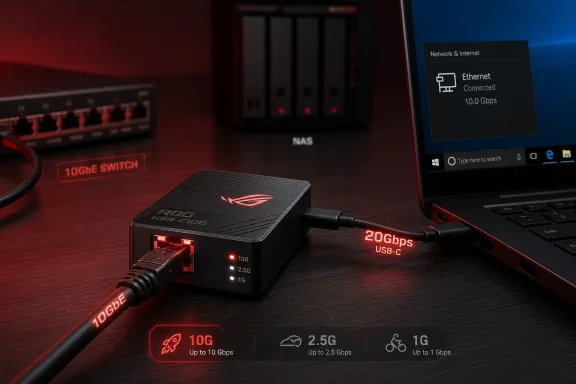 The port is 10GbE, not “Fast Ethernet”
The naming needs one quick correction: the ROG USB-C10G is a 10GbE adapter, not a Fast Ethernet device. “Fast Ethernet” is the older 100Mbps standard. Asus specifies an RJ45 port capable of 10Gbps, 2.5Gbps, and 1Gbps links, which makes this a multigigabit copper adapter built for modern 10GBase-T networks.That port speed is meaningful for two common setups. A PC with only 1GbE can move from roughly 110 MB/s real-world file transfers to the range needed to stop a fast NAS, NVMe cache, or 10GbE switch from waiting on the client. It can also give a laptop a wired link that matches a 2.5GbE or 10GbE office network without a dock that brings display outputs and power delivery features it does not need.
Asus’s technical specifications, however, list only three Ethernet rates: 10Gbps, 2.5Gbps, and 1Gbps. 5GbE is absent from the official compatibility table. Buyers with a 5GbE switch or NAS should not assume that a 5Gbps link will negotiate simply because many other 10GbE controllers support intermediate multigig speeds. Asus needs to clarify whether 5GbE is unsupported or merely omitted from the current specifications.
The adapter measures 85 x 32 x 19 mm and has a dual-color speed indicator for 10G, 2.5G, and 1G operation. At 38 grams, the unit itself is light, though a 10GBase-T cable will still determine how portable the package really feels.
USB-A compatibility does not mean USB-A 10GbE performance
Asus advertises the USB-C10G as a “2-in-1 USB-C & USB-A” design. Its global feature page says it can connect to laptops, desktops, NAS devices, tablets, and mobile devices across Windows, Linux, macOS, iOS, and Android. That is broad device recognition coverage, but it does not override the bandwidth limits of the host connection.The ROG USB-C10G’s own specification page identifies its USB connection as USB 3.2 Gen 2x2, a two-lane 20Gbps mode. The USB Implementers Forum defines Gen 2x2 as two 10Gbps lanes, and its multi-lane arrangement is built around USB-C. That gives the adapter enough upstream bandwidth to carry a genuinely high-rate Ethernet stream after USB protocol overhead is accounted for.
A normal 10Gbps USB 3.2 Gen 2 connection does not. Its advertised 10Gbps is a signaling rate, not an application-level payload guarantee, and it must also carry USB framing and protocol overhead. A 10GbE Ethernet connection can still come up at 10Gbps on the RJ45 side, but sustained transfers cannot reach line rate once the USB link is the narrower path.
The same issue applies more plainly to USB-A. A USB-A port can offer 5Gbps or 10Gbps SuperSpeed connectivity, but it cannot provide USB 3.2 Gen 2x2’s 20Gbps dual-lane mode. So the USB-A option is useful for compatibility, 1GbE, and likely 2.5GbE-class deployments; it is not a substitute for a verified 20Gbps USB-C port when the goal is maximum 10GbE throughput.
That distinction is more important than the connector shape. Many current laptops have USB-C ports that support charging, DisplayPort, USB4, or Thunderbolt, but not every one implements USB 3.2 Gen 2x2. Asus says the USB-C10G is Thunderbolt-compatible, yet it does not publish a host-port matrix or a performance table for Thunderbolt, USB4, USB 20Gbps, USB 10Gbps, and USB-A hosts. Microsoft’s own USB-C guidance warns that a dongle feature can be limited when the PC, cable, or chosen port lacks the required capability.
For a Windows buyer, the pre-purchase check is simple: inspect the system’s manual for USB 20Gbps or USB 3.2 Gen 2x2 support. “USB-C” alone is not enough. “Thunderbolt-compatible” alone is also not enough to establish the adapter’s eventual throughput.
Asus’s own documentation is inconsistent about the connection kit
Notebookcheck described the USB-C10G as having a USB-C female port, a USB-C-to-USB-C cable, and a Type-C-to-Type-A adapter at one end. Asus’s main product page likewise promotes a USB-C and USB-A “2-in-1” design and includes images describing both connector types.But the official technical-specification page says the product has a USB Type-C port and lists the package contents as only the Ethernet adapter, quick-start guide, and warranty card. It does not list a cable or a USB-A adapter.
This is more than a cosmetic documentation flaw. A removable short cable can be replaced with a certified 20Gbps cable if it is lost or damaged. An integrated captive cable or an unusual adapter arrangement changes that calculation. It also affects whether the customer can realistically use the unit with a desktop’s rear Type-A ports, a laptop’s USB-C port, or a router’s USB port without buying additional hardware.
Asus has therefore confirmed the broad two-connector concept but has not published a clean, consistent bill of materials. Buyers should wait for a local retail listing or the product’s manual to establish what comes in the box for their region.
“Plug-and-play” is not a substitute for driver and controller details
Asus says the USB-C10G supports Windows 10 and Windows 11, Linux, macOS, iOS, and Android, and calls it plug-and-play. The company also adds a qualification that compatibility and functionality can vary by device and operating system.That caveat is warranted. Asus does not identify the Ethernet controller inside the adapter, the driver version used for Windows validation, the Linux kernel drivers supported, power draw under 10GbE load, or thermal behavior during extended transfers. There were no independent throughput, stability, or thermal reviews available at publication time.
Those omissions matter more for a 10GbE USB adapter than for a basic gigabit dongle. A 10GBase-T PHY generates more heat and handles far more traffic, while USB-attached NICs depend on driver quality, host-controller behavior, cable quality, and power management. The adapter may work immediately in Windows 11, but “works” and “holds a near-line-rate transfer for an hour without link drops” are different tests.
The lack of controller disclosure also leaves IT buyers without a quick way to determine driver provenance, enterprise management characteristics, or likely compatibility with locked-down Windows deployments. For a home lab, that may be acceptable. For a deployment where a laptop’s wired connection is business-critical, it is a reason to wait for testing.
The router feature is a niche use, not a LAN expansion
Asus also positions the USB-C10G as a way to add an extra WAN connection to a compatible Asus router with Dual WAN support. This could be useful where a router has a free USB port and an administrator wants a second internet uplink for failover or load balancing.It is not a way to add another 10GbE LAN port for a NAS, desktop, or switch. Asus describes the function specifically as an additional WAN connection, and says that availability varies by router model and firmware version. Router USB ports also differ sharply in bandwidth and driver support, so the adapter’s 20Gbps USB host requirement should not be projected onto a router that may only expose USB 3.0-class connectivity.
The ROG USB-C10G fills a real gap: portable, standalone 10GbE over RJ45 for systems that cannot accept a PCIe NIC. But its value turns on the host port, not the badge on the adapter. Until Asus publishes bundled-accessory details, controller information, and independent tests establish sustained speeds and thermals, U.S. buyers should treat the $118 China price as a reference point rather than a buying signal—and verify that their USB-C port is actually rated for 20Gbps before paying a premium for 10GbE.
References
- Primary source: notebookcheck.net
Published: 2026-08-03T06:14:00+00:00
Loading…
www.notebookcheck.net - Related coverage: rog.asus.com
Gaming Networking|ROG - Republic of Gamers|Global
rog.asus.com
- Related coverage: rog.asus.com
- Related coverage: asus.com

ROG - Republic of Gamers - All Models|WiFi Routers|ASUS Global
In ASUS 「ROG - Republic of Gamers - All Models」 - Networking / IoT / Servers , you could find most appropriate Networking / IoT / Servers based on product features, specification or price. And you also could get product's detail information and comparsion, even add it into the wish list in buy page.
www.asus.com
- Related coverage: asus.com
- Related coverage: eshop.asus.com

Products
eshop.asus.com
- Related coverage: press.asus.com
ASUS Republic of Gamers Presents Next-Gen Gaming Innovations, Commemorates 20 Years of Gaming Excellence at CES 2026 | ASUS Pressroom - Official Global News & Updates
ROG at CES 2026: Next-gen gaming innovations, 20 years of excellence! Zephyrus laptops, Crosshair motherboards, Swift OLED monitors, ROG XREAL R1 & more! Subscribe to ASUS Pressroom for the latest tech updates! press.asus.com
- Related coverage: dlcdnets.asus.com
- Related coverage: eshop.asus.com
Accessories - Products
eshop.asus.com
- Related coverage: dlcdnets.asus.com
- Related coverage: dlcdnwebimgs.asus.com
- Related coverage: marvell.com
Ethernet Controllers | Boosting Server and Edge Connectivity - Marvell
Marvell multi-gigabit Ethernet controllers simplify PC, workstation, CPE and storage networking. www.marvell.com
- Related coverage: rog-forum.asus.com
Re: XG-C100C v2 rev 3 Flawed Detection on Reboots ... - Republic of Gamers Forum - 912130
New Firmware available for Windows based PCs (attached below). For cards with AQC113c chipset only. Just run the appx file and let it - 912130rog-forum.asus.com - Related coverage: digitalcitizen.life
ASUS XG-C100C review: Great yhen you need more than 1 Gbps! | Digital Citizen
Our team enjoys using 1 Gbps internet connections. For most people in the world, that is fast. However, 10 Gigabit internet connections and devices are starting to show up. Yes, they are mostly for business users, but internet service providers are going to create 10G plans for consumers too. If...www.digitalcitizen.life
- Related coverage: deviwiki.com
- Related coverage: tomshardware.com
Asus Releases XG-C100C 10GBASE-T NIC For $99 (Updated) | Tom's Hardware
Asus rounded out the 10GbE ecosystem today with a desktop add-in network interface card to go with the previously released xg-U2008 switch. For less than $100 you get massive bandwidth with priority queuing for enhanced gaming support.www.tomshardware.com - Related coverage: rog-forum.asus.com
- Related coverage: support.microsoft.com
Fix USB-C problems in Windows | Microsoft Support
Learn how to troubleshoot USB-C problems in Windows and fix USB devices, ports, and adapters not working properly.support.microsoft.com - Related coverage: techcommunity.microsoft.com
- Related coverage: learn.microsoft.com
OEM Tasks for USB Type-C Systems - Windows drivers | Microsoft Learn
This table describes the use cases supported by Windows, and the other tasks OEMs must perform for those use cases to work.learn.microsoft.com - Related coverage: learn.microsoft.com