
The practical appeal is straightforward: this is a 4K desktop monitor that can become a high-refresh competitive-gaming display without buying a second panel. ASUS rates the XG32UQWMS at 330 nits for full-screen SDR, up to 1,500 nits peak HDR, 99.5% DCI-P3 coverage, and a 0.03ms gray-to-gray response time. It also carries a three-year warranty that explicitly includes panel burn-in.
But buyers should separate what ASUS has improved from what it has merely made easier to manage. OLED burn-in remains cumulative wear caused by uneven use of self-emissive pixels; a sensor that turns the screen black when nobody is sitting in front of it reduces exposure during idle time. It cannot undo wear from a Windows taskbar, browser tabs, IDE panels, spreadsheets, or HUD elements that remain in the same place while the panel is actively in use.
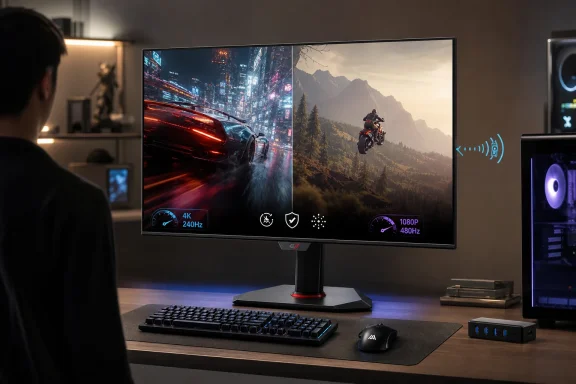 The useful part of ASUS OLED Care Pro
The Neo Proximity Sensor is the feature that most clearly changes day-to-day OLED ownership. ASUS says the sensor can be configured for distance and switches the image to black when the user steps away, then restores the prior content when the user returns. A black image means the OLED pixels are off, which is more useful than simply dimming a static Windows desktop.
That is a meaningful convenience feature for a PC that spends part of the day unattended. Windows’ own display timeout settings can do something similar, but they usually work on a timer and may be overridden by video playback, remote sessions, poorly behaved apps, or power-management policies. A presence-aware blackout reacts to the person rather than a clock.
ASUS pairs the sensor with familiar protection measures: pixel cleaning after several hours of operation, subtle screen shifting, an inactivity screen saver, static-logo dimming, outer-area dimming, and a mode that preserves brightness for one selected window while dimming the rest. The company’s implementation is unusually comprehensive, though the broad idea is no longer exclusive to this model. ASUS used a Neo Proximity Sensor in earlier ROG OLEDs, including the XG32UCWMG, and competitors increasingly offer some mix of pixel refresh, taskbar protection, static-element dimming, and panel care reminders.
The distinction matters for Windows users because none of these tools should be interpreted as a declaration that desktop burn-in is solved. ASUS itself says OLED displays remain susceptible to burn-in with prolonged static imagery. Recent long-running testing of a different OLED monitor, the MSI MPG 321URX, has shown visible artifacts after roughly 4,500 hours under an intentionally harsh office workload dominated by static Windows content. That is not a like-for-like result for the new ASUS panel, nor a prediction that every XG32UQWMS will behave the same way. It is evidence that warranty coverage and protective software reduce the consequences and risk; they do not repeal OLED aging.
For a mixed-use PC, the sensor’s value is in eliminating the avoidable hours: lunch breaks, meetings away from the desk, interruptions, and the end of a workday when the PC remains on. It does nothing during an eight-hour spreadsheet session. Users treating this as a productivity display should still use dark mode where comfortable, hide the taskbar automatically, set a short Windows display-off timeout, and allow the monitor to remain powered after shutdown long enough to complete its maintenance cycle.
4K at 240Hz is the mode most owners will use
Windows Central’s reviewer argues that 4K at 240Hz is the better fit for most people, and the evidence supports that conclusion. At 31.5 inches, 3840 × 2160 produces about 140 pixels per inch—dense enough that the panel’s non-RGB subpixel layout is less conspicuous in ordinary Windows use than it would be on a lower-resolution OLED. The reviewer reported no distracting text fringing at normal desk distance and found the display usable for routine work without special ClearType adjustments.
That does not mean this is an RGB-stripe OLED panel. PC Gamer’s independent review highlights a detail easily muddled by marketing around LG’s “Tandem Primary RGB” technology: the XG32UQWMS still uses an RGWB subpixel arrangement, with a white subpixel contributing to brightness. The phrase “Primary RGB” refers to the panel’s stacked emissive layers, not a conventional RGB-stripe pixel structure.
For shoppers coming from an IPS 4K monitor, that is the right expectation to set. The XG32UQWMS can look excellent for text because of its high pixel density, but it does not offer the same subpixel geometry as a 4K IPS LCD or ASUS’s forthcoming higher-tier ROG Swift OLED PG32UCWM, which ASUS lists as using a true RGB-stripe Tandem OLED panel. Buyers whose work involves small fonts, long documents, code editors, and crisp light-background UI should try to see the Strix in person rather than buying on the assumption that every 4K OLED has identical text behavior.
The more important compromise is the dual-mode switch. ASUS calls its 1080p/480Hz option Frame Rate Boost. It gives esports players a route to exceptionally clear motion and lower GPU demand, and PC Gamer found its motion clarity outstanding. Yet 1920 × 1080 spread across a 32-inch panel works out to only about 69 pixels per inch. That is a large, soft desktop by modern standards and a poor resolution for normal Windows use.
The 480Hz mode is therefore a specialized gaming preset, not a general-purpose second personality for the monitor. It makes sense for players who can actually sustain frame rates near 480fps in games such as Counter-Strike 2, Valorant, or similar competitive shooters. Everyone else is paying for a mode they will rarely activate. The good news is that the native 4K/240Hz setting already offers far more motion resolution than most games, GPUs, and players can exploit.
Tandem WOLED improves the panel, not the purchasing math
The XG32UQWMS is built around LG Display’s newer Tandem WOLED technology and ASUS’s glossy TrueBlack Glossy coating. ASUS claims the panel offers 15% higher peak brightness, 25% greater color volume, and a 60% longer light-emitting lifespan than its previous-generation WOLED. Those are vendor-relative claims, not a promise of a 60% longer useful monitor life under every workload, but they describe why this generation is more interesting than simply another 32-inch 4K OLED with a faster refresh rate.
The glossy coating is part of that equation. It preserves the deep black appearance and contrast that make OLED attractive in the first place, particularly in a room with controlled lighting. Windows Central found reflections tolerable, while PC Gamer also credited the coating with reinforcing OLED contrast. That is a far better result than the hazier anti-glare layers found on some older OLED monitors, but glossy is still glossy: a bright window or overhead light can be visible on a mostly black screen.
Brightness also needs a sober reading. ASUS advertises 1,500 nits peak HDR brightness, but that applies to a small highlight area, not a full-screen white document. PC Gamer found that turning off uniform brightness to extract the best performance made brightness variation more noticeable. That is common OLED behavior: a panel must limit output as bright content occupies more of the screen to control heat and power. For HDR games and movies, the result can still be spectacular. For all-day white-background office work in a brightly lit room, a high-quality mini-LED or IPS monitor can be the more predictable tool.
At the reported $899 U.S. price, ASUS is aiming below many flagship 32-inch OLEDs while retaining 4K/240Hz, HDMI 2.1, FreeSync Premium Pro, G-SYNC Compatible support, and the 480Hz fallback. PC Gamer independently lists the same $899 price and regards it as competitive beside a $1,099 MSI QD-OLED alternative, though it preferred the richer subjective color and USB-C connectivity of the MSI.
The USB hub specification needs clarification before purchase
The least satisfying part of the XG32UQWMS is not merely that Windows Central’s sample lacked an upstream USB cable. ASUS’s own U.S. technical specifications list two USB 3.2 Gen 1 Type-A hub ports, but list no upstream USB-B port and no USB-C port at all. The box contents likewise name a DisplayPort cable and power cord, but no USB cable.
That leaves a real documentation problem. A monitor’s USB-A ports need an upstream data path to the PC to work as a hub. Windows Central describes a hub connection that requires a cable ASUS did not supply, while ASUS’s published port list does not clearly identify that upstream connection. PC Gamer also notes the absence of USB-C, and ASUS markets the display as having a USB hub, but neither point answers where the host link is meant to be connected.
Prospective buyers should confirm the final retail unit’s rear I/O and included accessories before assuming the two USB-A ports will serve a keyboard, mouse receiver, storage device, firmware update, or Windows-based DisplayWidget Center workflow. ASUS may have omitted an upstream connector from the public specification sheet, but that is not a minor typo when it determines whether a claimed hub is usable. The omission is particularly hard to justify on a $899 monitor marketed for a gaming PC that may also share desk space with a laptop.
There is also a timing gap. Windows Central says the U.S. XG32UQWMS launch is planned for September 2026, but no specific U.S. retailer was named in its report. The model was already listed for sale in China on July 12, 2026, at 5,999 yuan, and ASUS’s U.S. product pages are live, though the company’s U.S. store page did not show an actual purchase price or availability date when checked on August 8. That makes September a stated target, not a firm U.S. retail commitment.
For buyers prepared to use OLED protection features as part of normal PC housekeeping, the XG32UQWMS looks like one of the more sensible 32-inch gaming options: high-resolution enough for Windows, fast enough for serious play, and backed by a burn-in-inclusive warranty. The remaining decision is less about whether the proximity sensor is clever—it is—and more about whether ASUS resolves the USB documentation before the U.S. launch, because a monitor that protects itself well should not leave its basic connectivity to guesswork.
References
- Primary source: Windows Central
Published: August 8, 2026 at 1:00 PM UTC
ASUS ROG Strix OLED XG32UQWMS gaming monitor review: I'm sold | Windows Central
The ASUS ROG Strix OLED XG32UQWMS is a spectacular upgrade over my IPS panels, with built-in tools to help prevent burn-in and appeal to competitive PC gamers.www.windowscentral.com - Related coverage: rog.asus.com
32-inch 4K Tandem OLED gaming monitor | ASUS USA
ROG Strix OLED XG32UQWMS 32-inch 4K Tandem WOLED gaming monitor delivers 240Hz, 0.03ms, HDR 500, and burn-in protection with 99.5% DCI-P3.rog.asus.com - Related coverage: rog.asus.com
32-inch 4K Tandem OLED gaming monitor | ASUS USA
ROG Strix OLED XG32UQWMS 32-inch 4K Tandem WOLED gaming monitor delivers 240Hz, 0.03ms, HDR 500, and burn-in protection with 99.5% DCI-P3.rog.asus.com - Related coverage: pcgamer.com
Asus ROG Strix XG32UQWMS review | PC Gamer
The latest Review,,,reviews, breaking news, comment, reviews and features from the experts at PC Gamerwww.pcgamer.com - Related coverage: windowscentral.com
ASUS ROG Swift OLED 32 (PG32UCDM) review: Nearly perfect, but something keeps falling off | Windows Central
The ASUS ROG Swift OLED 32 is part of a new era of 4K, 240Hz gaming monitors, and it boasts near-perfect picture quality and performance. There are some annoyances, though.www.windowscentral.com - Related coverage: games.gg
Asus ROG Strix XG32UQWMS Review 2026 | GAMES.GG
The Asus ROG Strix XG32UQWMS is a 32-inch 4K gaming monitor with a 160Hz refresh rate, Mini LED backlighting, and a built-in KVM switch aimed at serious PC gamers.games.gg - Related coverage: pcworld.com
Asus ROG Strix OLED XG32UCWG review: A dual-mode monitor that shines | PCWorld
The Asus ROG Strix OLED XG32UCWG provides great motion clarity with solid brightness for an OLED panel, and the price is right.www.pcworld.com
- Related coverage: ingamenews.com
Asus ROG Strix OLED XG32UQWMS: Review Roundup
A look at the critical consensus on the Asus ROG Strix OLED XG32UQWMS, a 32-inch 4K gaming monitor featuring LG's latest Tandem OLED panel technology.ingamenews.com - Related coverage: asus.com
- Related coverage: rtings.com
ASUS ROG Strix OLED XG32UCWMG Review - RTINGS.com
The ASUS ROG Strix OLED XG32UCWMG is a high-end 32-inch OLED gaming monitor. Using the same third-generation WOLED panel as competing models, like the LG 32GS95U... www.rtings.com
- Related coverage: tomshardware.com
Asus ROG Strix XG32UCWMG 4K OLED gaming monitor review: Premium high-speed gaming and stunning imagery | Tom's Hardware
The Asus ROG Strix XG32UCWMG is a 32-inch 4K OLED gaming monitor with 240 Hz, Adaptive-Sync, HDR10 and wide gamut color.www.tomshardware.com - Related coverage: asus.com
- Related coverage: 8ad48833d1ade579b77fe49652b73f00.r2.cloudflarestorage.com
- Related coverage: pcgamer.com
LG UltraGear Evo GX9 39GX950B review | PC Gamer
The latest Review,,,reviews, breaking news, comment, reviews and features from the experts at PC Gamerwww.pcgamer.com - Related coverage: techradar.com
PC hardware prices continue to skyrocket due to the RAM crisis — but not for OLED gaming monitors, and now's the best time to buy one | TechRadar
No RAM needed for monitors, thankfully...www.techradar.com - Related coverage: tomshardware.com
At 4,500 hours, MSI's OLED MPG 321URX is showing noticeable visual artifacts — intentional burn-in test shows the limits of monitor tech after 18 months of non-top use | Tom's Hardware
If you are using an OLED for work, be sure you're taking precautions to keep burn-in at bay.www.tomshardware.com - Related coverage: rog.asus.com.cn
- Related coverage: pchardware.org
ROG Strix OLED XG32UQWMS — Monitors — pchardware.org
ROG Strix OLED XG32UQWMS 31.5-inch WOLED gaming monitor with 4K, 240Hz, 0.03ms, HDR500, FreeSync Premium Pro, G-SYNC Compatible.pchardware.org - Related coverage: rog.asus.com.cn
- Related coverage: lasystems.be
ASUS 90LM0DT0-B01371 ROG Strix OLED XG32UQWMS computer monitor 80 cm (31.5") 3840 x 2160 pixels 4K Ultra HD Black | LASystems.be
Buy ASUS ROG Strix OLED XG32UQWMS computer monitor 80 cm (31.5") 3840 x 2160 pixels 4K Ultra HD Black (90LM0DT0-B01371) : Monitors, available from LASystems at best price. www.lasystems.be
- Related coverage: tftcentral.co.uk
Asus ROG Strix XG32UQWMS Unveiled with 32" 4K Tandem WOLED Panel and 240/480Hz Dual-Mode - TFTCentral
Share this contentAs part of their Computex 2026 launches, Asus revealed one of two new 32″ Tandem WOLED display this week. The ROG Strix XG32UQWMS features a 32″ Tandem WOLED....[click link for more]tftcentral.co.uk - Related coverage: alternate.nl
ASUS ROG Strix OLED XG32UQWMS 31.5" 4K UHD gaming monitor Zwart, DisplayPort, HDMI, USB Hub
De ROG Strix OLED XG32UQWMS is een 32” UHD TrueBlack Glossy™ Tandem WOLED gamingmonitor die scherpe beelden biedt en voorzien is van Tandem WOLED-t...www.alternate.nl