
The important detail is buried beneath AMD’s new Ryzen AI 400 naming. The Ryzen AI 7 445 is a six-core, 12-thread chip with two Zen 5 performance cores and four Zen 5c compact cores, plus a four-compute-unit Radeon 840M integrated GPU. AMD confirms those specifications and rates the chip at up to 4.6 GHz, 28 W default TDP, and 50 NPU TOPS. Asus is using it in a chassis that previously shipped with the eight-core Ryzen AI 7 350 and Radeon 860M.
For Windows laptop shoppers comparing clearance stock with current models, that makes the older machine the more compelling buy when prices are close. A “Ryzen 7” badge and a higher model number do not guarantee the newer Zenbook is faster.
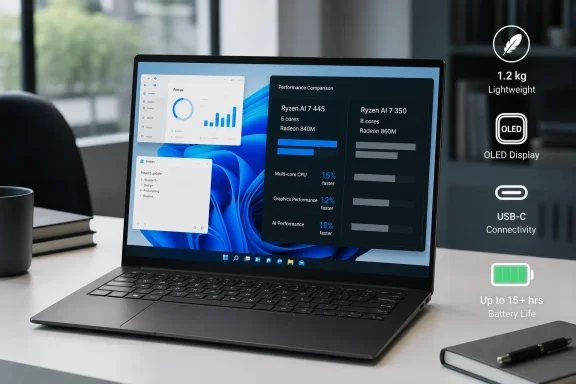 Ryzen AI 7 445 Is a Tier Shift, Not a Straight Refresh
Ultrabookreview tested a retail Zenbook 14 UM3406GA with 32 GB of LPDDR5X-7500 memory, a 1 TB PCIe 4.0 SSD, and a 1920×1200 touch OLED panel. In its 10-minute Cinebench R23 loop, the notebook scored 10,016 points in Performance mode. The site says that is roughly 20 percent behind its tested Ryzen AI 7 350 Zenbook 14 in sustained CPU work, while the Radeon 840M’s reduced graphics resources leave it much further behind for GPU-heavy tasks.
That conclusion is consistent with independent testing from Notebookcheck. Its Ryzen AI 7 445 results from other laptop implementations put the processor close to AMD’s prior Ryzen AI 5 340 in several workloads, and its data shows substantially weaker integrated graphics performance than Intel Core Ultra 7 256V systems. Cooling limits, memory configuration, and firmware can move individual laptop results, but they cannot change the central hardware comparison: the 445 has four Radeon compute units, while the Ryzen AI 7 350’s Radeon 860M has eight.
Asus’s own product page is unusually transparent about the present configuration, listing the Zenbook 14 with the Ryzen AI 7 445, Radeon 840M, up to 32 GB of RAM, 1 TB of storage, and Wi-Fi 6E. It does not position the chip against the 2025 Ryzen AI 7 350 model, however. That omission matters more than the marketing language around “AI,” because the NPU’s 50 TOPS still clears the baseline for Copilot+ PC features while the CPU and GPU cuts alter conventional performance.
For an IT buyer, this is a reminder to specify the complete platform rather than a processor family. “Zenbook 14 Ryzen AI 7” is no longer enough for inventory records, purchasing approvals, or user recommendations. The model suffix — UM3406KA versus UM3406GA — and the exact CPU designation now determine whether the machine has eight CPU cores and Radeon 860M graphics, or six cores and Radeon 840M graphics.
The 2025 Zenbook May Be the Better Performance Purchase
Ultrabookreview’s verdict is blunt: where the 2025 Zenbook 14 with Ryzen AI 7 350 remains available at a similar price, it recommends buying the prior model instead. That is a defensible conclusion from the processor specifications and testing, particularly for anyone who does local development builds, regular image processing, light CAD work, virtual-machine use, or occasional gaming.
The 2026 model remains quick enough for the tasks that dominate many business and personal Windows PCs. The review reports a Geekbench 6 score of 2,615 single-core and 10,557 multi-core, along with PCMark 10 results that indicate a responsive machine for browser-heavy use, Microsoft 365 work, video calls, and everyday multitasking. It also maintained its Performance profile when unplugged, which is useful for users who need predictable short bursts of work away from a charger.
But the available performance modes impose a clear tradeoff. Asus’s Performance mode allows around 28 W sustained CPU power and produced fan noise of roughly 42 dBA in the review. Standard mode reduced that sustained target to 20 W and noise to about 35 dBA. Whisper mode lowered power to 15 W, with sub-30 dBA fan noise, but also reduced the Cinebench R15 loop result to about three quarters of Performance mode.
That means the configuration makes the most sense when it stays in Standard mode: quiet enough for an office, fast enough for normal desktop work, and efficient enough to provide strong battery life. Running it in Performance mode to chase throughput exposes the limits of the single-fan cooling design and still does not turn the Radeon 840M into a serious creative or gaming GPU.
The review’s game results reinforce that boundary. Older titles can run at low settings and FHD+ resolution around the 30–40 fps range, but modern games are not a sensible purchasing target for this device. The same applies to workloads that lean on GPU acceleration. A user who needs those capabilities should either locate a Ryzen AI 7 350 Zenbook 14, move up to a Ryzen AI 7 450 or Ryzen AI 9 configuration, or choose a laptop with a discrete GPU.
OLED Quality Depends on the Exact Panel
The UM3406GA’s 14-inch OLED is one of the laptop’s most attractive features, but its configuration needs closer reading than a generic “Lumina OLED” label suggests. Ultrabookreview’s unit had the 1920×1200, 60 Hz touch panel and measured sustained brightness at roughly 350 nits. The reviewer found that adequate indoors but difficult under bright ambient light due to the glossy surface.
Asus advertises the touchscreen at up to 500 nits and the non-touch version at up to 600 nits. Those figures are not necessarily a contradiction: vendor claims may refer to a peak brightness condition, while a reviewer may measure sustained full-screen brightness. Asus does not clearly provide the panel-by-panel test methodology on the retail page, so buyers should not assume every Zenbook 14 OLED has the same brightness behavior merely because the product family shares a display name.
The more material limitation for Windows users is that this is a 60 Hz panel. Asus confirms a 60 Hz setting in its own battery test configuration. A 60 Hz OLED can still look excellent in video and ordinary desktop use, with deep blacks and wide color, but it will feel less fluid than 90 Hz or 120 Hz OLED options when scrolling lengthy documents, moving through code, or using touch gestures.
Ultrabookreview also flags the screen-door grain that can be visible on light backgrounds on its touch OLED sample. That is a practical concern for readers who spend their day in white-background applications: File Explorer, Word, Excel, browsers, ticketing systems, and development tools. It is not an issue every buyer will notice or consider disqualifying, but it is the kind of characteristic that should be seen in person before committing to a touch configuration.
OLED longevity remains another operational consideration. Asus says its Windows configuration enables Dark mode by default and uses screen timeout and OLED Care features including pixel shifting and pixel refresh to reduce burn-in risk. Those measures help, but organizations deploying these laptops for static dashboards, point-of-sale displays, monitoring consoles, or always-on office applications should retain normal screen-saver and display-sleep policies. The best OLED warranty policy cannot restore lost time if a device is constantly showing the same high-contrast Windows UI.
Battery Life Is the 2026 Model’s Strongest Argument
The performance downgrade buys something tangible: endurance. Ultrabookreview recorded roughly 10–12 hours in light text work, 13–15 hours in video playback, and 8–10 hours of web browsing at approximately 120 nits, with Windows 11 set to Best Power Efficiency. Gaming cut runtime to around two hours, as expected.
Those figures should be read as one reviewer’s controlled-use results rather than a promise for every panel, browser extension set, management agent, or corporate Wi-Fi environment. Still, they fit the hardware’s role. The Ryzen AI 7 445, 75 Wh battery, and 60 Hz 1200p OLED form a coherent package for portable productivity, particularly when the notebook is not asked to sustain heavy workloads.
Asus retains useful physical features that are increasingly scarce in thin laptops: HDMI, two USB-C ports with charging and video support, one USB4-capable USB-C port, a USB-A port, a 180-degree hinge, an FHD IR camera, and a physical camera shutter. The SSD is replaceable, although the wireless module is not a standard M.2 card. Wi-Fi 6E is serviceable for most deployments, but its inclusion rather than Wi-Fi 7 limits the machine’s future-facing appeal at a time when newer client hardware is moving up.
The Asus Zenbook 14 UM3406GA is therefore a sensible purchase only at the price its hardware implies: an efficient, well-built OLED notebook for indoor productivity, not a premium-performance Ryzen 7 system. If the 2025 UM3406KA with Ryzen AI 7 350 is discounted within reach, it offers more CPU and far more graphics headroom in essentially the same practical design.