
ASUS’s 2026 Zenbook S 14 UX5406AA is a genuine all-day Windows ultraportable with far stronger multi-core CPU performance than its predecessor, but the Core Ultra 9 badge conceals a serious trade-off: this configuration uses Intel’s entry-level four-core Xe3 integrated GPU, which is slower in graphics work than the 2024 Zenbook S 14’s Arc 140V. For buyers weighing the reported ₹239,990 Indian price of the UX5406AA-SU188WS, battery life, portability and CPU-heavy productivity are the reasons to buy it; gaming, GPU-accelerated creative work and long-term memory flexibility are reasons to look elsewhere.
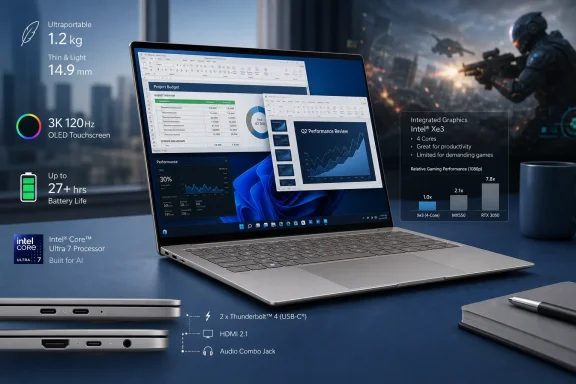
The month-long report published by PC-Tablet describes a 1.20 kg, 14-inch machine that handled office work, browser-heavy multitasking, photo editing, short-form video work and calls without excessive heat, while returning more than 10 hours of active use. ASUS’s India specifications confirm the core configuration: a 16-core, 16-thread Intel Core Ultra 9 386H; 32GB of LPDDR5X memory; a 1TB PCIe 4.0 SSD; a 77Wh battery; and a 2,880 × 1,800, 120Hz OLED touchscreen.
Independent testing from Notebookcheck broadly supports the battery-life claim, and gives it more useful boundaries. Its standardized Wi-Fi web test reached 16 hours 11 minutes, dropping to 10 hours 14 minutes at maximum brightness. That makes the source report’s 10-to-12-hour estimate credible for a real workday involving Wi-Fi, a bright OLED panel, chats and meetings—not an optimistic manufacturer number.
The important qualification is that ASUS’s headline “up to 27 hours” figure is a video-playback result under conditions that do not resemble a normal workday: Wi-Fi and keyboard lighting disabled, Windows set to Balanced, and the display at 150 nits. ASUS discloses those conditions in its own footnotes. The Zenbook’s battery is excellent, but prospective buyers should treat 10 hours under a bright, connected workload as the safer planning number.
The UX5406AA replaces the previous Zenbook S 14’s Lunar Lake platform with Intel’s Panther Lake Core Ultra 9 386H. ASUS lists 16 CPU cores, a 4.9GHz maximum turbo frequency, 18MB cache and an NPU rated for up to 50 TOPS. Intel’s own Series 3 reference material confirms that the 386H consists of 16 cores and carries the 50-TOPS NPU, but also shows the processor’s integrated graphics as basic “Intel Graphics” with four Xe3 cores rather than an Arc B390-class GPU.
That implementation decision shapes the laptop more than the Ultra 9 label does. Notebookcheck measured substantially improved CPU performance over the old Zenbook S 14 and found the processor can sustain 28W after short bursts up to 57W. In practical Windows use, that supports PC-Tablet’s experience of heavy Chrome sessions, large PDFs, Slack, streaming and office applications remaining responsive. It also means light 1080p editing, routine 4K timeline work, code compilation and CPU-bound media exports are within the machine’s intended range.
But ASUS has paired that upgraded CPU with a graphics block that is weaker than the prior generation’s Arc 140V. Notebookcheck explicitly found the UX5406AA’s four-Xe3-core iGPU slower than the old Zenbook S 14’s graphics. Its gaming measurements underline the limitation: Cyberpunk 2077 averaged roughly 39 frames per second at 1080p Low with FSR disabled, then fell to about 29 fps at Medium and 21 fps at Ultra. Those are respectable figures for an integrated GPU at low settings, but they are not the results of a premium machine intended for graphics-intensive work.
This does not make the Zenbook S 14 a bad creator laptop. For Lightroom catalogs, browser graphics, document design, call backgrounds and occasional short videos, the CPU, RAM and fast SSD matter more than peak GPU throughput. It does mean that an editor working frequently with GPU effects, high-resolution color grading, 3D tools, AI image generation or modern games should not mistake its 32GB memory and “Ultra 9” branding for workstation-class graphics capability.
The better comparison is not a gaming laptop. It is a high-end mobile office PC that can absorb demanding bursts of CPU work while remaining light enough to carry daily.
The 16:10 aspect ratio also deserves more attention than it usually gets in spec sheets. On a 14-inch system it provides meaningful extra vertical room for Word documents, spreadsheets, remote admin consoles and browser-based management portals. It reduces scrolling in precisely the work patterns for which this system is being sold.
However, “OLED” should not be read as an automatic win for every buyer. Notebookcheck detected pulse-width modulation at 960Hz across the brightness range. That is a substantially higher frequency than the slow flicker that causes problems for many users, and most people will not notice it. Yet anyone who knows they are PWM-sensitive should test this exact panel before committing. A glossy or reflective OLED is also an imperfect fit for bright offices, hotel lobbies and outdoor work; PC-Tablet encountered reflections under overhead lighting, and raising brightness only partly solves reflection rather than eliminating it.
There is another detail worth separating from the review’s description of an aluminum build. ASUS markets the lid material as Ceraluminum, its ceramic-metal treatment, while the system uses an integrated metal chassis. The practical takeaway is favorable: independent reviews and the source report agree that the chassis is rigid, slim and relatively resistant to smudges. But “Ceraluminum” is a branded material treatment, not a reason to infer the same repairability or dent resistance as a thicker conventional aluminum notebook.
Notebookcheck found that the laptop is nearly silent in its Whisper profile, topping out around 28 dB(A), while its Performance profile can reach 49.1 dB(A) under load. ASUS’s “under 25 dB” statement applies to light workloads, not sustained rendering, compiling, benchmarking or extended 4K exports. The same testing found that the new model is louder under load than the preceding Lunar Lake Zenbook S 14.
This is the price of the CPU upgrade. The Zenbook’s cooling system appears effective enough to maintain sustained performance, and PC-Tablet’s observation that the keyboard deck stayed comfortable is encouraging. But “does not overheat” should not be mistaken for “remains quiet at full speed.” An executive writing documents or taking calls will hear little; a creator exporting footage in Performance mode will hear the fans.
For IT buyers, the profile behavior has a straightforward implication: leave normal fleets in Whisper or Standard mode and reserve Performance for users who genuinely need the CPU throughput. The test results show a notable performance jump when moving to Performance mode, but also a sharp rise in noise. A managed power policy can preserve the machine’s central appeal—quiet portability—without denying users a faster mode when they need it.
The included software bundle is also unusually concrete for the Indian market. ASUS lists Windows 11 Home, Microsoft Office Home 2024 with a perpetual license, one year of Microsoft 365 Basic with 100GB cloud storage, and a one-month Adobe Creative Cloud membership. Buyers should note ASUS’s redemption condition: Microsoft and Windows bundled benefits must be redeemed within 90 days of initial setup. The Adobe offer shown on ASUS’s India specifications is scheduled to end on August 31, 2026, so it should be verified at checkout rather than assumed for later purchases.
The machine’s upgrade story is less generous. The 32GB LPDDR5X memory is soldered and cannot be expanded; Notebookcheck also reports that the Wi-Fi module is soldered. The M.2 2280 SSD can be replaced, which at least gives owners a path to more storage later. Still, at this price, 32GB should be regarded as a fixed lifetime ceiling rather than a generous starting point.
That is the main purchasing test. If 32GB is enough for the full expected life of the laptop and the work is CPU-heavy rather than GPU-heavy, the UX5406AA is a polished Windows travel machine with battery endurance that has been independently borne out. If the requirement includes future RAM expansion, sustained quiet performance under exports, or a serious graphics pipeline, the same premium budget should be aimed at a system with a stronger Arc B-series iGPU or discrete graphics rather than this particular Ultra 9 configuration.
Independent testing from Notebookcheck broadly supports the battery-life claim, and gives it more useful boundaries. Its standardized Wi-Fi web test reached 16 hours 11 minutes, dropping to 10 hours 14 minutes at maximum brightness. That makes the source report’s 10-to-12-hour estimate credible for a real workday involving Wi-Fi, a bright OLED panel, chats and meetings—not an optimistic manufacturer number.
The important qualification is that ASUS’s headline “up to 27 hours” figure is a video-playback result under conditions that do not resemble a normal workday: Wi-Fi and keyboard lighting disabled, Windows set to Balanced, and the display at 150 nits. ASUS discloses those conditions in its own footnotes. The Zenbook’s battery is excellent, but prospective buyers should treat 10 hours under a bright, connected workload as the safer planning number.
 The Panther Lake CPU upgrade is real, but graphics went backward
The UX5406AA replaces the previous Zenbook S 14’s Lunar Lake platform with Intel’s Panther Lake Core Ultra 9 386H. ASUS lists 16 CPU cores, a 4.9GHz maximum turbo frequency, 18MB cache and an NPU rated for up to 50 TOPS. Intel’s own Series 3 reference material confirms that the 386H consists of 16 cores and carries the 50-TOPS NPU, but also shows the processor’s integrated graphics as basic “Intel Graphics” with four Xe3 cores rather than an Arc B390-class GPU.That implementation decision shapes the laptop more than the Ultra 9 label does. Notebookcheck measured substantially improved CPU performance over the old Zenbook S 14 and found the processor can sustain 28W after short bursts up to 57W. In practical Windows use, that supports PC-Tablet’s experience of heavy Chrome sessions, large PDFs, Slack, streaming and office applications remaining responsive. It also means light 1080p editing, routine 4K timeline work, code compilation and CPU-bound media exports are within the machine’s intended range.
But ASUS has paired that upgraded CPU with a graphics block that is weaker than the prior generation’s Arc 140V. Notebookcheck explicitly found the UX5406AA’s four-Xe3-core iGPU slower than the old Zenbook S 14’s graphics. Its gaming measurements underline the limitation: Cyberpunk 2077 averaged roughly 39 frames per second at 1080p Low with FSR disabled, then fell to about 29 fps at Medium and 21 fps at Ultra. Those are respectable figures for an integrated GPU at low settings, but they are not the results of a premium machine intended for graphics-intensive work.
This does not make the Zenbook S 14 a bad creator laptop. For Lightroom catalogs, browser graphics, document design, call backgrounds and occasional short videos, the CPU, RAM and fast SSD matter more than peak GPU throughput. It does mean that an editor working frequently with GPU effects, high-resolution color grading, 3D tools, AI image generation or modern games should not mistake its 32GB memory and “Ultra 9” branding for workstation-class graphics capability.
The better comparison is not a gaming laptop. It is a high-end mobile office PC that can absorb demanding bursts of CPU work while remaining light enough to carry daily.
The 3K OLED is excellent, with two practical caveats
The 14-inch 3K OLED panel is one of the Zenbook’s strongest assets. ASUS specifies 100% DCI-P3 coverage, PANTONE validation, a 120Hz refresh rate, 500 nits of standard brightness and up to 1,100 nits HDR peak brightness, along with VESA DisplayHDR True Black 1000 certification. PC-Tablet reported convincing dark-mode contrast, sharp text and usable color for RAW editing, which aligns with the independent assessment of an accurate, fast 120Hz touchscreen.The 16:10 aspect ratio also deserves more attention than it usually gets in spec sheets. On a 14-inch system it provides meaningful extra vertical room for Word documents, spreadsheets, remote admin consoles and browser-based management portals. It reduces scrolling in precisely the work patterns for which this system is being sold.
However, “OLED” should not be read as an automatic win for every buyer. Notebookcheck detected pulse-width modulation at 960Hz across the brightness range. That is a substantially higher frequency than the slow flicker that causes problems for many users, and most people will not notice it. Yet anyone who knows they are PWM-sensitive should test this exact panel before committing. A glossy or reflective OLED is also an imperfect fit for bright offices, hotel lobbies and outdoor work; PC-Tablet encountered reflections under overhead lighting, and raising brightness only partly solves reflection rather than eliminating it.
There is another detail worth separating from the review’s description of an aluminum build. ASUS markets the lid material as Ceraluminum, its ceramic-metal treatment, while the system uses an integrated metal chassis. The practical takeaway is favorable: independent reviews and the source report agree that the chassis is rigid, slim and relatively resistant to smudges. But “Ceraluminum” is a branded material treatment, not a reason to infer the same repairability or dent resistance as a thicker conventional aluminum notebook.
Quiet office behavior, loud performance mode
ASUS says the Zenbook S 14’s dual fans, vapor chamber and venting can maintain less than 25 dB during light workloads, and claims a 28W operating envelope without throttling under heavy loads. The two claims can coexist, but they apply to different modes and use cases.Notebookcheck found that the laptop is nearly silent in its Whisper profile, topping out around 28 dB(A), while its Performance profile can reach 49.1 dB(A) under load. ASUS’s “under 25 dB” statement applies to light workloads, not sustained rendering, compiling, benchmarking or extended 4K exports. The same testing found that the new model is louder under load than the preceding Lunar Lake Zenbook S 14.
This is the price of the CPU upgrade. The Zenbook’s cooling system appears effective enough to maintain sustained performance, and PC-Tablet’s observation that the keyboard deck stayed comfortable is encouraging. But “does not overheat” should not be mistaken for “remains quiet at full speed.” An executive writing documents or taking calls will hear little; a creator exporting footage in Performance mode will hear the fans.
For IT buyers, the profile behavior has a straightforward implication: leave normal fleets in Whisper or Standard mode and reserve Performance for users who genuinely need the CPU throughput. The test results show a notable performance jump when moving to Performance mode, but also a sharp rise in noise. A managed power policy can preserve the machine’s central appeal—quiet portability—without denying users a faster mode when they need it.
Good port selection does not fix the upgrade limits
ASUS has avoided one common ultraportable mistake: it kept useful physical connectivity. The UX5406AA includes two Thunderbolt 4/USB4 ports with DisplayPort and Power Delivery, HDMI 2.1, USB-A 3.2 Gen 2 and a 3.5mm audio jack. That supports desk docking without a mandatory dongle, and the USB-C charging support gives travelers an alternative to carrying the included 68W adapter.The included software bundle is also unusually concrete for the Indian market. ASUS lists Windows 11 Home, Microsoft Office Home 2024 with a perpetual license, one year of Microsoft 365 Basic with 100GB cloud storage, and a one-month Adobe Creative Cloud membership. Buyers should note ASUS’s redemption condition: Microsoft and Windows bundled benefits must be redeemed within 90 days of initial setup. The Adobe offer shown on ASUS’s India specifications is scheduled to end on August 31, 2026, so it should be verified at checkout rather than assumed for later purchases.
The machine’s upgrade story is less generous. The 32GB LPDDR5X memory is soldered and cannot be expanded; Notebookcheck also reports that the Wi-Fi module is soldered. The M.2 2280 SSD can be replaced, which at least gives owners a path to more storage later. Still, at this price, 32GB should be regarded as a fixed lifetime ceiling rather than a generous starting point.
That is the main purchasing test. If 32GB is enough for the full expected life of the laptop and the work is CPU-heavy rather than GPU-heavy, the UX5406AA is a polished Windows travel machine with battery endurance that has been independently borne out. If the requirement includes future RAM expansion, sustained quiet performance under exports, or a serious graphics pipeline, the same premium budget should be aimed at a system with a stronger Arc B-series iGPU or discrete graphics rather than this particular Ultra 9 configuration.
References
- Primary source: pc-tablet.com
Published: 2026-08-05T05:37:39+00:00
Loading…
pc-tablet.com - Related coverage: pcgamer.com
Loading…
www.pcgamer.com - Related coverage: notebookcheck.net
Loading…
www.notebookcheck.net - Related coverage: musicphotolife.com
Loading…
musicphotolife.com - Related coverage: pokde.net
Loading…
pokde.net - Related coverage: notebookcheck.net
Loading…
www.notebookcheck.net - Related coverage: hitechcentury.com
Loading…
hitechcentury.com - Related coverage: asus.com
Loading…
www.asus.com - Related coverage: thehikaku.net
Loading…
thehikaku.net - Related coverage: asus.com
Loading…
www.asus.com - Related coverage: smartprix.com
Loading…
www.smartprix.com - Related coverage: xpertpick.com
Loading…
www.xpertpick.com - Related coverage: techradar.com
Loading…
www.techradar.com - Related coverage: t3.com
I've tested dozens of laptops and didn't expect Lenovo's "Gen 11" Yoga Pro to be such a powerhouse – as it's got an impressive discrete GPU | T3
Lenovo's laptop has a crazy name, but is a great machinewww.t3.com