
That distinction should guide a purchase more than the “Ultra 9” badge. Asus lists the Core Ultra 9 386H as a 16-core, 16-thread Core Ultra Series 3 processor with a 50 TOPS NPU, 32 GB of LPDDR5X memory in the reviewed configuration, Intel Graphics, a 120 Hz OLED touchscreen, Wi‑Fi 7, two Thunderbolt 4 ports, HDMI, USB-A, and a 1.2 kg chassis. Those are strong specifications for a machine that is roughly 11 mm thin. The limitation is that the 386H does not carry the higher-end Arc B390 integrated graphics found in Intel’s Core Ultra X-series designs.
Ultrabookreview’s August 21 review is especially useful because it tests the laptop after months of use rather than treating launch-day behavior as final. Its central finding is credible and independently supported: the new S14 makes a meaningful leap in sustained CPU workloads over the older Core Ultra 7 258V version, but Asus has not changed the physical design enough to make that performance free.
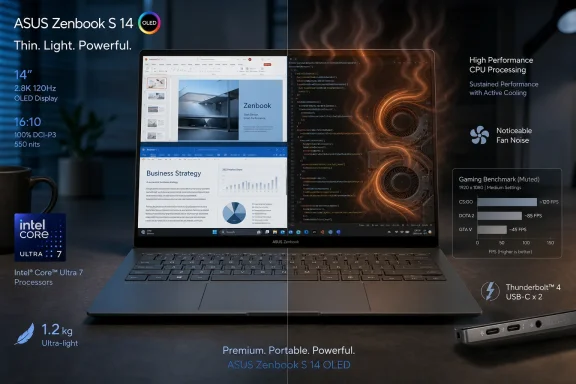 The 386H changes what the Zenbook S14 is good at
The 2024 Zenbook S14 was built around Lunar Lake’s efficiency-oriented Core Ultra 7 258V. The 2026 model uses Intel’s Panther Lake Core Ultra 9 386H: four performance cores, eight efficiency cores, and four low-power efficiency cores. Intel confirms that it is a 16-core, 16-thread part with boost clocks up to 4.9 GHz.
In Ultrabookreview’s testing, Asus’s Performance profile held roughly 28 W in sustained CPU work, producing about 2,300 points in a Cinebench R15 loop and 16,758 points in Cinebench R23’s best run. Its own comparison with the prior S14 indicated roughly a 50% uplift in sustained CPU performance. Notebookcheck measured an even starker gap in its Cinebench R23 results: 18,553 points for the UX5406AA against 9,114 points for the prior Core Ultra 7 258V S14.
Different labs, firmware versions, ambient temperatures, benchmarks, and test settings mean the exact percentages should not be treated as interchangeable. The important point is consistent across both reports: this is no longer merely a premium web-and-office ultrabook. Developers compiling projects, users working through code-analysis jobs, Lightroom exports, CPU rendering, virtual machines, and other sustained multithreaded tasks can see an actual benefit from the new processor.
Single-threaded gains are smaller. Notebookcheck recorded 2,066 points for the 386H and 1,865 for the 258V in Cinebench R23 single-core testing. That means buyers whose workload is mostly browser tabs, Office, Teams, remote desktops, and lightweight scripting should not assume the new model will feel dramatically different from a discounted Lunar Lake predecessor. It will feel quick, but the upgrade’s value is concentrated in work that stays busy across many cores.
The thin chassis makes Performance mode a conditional feature
Asus gives the S14 three meaningful behavior choices in MyAsus: Performance, Standard, and Whisper. Ultrabookreview measured approximately 28 W sustained in Performance, 17 W in Standard, and 12 W in Whisper. The difference is not cosmetic.
In Ultrabookreview’s sustained CPU loop, Standard mode lost about one quarter of Performance-mode throughput. In Blender, the publication reported that the quieter mode increased a CPU render time by more than 30%. Those are material reductions for a machine sold partly on the strength of its new processor.
The trade-off is acoustics. Ultrabookreview recorded about 45 dBA at head level in Performance mode and about 35 dBA in Standard. Notebookcheck reached an even higher maximum of 49 dBA in its Performance testing and recommends Whisper mode unless full performance is necessary. The two outlets did not record precisely the same peak noise, but the direction of their finding is identical: the S14’s top performance profile is loud for a 14-inch premium ultrabook.
This is the part of the refresh that is easiest to miss when comparing benchmark charts. A 28 W CPU ceiling is useful, but only if a buyer accepts fans that can approach the noise level associated with considerably larger performance notebooks. Conversely, Standard mode makes for a much more pleasant everyday machine, but it also means paying $1,899 list price for a processor that Asus is deliberately restraining after a sustained workload begins.
That is not a defect in the conventional sense. The laptop maintains safe internal and exterior temperatures in the available testing, and its profile choices let owners decide when speed is worth the noise. It is a design decision. Asus has preserved the S14’s extreme thinness and 1.2 kg weight rather than adding the millimeters necessary for a larger heatsink, larger fans, a wider exhaust path, and a quieter higher-power operating point.
Intel Graphics is the weaker half of this Panther Lake package
The naming creates an expectation problem. “Core Ultra 9” suggests a top-tier all-rounder, but Intel’s processor label does not tell buyers which integrated GPU tier they are getting. The Core Ultra 9 386H in the Zenbook S14 uses Intel Graphics with four Xe3 cores. It is not the 12-core Arc B390 iGPU paired with Core Ultra X7 and X9 chips in more expensive Panther Lake systems.
Ultrabookreview describes the 386H graphics as close to the outgoing Arc 140V and says its CPU-heavy workloads gain far more than its GPU workloads. Notebookcheck is blunter: it found the new S14’s graphics performance a little lower than the old Lunar Lake S14 in several tests. In its X-Plane 11 result, the UX5406AA recorded 54.6 fps, essentially tied with the older 258V model’s 54 fps.
The practical message is straightforward. The Zenbook S14 can handle older and less demanding games at lowered settings, and XeSS can help in titles that support it. It is also competent for display output, media consumption, and moderate GPU-accelerated work. But a buyer choosing between this and a Panther Lake laptop with Arc B390 should not treat the systems as equivalents simply because both have Intel Core Ultra Series 3 branding.
For Windows developers, the split matters as well. CPU-limited compiling, containerized development, and local virtualized tasks favor the 386H S14 over the older model. GPU compute, heavier Blender work, local graphics development, and current games are better reasons to step up to a Core Ultra X-series laptop—or to choose a system with discrete graphics—rather than hoping a driver update transforms this four-Xe-core implementation.
The brighter OLED is real, but the touchscreen layer remains a compromise
The new 14-inch 2.8K, 120 Hz OLED panel is the refresh’s other major improvement. Ultrabookreview measured 500.67 cd/m² at the screen center, while Notebookcheck measured 458 cd/m² and reports that the panel’s maximum SDR brightness rose from about 370 nits in the prior generation to 450 nits, with HDR peak brightness increasing substantially as well.
The small variation in measured SDR brightness is normal across independent review methods and units. Both outlets agree that the new display is notably brighter than the old one, making a glossy touchscreen more usable under indoor lighting and in bright environments. The panel retains OLED’s deep blacks, contrast, fast response characteristics, wide color gamut, and 120 Hz refresh rate.
There is a price to that touch capability. Ultrabookreview and Notebookcheck both call out visible grain or a screen-door effect on bright backgrounds and fine text, attributed to the touch digitizer layer. Notebookcheck also detected PWM behavior. Buyers who spend all day reading code, documents, terminals, spreadsheets, or light-background web pages should see the display in person if possible. The S14’s OLED is visually impressive for video and dark interfaces; it is less universally comfortable than a good matte IPS or matte OLED panel.
The display specification also exposes a market choice Asus has made. A premium laptop at this price does not appear to offer a mainstream retail non-touch OLED option in the United States, even though Asus’s specifications mention configuration variation by region. Touch is therefore not an optional extra for most buyers—it is part of the display trade-off.
The real buying decision is between the new S14 and a discounted old one
Notebookcheck reports a $1,899 U.S. price for the 32 GB/1 TB Zenbook S14 UX5406AA. Ultrabookreview says it has already seen U.S. pricing as low as $1,649, while older UX5406SA Lunar Lake models remained around $1,400. Those numbers can change quickly, but the gap defines the decision.
At a modest sale-price difference, the 2026 model is the stronger long-term Windows machine. The 32 GB memory configuration, faster sustained CPU, 77 Wh battery, bright OLED, USB-A, HDMI, Thunderbolt 4, Wi‑Fi 7, and compact build make it unusually capable for travel-heavy users who also need x86 Windows performance without relying on Arm compatibility.
At the full $1,899 list price, it should be judged against laptops with better cooling and higher-tier graphics rather than only against the previous S14. Asus has delivered a real generational CPU gain, but it has not removed the underlying S-series compromises: soldered memory, a shallow 1.1 mm keyboard, a restricted display hinge angle, a glossy touch OLED with visible texture on pale content, and fan behavior that makes its best benchmark results situational.
The 2026 Zenbook S14 is therefore best bought by someone who wants a very light Windows laptop that can briefly become a serious CPU workstation. Anyone expecting a quiet all-day development machine at maximum performance, or a premium ultrabook with a meaningful gaming and GPU-compute upgrade, should look beyond the Core Ultra 9 label and compare the cooling design and iGPU configuration first.