
Windows Central’s August 4 Bitdefender promotion identifies a real household problem: the average home now has a mix of Windows 11 PCs, Macs, Android phones, iPhones, tablets, TVs, cameras, and cloud accounts. Keeping that collection patched, protected, and accessible to the right people is harder than keeping one family PC safe.
But the article overstates what an all-in-one subscription can solve. A unified suite can make household security easier to administer. It does not, by itself, secure the router, isolate untrusted smart-home devices, enforce multifactor authentication on email, or stop a family member from approving a convincing phishing prompt. Those remain the controls that determine whether a compromised device becomes a contained incident or a household-wide problem.
Bitdefender’s current consumer lineup does offer a legitimate management benefit across Windows, macOS, Android, and iOS. The important qualification is that “one platform” describes the subscription, dashboard, and some shared services far more than it describes identical endpoint protection on every operating system.
The Windows Central piece argues that using different tools on different devices creates dangerous gaps. That is directionally correct when it means no one knows which devices are unpatched, which account has been breached, or whether a child’s tablet has a weak screen lock. A central console that shows device status and lets a household deploy subscriptions can reduce that administrative failure.
Bitdefender Central is designed for that role. Bitdefender says it can manage installations, subscriptions, and the security status of Windows, Mac, Android, and mobile devices from one account. Its Total Security plan supports those four platforms, and its current U.S. sales page lists both an individual five-device tier and a family tier with five accounts and 25 devices.
That is a material detail missing from Windows Central’s plan comparison, which describes Total Security as simply “up to 5 devices.” Five devices is the individual-plan limit, not the upper limit available under the product name. For a household with several phones, tablets, laptops, and a shared desktop, the difference between five and 25 protected devices is the difference between a partial deployment and a workable family plan.
The other gap is platform capability. Third-party security software does not have the same reach on an iPhone as it has on a Windows 11 laptop. Apple’s iPhone and iPad security architecture relies on code signing, sandboxing, App Store review, and its own malware checks. An iOS security app can add privacy, identity, scam, or web-protection features, but it cannot operate as a traditional full-system antivirus engine scanning every process and file in the way Bitdefender Total Security can on Windows.
Windows Central’s blanket statement that every device needs an antivirus solution therefore muddies the actual decision. Every device needs to be secured, updated, locked, and backed up where appropriate. A Windows PC benefits from active antivirus and ransomware protection. An iPhone’s most consequential protections are current iOS updates, a device passcode, account security, and cautious handling of links, app permissions, and sign-in prompts.
Windows 11 already ships with Microsoft Defender Antivirus, Defender Firewall, SmartScreen, phishing protections, and other controls in Windows Security. Microsoft says Defender Antivirus switches off when a working third-party antivirus product is installed. Buying Bitdefender does not layer a second simultaneous real-time antivirus engine over Defender; it replaces that component while adding Bitdefender’s own protection stack and management services.
The supplied Verizon 2025 Data Breach Investigations Report statistic is also accurate in context. Verizon reported that the human element was involved in roughly 60% of breaches it analyzed, including social engineering, mistakes, and misuse. Yet the report is based on investigated organizational breaches, not a measurement of how often a child’s unprotected Android tablet leads to a complete home-network compromise.
That distinction changes the practical takeaway. The highest-value household protections are often not an additional endpoint agent:
This is where the “all-in-one” pitch becomes too neat. A household with one paid security vendor but no MFA, no tested backups, no router maintenance, and no network separation may look organized in a dashboard while retaining the most exploitable weaknesses.
The upgrade to Premium Security is therefore chiefly a VPN purchase. Bitdefender says Premium Security combines Total Security with Premium VPN unlimited traffic and Premium Support. That can be useful for travelers and people frequently using public Wi-Fi, but it should not be sold as a general cure for unsafe internet use. A VPN encrypts the connection between the device and the VPN service; it does not make phishing pages legitimate, reverse a fraudulent payment, or protect an account whose password and MFA approval have been surrendered to a scammer.
The Ultimate tier adds identity-focused services, including monitoring and restoration support. Bitdefender advertises up to $2 million in identity-theft insurance for eligible plans, but consumers should read the plan terms rather than treat that figure as cash paid after any identity incident. Bitdefender’s own identity-theft material describes coverage as reimbursement for specified out-of-pocket expenses and lost wages, and identifies the service as U.S.-only. Insurance, credit monitoring, and restoration specialists are useful after an identity event; they do not prevent an attacker from accessing an email account whose recovery methods remain insecure.
There is also a naming issue worth watching. Bitdefender’s current sales pages distinguish Ultimate Security from Ultimate Security Plus options, while the Windows Central article compresses identity monitoring, insurance, and restoration into “Ultimate Security.” Consumers should verify the exact SKU, device count, renewal price, identity-service eligibility, and insurance terms before checkout. Bitdefender’s lineup is broad enough that the headline plan name alone is no longer a reliable feature list.
That is credible evidence that Bitdefender’s Windows consumer product performs well in that test. It is not proof that every Bitdefender feature is equally effective, that the same result applies to iOS or Android, or that a household can ignore patching and account security. Independent tests measure a defined set of samples, products, and conditions; they do not measure whether a family enables MFA, checks router updates, or spots a fake Microsoft 365 login page.
The more useful conclusion is narrower than Windows Central’s “essential” framing: centralized security is worth paying for when it makes a household consistently use protections it would otherwise neglect. That could mean Bitdefender Total Security for a family that needs cross-platform deployment and a central device view. It could also mean Windows Security on well-maintained Windows 11 PCs, Apple’s built-in protections on iPhones, a reputable password manager, router hygiene, and a modestly segmented network.
A complete household security plan should make the weakest device less dangerous. It should not pretend that a single subscription makes the weakest device disappear.
Bitdefender’s current consumer lineup does offer a legitimate management benefit across Windows, macOS, Android, and iOS. The important qualification is that “one platform” describes the subscription, dashboard, and some shared services far more than it describes identical endpoint protection on every operating system.
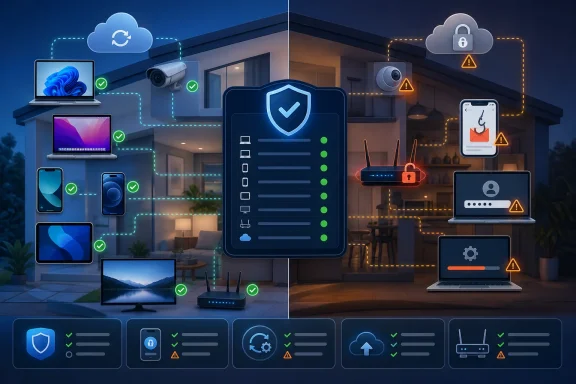 One dashboard does not make every device equally protected
The Windows Central piece argues that using different tools on different devices creates dangerous gaps. That is directionally correct when it means no one knows which devices are unpatched, which account has been breached, or whether a child’s tablet has a weak screen lock. A central console that shows device status and lets a household deploy subscriptions can reduce that administrative failure.Bitdefender Central is designed for that role. Bitdefender says it can manage installations, subscriptions, and the security status of Windows, Mac, Android, and mobile devices from one account. Its Total Security plan supports those four platforms, and its current U.S. sales page lists both an individual five-device tier and a family tier with five accounts and 25 devices.
That is a material detail missing from Windows Central’s plan comparison, which describes Total Security as simply “up to 5 devices.” Five devices is the individual-plan limit, not the upper limit available under the product name. For a household with several phones, tablets, laptops, and a shared desktop, the difference between five and 25 protected devices is the difference between a partial deployment and a workable family plan.
The other gap is platform capability. Third-party security software does not have the same reach on an iPhone as it has on a Windows 11 laptop. Apple’s iPhone and iPad security architecture relies on code signing, sandboxing, App Store review, and its own malware checks. An iOS security app can add privacy, identity, scam, or web-protection features, but it cannot operate as a traditional full-system antivirus engine scanning every process and file in the way Bitdefender Total Security can on Windows.
Windows Central’s blanket statement that every device needs an antivirus solution therefore muddies the actual decision. Every device needs to be secured, updated, locked, and backed up where appropriate. A Windows PC benefits from active antivirus and ransomware protection. An iPhone’s most consequential protections are current iOS updates, a device passcode, account security, and cautious handling of links, app permissions, and sign-in prompts.
Windows 11 already ships with Microsoft Defender Antivirus, Defender Firewall, SmartScreen, phishing protections, and other controls in Windows Security. Microsoft says Defender Antivirus switches off when a working third-party antivirus product is installed. Buying Bitdefender does not layer a second simultaneous real-time antivirus engine over Defender; it replaces that component while adding Bitdefender’s own protection stack and management services.
“One weak device compromises the home” is a risk model, not an inevitability
The article is right to flag lateral movement: an attacker who gains a foothold can probe for other accessible machines, file shares, weak credentials, and exposed services. That is a familiar enterprise intrusion pattern and it can happen on a home network, particularly where devices share credentials, network storage is broadly writable, router administration is weak, or obsolete IoT gear can communicate freely with PCs.The supplied Verizon 2025 Data Breach Investigations Report statistic is also accurate in context. Verizon reported that the human element was involved in roughly 60% of breaches it analyzed, including social engineering, mistakes, and misuse. Yet the report is based on investigated organizational breaches, not a measurement of how often a child’s unprotected Android tablet leads to a complete home-network compromise.
That distinction changes the practical takeaway. The highest-value household protections are often not an additional endpoint agent:
- Keep Windows, macOS, iOS, Android, browsers, router firmware, and smart-home firmware current, and replace devices that no longer receive security updates.
- Use a password manager to create distinct passwords for every account, then enable multifactor authentication—preferably passkeys or hardware-backed authentication—on email, banking, cloud storage, and password-manager accounts.
- Change the router’s default administrator credentials, disable features that are not needed, use WPA3 or WPA2-Personal, and create a separate guest or IoT network where the router supports it.
- Keep work computers off the same trusted segment as unmanaged cameras, TVs, plugs, and other low-maintenance IoT devices whenever practical.
This is where the “all-in-one” pitch becomes too neat. A household with one paid security vendor but no MFA, no tested backups, no router maintenance, and no network separation may look organized in a dashboard while retaining the most exploitable weaknesses.
Bitdefender’s tiers are clearer than the marketing copy suggests
Bitdefender Total Security is the relevant starting point for a mixed-device household that wants vendor-managed malware, scam, ransomware, password-manager, and basic VPN features under one account. The product page lists the standard VPN allowance as 200 MB per day, per device, not unlimited traffic. That amount can cover brief privacy-sensitive browsing on public Wi-Fi, but it is far too small for day-to-day laptop use, software downloads, video, cloud synchronization, or remote work.The upgrade to Premium Security is therefore chiefly a VPN purchase. Bitdefender says Premium Security combines Total Security with Premium VPN unlimited traffic and Premium Support. That can be useful for travelers and people frequently using public Wi-Fi, but it should not be sold as a general cure for unsafe internet use. A VPN encrypts the connection between the device and the VPN service; it does not make phishing pages legitimate, reverse a fraudulent payment, or protect an account whose password and MFA approval have been surrendered to a scammer.
The Ultimate tier adds identity-focused services, including monitoring and restoration support. Bitdefender advertises up to $2 million in identity-theft insurance for eligible plans, but consumers should read the plan terms rather than treat that figure as cash paid after any identity incident. Bitdefender’s own identity-theft material describes coverage as reimbursement for specified out-of-pocket expenses and lost wages, and identifies the service as U.S.-only. Insurance, credit monitoring, and restoration specialists are useful after an identity event; they do not prevent an attacker from accessing an email account whose recovery methods remain insecure.
There is also a naming issue worth watching. Bitdefender’s current sales pages distinguish Ultimate Security from Ultimate Security Plus options, while the Windows Central article compresses identity monitoring, insurance, and restoration into “Ultimate Security.” Consumers should verify the exact SKU, device count, renewal price, identity-service eligibility, and insurance terms before checkout. Bitdefender’s lineup is broad enough that the headline plan name alone is no longer a reliable feature list.
The AV-Comparatives claim holds up, but it is one Windows test
Windows Central says Bitdefender achieved a 99.5% protection rate with a low false-positive score in AV-Comparatives’ Real-World Protection Test. AV-Comparatives’ February–May 2026 consumer report confirms a 99.5% Bitdefender protection result and five false-positive events, which was below the test average. Bitdefender received an Advanced+ award in that evaluation.That is credible evidence that Bitdefender’s Windows consumer product performs well in that test. It is not proof that every Bitdefender feature is equally effective, that the same result applies to iOS or Android, or that a household can ignore patching and account security. Independent tests measure a defined set of samples, products, and conditions; they do not measure whether a family enables MFA, checks router updates, or spots a fake Microsoft 365 login page.
The more useful conclusion is narrower than Windows Central’s “essential” framing: centralized security is worth paying for when it makes a household consistently use protections it would otherwise neglect. That could mean Bitdefender Total Security for a family that needs cross-platform deployment and a central device view. It could also mean Windows Security on well-maintained Windows 11 PCs, Apple’s built-in protections on iPhones, a reputable password manager, router hygiene, and a modestly segmented network.
A complete household security plan should make the weakest device less dangerous. It should not pretend that a single subscription makes the weakest device disappear.
References
- Primary source: windowscentral.com
Published: 2026-08-04T14:23:33+00:00
Why all‑in‑one online security isn't just easier for modern households — it's essential | Windows Central
All-in-one security simplifies protection and closes the gaps most homes miss.www.windowscentral.com - Related coverage: pcworld.com
Bitdefender Total Security review: Great, easy to use protection | PCWorld
Bitdefender offers superb antivirus and malware defense, but this mid-tier security suite is oddly stingy in a key regard: VPN support.www.pcworld.com
- Related coverage: bitdefender.com
- Related coverage: bitdefender.com
Bitdefender Ultimate Security – All-in-one Digital Protection
Bitdefender Ultimate Security provides unbeatable protection, cross-platform and multi-device, in the most comprehensive mega-suite.www.bitdefender.com - Related coverage: verizon.com
- Related coverage: cisa.gov

Enhanced Visibility and Hardening Guidance for Communications Infrastructure | CISA
This guide provides network engineers and defenders of communications infrastructure with best practices to strengthen their visibility and harden their network
www.cisa.gov
- Related coverage: cisa.gov
Internet Exposure Reduction Guidance | CISA
Critical infrastructure operators face heightened risks from internet-exposed systems and CISA urges these organizations to prioritize this guidance to
www.cisa.gov
- Related coverage: nist.gov
Recommended Cybersecurity Requirements for Consumer-Grade Router Products
Ensuring the security of routers is crucial for safeguarding not only individuals' data but also the integrity and availability of entire networks.www.nist.gov - Related coverage: techradar.com
CISA tells federal agencies to replace at-risk end-of-life edge devices | TechRadar
It's a reminder to remove and replace any unsupported deviceswww.techradar.com - Related coverage: techradar.com
Bitdefender Total Security Review 2025: A Comprehensive Guide | TechRadar
A premium, high-performance security suite that ticks virtually every boxwww.techradar.com - Related coverage: tomsguide.com
Bitdefender Ultimate Security Plus identity theft protection review: Taking online security to the next level | Tom's Guide
Bitdefender’s Ultimate Security Plus Extended pairs the company’s antivirus software with identity theft protection from TransUnion for comprehensive online protection.www.tomsguide.com - Related coverage: support.microsoft.com
Windows Security App Overview | Microsoft Support
The Windows Security app is a security solution designed to defend against malware, viruses, and other threats, ensuring your PC stays secure. This article provides an overview of the Windows Security app.support.microsoft.com - Related coverage: support.apple.com
Security Verification
Security verification page to protect against malicious bots.support.apple.com
- Related coverage: support.microsoft.com
Protect your PC from unwanted software | Microsoft Support
Learn how to identify, remove, and prevent unwanted software on your PC. support.microsoft.com
- Related coverage: support.apple.com
If your iPhone or iPad warns you that a third-party app contains malware and cannot be opened - Soporte técnico de Apple (US)
If your iPhone or iPad displays an alert that an app contains malware and cannot be opened, delete the app from your device.support.apple.com - Related coverage: source.android.com
- Related coverage: source.android.com