
Atlas users should treat August 9 as a hard retirement date, not a date after which an unsupported Chromium browser might remain usable. OpenAI says Atlas may no longer open, browse the web, or support browser-based agent workflows after that day. The company is moving its agentic browsing work into ChatGPT and Codex, but it is not preserving the Atlas browser installation or its local browsing state as a portable workspace.
For Windows users, there is a sharper conclusion: Atlas is being discontinued before OpenAI delivered the Windows version it promised at launch. The product that was positioned in October 2025 as a coming cross-platform competitor to Chrome, Edge, and Safari will end as a macOS-first experiment with no native Windows release.
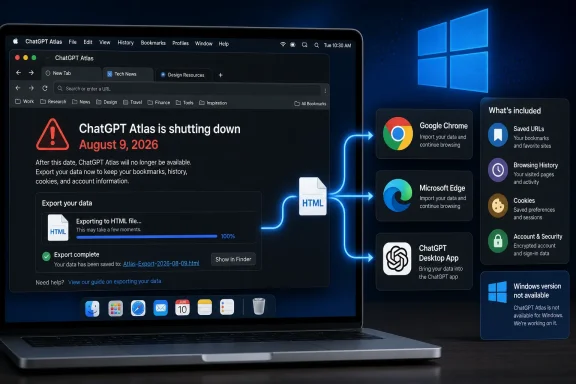 The Atlas deadline is a data-retention deadline
OpenAI launched ChatGPT Atlas on October 21, 2025, initially worldwide on macOS. Its pitch was simple enough: a Chromium-based browser with ChatGPT embedded into browsing, able to summarize pages, retain optional browser memories, and—in preview for eligible paid plans—operate an agent that could act through websites.
On July 9, OpenAI announced the retirement alongside its ChatGPT Work rollout. The company’s current release notes and help documentation set August 9 as the date Atlas is scheduled to stop working. Reporting from The Register, TechRadar, and MacRumors independently described the same timetable and OpenAI’s plan to move browser-based agent capabilities into the broader ChatGPT product line.
The deadline has an immediate practical consequence that OpenAI’s product messaging can obscure: users are not merely changing browsers. They are separating the durable pieces of their web life from a local application whose access to the web may be deliberately cut off.
A bookmark file can be imported elsewhere. A collection of live tabs, session cookies, site-specific settings, download records, and browser history cannot be assumed to follow.
That difference is particularly important for people who used Atlas as an active work surface rather than as a secondary browser. A browser window full of research tabs, internal dashboards, customer portals, cloud consoles, documentation pages, and partially completed workflows is not equivalent to a bookmark folder. OpenAI’s own retirement guidance tells users to bookmark important pages or copy their URLs elsewhere because open tabs may not transfer automatically.
OpenAI offers an export path, but not a full migration
OpenAI’s instructions establish a clear route for exporting bookmarks: open Atlas’s Bookmark Manager, use the menu to export bookmarks as an HTML file, then import that file into another browser. Chrome, Edge, Firefox, Safari, and most Chromium-based browsers can work with the standard HTML bookmark format.
The company does not offer an equivalent one-step migration for Atlas browsing history. Its help article says history will not be automatically transferred and advises users to save or bookmark pages they may need later. That wording is consequential. Browser history is often where users recover the one page they forgot to bookmark, retrace a research path, or find the download portal and support thread behind a past change.
Open tabs are in a similar position. Before August 9, users should convert important tab groups into bookmarks, save reading lists manually, or copy URLs into a document, note-taking system, or project tracker. If a tab contains an unfinished web form, a cloud-console change, or a request that relies on session state, save the underlying work now rather than assuming reopening the URL later will restore it.
Cookies and logged-in sessions need more care. OpenAI says Atlas will provide cookie-export options where available, while warning users not to share cookie or session files unless they understand the access those files can grant. That warning is warranted: a session cookie can function as proof that a user has already authenticated to a service. It is sensitive credential material, not a convenience file to email, upload, or store in a shared migration folder.
More importantly, exporting cookies does not mean another browser will import them. OpenAI’s retirement guidance specifically notes that Chrome may not natively import cookies unless a supported import path exists. In ordinary use, the realistic migration plan is to sign into sites again in the replacement browser, re-approve multifactor authentication prompts, and recreate site permissions and preferences.
The browser is being retired on a compressed timetable, so users should not wait until the final weekend. An export that produces a file is only the first step; it must be imported and checked in the destination browser while Atlas can still be opened to resolve missing folders, stale bookmarks, or unrecorded tabs.
Chat history survives, but browser memories are a separate concern
The reassuring part of OpenAI’s guidance is that ChatGPT conversation history is separate from Atlas browser data. Existing chats remain available through ChatGPT, subject to the user’s account, plan, workspace settings, and access status. Atlas disappearing does not itself delete a user’s ChatGPT conversations.
But that does not mean every piece of AI-assisted browsing context has an obvious successor. Atlas included optional Browser memories, which OpenAI described as account-linked summaries and insights derived from web activity rather than full copies of pages. The company’s data-controls documentation says browser memories are distinct from ChatGPT memories and can be affected when related browsing history is deleted.
OpenAI’s Atlas retirement article tells users to export or save important Atlas data, specifically naming bookmarks and pages, but it does not describe a general export-and-import procedure for browser memories into the ChatGPT desktop app or another browser. It also does not promise that existing Atlas memories will automatically reappear in the replacement experience.
For users who relied on Atlas to maintain context about recurring research, vendors, travel, project materials, or shopping, that omission matters. Important conclusions should be moved into ChatGPT chats, project files, notes, or documents that can be opened independently of Atlas. Do not assume that an account-level ChatGPT history is a complete archive of what the browser knew about your browsing.
The Windows promise expired with the browser
OpenAI’s October 2025 launch announcement explicitly said Windows, iOS, and Android versions of Atlas were coming soon. The company launched the browser on macOS and made agent mode available in preview for Plus, Pro, and Business users, while presenting Atlas as a serious attempt to make ChatGPT the center of web activity.
That expansion never arrived before the shutdown. OpenAI’s current getting-started documentation still identifies Atlas as a macOS browser, and its listed requirements are confined to Apple-silicon Macs. The company is retiring Atlas less than ten months after the October 21 launch, and before the anticipated Windows build materialized.
This makes Atlas less a failed replacement for Windows browsers than a product Windows users were never actually able to evaluate as a native browser. The relevant transition path for Windows is therefore not from an installed Atlas app; it is toward the new ChatGPT desktop experience, ChatGPT on the web, Codex where appropriate, and OpenAI’s Chrome extension or sidebar where available.
OpenAI says the new desktop app is intended to support more capable browser-based agent workflows, including multiple tabs, downloads, improved navigation, and account sign-in support. Those are stated product goals, not a guarantee that it will replicate every Atlas behavior at retirement. The company has not published a feature-by-feature compatibility matrix showing which Atlas controls, data types, extensions, memories, or enterprise management settings migrate into ChatGPT and Codex.
Save the information, then verify the destination
The useful migration sequence is short, but it requires more than one export click:
- Export Atlas bookmarks to an HTML file and import them into the browser you will actually use after August 9.
- Save open tab groups as bookmarks, reading-list entries, or a plain-text URL inventory, especially for work in progress.
- Preserve pages whose contents matter in a durable format, such as a downloaded PDF, a note, or an approved document-management location.
- Expect to sign in again to websites and reconfigure extensions, permissions, default search settings, and site preferences.
- Do not move cookie or session exports through untrusted storage, messaging apps, ticket systems, or shared drives.
- Review any important Atlas-derived context and copy it into ordinary ChatGPT chats, project notes, or records that will remain accessible outside the browser.
The vendor’s strategic change is clear: OpenAI is keeping AI-assisted web work but dropping the standalone browser that contained it. For the small group that used Atlas, the immediate job is less about choosing between Chrome and another browser than making sure their bookmarks, active work, and hard-to-recreate browsing context are no longer trapped inside an application scheduled to stop functioning on August 9.
