
Ken Colburn of Data Doctors recommends pasting a suspicious message into a general-purpose chatbot and asking it to identify what the sender wants, the likely consequences of complying, and the specific red flags. The advice arrives as the Federal Trade Commission says consumers reported roughly $16 billion in fraud losses during 2025, a record total and about 25% above the prior year. Imposter scams alone accounted for $3.5 billion in reported losses, according to the agency.
The practical appeal is obvious. Generative AI has made scam copy cleaner, more personalized, and less dependent on the misspellings and awkward syntax that once made phishing easier to dismiss. A chatbot can turn an alarming “Your account has been frozen” message into a list of recognizable techniques: urgency, impersonation, a demand for credentials, and a link designed to move the victim outside a trusted app or website.
But the useful version of this workflow begins with a narrower instruction: ask the AI to explain risk signals, never to authenticate the sender. The chatbot sees only what the user supplies. It does not gain access to a bank’s systems, a retailer’s order records, the sender’s real identity, or the final destination of a link merely because the message looks convincing.
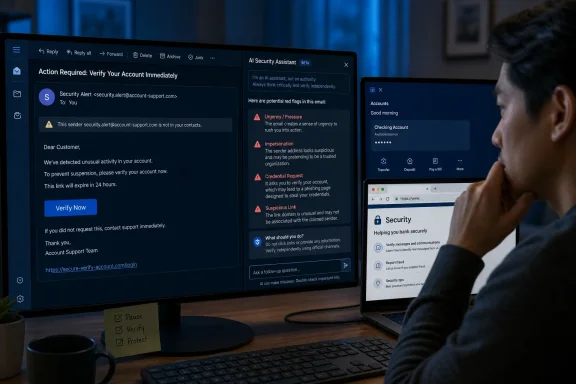 The message is evidence, not proof
Data Doctors is right to steer readers away from many standalone “scam detector” apps. A single-purpose app that produces an unexplained safe-or-unsafe score gives a false sense of certainty, particularly when its business model, privacy practices, and update record are unclear. A mainstream chatbot can provide a more transparent explanation if the user asks it to show its reasoning in plain language.
That explanation should be treated as a prompt for the next safe action, rather than a verdict. The Federal Trade Commission’s consumer guidance reaches the same operational conclusion without relying on AI: do not click a link in an unexpected email or text, do not use the telephone number supplied by the message, and independently contact the organization through a known-good website, official mobile app, card, bill, or stored contact.
This is more than cautious wording. A legitimate-looking notification may contain an accurate company name, a current logo, and even details lifted from a breach or public profile. Conversely, a genuine transaction alert can resemble a scam because financial institutions deliberately use urgent language when they detect suspected fraud. An AI model can recognize patterns; it cannot resolve that ambiguity from prose alone.
For Windows users, the safest confirmation path is usually direct: open the installed banking, carrier, delivery, or retailer app yourself, or type the organization’s known address into a browser. Do not reply to the message, call the number in it, or follow its embedded “support” link. If the notification concerns a Microsoft account, go to the account or security pages through a trusted bookmark or the Microsoft account portal already associated with the user—not via an unexpected email.
Pasted text often leaves out the most important part
The largest technical limitation in the Data Doctors approach involves links. A chatbot can inspect a URL that has been copied as text and may spot a typo-squatted brand, an odd country-code domain, a misleading subdomain, or a link shortener. That can be genuinely valuable.
Yet a pasted email message frequently does not include the underlying destination of a clickable link. What appears as Microsoft Security Alert or View invoice may conceal an entirely different address in the hyperlink itself. Copying the visible label into a chatbot tells it nothing about the actual target. Screenshots can have the same problem if the browser’s full address bar is not shown.
Users should not try to solve that gap by clicking through “just to see where it goes.” CISA and the FTC both advise people to avoid links in suspicious messages and verify through an independently obtained route. The safe question for a chatbot is therefore not “Can I trust this link?” but “What signals in this message mean I should verify this through the official app or site?”
That phrasing improves the answer and reduces a second danger: chatbots can make mistakes with high confidence. They may misread a domain, confuse a genuine business notification with a known scam template, or overlook a new fraud campaign. An answer such as “this looks legitimate” should carry no more weight than an automated spam filter’s decision to leave a message in the inbox.
Privacy controls matter before a message is shared
The column correctly tells readers to remove names, telephone numbers, email addresses, and account numbers before pasting anything into a chatbot. For consumers and especially for employees, that advice needs to go further: remove full addresses, order numbers, one-time passcodes, QR codes, account balances, internal signatures, ticket numbers, invoice attachments, and any screenshots that expose unrelated notifications or browser tabs.
Consumer AI services are not interchangeable with an organization’s approved AI environment. OpenAI says personal ChatGPT accounts can use submitted content to improve models unless the user changes the relevant data-control setting; its Temporary Chat option avoids training use and is deleted after 30 days, though it may still be reviewed for abuse monitoring. Google’s Gemini privacy documentation similarly says that data handling depends on activity settings and warns users not to enter confidential material they would not want human reviewers to see. Anthropic also publishes separate data practices for consumer Claude accounts.
For a home user, that means redaction should be the default before submitting a suspicious message. For a company, school, healthcare provider, law firm, or government agency, a consumer chatbot may violate policy even after obvious personal details are removed. A phishing email can contain customer information, internal project names, contract terms, routing data, or details of a live security incident. IT teams should direct staff to the organization’s sanctioned reporting channel and, where appropriate, an approved enterprise AI service with contractual data controls.
The decision is especially important when the message is an attachment rather than plain text. Do not upload a potentially malicious Office document, PDF, archive, or executable to a chatbot simply because its interface accepts files. An enterprise security team may need the original message headers, attachment hashes, mail-gateway telemetry, and endpoint evidence to investigate it. Feeding the artifact into an outside service can create both disclosure and evidence-handling problems.
A better prompt produces a safer next step
The most useful form of AI assistance is a constrained analysis that asks the model to identify manipulation, missing information, and a verification route. It should explicitly forbid the model from giving a legitimacy verdict.
A strong prompt is:
Analyze the following text as a possible phishing or impersonation attempt. Identify urgency, requests for money or credentials, impersonation claims, and suspicious wording. Do not tell me the sender is legitimate. Tell me the safest independent way to verify the claimed issue without using any link, phone number, or reply address in the message.
That prompt keeps the model focused on the task it can perform: translating a stressful message into a set of observable red flags and a safe response. It also counters the most common failure mode in scam response—the victim moving too quickly because the message claims a payment, delivery, tax, security, or account deadline.
Users who receive an alleged account-security alert should check the account directly and then change the password only through the official service if necessary. If they entered credentials after interacting with a suspicious message, they should change the password immediately from a clean, trusted path, enable multifactor authentication, review account recovery details and active sessions, and contact the company through verified support channels. For a work account, the employee should report the message to IT or the security team rather than attempting to investigate it alone.
AI can build judgment, but it should not make the decision
There is real value in Data Doctors’ central idea: the same technology that helps criminals produce polished phishing messages can help potential victims unpack why those messages feel persuasive. It can be particularly helpful for people who are unfamiliar with domain names, payment-scam patterns, or the difference between a surprise notification and a request they independently initiated.
The error would be treating a chatbot as a scam-detection service with privileged knowledge. It is neither a bank fraud department nor a mail-security gateway, and its answer cannot make an unexpected demand for passwords, gift cards, cryptocurrency, wire transfers, or remote computer access safe.
The decisive action remains simple: pause, preserve the message if it needs reporting, and verify the underlying claim through a channel the suspicious message did not choose. AI can help explain why that pause is necessary. It should never be the reason a user skips it.
