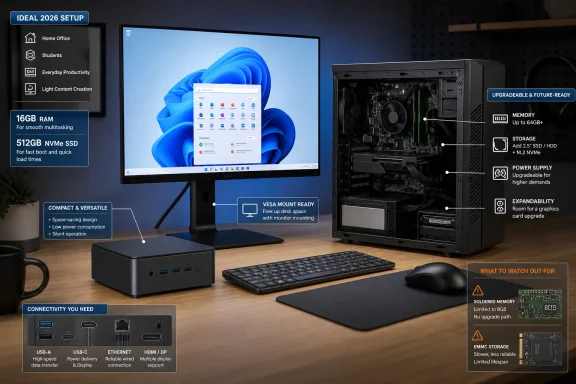
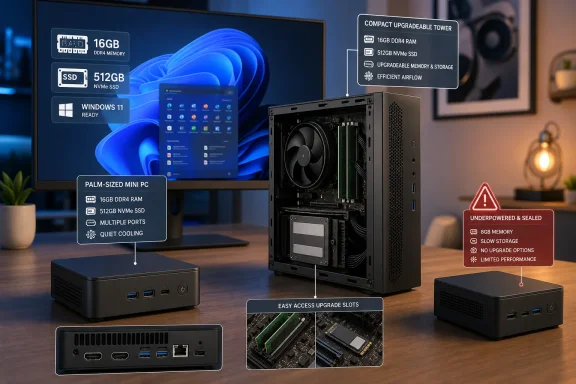
PCMag’s August 2 guide to the best cheap desktop PCs for 2026 gets the market’s central change right: a low-cost desktop is now often a palm-size mini PC rather than a cut-down tower. For web work, streaming, Office documents, point-of-sale use, and digital signage, that shift can save real desk space and money. But shoppers should treat “cheap” as a specification decision, not a price tag: in 2026, the wrong 8GB configuration or non-upgradeable storage can turn an apparent bargain into a short-lived Windows 11 machine.
The guide also catches an uncomfortable reality that is reshaping every value-PC list. RAM and SSD pricing are no longer background components that improve quietly every generation. TrendForce reported extraordinary rises in conventional DRAM contract pricing during the first half of 2026 as supply was directed toward AI-server memory; the effect is now visible in consumer configurations, retail pricing, and the disappearance of formerly inexpensive models.
Apple’s Mac mini is the clearest example. As reported independently by Bloomberg, Macworld, Ars Technica, and 9to5Mac, Apple removed the $599 M4 Mac mini with 256GB of storage from its lineup during 2026. The entry price is now $799 for an M4 model with 16GB of memory and 512GB of storage. Calling that a straightforward $200 price rise is incomplete: Apple did not increase the price of the pre-existing 512GB configuration, but it did remove the configuration that made the Mac mini a genuine sub-$600 desktop option.
For Windows buyers, the lesson is sharper. The baseline configuration matters more than the badge on the case.
PCMag divides affordable desktops into familiar towers and increasingly capable mini PCs, and that is the right place to start. A tower remains the sensible option when future expansion is part of the purchase: adding a second SSD, replacing memory, installing a PCIe card, or eventually fitting a graphics card is far more practical in a conventional chassis.
A mini PC is a different kind of purchase. It is usually a finished appliance built around laptop-class silicon: compact, quiet enough for an office or living room, and often able to run two or more external displays. Windows Central’s 2026 budget-desktop coverage reaches the same conclusion for systems under $500: mini PCs frequently offer the strongest new-hardware value at that price, while a larger prebuilt tower buys physical expansion rather than a radically better everyday experience.
That does not mean every mini PC deserves a place behind a monitor. The category covers everything from low-power Intel N-series systems intended for browser-based tasks to Ryzen 7 and Core Ultra machines capable of sustained productivity work. Those are profoundly different computers despite looking almost identical on a product page.
A small PC with an Intel N100, N150, or similarly low-power processor can be perfectly adequate for a reception display, a browser kiosk, Microsoft 365 web apps, video playback, Remote Desktop, or light home use. It should not be selected for a busy family PC, a multitasking office workstation, local development, photo editing, or anything that relies on multiple heavy browser sessions. The buyer who expects a tiny box to replace a midrange tower needs a mobile Ryzen 5 or Ryzen 7, a Core i5-class mobile processor, or better—and enough memory to let that CPU work.
A new Windows 11 desktop with 8GB can still be appropriate for narrowly defined work: one user, light browsing, a few Office documents, streaming, and no expectation of running virtual machines, creative applications, or dozens of browser tabs. The problem is that low-end systems are often sold with 8GB soldered to the motherboard. Once that memory is exhausted, the machine leans harder on its SSD for paging, and the performance penalty is visible long before the processor is technically obsolete.
For a general-purpose Windows desktop bought in August 2026, 16GB should be the practical floor. It gives the operating system, a modern browser, Microsoft 365, Teams or Zoom, security tools, and background sync services room to coexist. It is also the safer choice for a shared household machine, where “light use” tends to become a collection of open tabs, school portals, cloud-storage clients, and video calls.
The RAM shortage complicates this advice because it makes 16GB more expensive precisely when buyers need it most. That is a reason to buy a system with accessible SO-DIMM slots or standard desktop DIMMs, not a reason to accept an 8GB sealed design for a machine expected to last four or five years. If a vendor offers an 8GB mini PC for $299 and a 16GB version for $389, the higher-memory model is usually the cheaper ownership decision.
Storage deserves the same scrutiny. A 256GB SSD can work for a dedicated kiosk, a browser appliance, or a tightly managed business endpoint. It is cramped for a home Windows PC once Windows updates, OneDrive folders, application caches, phone backups, and locally stored media arrive. A 512GB NVMe SSD is the sensible target; 1TB is preferable for a budget gaming desktop, where one or two contemporary games can consume a substantial portion of a smaller drive.
Intel’s desktop Core Ultra 200S family exists, but it has not displaced older Core i processors from the cheap prebuilt market. PCMag is right to say that 14th Gen Core i chips remain common in low-cost towers. A Core i3-14100 or Core i5-14400 in a properly equipped tower can be a better long-term desktop purchase than a newer-sounding laptop chip in a non-upgradeable micro chassis.
Intel’s newer mobile naming makes product pages even more difficult to read. Panther Lake powers Core Ultra Series 3 mobile products, while Wildcat Lake is positioned as the lower-cost Core Series 3 family for value laptops and edge devices. MSI, ECS, Beelink, and other manufacturers have already begun showing mini PCs based on these platforms. Their arrival does not make a discounted Ryzen 6000, Ryzen 7000, or 14th Gen Intel mini PC obsolete; it means buyers should compare the exact processor, memory, ports, cooling, and warranty instead of rewarding the newest code name.
AMD’s older mobile Ryzen chips can still be excellent budget value, particularly where 16GB of RAM and a 512GB or 1TB SSD are included. A discounted Ryzen 5 6600U or Ryzen 7 6800H mini PC with replaceable memory and storage can be more useful than a brand-new entry-level system that sacrifices RAM, ports, and serviceability to hit a lower sticker price.
Buyers planning to add a discrete GPU later should verify four facts before purchase:
The tower’s advantage is less glamorous but more durable: it can accept additional storage and memory. In a period of expensive RAM and flash storage, an accessible M.2 slot, spare SATA port, and user-serviceable DIMMs have become part of the value proposition.
But its apparent low board price has become less persuasive in 2026. Raspberry Pi itself raised Pi 5 prices in response to memory costs: the 1GB model starts at $45, while higher-memory versions carry much larger premiums. Add a proper power supply, case, cooling, storage, cables, keyboard, mouse, and a display, and the total no longer resembles the bare-board number.
More important, a Raspberry Pi does not run standard x86 Windows 11 as a normal desktop replacement. Its natural environment is Raspberry Pi OS or another ARM Linux distribution. That is an advantage for an administrator building an appliance and a disadvantage for a household that needs familiar Windows applications, peripherals, and support expectations.
Windows 10 reached end of support on October 14, 2025, according to Microsoft. That makes refurbished business desktops attractive only when they have a supported Windows 11 processor, TPM 2.0, sufficient memory, and a clean licensing path. An old Core i7 badge is not enough. A well-configured refurbished Lenovo ThinkCentre Tiny, Dell OptiPlex Micro, or HP EliteDesk can still be a smarter value than an unknown-brand mini PC, but only after those checks.
Cheap desktops have become capable enough that most buyers no longer need a bulky tower for basic computing. The catch is that component scarcity has made configuration shortcuts much more expensive to live with. Buy the memory and storage capacity you will actually use, then choose the smallest chassis that still leaves you the ports, cooling, and upgrade options your workload requires.
Apple’s Mac mini is the clearest example. As reported independently by Bloomberg, Macworld, Ars Technica, and 9to5Mac, Apple removed the $599 M4 Mac mini with 256GB of storage from its lineup during 2026. The entry price is now $799 for an M4 model with 16GB of memory and 512GB of storage. Calling that a straightforward $200 price rise is incomplete: Apple did not increase the price of the pre-existing 512GB configuration, but it did remove the configuration that made the Mac mini a genuine sub-$600 desktop option.
For Windows buyers, the lesson is sharper. The baseline configuration matters more than the badge on the case.
The $500 desktop is now two very different products
PCMag divides affordable desktops into familiar towers and increasingly capable mini PCs, and that is the right place to start. A tower remains the sensible option when future expansion is part of the purchase: adding a second SSD, replacing memory, installing a PCIe card, or eventually fitting a graphics card is far more practical in a conventional chassis.A mini PC is a different kind of purchase. It is usually a finished appliance built around laptop-class silicon: compact, quiet enough for an office or living room, and often able to run two or more external displays. Windows Central’s 2026 budget-desktop coverage reaches the same conclusion for systems under $500: mini PCs frequently offer the strongest new-hardware value at that price, while a larger prebuilt tower buys physical expansion rather than a radically better everyday experience.
That does not mean every mini PC deserves a place behind a monitor. The category covers everything from low-power Intel N-series systems intended for browser-based tasks to Ryzen 7 and Core Ultra machines capable of sustained productivity work. Those are profoundly different computers despite looking almost identical on a product page.
A small PC with an Intel N100, N150, or similarly low-power processor can be perfectly adequate for a reception display, a browser kiosk, Microsoft 365 web apps, video playback, Remote Desktop, or light home use. It should not be selected for a busy family PC, a multitasking office workstation, local development, photo editing, or anything that relies on multiple heavy browser sessions. The buyer who expects a tiny box to replace a midrange tower needs a mobile Ryzen 5 or Ryzen 7, a Core i5-class mobile processor, or better—and enough memory to let that CPU work.
Eight gigabytes is a minimum, not a recommendation
PCMag correctly advises buyers to avoid Windows systems with only 4GB of memory. Microsoft’s formal Windows 11 minimum is still 4GB of RAM and 64GB of storage, alongside TPM 2.0 and the other hardware requirements. That is an installation threshold, however, not a purchasing standard for a desktop expected to remain usable through several feature updates.A new Windows 11 desktop with 8GB can still be appropriate for narrowly defined work: one user, light browsing, a few Office documents, streaming, and no expectation of running virtual machines, creative applications, or dozens of browser tabs. The problem is that low-end systems are often sold with 8GB soldered to the motherboard. Once that memory is exhausted, the machine leans harder on its SSD for paging, and the performance penalty is visible long before the processor is technically obsolete.
For a general-purpose Windows desktop bought in August 2026, 16GB should be the practical floor. It gives the operating system, a modern browser, Microsoft 365, Teams or Zoom, security tools, and background sync services room to coexist. It is also the safer choice for a shared household machine, where “light use” tends to become a collection of open tabs, school portals, cloud-storage clients, and video calls.
The RAM shortage complicates this advice because it makes 16GB more expensive precisely when buyers need it most. That is a reason to buy a system with accessible SO-DIMM slots or standard desktop DIMMs, not a reason to accept an 8GB sealed design for a machine expected to last four or five years. If a vendor offers an 8GB mini PC for $299 and a 16GB version for $389, the higher-memory model is usually the cheaper ownership decision.
Storage deserves the same scrutiny. A 256GB SSD can work for a dedicated kiosk, a browser appliance, or a tightly managed business endpoint. It is cramped for a home Windows PC once Windows updates, OneDrive folders, application caches, phone backups, and locally stored media arrive. A 512GB NVMe SSD is the sensible target; 1TB is preferable for a budget gaming desktop, where one or two contemporary games can consume a substantial portion of a smaller drive.
Processor names conceal more than they reveal
The guide’s warning about laptop chips inside mini PCs is essential. An Intel processor ending in U, H, HS, or HX is generally a mobile part, and its performance depends heavily on the mini-PC maker’s cooling design and configured power limit. Two systems carrying similar processor names can perform very differently if one is restricted to a conservative low-wattage profile and the other has a larger heatsink and fan.Intel’s desktop Core Ultra 200S family exists, but it has not displaced older Core i processors from the cheap prebuilt market. PCMag is right to say that 14th Gen Core i chips remain common in low-cost towers. A Core i3-14100 or Core i5-14400 in a properly equipped tower can be a better long-term desktop purchase than a newer-sounding laptop chip in a non-upgradeable micro chassis.
Intel’s newer mobile naming makes product pages even more difficult to read. Panther Lake powers Core Ultra Series 3 mobile products, while Wildcat Lake is positioned as the lower-cost Core Series 3 family for value laptops and edge devices. MSI, ECS, Beelink, and other manufacturers have already begun showing mini PCs based on these platforms. Their arrival does not make a discounted Ryzen 6000, Ryzen 7000, or 14th Gen Intel mini PC obsolete; it means buyers should compare the exact processor, memory, ports, cooling, and warranty instead of rewarding the newest code name.
AMD’s older mobile Ryzen chips can still be excellent budget value, particularly where 16GB of RAM and a 512GB or 1TB SSD are included. A discounted Ryzen 5 6600U or Ryzen 7 6800H mini PC with replaceable memory and storage can be more useful than a brand-new entry-level system that sacrifices RAM, ports, and serviceability to hit a lower sticker price.
Upgrade claims need a chassis-level inspection
The most consequential caution in PCMag’s guide concerns future graphics upgrades. An inexpensive tower may have a PCIe x16 slot, but that alone does not make it a viable gaming-PC foundation. Low-wattage or proprietary power supplies, cramped cases, insufficient PCIe power connectors, and half-height-only expansion slots can limit upgrades to a small set of cards—or rule them out entirely.Buyers planning to add a discrete GPU later should verify four facts before purchase:
- The power supply’s wattage, connector count, and whether it can be replaced with a standard ATX unit must be stated in the machine’s service documentation.
- The case must accommodate the physical length, height, and thickness of the intended graphics card.
- The system must provide a usable PCIe x16 slot without obstructing it with storage cages, cooling hardware, or a proprietary riser.
- The CPU, memory, and cooling must be strong enough that a later GPU purchase does not merely expose another bottleneck.
The tower’s advantage is less glamorous but more durable: it can accept additional storage and memory. In a period of expensive RAM and flash storage, an accessible M.2 slot, spare SATA port, and user-serviceable DIMMs have become part of the value proposition.
Raspberry Pi remains a project platform, not a bargain Windows replacement
PCMag includes Raspberry Pi as the ultra-cheap DIY alternative, with appropriate warnings. A Raspberry Pi 5 is flexible hardware for a media server, Home Assistant host, light web service, embedded controller, signage player, or learning project. Raspberry Pi says the Pi 5 will remain in production through at least January 2036, which is unusually reassuring for long-lived projects.But its apparent low board price has become less persuasive in 2026. Raspberry Pi itself raised Pi 5 prices in response to memory costs: the 1GB model starts at $45, while higher-memory versions carry much larger premiums. Add a proper power supply, case, cooling, storage, cables, keyboard, mouse, and a display, and the total no longer resembles the bare-board number.
More important, a Raspberry Pi does not run standard x86 Windows 11 as a normal desktop replacement. Its natural environment is Raspberry Pi OS or another ARM Linux distribution. That is an advantage for an administrator building an appliance and a disadvantage for a household that needs familiar Windows applications, peripherals, and support expectations.
What a sensible cheap desktop purchase looks like now
The practical buying specification for a Windows desktop in 2026 is less complicated than the marketing makes it appear. For mainstream household and office use, seek a supported Windows 11 system with 16GB of RAM, a 512GB SSD, a processor that matches the workload, and documented upgrade paths where a tower is involved. Confirm display outputs before assuming a mini PC can drive the monitor arrangement you already own, and account for the cost of a display, keyboard, mouse, and Windows license if they are not included.Windows 10 reached end of support on October 14, 2025, according to Microsoft. That makes refurbished business desktops attractive only when they have a supported Windows 11 processor, TPM 2.0, sufficient memory, and a clean licensing path. An old Core i7 badge is not enough. A well-configured refurbished Lenovo ThinkCentre Tiny, Dell OptiPlex Micro, or HP EliteDesk can still be a smarter value than an unknown-brand mini PC, but only after those checks.
Cheap desktops have become capable enough that most buyers no longer need a bulky tower for basic computing. The catch is that component scarcity has made configuration shortcuts much more expensive to live with. Buy the memory and storage capacity you will actually use, then choose the smallest chassis that still leaves you the ports, cooling, and upgrade options your workload requires.
References
- Primary source: PCMag Australia
Published: 2026-08-02T20:00:00+00:00
Loading…
au.pcmag.com - Related coverage: videocardz.com
Loading…
videocardz.com - Related coverage: tomsguide.com
Best MacBook deals in July 2026 | Tom's Guide
The best MacBook deals and sales right nowwww.tomsguide.com - Related coverage: techradar.com
The best gaming PC in 2026 | TechRadar
Whether you're looking for something affordable and upgradable, or top-of-the-line with no holds barred, we've got you covered with our list of the best gaming PCs in 2026 that can help beat the current RAM crisis.www.techradar.com - Related coverage: creativebloq.com
Loading…
www.creativebloq.com - Related coverage: itpro.com
Loading…
www.itpro.com - Related coverage: gamesradar.com
The Asus ROG NUC is a Steam Machine for the big kids, with their big wallets | GamesRadar+
The Asus ROG NUC sits somewhere between a gaming laptop and a desktop, offering a grown up Steam Machine experience - at a serious price.www.gamesradar.com - Related coverage: gamesradar.com
The best gaming PC 2026: Find your perfect pre-built powerhouse | GamesRadar+
We're rounding up all the best gaming PCs currently available on the market from budget builds to higher-end rigs ready for the next generation of gaming.www.gamesradar.com - Related coverage: windowscentral.com
Loading…
www.windowscentral.com - Related coverage: windowscentral.com
Best mini PCs 2026 | Windows Central
We've spent hundreds of hours testing mini PCs, and I've put together this list of the best-rated options for a wide range of users and budgets.www.windowscentral.com - Related coverage: techradar.com
Loading…
www.techradar.com - Related coverage: digitalcitizen.life
Loading…
www.digitalcitizen.life - Related coverage: the-gadgeteer.com
Loading…
the-gadgeteer.com - Related coverage: tech.yahoo.com
Loading…
tech.yahoo.com - Related coverage: raspberrypi.com
Loading…
www.raspberrypi.com - Related coverage: techwalls.com
Loading…
www.techwalls.com - Related coverage: learn.microsoft.com
Windows 10 reaching end of support - Microsoft Lifecycle | Microsoft Learn
Announcing Windows 10 reaching end of support.learn.microsoft.com - Related coverage: learn.microsoft.com
Windows 11 requirements | Microsoft Learn
Hardware requirements to deploy Windows 11.learn.microsoft.com - Related coverage: newsroom.intel.com
Loading…
newsroom.intel.com - Related coverage: support.microsoft.com
Windows 11 System Requirements | Microsoft Support
Learn about Windows 11 minimum system requirements and how to assess your upgrade eligibility.support.microsoft.com - Related coverage: download.intel.com