
Android Authority’s August 6 argument that Chrome on Android is falling behind lands on a real problem: Google’s phone-and-tablet browser still offers no supported extension platform, while Firefox for Android and Samsung Internet do. But the article’s proposed “five” fixes actually bundle seven distinct requests, and its list of alternatives includes Kiwi Browser, which its own code repository says has not been maintained since January 2025. That changes the practical advice for anyone considering a switch.
The underlying point remains sound. Chrome’s dominance on Android no longer means it is the most configurable browser on Android, and Google has left several ordinary power-user functions either absent, buried behind experimental flags, or scattered across separate apps and services. The most consequential absence is extensions; the most revealing omission is visibility into what Chrome’s privacy tools actually block.
There is also a minor but telling publishing discrepancy in the Android Authority page metadata: it lists a publication date of August 6, 2026, while its “modified” date is August 3, 2026 — three days earlier. That is almost certainly a CMS error, not evidence of a changed story, but it is worth separating the article’s current claims from its dated product examples.
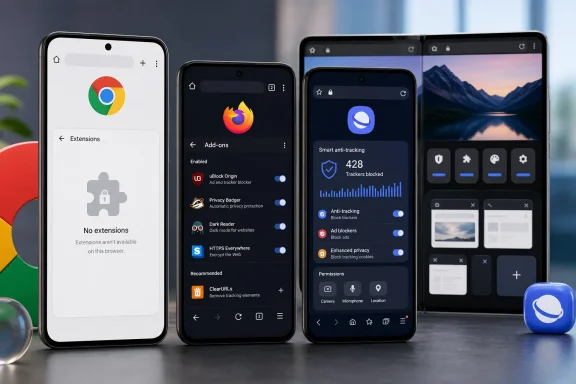
Chrome for Android on ordinary phones and tablets does not support Chrome Web Store extensions. Google’s own Chrome support forums and Chromium developer discussions continue to draw that line clearly. Firefox for Android, by contrast, has an official add-ons manager and an Android-compatible extension catalog; Samsung Internet officially supports its own add-ons, including content blockers.
Android Authority is also correct that Google has been developing a Chrome variant for Android’s desktop-style environments with extension capability. But that work is aimed at Android-powered PCs and desktop-mode use cases, not the Chrome app installed on a Pixel, Galaxy phone, or conventional Android tablet. It is not a pending feature users can enable in stable Chrome on a handset.
The article weakens its otherwise valid case by grouping Firefox, Edge, Kiwi Browser, and Samsung Internet as if they are equivalent, current extension alternatives. They are not.
Kiwi was historically the clearest Chromium-based answer for people who wanted desktop-class extensions on Android. Its official source repository was archived and marked as no longer maintained after January 2025, however. A browser that is not receiving maintained Chromium security updates should not be presented in 2026 as a routine recommendation, particularly when browser vulnerabilities are often exploited through web content before a user has time to decide whether an extension was worth installing.
Microsoft Edge is murkier. Edge has experimented with Android extension support and its mobile code has absorbed work associated with Kiwi, but Microsoft’s mainstream extension documentation still applies its instructions to Windows. That does not establish a broadly supported, fully documented Android extension platform for Edge stable. Android Authority may have encountered an available Edge implementation, but Microsoft has not supplied the public support record needed to treat it as a settled replacement for Chrome extensions on phones.
Firefox and Samsung Internet are the defensible examples. Firefox is the choice for users who need a maintained mobile browser with a recognizable add-on workflow. Samsung Internet is the choice for users who want a Chromium-based browser with supported add-ons and a more configurable Android interface. That is already enough to make Chrome’s omission conspicuous; invoking a retired browser and an ambiguously supported Edge feature is unnecessary.
For managed Android fleets, the gap has a more concrete consequence. A company can standardize Chrome policies and sign-in behavior, but it cannot replicate a desktop Chrome setup that depends on an extension for password management, web filtering, workflow automation, or content control. The answer on Android is usually an app, an Android Enterprise policy, a DNS or secure-web-gateway service, or a browser change — not the extension deployment model Windows administrators know from Chrome Enterprise.
Those are not one feature. They affect different subsystems, carry different policy implications, and would be owned by different Chrome teams. Treating them as a single catch-all makes the request sound smaller than it is.
The list is therefore:
But those tradeoffs do not explain why Chrome offers so little user choice while competitors expose similar functions with clear settings and disclaimers. The more important question is not whether every requested feature should ship with the same defaults as Firefox, Brave, or Samsung Internet. It is whether Google intends Chrome for Android to remain a deliberately minimal companion browser, even as Android phones and foldables take on more PC-like tasks.
Google has also been doing real work on larger Android screens. Chrome 146 added a bookmarks bar option for Android tablets and foldables, according to reporting by 9to5Google and Android Central. That is a practical desktop-style addition for users with a Galaxy Tab, a Pixel Fold-class device, or an Android desktop environment.
Those changes support a narrower conclusion: Chrome is not ignoring Android form factors. It is making targeted layout improvements without opening general customization. A movable address bar and a bookmarks bar on large screens do not give phone users configurable tab behavior, a flexible menu, a customizable new-tab page, or multiple toolbar shortcuts.
Samsung Internet’s official product materials explicitly advertise an adjustable toolbar and a browsing privacy dashboard. Chrome’s approach remains closer to a controlled set of Google-selected actions. That is a design philosophy, not an accidental feature backlog.
For ordinary users, minimalism can be an advantage. For people managing dozens of tabs, frequently translating pages, using accessibility controls, switching between desktop and mobile rendering, or handling research on a foldable, the missing controls become repetitive friction. Chrome is optimized for the median Google account holder, not for the Android user who wants their browser arranged around their own work.
But Chrome does not present these controls as an easily readable, ongoing account of browsing protection. Samsung Internet’s privacy dashboard displays a privacy level and tracker-blocking activity. Firefox markets a Protections Dashboard that summarizes blocked trackers and other protections. Brave similarly makes blocking activity highly visible.
Chrome’s weakness here is observability. A browser can provide a setting to block third-party cookies, but users cannot readily answer basic questions afterward: Did this page attempt cross-site tracking? Did Chrome block anything? Which sites are making the most attempts? What was permitted because of an exception?
That visibility has a downside: a prominent tracker counter can create a false sense of safety, especially when tracking techniques do not rely on a conventional third-party cookie. Yet hiding the information entirely also turns privacy into a trust-me configuration screen. Google has enough data locally in the browser to give users a meaningful per-site report without claiming that Chrome has defeated every form of tracking.
The distinction matters especially as Google promotes Privacy Sandbox technologies and ad privacy controls. Users need a practical way to see the browser’s behavior, not another broad description of its intent.
Google shut down VPN by Google One on June 20, 2024, while retaining the Pixel-specific service. That history is important. Google has the technology, but it chose to narrow availability rather than turn it into a broad Google-account benefit. A free Chrome VPN for all Android users would reverse that product decision and create infrastructure, abuse-prevention, and regional-availability obligations at far greater scale.
A browser-only VPN can still be useful on public Wi-Fi, but it would not protect traffic from messaging apps, mail clients, or other installed software. Chrome should be explicit about that limitation if it ever adds the feature. For Pixel owners, the better immediate answer is to use the existing system VPN; for everyone else, Chrome has announced no comparable service.
The more achievable request is the privacy dashboard. The feature carries fewer support and network costs, does not depend on a Pixel purchase, and would let Google demonstrate the protections Chrome already claims to provide.
Chrome’s Android roadmap is now visibly split between desktop-style features for tablets and foldables, controlled simplicity on phones, and Pixel-exclusive services outside the browser. Until Google changes that strategy, users who need extensions or a configurable interface should stop waiting for a hidden Chrome switch and choose a browser that supports those requirements today.
There is also a minor but telling publishing discrepancy in the Android Authority page metadata: it lists a publication date of August 6, 2026, while its “modified” date is August 3, 2026 — three days earlier. That is almost certainly a CMS error, not evidence of a changed story, but it is worth separating the article’s current claims from its dated product examples.
 Chrome Android Still Has No Extension Story for Phones
Chrome for Android on ordinary phones and tablets does not support Chrome Web Store extensions. Google’s own Chrome support forums and Chromium developer discussions continue to draw that line clearly. Firefox for Android, by contrast, has an official add-ons manager and an Android-compatible extension catalog; Samsung Internet officially supports its own add-ons, including content blockers.Android Authority is also correct that Google has been developing a Chrome variant for Android’s desktop-style environments with extension capability. But that work is aimed at Android-powered PCs and desktop-mode use cases, not the Chrome app installed on a Pixel, Galaxy phone, or conventional Android tablet. It is not a pending feature users can enable in stable Chrome on a handset.
The article weakens its otherwise valid case by grouping Firefox, Edge, Kiwi Browser, and Samsung Internet as if they are equivalent, current extension alternatives. They are not.
Kiwi was historically the clearest Chromium-based answer for people who wanted desktop-class extensions on Android. Its official source repository was archived and marked as no longer maintained after January 2025, however. A browser that is not receiving maintained Chromium security updates should not be presented in 2026 as a routine recommendation, particularly when browser vulnerabilities are often exploited through web content before a user has time to decide whether an extension was worth installing.
Microsoft Edge is murkier. Edge has experimented with Android extension support and its mobile code has absorbed work associated with Kiwi, but Microsoft’s mainstream extension documentation still applies its instructions to Windows. That does not establish a broadly supported, fully documented Android extension platform for Edge stable. Android Authority may have encountered an available Edge implementation, but Microsoft has not supplied the public support record needed to treat it as a settled replacement for Chrome extensions on phones.
Firefox and Samsung Internet are the defensible examples. Firefox is the choice for users who need a maintained mobile browser with a recognizable add-on workflow. Samsung Internet is the choice for users who want a Chromium-based browser with supported add-ons and a more configurable Android interface. That is already enough to make Chrome’s omission conspicuous; invoking a retired browser and an ambiguously supported Edge feature is unnecessary.
For managed Android fleets, the gap has a more concrete consequence. A company can standardize Chrome policies and sign-in behavior, but it cannot replicate a desktop Chrome setup that depends on an extension for password management, web filtering, workflow automation, or content control. The answer on Android is usually an app, an Android Enterprise policy, a DNS or secure-web-gateway service, or a browser change — not the extension deployment model Windows administrators know from Chrome Enterprise.
The “Five” Features Are Really Seven Separate Product Decisions
Android Authority’s list starts with four clean requests: extensions, deeper interface customization, a privacy dashboard, and a built-in VPN. Its fifth category, described as “little quality-of-life features,” then asks for forced dark mode, background media playback, and quick per-search search-engine switching.Those are not one feature. They affect different subsystems, carry different policy implications, and would be owned by different Chrome teams. Treating them as a single catch-all makes the request sound smaller than it is.
The list is therefore:
- Chrome should support a maintained extension framework on Android phones and tablets.
- Chrome should let users configure more of its toolbar, menu, tab presentation, and new-tab experience.
- Chrome should show per-site and aggregate privacy-protection activity in a visible dashboard.
- Chrome should provide or integrate a VPN service.
- Chrome should offer a supported forced-dark rendering option for websites that lack dark themes.
- Chrome should permit background media playback where websites and media policies allow it.
- Chrome should make alternate search engines easier to invoke without changing the global default.
But those tradeoffs do not explain why Chrome offers so little user choice while competitors expose similar functions with clear settings and disclaimers. The more important question is not whether every requested feature should ship with the same defaults as Firefox, Brave, or Samsung Internet. It is whether Google intends Chrome for Android to remain a deliberately minimal companion browser, even as Android phones and foldables take on more PC-like tasks.
Google Has Improved Chrome’s Layout — Selectively
The customization critique needs a little more precision. Chrome for Android does now officially let users move the address bar between the top and bottom of the screen. Google’s support documentation describes the setting and says it can sync across Android devices. That is no longer an experimental trick, even if the accompanying navigation controls have changed through staged interface rollouts that some users have disliked.Google has also been doing real work on larger Android screens. Chrome 146 added a bookmarks bar option for Android tablets and foldables, according to reporting by 9to5Google and Android Central. That is a practical desktop-style addition for users with a Galaxy Tab, a Pixel Fold-class device, or an Android desktop environment.
Those changes support a narrower conclusion: Chrome is not ignoring Android form factors. It is making targeted layout improvements without opening general customization. A movable address bar and a bookmarks bar on large screens do not give phone users configurable tab behavior, a flexible menu, a customizable new-tab page, or multiple toolbar shortcuts.
Samsung Internet’s official product materials explicitly advertise an adjustable toolbar and a browsing privacy dashboard. Chrome’s approach remains closer to a controlled set of Google-selected actions. That is a design philosophy, not an accidental feature backlog.
For ordinary users, minimalism can be an advantage. For people managing dozens of tabs, frequently translating pages, using accessibility controls, switching between desktop and mobile rendering, or handling research on a foldable, the missing controls become repetitive friction. Chrome is optimized for the median Google account holder, not for the Android user who wants their browser arranged around their own work.
Privacy Controls Without a Privacy Report Leave Users Guessing
Android Authority is right to distinguish between having privacy protections and showing what those protections did. Chrome offers cookie controls, Incognito mode, Safe Browsing, site-permission settings, and an Android Privacy Guide. Google’s documentation also confirms that third-party cookies can be blocked on Android, while Incognito blocks them by default.But Chrome does not present these controls as an easily readable, ongoing account of browsing protection. Samsung Internet’s privacy dashboard displays a privacy level and tracker-blocking activity. Firefox markets a Protections Dashboard that summarizes blocked trackers and other protections. Brave similarly makes blocking activity highly visible.
Chrome’s weakness here is observability. A browser can provide a setting to block third-party cookies, but users cannot readily answer basic questions afterward: Did this page attempt cross-site tracking? Did Chrome block anything? Which sites are making the most attempts? What was permitted because of an exception?
That visibility has a downside: a prominent tracker counter can create a false sense of safety, especially when tracking techniques do not rely on a conventional third-party cookie. Yet hiding the information entirely also turns privacy into a trust-me configuration screen. Google has enough data locally in the browser to give users a meaningful per-site report without claiming that Chrome has defeated every form of tracking.
The distinction matters especially as Google promotes Privacy Sandbox technologies and ad privacy controls. Users need a practical way to see the browser’s behavior, not another broad description of its intent.
A Chrome VPN Would Duplicate a Pixel Feature, Not Fill a Technical Gap
The proposed VPN is the least straightforward item on Android Authority’s list. Google already operates VPN by Google for eligible Pixel 7-and-later phones and the Pixel Tablet in supported countries, including the United States. It is system-wide rather than browser-only, which is the more useful model: it protects traffic from supported apps, not just Chrome tabs.Google shut down VPN by Google One on June 20, 2024, while retaining the Pixel-specific service. That history is important. Google has the technology, but it chose to narrow availability rather than turn it into a broad Google-account benefit. A free Chrome VPN for all Android users would reverse that product decision and create infrastructure, abuse-prevention, and regional-availability obligations at far greater scale.
A browser-only VPN can still be useful on public Wi-Fi, but it would not protect traffic from messaging apps, mail clients, or other installed software. Chrome should be explicit about that limitation if it ever adds the feature. For Pixel owners, the better immediate answer is to use the existing system VPN; for everyone else, Chrome has announced no comparable service.
The more achievable request is the privacy dashboard. The feature carries fewer support and network costs, does not depend on a Pixel purchase, and would let Google demonstrate the protections Chrome already claims to provide.
Chrome’s Android roadmap is now visibly split between desktop-style features for tablets and foldables, controlled simplicity on phones, and Pixel-exclusive services outside the browser. Until Google changes that strategy, users who need extensions or a configurable interface should stop waiting for a hidden Chrome switch and choose a browser that supports those requirements today.
References
- Primary source: Android Authority
Published: 2026-08-06T10:00:00+00:00
Loading…
www.androidauthority.com - Related coverage: support.google.com
Loading…
support.google.com - Related coverage: support.mozilla.org
Loading…
support.mozilla.org - Related coverage: support.mozilla.org
Loading…
support.mozilla.org - Related coverage: developer.samsung.com
Loading…
developer.samsung.com - Related coverage: firefox.com
Loading…
www.firefox.com - Related coverage: developer.samsung.com
Loading…
developer.samsung.com - Related coverage: blog.mozilla.org
Loading…
blog.mozilla.org - Related coverage: addons.mozilla.org
Loading…
addons.mozilla.org - Related coverage: blog.mozilla.org
Loading…
blog.mozilla.org - Related coverage: research.mozilla.org
Loading…
research.mozilla.org - Related coverage: androidcentral.com
Loading…
www.androidcentral.com - Related coverage: androidcentral.com
Loading…
www.androidcentral.com - Related coverage: cincodias.elpais.com
Loading…
cincodias.elpais.com - Related coverage: support.google.com
Loading…
support.google.com - Related coverage: blogs.windows.com
New updates to Edge across desktop and mobile
Edge just made it easier to go from first tab to final plan, wherever you go. Your favorite Copilot experiences, plus new ones, are now available directly in Edge on desktop and, for the first time, in the Edge mobile app. This includes capabilitiesblogs.windows.com - Related coverage: support.microsoft.com
Add, turn off, or remove extensions in Microsoft Edge | Microsoft Support
Learn how to add, turn off, or remove extensions in Microsoft Edge.support.microsoft.com - Related coverage: extensionbooster.net
Loading…
extensionbooster.net - Related coverage: support.brave.app
Loading…
support.brave.app - Related coverage: learn.microsoft.com
Loading…
learn.microsoft.com - Related coverage: tech.yahoo.com
Loading…
tech.yahoo.com - Related coverage: androidauthority.com
Loading…
www.androidauthority.com - Related coverage: learn.microsoft.com
Loading…
learn.microsoft.com - Related coverage: cincodias.elpais.com
Loading…
cincodias.elpais.com - Related coverage: techradar.com
Loading…
www.techradar.com - Related coverage: techradar.com
Loading…
www.techradar.com - Related coverage: 9to5google.com
Loading…
9to5google.com - Related coverage: chromium.org
Loading…
www.chromium.org - Related coverage: digitaltrends.com
Loading…
www.digitaltrends.com - Related coverage: developer.chrome.com
Loading…
developer.chrome.com - Related coverage: engadget.com
Loading…
www.engadget.com - Related coverage: wanture.com
Loading…
www.wanture.com - Related coverage: support.google.cn
Loading…
support.google.cn - Related coverage: cdnsm5-ss18.sharpschool.com
Loading…
cdnsm5-ss18.sharpschool.com