
As reported by ZDNET, Gewirtz recorded himself reviewing expert responses from HARO and Qwoted, sorting useful quotations from unusable pitches, extracting aggregate data, and assembling results in Google Docs. Claude converted roughly 25 minutes of narrated demonstrations, recorded in three chunks, into an installed skill. On a later run, it reportedly processed 121 responses and generated a 19-page research document in around half an hour.
Anthropic’s documentation confirms the larger product premise: Claude Skills are reusable packages built around a
SKILL.mdinstruction file and can also include scripts, templates, and reference materials. Anthropic positions them as a way to make a repeatable method available across Claude conversations rather than re-explaining the process each time. Record-a-Skill removes the most technical step—writing that package manually—by attempting to infer the procedure from a user’s screen activity and narration.
The important finding from ZDNET’s trial is that the feature appears most useful when the task is clerical but judgment-heavy: work too variable for a conventional macro, yet structured enough that a human can explain what to prioritize and what to reject. It is far less persuasive as a substitute for robust desktop automation, especially when the job relies on a brittle web interface or when a bad action has real-world consequences.
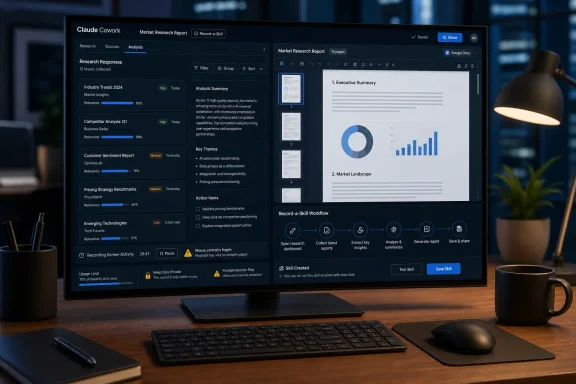 A narrated recording produces instructions, not a durable macro
Gewirtz correctly frames Record-a-Skill as teaching rather than macro recording. A classic recorded macro repeats a fixed sequence of clicks and keystrokes; it breaks when an application window moves, a webpage redesigns a button, or an unexpected dialog appears. Claude’s skill format is intended to capture the reason behind a step as well as the step itself.
That distinction explains why his narration mattered. He did not merely show Claude where to click in HARO and Qwoted. He described how to identify the current query, how to distinguish a potentially quotable expert response from self-promotional public-relations material, and how to preserve useful aggregate data even when a response was unsuitable for direct quotation. Those are rules a macro cannot infer from pixels.
Anthropic’s own Skills materials support that interpretation. The company describes skills as folders containing instructions, optional reference material, and executable scripts; the
SKILL.mdfile gives Claude both a name and a description of when the skill should apply. In other words, the saved object is an AI-readable work procedure, not simply a replay log.
That is also why users should inspect the generated skill before trusting it. Gewirtz found that his initial version was too eager to invoke HARO whenever its name appeared, then adjusted the language. Anthropic similarly advises users to test skills with multiple prompts and refine them after seeing the results. The recording is the first draft of an automation policy, not evidence that the process has been correctly encoded.
For IT teams, that distinction has a direct operational consequence: a Record-a-Skill workflow requires versioning and validation even if it was created by a nontechnical employee. A skill that copies data, opens internal dashboards, drafts customer communications, or updates a spreadsheet can encode a flawed assumption just as easily as a PowerShell script can. The difference is that the defect may be buried in natural-language instructions rather than obvious source code.
ZDNET’s 30-minute result is promising, but it is one workflow
The headline number deserves context. ZDNET’s reported reduction—from up to a full workday of response triage to roughly 30 minutes—comes from one journalist’s task, one set of web services, and a self-created skill. It is a useful real-world demonstration, but it is not a benchmark of Claude Cowork’s accuracy, reliability, or cost across other applications.
The task was unusually favorable to AI assistance. It involved a large response queue, repeated patterns, clearly stated evaluation criteria, and a valuable output even when individual judgments were imperfect. The system did not need to make an irreversible business decision; it produced a research document that the journalist could review before publishing an article.
That makes research synthesis, inbox triage, information extraction, recurring report preparation, and document classification sensible early candidates for the feature. The work should have a defined input set, a verifiable output, and a human review stage. If a run fails, the user should be able to discard the output and repeat it without creating a customer incident, changing a production system, or exposing protected information.
The feature is much less suited to tasks where the workflow only appears repetitive. A monthly vendor-payment run, HR onboarding sequence, legal review process, or privileged admin procedure may contain exceptions that are infrequent but consequential. In those settings, recording an experienced employee’s routine can conceal the very decision points a junior operator—or an AI agent—needs made explicit.
Anthropic’s support guidance is more conservative than the marketing appeal of “teach it once” suggests. The company says computer use remains a research preview for Pro and Max plans, warns that complex multi-step tasks may need a second try, and says screen interaction is slower and more error-prone than using a direct connector. The vendor recommends starting with simple research or organization tasks rather than high-stakes workflows.
The most revealing limitation is that screen control remains fragile
Gewirtz’s most practical complaint was not poor analysis. It was that Claude’s desktop control could be slow, could monopolize the machine, and could become confused when the user interacted with the same screen. He reports that an incorrect click or unexpected mouse movement could leave the agent stuck until he stopped and restarted the run—while usage continued to be consumed.
Anthropic’s documentation independently supports the underlying limitation. Cowork prioritizes direct connectors first, then browser access, then full screen interaction. The company explicitly says a connector is faster and more reliable than navigating an app through the screen, and characterizes screen-driven work as slower and more error-prone.
For Windows users, this is a strong reason to separate computer use from data processing when designing a skill. Let Claude use browser or desktop controls only to collect information from a system without an API, then move the data into a file, connector, or structured workspace for the rest of the job. If the output can be generated from a CSV, Excel workbook, exported report, or connected cloud service, Claude has fewer visual elements to misread and fewer opportunities to lose its place.
It also means a Record-a-Skill run should be treated like an occupied remote desktop session. Do not assume it can share an actively used workstation. Run it on a spare Windows device, a separate user session, or during a period when the PC can be left alone. Anthropic says the computer must be awake and Claude Desktop open when computer use needs access to the local machine, browser, or local files.
Windows deployment adds another constraint that gets lost in consumer-focused demonstrations. Anthropic says Claude Desktop for Windows requires the Windows Virtual Machine Platform for Cowork, and that individual installations with full feature support require administrator privileges. That makes Record-a-Skill a more involved proposition on managed endpoints than installing an ordinary chat client, particularly in organizations that restrict virtualization components or local administrative rights.
Usage limits make “hands-off” work a budget decision
ZDNET’s trial used Anthropic’s $100-per-month Max plan, yet Gewirtz says several hours of Cowork computer-use activity consumed an entire usage session and pushed him into billable credits. His comparison with Claude Code is notable: he says he could spend full days coding without triggering the same overage behavior.
Anthropic does not publish a simple per-task price for a screen-driven skill run. It does state that Cowork’s multi-step tasks consume more usage allocation than ordinary chat because they require more computation, and it recommends batching related work, reserving Cowork for tasks that need file access or extended execution, and monitoring individual usage.
That makes the reported time saving a cost-management problem rather than a blanket productivity gain. A 30-minute unattended run is valuable if it replaces six hours of low-value triage. It is not valuable if it replaces a five-minute task, spends scarce usage to navigate an unstable website, and then has to be supervised or rerun.
The unpublicized details matter here. ZDNET encountered a 10-minute recording segment limit, but Anthropic’s public Skills materials focus on manually created or conversationally created skills and do not publish a comparable Record-a-Skill limit in the documentation reviewed for this report. Likewise, Anthropic acknowledges that Cowork has higher usage demands but does not define the consumption rate for a recording, a skill-generation pass, or an execution that relies heavily on computer use.
Admins considering a rollout should therefore set an internal pilot budget before allowing broad use. Measure the time to record and revise a skill, successful-run rate, average usage consumption, required review time, and the percentage of runs that need manual recovery. Without that data, “automation” can shift work from data entry to watching an agent struggle with a webpage.
The security boundary is narrower than the demonstration makes it look
The ZDNET task involved journalist-source platforms and a Google document, but Record-a-Skill can potentially observe far more than the target workflow. Anthropic says computer use takes screenshots to understand the desktop and may see any data visible in permitted apps. The company specifically advises users not to give computer use access to banking, health-care, government, financial, legal, or other sensitive applications.
This is a material issue for anyone recording a work process on Windows. A training demonstration can accidentally include notification banners, browser tabs, a password manager prompt, private Teams messages, customer data, or credentials in a console window. The most efficient recording practice is therefore also the safest: use a clean browser profile, close unrelated applications, work from a dedicated folder, and demonstrate with sample data where possible.
Anthropic also warns that Cowork can encounter prompt-injection attempts in websites, messages, files, and other external content. In the specific use case ZDNET tested, the agent was reading submissions from unknown third parties—exactly the kind of untrusted text that deserves caution. A malicious message does not need to fool the human reader; it only needs to contain instructions designed to redirect an agent that is allowed to read it and take actions elsewhere.
For research workflows, the safest design is read-only collection and local report generation. Do not let the same skill send emails, publish text, alter records, or access unrelated applications. Anthropic offers manual approval modes and app permissions, but it also acknowledges that its safeguards are not absolute and that users remain responsible for actions Claude takes on their behalf.
Record-a-Skill’s achievement is lowering the barrier to building a useful personal automation from days of scripting to an hour of demonstration and revision. Its constraint is equally clear: the resulting skill inherits the uncertainty of screen automation, the cost profile of an agentic workload, and the access of the Windows session that created it. For repetitive, reviewable research work, that trade-off can be excellent. For sensitive or irreversible work, the 30-minute result is a reason to run a controlled pilot—not a reason to hand over the desktop.