
The useful part of that story is not that an MBA student found a chatbot helpful. It is that the failure began with fragmented inputs, and the proposed fix depends on turning those inputs into one reviewable system. Claude can now help do that work, but it does not automatically make a deadline reliable merely because it has been mentioned in a chat.
Dailyhunt’s account leaves out the key implementation details: which Claude plan Ravindranathan uses, whether his WhatsApp and academic portal items are entered manually, whether he has connected a calendar or mail account, and where the authoritative task list lives. Those omissions matter more than the choice between Claude, ChatGPT or Gemini. Without a defined capture process and a calendar that actually issues alerts, an AI summary can become another place for a deadline to vanish.
IIM Bangalore’s own programme material identifies its Executive Post Graduate Programme in Management as a one-year residential MBA for professionals with at least five years of work experience. Ravindranathan’s public LinkedIn profile lists him as an IIM Bangalore member of the class of 2027, so this is not simply an undergraduate experimenting with a novelty tool between lectures. It is an experienced professional in an intensive course load describing a familiar information-management problem.
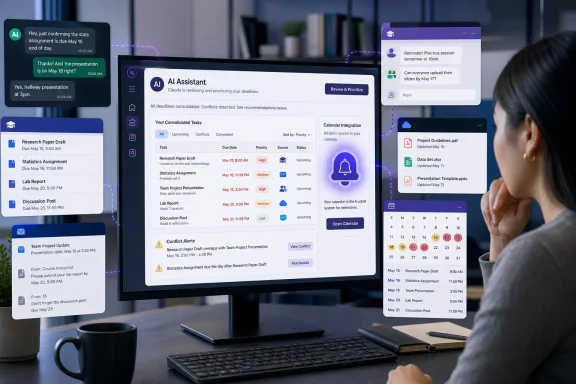 Claude can consolidate work, but it needs permission and structure
Anthropic’s current Claude features make Ravindranathan’s workflow plausible in ways that were not available in a normal standalone chatbot. Claude can connect to Google Workspace to search Gmail and Drive, view and manage Google Calendar events, identify schedule conflicts and create recurring meetings. Anthropic says every action in that connector requires explicit user approval.
For a Windows user who lives in Outlook, Teams, OneDrive and SharePoint, Anthropic also now offers a Microsoft 365 connector. It can search email, calendar information, OneDrive, SharePoint and Teams content that the signed-in user already has permission to see. With administrator-approved write tools, Claude can also create, update or delete calendar events and perform limited mail and file actions.
That is the operational shift behind productivity claims such as Ravindranathan’s. Instead of manually searching a course portal, recalling a WhatsApp promise, checking an email thread and cross-referencing a calendar, a user can ask an assistant to assemble the relevant context into an agenda or an open-items list.
But there is an important boundary: Anthropic says the Microsoft 365 connector is on demand. Claude does not conduct background searches of Microsoft 365 simply because it is connected. The connector also requires a work Microsoft 365 account backed by a Microsoft Entra tenant; personal Outlook.com, Hotmail.com and Live.com accounts are not supported. In managed environments, a Global Administrator must grant consent, and an organization may decide whether users receive write capabilities at all.
That makes the viral formulation — “AI became my personal organiser” — too loose for IT readers. Claude is a capable layer over connected services. It is not an unattended monitoring agent for every application and message stream on a Windows PC.
The missing WhatsApp and portal step is the real work
The original missed deadline reportedly existed in WhatsApp, an online portal and Ravindranathan’s memory. Only one of those is naturally suited to Claude’s documented Google Workspace and Microsoft 365 integrations. Neither public documentation nor Dailyhunt’s report explains how the WhatsApp message or portal deadline made its way into his system.
That is not a minor detail. The task is only as complete as the information reaching it.
A user can paste a WhatsApp message into Claude, forward an email, upload or link a document, create a calendar entry, or use a custom workflow that transfers selected items into a task store. Each approach has different consequences for privacy, reliability and duplication. A chat-based assistant can then summarize and prioritize that material. It cannot infer an unshared assignment date from an institutional portal it has not been connected to or given access to.
Anthropic’s Android integration further illustrates the limitation. Claude can help draft messages and work with calendar events, alarms and timers through device apps. But its documented reminder-management capability is exclusive to the iOS version, rather than Android. In other words, a student using an Android phone should not assume that telling Claude about an assignment produces a dependable reminder in the way a dedicated calendar or task app would.
For Windows users, the practical answer is to make Outlook Calendar or another calendar service the notification authority, even if Claude is the interface used to extract, categorize and plan deadlines. A calendar can issue time-based alerts whether or not the chat application is open. A conversational summary cannot replace an alarm that fires at the right time.
“Mostly free” does not describe every useful automation tier
Ravindranathan argued that the tools are broadly available and “mostly free.” That is defensible for basic chat, calendar assistance and some connectors, but it becomes less true when the workflow calls for recurring automated monitoring.
Anthropic’s scheduled-task feature in Claude Cowork can run recurring briefings, reports and research using connected tools. The company says those tasks are available on paid Pro, Max, Team and Enterprise plans, while Cowork itself remains in beta and is being rolled out in stages. Scheduled tasks can run even while a computer is asleep or the Claude Desktop app is closed, provided the task does not require local files or local applications.
That is a meaningful distinction. A free user can ask Claude, “Review my calendar and tell me what is due this week,” but that still requires remembering to ask. A paid scheduled workflow can produce a morning deadline digest on a set cadence. Neither version inherently proves that every deadline has been captured correctly, but the latter reduces the chance that the review itself gets skipped.
Microsoft 365 adds a separate organizational cost and governance layer. Users need the right tenant, license, administrator approval and, for modifications, enabled write tools. That is sensible security design: an AI assistant that can read Teams, Outlook, SharePoint and OneDrive should not silently acquire that access. It also means individual employees cannot assume the same Claude workflow will work with corporate accounts merely because it works with a personal Google Calendar.
The safe version is a task system with Claude as a reviewer
The strongest reading of Ravindranathan’s experience is not that AI eliminated deadline risk. It is that he replaced an unreliable internal reminder system with a process that forces regular review. Claude can reduce the effort needed to run that process: turn messy messages into a list, flag incomplete commitments, arrange a weekly plan, and translate an unstructured request into a calendar event or checklist.
A reliable setup should separate four jobs:
- Capture every deadline, meeting and commitment from chat, email, portals and conversations into one chosen task list or calendar.
- Preserve the original source, due date and timezone so a model-generated summary can be checked against the underlying message or notice.
- Use fixed calendar alerts for hard deadlines rather than relying on an AI-generated daily briefing.
- Ask Claude to review the system on a schedule, identify conflicts and draft a prioritized plan, while keeping final approval with the user.
This is especially relevant in Windows-heavy workplaces. The Microsoft 365 connector can surface information distributed across Outlook, Teams, OneDrive and SharePoint, but it inherits the user’s access scope. Anthropic warns that it cannot be restricted to an allowlist of selected SharePoint sites; it searches the SharePoint content the user is already allowed to access. Admins should treat that as a data-access decision, not a harmless desktop convenience feature.
The lesson is less glamorous than the LinkedIn post
Ravindranathan’s account captures a change in expectations: once people have access to tools that summarize fragmented information and create structured plans, “I forgot” becomes harder to defend as a routine working method. But the tool is not the system.
Claude can now manage calendar events, analyze material across Google Workspace or Microsoft 365, and run certain recurring tasks for paying users. It still requires authenticated access, explicit actions in many cases, a plan that supports the feature, and a human-maintained source of truth. The missing assignment was solved when Ravindranathan stopped allowing WhatsApp, portals and memory to act as separate task managers; the AI assistant is useful because it makes that consolidation less tedious.
References
- Primary source: Dailyhunt
Published: August 8, 2026 at 11:50 PM UTC
Loading…
m.dailyhunt.in