 Background / Overview
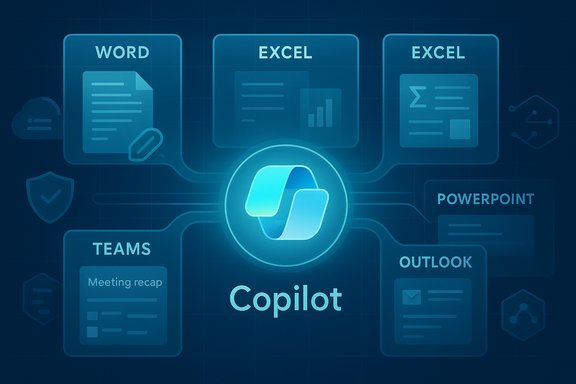
Microsoft’s recent rollout and commercial packaging of Copilot mark a deliberate strategy: bake generative AI into the apps where knowledge work happens rather than treat it as a separate product. The company has layered several capabilities to make that possible:
- In‑app Copilot experiences that appear inside Word, Excel, PowerPoint, Outlook and Teams to summarize, draft, analyze and export content directly into native Office formats.
- Agent Mode, which decomposes natural‑language briefs into multi‑step workflows and writes changes directly into documents and sheets.
- Copilot Studio, a low‑code environment to build and deploy domain‑specific agents that connect to internal systems and APIs.
- Work IQ, an intelligence layer that aggregates signals (files, calendared events, email context and usage patterns) to ground Copilot responses in business context.
- Agent 365 and identity controls, providing registry, lifecycle, access control and telemetry so agents can be managed like services rather than ad‑hoc bots.
- Connectors, an opt‑in model that lets Copilot search and act across linked cloud accounts (for example, OneDrive/Outlook and external Google accounts) when users authorize access.
- Commercial packaging for SMBs, with a Copilot Business SKU priced to broaden tenant‑aware Copilot adoption.
This is not speculative — the capabilities are shipping in stages, appearing in web and desktop apps, Windows Copilot and partner bundles. The effect is twofold: everyday users get more AI assistance in their familiar apps, while IT and security teams suddenly need to treat agentic AI as part of their operational estate.
What’s new — the integration map
Copilot in the Office apps: Word, Excel, PowerPoint, Outlook and Teams
Copilot now appears as a contextual assistant inside core Office apps. In practical terms that means:
- In Word, Copilot drafts, rewrites, summarizes long documents, applies corporate styles and — in Agent Mode — can implement multi‑step changes into a document (insert sections, reconcile numbers with attachments, format to style guides).
- In Excel, Copilot answers natural language queries, builds formulas, generates pivot tables, surfaces trends in plain English and can run Python snippets where enabled.
- In PowerPoint, Copilot can convert longform content into slide outlines, generate speaker notes and apply layouts; Copilot Pages (an ideation canvas) can be exported into editable slides.
- In Outlook, Copilot triages high‑volume mailboxes, summarizes long threads, and drafts context‑aware replies.
- In Teams, Copilot produces meeting recaps, lists action items with owners and due dates, and can act as a channel facilitator or meeting participant when configured.
These in‑app experiences are designed to be content aware: Copilot reasons over the open document, the tenant’s Microsoft Graph context, and — where permitted — connected accounts.
Agent Mode and Copilot Studio — from suggestions to action
Agent Mode changes the relationship between user and assistant. Instead of only returning text suggestions, the agent:
- Generates a plan of discrete steps to meet the user’s brief.
- Shows intermediate artifacts and asks clarifying questions when needed.
- Executes changes directly in the target file (Word, Excel or PowerPoint), with audit trails and the ability to roll back.
Copilot Studio is the authoring environment where IT teams and citizen developers can build these agents. Key capabilities include:
- Low‑code flow designers and prebuilt connectors to Graph, Dataverse, SharePoint and external APIs.
- Identity management for agents (managed agent identities) so agents can be granted least‑privilege access.
- Options for model selection and grounding logic for domain‑specific behavior.
Together, these tools let organizations create repeatable automation workflows — for onboarding packs, inventory reconciliation, customer‑support triage or quarterly reporting — without every flow being hand‑coded.
Work IQ, Agent 365 and governance primitives
To make agentic behavior safe and auditable, Microsoft introduced Work IQ, an intelligence layer that aggregates signals about work (documents, emails, meetings and metadata) to ground Copilot responses in relevant context. Complementing Work IQ is Agent 365, the control plane that gives admins a registry, access controls, visualization, telemetry and remediation tools for agent fleets.
Key governance primitives include:
- Managed agent identities that can be lifecycle‑managed via the organization’s identity system.
- Least‑privilege access and conditional access policy enforcement for agents.
- Logging, audit trails and dashboards to discover and quarantine misbehaving agents.
- Sensitivity and compliance integration so agents respect Microsoft Purview labels and data protection policies.
These tools aim to let organizations treat agents like any other IT service: discoverable, governed and observable.
Connectors and cross‑service access
Copilot now supports an opt‑in Connectors model that allows a user to link cloud accounts so a single natural‑language prompt can pull data across services. Examples include:
- OneDrive and Outlook content being accessible to Copilot when permitted.
- Optional connectors for Gmail, Google Drive and Google Calendar (user must explicitly opt in via OAuth).
- Cross‑account searches and one‑click export of chat output to Word, Excel, PowerPoint or PDF.
The connectors model is explicitly opt‑in and granular: users and admins control which services an instance of Copilot can access.
Commercial rollouts and pricing notes
Microsoft has broadened commercial packaging to reach smaller organizations. A Copilot Business SKU priced to widen adoption has been introduced for tenants under a seat cap, accompanied by promotional bundles that combine Copilot with Business Basic, Standard or Premium plans. At launch, the goal is to make tenant‑grounded Copilot accessible to more small and mid‑sized firms — a material change in how organizations can procure AI productivity tooling.
Verifying the major technical claims
Several specific claims are repeated across vendor materials and the press; they merit verification before accepting them as operational reality.
- Claim: Copilot is embedded into Word, Excel, PowerPoint, Outlook and Teams as an in‑app assistant.
- Verified: the in‑app Copilot experiences are being shipped across the Microsoft 365 apps and appear in both web and desktop paths.
- Claim: Agent Mode can execute multi‑step workflows and write directly into files with an auditable plan.
- Verified: Agent Mode is available via preview programs and has been extended into Word and Excel in staged rollouts; agents expose intermediate steps for inspection.
- Claim: Copilot Studio and Agent 365 provide low‑code agent creation and tenant governance.
- Verified: the product descriptions show low‑code tooling, connectors and a governance plane designed for lifecycle and monitoring.
- Claim: Copilot Connectors can link Gmail/Google Drive and make those accounts searchable when the user opts in.
- Verified: Connectors operate via an opt‑in OAuth model; cross‑account linking for Google consumer services is available in preview in supported markets and builds.
- Claim: A Microsoft 365 Copilot Business SKU is available at a specific SMB price point.
- Verified: New SMB‑oriented Copilot packaging has been made available with list pricing designed for up to a 300‑seat cap and introductory promotions.
Caveat: some technical claims — for example, specific internal accuracy benchmarks for Agent Mode against human baselines or the exact distribution of model workloads (GPT‑5, GPT‑5.1, Anthropic variants) across every Copilot surface — are evolving. These are product‑and‑preview dependent and remain subject to Microsoft’s staged rollouts and experimentation. Treat benchmark claims and model availability statements as time‑sensitive and verify specific behavior in your tenant before operationalizing agent workflows.
Why this matters: benefits and immediate upsides
Embedding Copilot across Microsoft’s productivity stack delivers several practical advantages:
- Reduced context switching. When Copilot lives inside Word, Excel and Outlook, users can ask questions, draft and export artifacts without juggling tabs or tools.
- Faster routine work. Drafting, summarization, formula generation and slide creation are dramatically sped up — especially for repetitive or template‑driven tasks.
- Accessible automation. Copilot Studio lowers the barrier to creating repeatable agent workflows; citizen developers can automate processes without full engineering cycles.
- Tenant grounding and auditability. When agents are tied to tenant context and identities, outputs are more traceable and can respect corporate data controls.
- Lower barrier for SMBs. New Copilot Business packaging intends to put tenant‑aware AI within reach of smaller firms, accelerating adoption and standardization.
For day‑to‑day users — writers, analysts, ops teams and managers — Copilot’s deeper integration can be a genuine productivity multiplier when outputs are reviewed and validated.
The risks — technical, security and governance challenges
The same features that make Copilot powerful also expand the attack surface and governance complexity. Key risks to plan for:
- Hallucinations and factual errors. Generative models still make mistakes. Agent Mode that writes into files increases the harm from a mistaken instruction. Always require human verification for critical outputs.
- Data leakage through connectors. Cross‑service searching is convenient, but poorly configured connectors or overly permissive scopes can surface sensitive data. Enforce strict opt‑in, audit connector consent, and restrict connectors at the tenant level for sensitive teams.
- Agent identity and credential misuse. Giving agents Entra identities and connectors means they can hold permissions. Compromised agent IDs or misconfigured least‑privilege rules could be exploited to access corporate resources.
- Regulatory and compliance exposure. Agents that process personal data must respect data residency, retention and compliance regimes. Integrate Copilot usage into data governance and Purview label workflows.
- Operational dependence and vendor lock‑in. As workflows are translated into Copilot agents, organizations may become dependent on Microsoft’s platform and model choices — a risk for long‑term flexibility and cost control.
- Unclear model provenance and auditability. Model selection across OpenAI, Anthropic or proprietary models introduces differences in outputs and behavior. Organizations must track which model was used for sensitive decisions and maintain reproducibility where needed.
- Cost creep. Increased productivity can drive higher compute and licensing usage. New SKUs and per‑seat pricing mean organizations should model long‑term cost implications before broad rollouts.
Practical guidance for IT managers and Windows power users
Treat Copilot and agents like a new class of enterprise service. The following checklist and phased rollout approach reduce risk while letting teams extract value.
Governance checklist (start here)
- Establish an agent policy that defines allowed use cases, approval workflows and acceptable risk levels.
- Assign a central inventory owner and require every agent to be registered in the control plane.
- Require least‑privilege access and short‑lived credentials for agent identities.
- Integrate agent activity logging with SIEM and enable alerting for anomalous agent behavior.
- Link Copilot outputs to Purview sensitivity labels and retention rules (where applicable).
- Add a mandatory human validation step for high‑impact outputs (financial reports, contract language, regulatory submissions).
- Restrict Connectors for high‑sensitivity groups and require admin review for cross‑cloud links.
Phased rollout plan (recommended)
- Pilot small, measure outcomes. Choose a single app (Outlook triage or Excel analysis) and a single line of business to measure accuracy gains and error rates.
- Build a playbook. Document prompting patterns, validation steps and escalation processes for incorrect outputs.
- Harden identity controls. Provision Entra Agent IDs only after an internal security review; apply conditional access and approval flows.
- Operationalize audits. Feed agent logs into your SOC tools and build dashboards for agent activity and usage patterns.
- Expand with guardrails. Use Copilot Studio templates for repeatable flows and require peer review for production agents.
Prompt and user training
- Teach staff to include Goals, Context and Expectations in prompts to reduce ambiguity.
- Provide a “trusted templates” library for frequent tasks to limit creative but risky prompts.
- Train users to treat Copilot output as a first draft and to verify numbers and citations before publishing.
How to get the most from Copilot without overreliance
- Use Copilot for ideation, first drafts and repetitive editing. Reserve final sign‑offs for humans.
- Turn on explicit grounding and require Copilot to list the files or data sources used to answer a prompt.
- Prefer agent workflows with visible plans and intermediate artifacts, not opaque one‑shot changes.
- Maintain a change‑review culture: automated outputs included in official documents should be peer‑reviewed.
- Rehearse incident playbooks where an agent is misused, including ability to quarantine the agent and revoke identity credentials.
The strategic view: where this positions Microsoft and customers
Microsoft’s shift to integrate Copilot across apps and ship governance and low‑code tooling signals a platform bet: customers who invest in Copilot now may gain immediate productivity benefits and, over time, convert that advantage into process automation that is hard to replicate. For Microsoft, the commercial logic is clear — embedding AI into the fabric of Microsoft 365 and Windows increases stickiness, opens new routes to monetize AI capabilities and creates enterprise dependency on a governed AI stack.
For customers, the calculus is different: there are real gains to be had, but they come with operational costs and responsibilities. Successful adopters will be those who pair quick pilot projects with robust governance, continuous measurement and an organizational culture that treats AI outputs cautiously until the technology’s limitations are fully understood in their domain.
Final assessment: practical optimism with disciplined caution
The expansion of Copilot into Word and the rest of the productivity suite is a genuine step change: it moves intelligent assistance from “nice to have” to an operational layer that touches daily work. The promise — faster drafting, smarter analysis and accessible automation — is substantial and will reshape knowledge work for many teams.
But the very features that deliver those benefits introduce complexities that cannot be ignored: hallucinations, data governance, agent identity management, model provenance and cost. Organizations that rush to enable agents everywhere without clear approval paths and operational controls will face compliance headaches and security incidents.
A pragmatic, phased approach will deliver the most value: pilot in low‑risk areas, harden identity and data controls, train users on prompting and validation, and scale with governance baked in. That approach preserves the upside of embedded Copilot while containing the downside risks that come with turning AI assistants into active authors of business artifacts.
Microsoft has placed powerful tools on the table. The next task belongs to IT and business leaders: decide how those tools should behave in your environment, who gets to build them, and how you will prove that they are making your organization safer, faster and smarter rather than simply louder and more automated.